Kendo UI for Angular
Angular SmartPasteButton
- Turn unstructured clipboard text into structured form data with one click Automatically detect and map Angular form fields for AI-assisted pasting Control AI endpoints, validation, events and styling from a single button component
- Part of the Kendo UI for Angular library along with 110+ professionally-designed components.
- Includes support, documentation, demos, virtual classrooms, Visual Studio Code Extensions and more!
-
AI-Powered Smart Paste for Faster, Accurate Data Entry
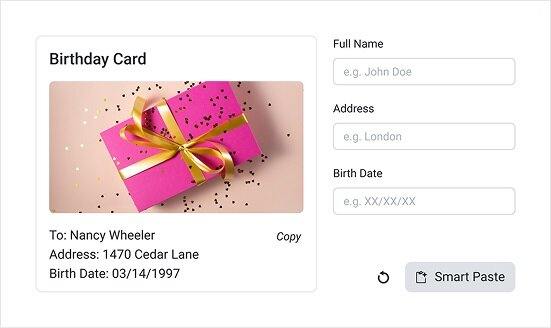
The Kendo UI for Angular SmartPasteButton is an AI-enhanced button component that reads clipboard content, sends it to your AI service and returns structured values that automatically populate form fields. This turns messy input from emails, tickets or documents into clean, validated data in your Angular forms with a single action.
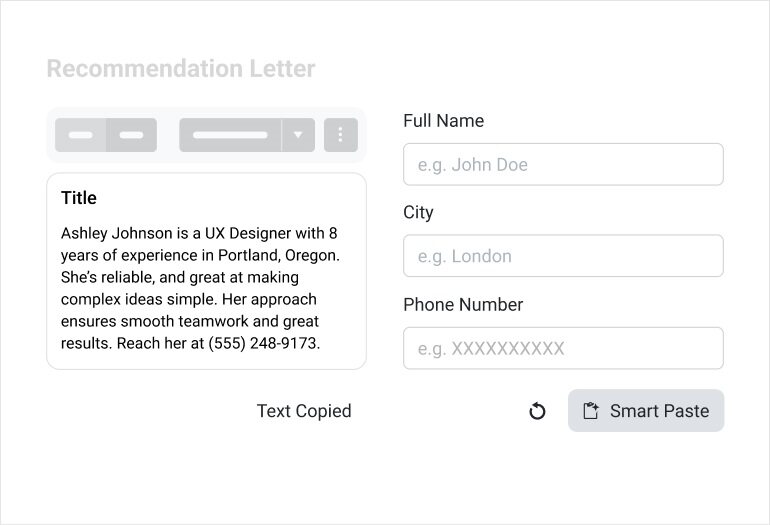
Built to work seamlessly with both Reactive and Template-driven Forms, the SmartPasteButton automatically inspects form controls in its form context, generates metadata and passes it along to your AI endpoint. You configure how the AI is called, how the results are validated and when the form is updated, while the component handles clipboard integration and mapping.
Part of the Telerik UI component suite, SmartPasteButton follows the same design, theming and accessibility patterns as other Kendo UI for Angular components. That means consistent styling, familiar APIs and a predictable configuration experience across your application.
-
AI Service Configuration and Automatic Form Detection
Configure how the SmartPasteButton talks to your AI service using the
requestUrlinput, which points to the endpoint that processes clipboard content and returns structured field values. You can further refine the HTTP request withrequestOptions, including headers, HTTP method and credentials, so the component fits into your existing API and security model.The SmartPasteButton automatically discovers form controls in the same form context and sends their names, labels and types as metadata to your AI service, so you do not need to manually wire every field. For advanced scenarios, you can explicitly define the
formFieldscollection to describe field types, constraints and descriptions for more precise AI output.See the Angular SmartPasteButton configuration demo.
-
Flexible Validation Strategies for AI Output
SmartPasteButton plugs into standard Angular form validation, allowing existing validators such as
Validators.required,Validators.pattern,Validators.minandValidators.maxto run automatically after AI-populated values are applied. Your forms continue to surface validation messages and error states as usual, now driven by AI-generated content instead of manual input.For stricter control, you can guide the AI with rich field descriptions, numeric ranges and constrained lists, then intercept responses using SmartPasteButton events before values are committed to the form. This combination lets you prevent invalid data at the source, enforce business rules and avoid unnecessary API calls based on clipboard content.
See the Angular SmartPasteButton validation demo.
-
Lifecycle Events for Smart Paste Requests
The SmartPasteButton exposes three lifecycle events -
requestStart,requestEndandrequestCancel- so you can plug custom logic into every stage of the AI call. UserequestStartto inspect clipboard content, cancel unnecessary requests or trigger loading indicators, then handlerequestEndto log responses, transform values or prevent automatic form updates when needed.When users cancel a long-running AI operation, the
requestCancelevent lets you clean up UI state, hide spinners and track usage patterns in your analytics. Together these events provide full visibility and control over the Smart Paste workflow, from the initial click to final field population.See the Angular SmartPasteButton events demo.
-
Configurable Appearance to Match Any Design System
SmartPasteButton inherits the rich styling capabilities of the Kendo UI for Angular Button component, including
size,rounded,fillModeandthemeColoroptions. You can configure compact or prominent buttons, subtle or strong border radii and different visual treatments such as solid, flat, outline, clear or link styles to align with your design system.Appearance settings now default to values defined by the active Kendo theme, which keeps SmartPasteButton consistent with the rest of your UI out of the box. You can still override these options at component level when you need to visually distinguish Smart Paste actions in high-traffic forms.
See the Angular SmartPasteButton appearance demo.
-
Rich Icon Options for Visual Clarity
By default, SmartPasteButton displays a clipboard-with-sparkle icon that clearly communicates its AI-powered paste behavior, but you can replace it with any icon that fits your product language. The component supports SVG icons through the
svgIconproperty, Kendo font icons throughicon, custom icon fonts viaiconClassand image icons viaimageUrl.This flexibility makes it easy to align SmartPasteButton with brand guidelines, adopt new icon sets or highlight AI actions across your application. Whether you standardize on Kendo SVG icons or third-party libraries like FontAwesome, configuration stays within the component and requires no custom markup.
-
Backend AI Integration with .NET and Beyond
On the server side, SmartPasteButton works with any backend that can accept HTTP requests and connect to an AI provider. For .NET applications you can use the Telerik.AI.SmartComponents.Extensions helpers together with Microsoft.Extensions.AI to turn SmartPaste requests into chat messages, process them with your AI model and return structured field values back to the component.
This pattern lets you centralize prompt engineering, data post-processing and compliance logic in your backend while the Angular component focuses on clipboard access, field metadata and UI behavior. It also makes it straightforward to reuse your AI Smart Paste endpoint across multiple forms and applications.

Get Started with Kendo UI for Angular