Tool Call Overview
The Tool Call component displays an action performed by an AI agent, including the tool name, input parameters, result, approval request, or error information. It is intended for agentic interfaces in which users need to understand what external action is taking place and what outcome it produces.
The component presents the tool invocation in a collapsible block and adapts its content to the current lifecycle state. Use it for database queries, API requests, web searches, code execution, and other operations performed through tools or functions.
Appearance
The Tool Call component uses a header to identify the invoked tool and an expandable content area for parameters, results, approval content, or error information. Its status treatment changes according to the tool-call state.
States
Active—Indicates that the tool invocation is in progress. The active state does not display a status badge.Completed—Indicates that the tool invocation finished successfully and displays a completed badge. A result can appear in the expanded content area.Awaiting approval—Indicates that the action requires user confirmation. The expanded content can include an approval message and Approve and Reject actions.Error—Indicates that the tool invocation failed. The component displays an error badge and can present an error message in the expanded content area.
Anatomy
The anatomy of the Tool Call component includes the following elements:
- Tool icon (optional)—Identifies the tool or function being invoked.
- Tool label—Displays the tool or function name.
- Secondary label (optional)—Provides additional context, such as a target, resource, or execution duration.
- Status badge (conditional)—Communicates completed, awaiting-approval, or error status. It is not displayed in the active state.
- Expand/collapse control—Indicates whether the tool-call content is shown or hidden.
- Content container—Groups the details associated with the invocation.
- Tool parameters (optional)—Display the data sent to the tool.
- Tool result (optional)—Displays the output returned by a completed tool call.
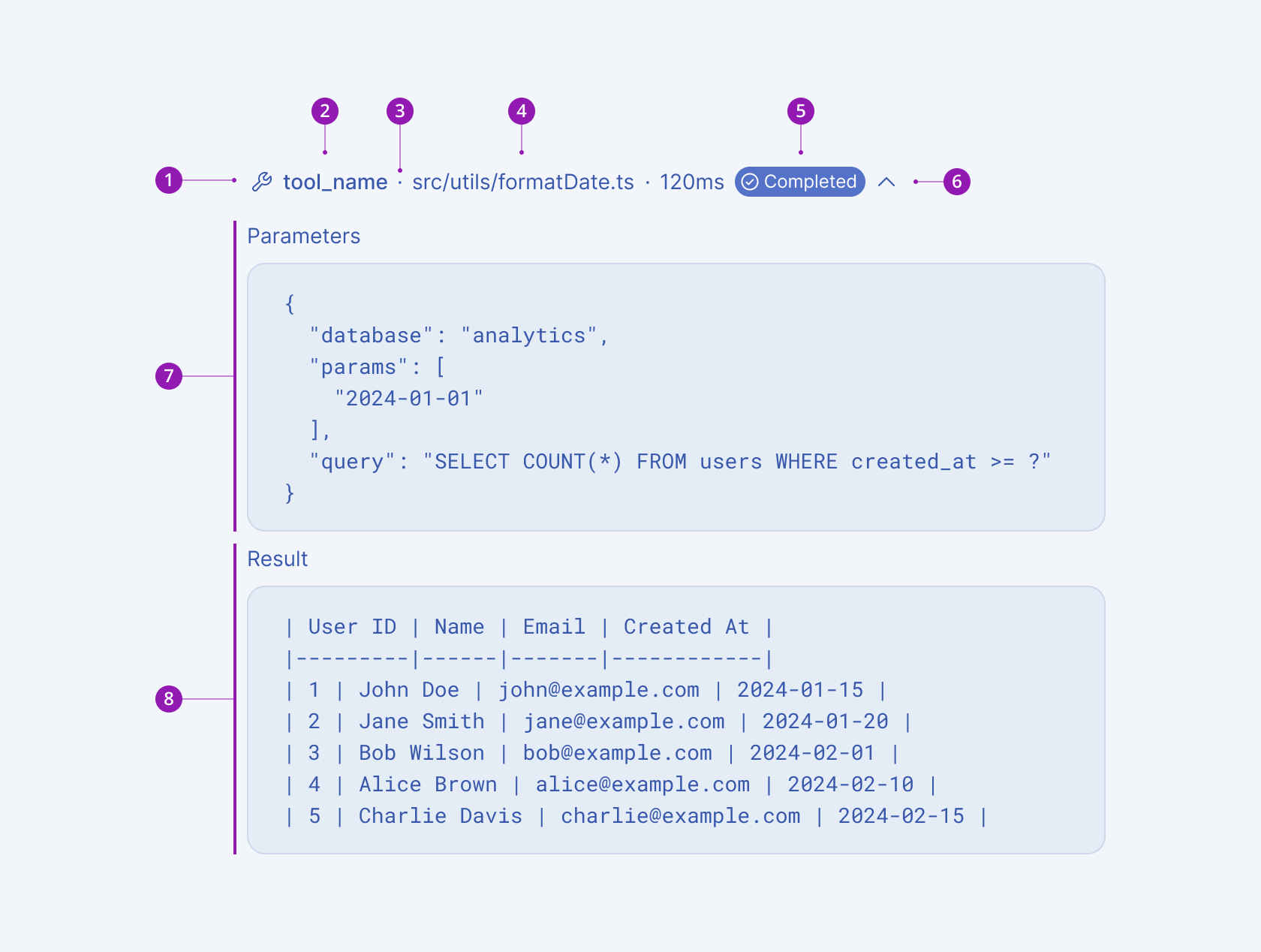
- Tool icon (optional)
- Tool label
- Separator (optional)
- Secondary label (optional)
- Status badge
- Expand/collapse control
- Tool parameters
- Tool result
Framework-Specific Documentation
For specific information about the component, refer to its official product documentation: