Contact Sales: +1-888-365-2779

Chart

Overview

Chart
Charts to give sense to data, enabling end-users to analyze volumes of complex information

Features

  • 20 2D Charts Types for WPF

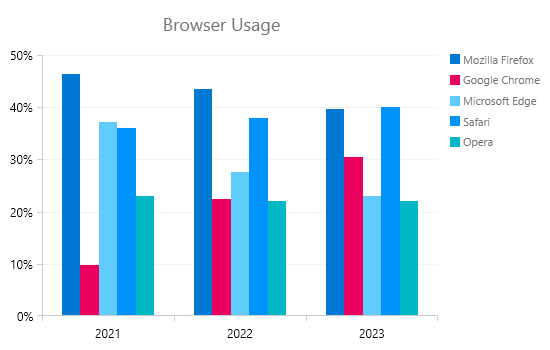
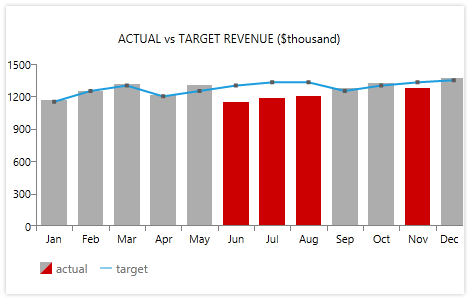
    Telerik WPF Chart supports 20 2D charts to help you create rich, visually-appealing presentations. RadChart supports the following 2D chart types:
    • Bar
    • Stacked Bar
    • Stacked Bar 100
    • Line
    • StackedLine
    • Area
    • Stacked Area
    • Stacked Area 100
    • Range
    • Spline
    • StackedSpline
    • Spline Area
    • Stacked Spline Area
    • Stacked Spline Area 100
    • Spline Range
    • Bubble
    • Stick
    • Candlestick
    • Pie
    • Doughnut

    Top

  • Support for 16 3D Chart Types

    For even richer and more interactive presentation of large business data, Telerik WPF Chart supports also 16 types of 3D charts.

    • Bar
    • Pie
    • Doughnut
    • Bubble
    • Funnel
    • Line
    • Pyramid
    • Spline
    • Spline Area
    • Stacked Spline Area
    • Stacked Spline Area 100
    • Area
    • Stacked Area
    • Stacked Area 100
    • StackedBar
    • StackedBar 100

    Top

  • 2D and 3D Stacked Bar Series

    Telerik WPF Chart features stacked bar series that can be also grouped through the GroupName property.

    Top

  • Styling and Appearance

    Telerik WPF Chart introduces an innovative approach that separates functionality and appearance altogether. This allows you to completely restyle the control without changing a single line of code. Telerik WPF Chart is a 100% lookless control providing full support for Expression Blend.  All 2D series, charts and axis elements can be dropped independently in Blend and styled individually. Furthermore the control ships with several pre-defined skins, which will help you, deliver a consistent look and feel in your application. Restyling RadChart with the available themes is as simple as changing a single property.
    The added custom style properties for all major chart elements and all series facilitate using custom user styles.

    Top

  • Rich Databinding Support

    Leveraging the WPF databinding capabilities, Telerik WPF Chart ca bind to various data services and other sources, such as

    • DataTable
    • Data services
    • Lists of objects
    • ArrayList
    • ObservableCollection (with support for change notification),
    • XMLDataProvider,
    • ObjectDataProvider
    • CollectionView
    • Property Paths


    Top

  • Automated Databinding to Nested Collections

    With the increasing number of WPF data sources and support for various data services, a new scenario is becoming more common: data binding to a collection of collections or nested collections. To support new data binding scenarios, Telerik WPF Chart provides automated data binding to Nested Collections.

    Top

  • Categorical Axis

    With this feature enabled X axis can be used to plot not only values (e.g. number of sales, etc.), but also categories (e.g. months of the year, units, people, etc.). Using a Category axis, the WPF Chart treats data as a sequence of non-numerical text labels; the marker is placed according to the position of the category in the sequence; data is provided per category.

    Top

  • Easily Customizable Series

    With RadChart for WPF you can easily change the appearance of series: for example you can make the Bar series use Button controls to visualize data with a very simple change or just use cylinders, cones and even star-shaped bars for your charts.

    Top

  • Animations, Interactivity

    Telerik WPF Chart offers rich animations out of the box. In addition, the chart control offers a built-in camera tool allowing rotation and zooming into 3D charts.

    Top

  • Tooltip Support

    Telerik WPF Chart allows adding tooltips to your charts for better visualization of your data. The tooltips can easily show the actual numbers behind the chart or even another chart.

    Top

  • Advanced X Axis Capabilities

    To make the horizontal axis more intelligent and to improve the way horizontal axis handles user data, several new features are introduced:

    • Ticks Distance - allows you to provide your own custom interval for tick marks
    • Label rotation angle – allows you to skew the labels and choose the angle in order to use the X axis in the most efficient way
    • Label step – a very convenient feature in a scenario when there are too many labels and they start overlap on the AxisX. What LabelStep does is kind of “sampling” operation where the criteria is ordinal e.g.

    1….2….3….4….5….6….7….8….9….10

    with LabelStep=2 will look like

    1………..3……….5……….7……….9

    Top

  • Strict Mode for X Axis

    Telerik WPF Chart features a so-called "strict mode" for bar series. All XValues will be respected and bars will be positioned according to their XValues. If, however, you don't have any series items with XValues then RadChart will resume standard sequential ordering of each item. The following supporting features are available:
    • Automatic range calculation - given in "strict" mode, the horizontal axis is able to calculate its MinValue and MaxValue such as no data is left behind.
    • Automatic step calculation - when in "strict" mode with AutoRange enabled, the horizontal axis is able to dynamically increase/decrease the number of ticks on resize, resulting in more precise data presentation and better readability.

    Top

  • Grouping and Aggregation

    RadChart is now able to group and aggregate data during data binding, optimizing numerous analytical business scenarios. With this feature you can group business objects according to some criteria and calculate aggregate functions on those groups.


    Top

  • WPF/Silverlight Code Compatibility

    The WPF Chart shares a single codebase with its Silverlight counterpart. This means that you can achieve close to 100% code reuse for your chart logic if you have parallel WPF/Silverlight development.

    Top

  • Save Image

    Telerik WPF Chart allows you to save any given chart as image and use it as you need.


    Top

  • Multiple YAxis support

    RadChart is able to draw multiple y axes allowing you to plot series of different magnitude side-by-side. The feature comes in handy when the values of the displayed data series vary a lot from one another or different types of data should be presented in one chart. The scale of each added Y axis corresponds to the associated data series and auto adjusts its range.

    Top

  • Gridlines

    Telerik WPF Chart features gridlines, which act as natural continuation of the tick marks and serve as visual guides making it easier to read data from the charts.

    Top

  • Strip Lines

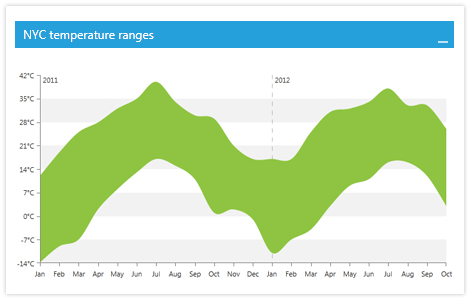
    The WPF Chart control introduces vertical and horizontal strip lines for 2D and 3D charts for improved readability for looking up individual values. With them the users can easily identify and highlight data that appears at regular intervals or in a specific key range for better understanding of the information presented in the chart.

    Top

  • Flexible Layout

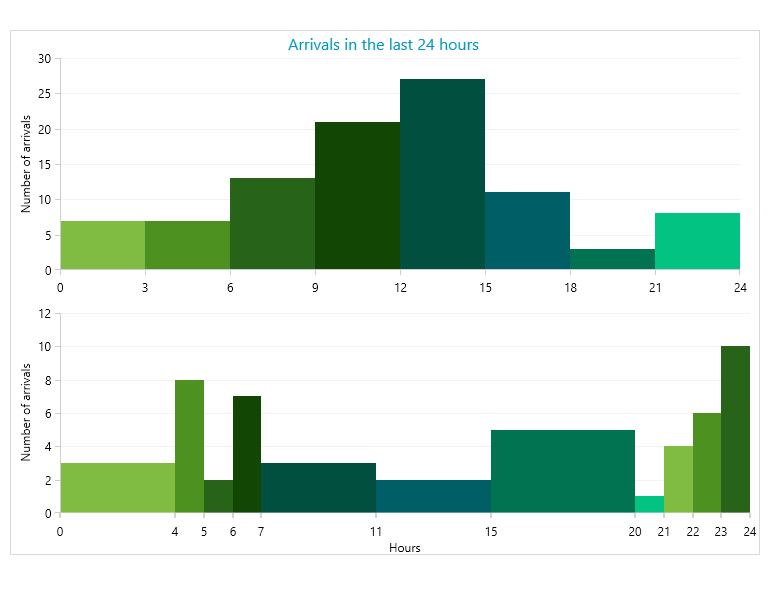
    RadChart offers support for multiple chart areas in a single chart control, with a smart legend that can aggregate data from all of them.

    Top

  • Axis AutoScale Functionality

    Axes automatically adjust the MinValue / MaxValue range based on the series data that is displayed in the associated chart area.

    Top

  • Axis AutoStep Functionality

    The AutoStep feature introduces new and improved level of re-scaling that allows the chart axes to automatically re-arrange their values in order to avoid point labels overlapping and preserves the neat and clear outlook and easy understanding of the presented information.

    Top

  • Negative Values

    Telerik WPF Chart is now able to draw series below the X-Axis to achieve a more visually appealing rendering of negative values.


    Top

  • Horizontal Series

    RadChart features HorizontalBar, HorizontalStackedBar and HorizontalStackedBar100 types.

    Top

  • Exporting

    Telerik WPF Chart is now able to export the rendered chart to different formats like: PNG, BMP, XLSX, SVG.

    Top

  • Human Readable & Scientific labels

    For optimizing the understanding of data, RadChart introduces new support formats for numbers. Now the big numbers like 5,000,000 can be represented like 5mln or 5e6.

    Top

  • Hover and Selection Effects

    The hover effect is the small detail which helps the styling, the usability and the readability of a given control. Now you can create more user friendly and appealing charts with RadChart. The selection in Telerik’s chart increases the interactivity across all available chart types and makes various scenarios more intuitive.

    Top

  • Exploding Radial Series

    This feature allows for better data visualization to pin point the exact piece of information you need for your analysis and representation.

    Top

  • Custom Lines and Gridlines

    Their basic use is as trendlines which will indicate better the important information in RadChart.

    Top

  • Marked Zones

    Marked zones is very useful when you need to separate your chart into different areas and make sure that nobody will miss in which one the most appropriate information is situated.

    Top

  • Support for Hierarchical Data

    The Telerik Chart for WPF features integrated support for hierarchical data. The HierarchyManager in RadChart utilizes the innovative Telerik data engine already used in RadGridView for Silverlight to populate the chart with data at any given level of the hierarchy. All you need to do is to describe your hierarchy structure in XAML and let RadChart take care of the rest.

    Top

  • VS Plug-in for Testing RadControls

    Telerik's automated software testing tool Test Studio is among the few to deliver rich UI object model that covers the entire range of UI elements in WPF. Easily record tests, customize them in code within Visual Studio or convert them to unit tests. What’s more, Test Studio is the best way to test RadControls for WPF. The powerful test recorder automatically detects the controls and exposes commonly used verifications. Learn more

    Top