Telerik
Rad

TreeView for WPF

Skip Navigation LinksHome / Products / WPF Controls / TreeView

Overview

TreeView
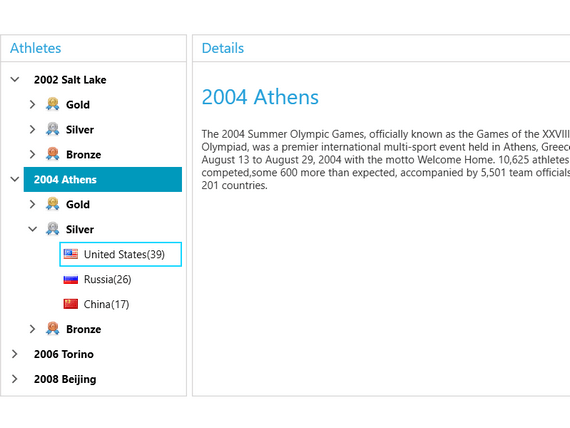
In need of building complicated navigation systems which perform with the speed of light? With RadTreeView you can achieve all of this and much more. With its powerful databinding and load on demand mechanism, the control lets you display hierarchical structures, such as directories and relational data. With its drag and drop functionality and other advanced capabilities, RadTreeView significantly improves the navigation and performance of your application. In addition, RadTreeView provides effortless skinning and ready to use themes.

Features

  • Powerful Databinding

    Binding RadTreeView is as simple as setting a single property. The binding sources RadTreeView supports include Objects, XML, WCF services, etc.

    Top

  • Load on Demand

    The performance of the Telerik WPF TreeView control when operating with huge amount of items is significantly optimized through its load on demand feature. This mechanism lets the nodes load their child nodes as the user expands the parent by clicking on the “+” icon.

    Top

  • UI Virtualization

    RadTreeView introduces a built-in UI virtualization. Thanks to it the control can easily handle million of records. The UI virtualization technique ensures that the TreeView creates only the needed containers.

    Top

  • Drag and Drop Behavior

    RadTreView enhances further your application’s capabilities through the rich drag and drop functionality. Your users can create and re-order any hierarchical structures and easily perform the following drag and drop operations:

    • Drag and drop onto another node or between two nodes
    • Drag and drop between treeviews
    • Drag and drop multiple nodes

    Top

  • Styling and Appearance

    The Telerik WPF TreeView control is fully customizable in terms of UI. You can change the control’s appearance as per your very custom needs.   
     

    Top

  • Keyboard Support

    Navigate through the nodes without using the mouse. The keyboard can entirely replace the mouse by allowing you to perform navigation, editing, expanding, collapsing and selecting the nodes, allowing you to perform navigation, editing, expanding, collapsing and selecting the nodes.

    Top

  • CheckBox Support

    Check/uncheck the nodes and let the users perform various tasks with the collection of checked nodes. The tri-state checkboxes provide a better visual interaction with the nodes. Using the corresponding events, you can entirely handle the node-check action.

    Top

  • Multi-node Selection

    Let users select multiple nodes by simply setting a single property of the Telerik WPF TreeView.

    Top

  • Single Expand Path

    For an even easier navigation, the Telerik WPF TreeView component provides the feature to automatically collapse items that are not on the path of the currently expanded item.

    Top

  • Item Editing

    RadTreeView items can be edited by simply pressing the F2 key or double-clicking the item.  By using the corresponding events, you can entirely handle this action.

    Top

$999

Part of RadControls for WPF

License:
Developer License with Subscription and Priority SupportAdd to Cart
Full List of Controls

Product Resources

Powered by Sitefinity ASP.NET CMS

Contact Us | Site Feedback | Terms of Use | Privacy Policy
Copyright © 2002-2010 Telerik. All rights reserved.