Rad

RibbonBar for WPF

Overview

RibbonBar
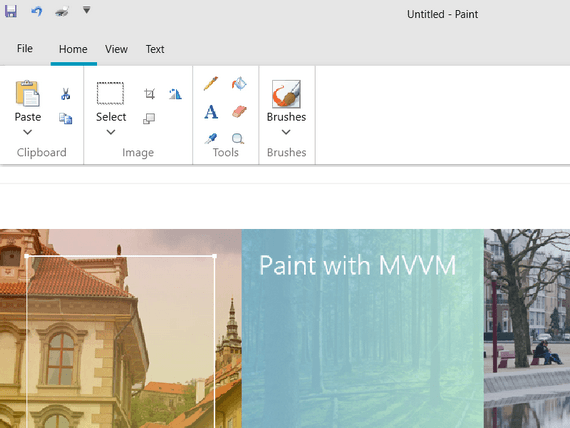
Telerik WPF RibbonBar is an easy-to-use implementation of the Microsoft Office 2007 “ribbon” UI, which allows you to codelessly organize the navigation functionality of your application into a single compact toolbar control. Its popup engine, dynamic resizing and powerful customization capabilities, make the WPF RibbonBar your shortcut to creating powerful navigation systems.

Features

  • MS Office 2007 Interface at your Fingertips

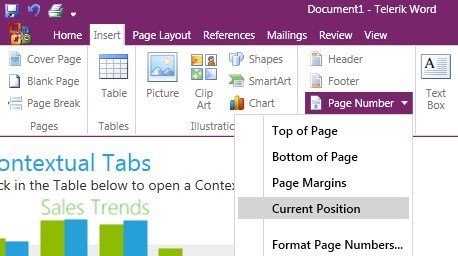
    Telerik WPF RibbonBar control enables you to build user interfaces similar to the RibbonBar used in Microsoft Office 2007. This feature ensures your applications will look up to date with the Microsoft applications your users are familiar with.

    Top

  • Automatic Resizing and Minimization

    Telerik WPF RibbonBar and its composite parts fully support automatic resizing. The different groups and panels adjust their dimensions and internal layout dynamically to accommodate best the available space.
    Each RibbonBar group has up to four different layouts, so that the control can be easily resized.
    The Telerik RibbonBar also supports minimization that allows you to hide the RibbonBar and let only the tabs appear, thus saving space. Clicking a tab will make the RibbonBar popup and let you use all its controls.

    Top

  • Galleries and Popups

    Telerik WPF RibbonBar is built on modular popups, in which galleries, menus and collapsed groups are embedded. All RibbonBar galleries and popups mimic Office galleries exactly and fully comply with the ribbon UI requirements. Telerik RibbonBar allows you to fully control the popups’ location, size and  content.
    The RibbonBar’s ColorPicker galleries provide an advanced implementation for color selection.

    Top

  • Context Menus

    Telerik RibbonBar inherits from ContextMenu, thus allowing you to use any ribbon control on context menus.

    Top

  • Application Menu, Recent Documents Menu

    The Application menu is accessible through the Application Menu Button on the left.
    Besides the standard buttons (such as New, Open, Save, Print, etc.) you can use footer buttons. In the right side of the Application Menu you can nest any content – Recent Documents, for example.

    Top

  • Quick Access Toolbar

    The RibbonBar's quick access toolbar is usually displayed either in the window's title bar or below the RibbonBar. It provides quick access to the most commonly used commands in your application. You can fully customize the Quick Access Toolbar to make it most convenient for your application.

    Top

  • Nested Controls

    Telerik WPF suite supplies all controls that you will need in a ribbon bar. This means reduced learning curve, because you will not need to learn new tools if you have already worked with the RadControls suite. The controls included in the WPF RibbonBar are:

    • TabControl
    • ColorPicker
    • ToolBar
    • Buttons and check boxes 
    • ComboBox
    • Galleries - RadGallery, which is already built-in RadRibbonBar

    Top

  • Styling and Appearance

    Telerik WPF RibbonBar is a fully customizable control, which lets you easily modify all its visual elements. The control comes with several predefined skins that can be customized if needed.

    Top

  • WPF/Silverlight Code Compatibility

    The WPF RibbonBar shares a single codebase with its Silverlight counterpart. This means that you can achieve close to 100% code reuse for your RibbonBar logic if you have parallel WPF/Silverlight development.

    Top

  • Feature Matrix

    Section Required "Must" Item Status "Should" Item Status
    Application Menu Yes No No
    Displaying the Application Menu Yes Complete Complete
    Application Menu Controls Yes Complete Complete
    Ribbon Yes Complete Complete
    Tabs Yes No No
    Displaying Tabs Yes Complete Complete
    Minimizing the Ribbon No Complete Complete
    Tab Scrolling No Complete Complete
    Group Yes No No
    Displaying Groups Yes Complete Complete
    Dialog Box Launchers Yes Complete Complete
    Controls Yes No No
    Displaying Controls Yes Complete Complete
    Control Layouts Yes Complete Complete
    Control Labels Yes Complete Complete
    Control Behaviors Yes Complete Complete
    Ribbon Resizing Yes No No
    Defining Groups for Ribbon Resizing Yes Complete Complete
    Collapsed Group Behavior Yes Complete Complete
    Defining Group Combinations for Ribbon Resizing Yes Complete Complete
    Quick Access Toolbar Yes No No
    Displaying the Quick Access Toolbar Yes Complete Complete
    Customizing the Quick Access Toolbar No TBD TBD
    Displaying Many Controls in the Quick Access Toolbar No TBD TBD
    Visual Appearance Yes No No
    Application Button Yes Complete Complete
    Quick Access Toolbar Yes Complete Complete
    Application Title Bar Yes Complete Complete
    Tabs Yes Complete Complete
    Ribbon Background Yes Complete Complete
    Groups Yes Complete Complete
    Keyboard Access Yes No No
    Displaying KeyTips Yes Complete
    Complete
    Dismissing KeyTips Yes Complete
    Keyboard Navigation Yes Complete Complete
    KeyTip Size and Positioning Yes Complete Complete
    KeyTips for Collapsed Groups Yes Complete Complete
    Contextual Tabs No No No
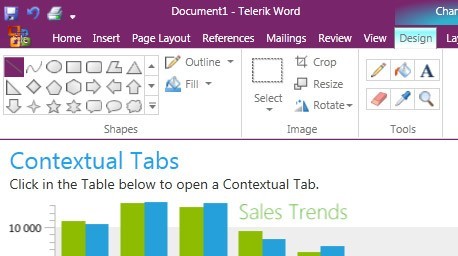
    Selecting Contextual Tabs When Inserting a New Object Yes Complete Complete
    Showing Contextual Tabs After Selecting An Existing Object Yes Complete Complete
    Contextual Tab Labels Yes Complete Complete
    Galleries No No No
    Displaying Galleries Yes Complete Complete
    In-Ribbon Gallery Navigation Arrows Yes Complete Complete
    Displaing Expanded In-Ribbon Galleries Yes Complete Complete
    ScreenTips Yes No No
    Displaying ScreenTips Yes Complete Complete

    Top

  • VS Plug-in for Testing RadControls

    Telerik's automated software testing tool Test Studio is among the few to deliver rich UI object model that covers the entire range of UI elements in WPF. Easily record tests, customize them in code within Visual Studio or convert them to unit tests. What’s more, Test Studio is the best way to test RadControls for WPF. The powerful test recorder automatically detects the controls and exposes commonly used verifications. Learn more

    Top