UI for WinForms
WinForms Dock
- Part of the Telerik UI for WinForms library along with 165+ professionally-designed UI controls.
- Includes support, documentation, demos, virtual classrooms, Visual Studio Extensions and more!

-
Full-featured Visual Studio-like Docking System
Telerik Dock is probably the most feature-rich Visual Studio-like layout and document system on the market today, ensuring that you can provide advanced layout to your users with complete support of the latest user interface standards.
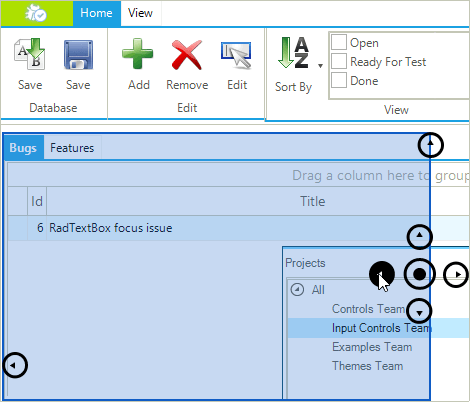
The Telerik docking system offers full drag-and-drop support including VS2010-like docking compass and docking hints for visual feedback:- The drag and drop behavior is quick and flicker-free, and allows for pixel-perfect hit-testing;
- When a DockWindow or DocumentWindow is about to be docked to a zone, the zone is highlighted to show where the object will be placed. The way a zone is highlighted can be customized;
- All docking elements support Z-order. The docking guides are on top of all elements, a semi-transparent hint of the new dropping location is next in the Z index, and the dragged form itself is last in the z-order;
- True layered window guides allow for per-pixel transparency and hot state support (e.g. the docking guide will be rendered differently when the mouse hovers it);
- Completely transparent drag-and-drop API - a service-based semantic allows for plugging entirely custom drag-and-drop behavior, if the scenario requires it.
-
Flexible Layout Mechanism
A prerequisite for any good docking framework is a fine-grained layout system. Solid efforts were put in designing and implementing a flexible and powerful, yet simple to understand and easy to use layout mechanism for Telerik Dock control. For example, all sizing information is stored per panel in a separate object. This allows for easy transition from one state to another and vice-versa without loosing the sizing information for each state.
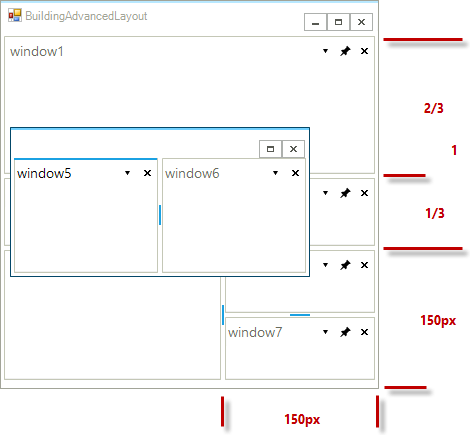
RadDock's layout mechanism gives several distinct advantages over similar Windows Forms products:- Complex scenarios made simple. By providing many sizing modes (Auto, Relative, Absolute, Fill) virtually any layout scenario can be easily achieved. The user has complete control over sizing and layout behavior;
- Completely transparent and extensible model. Each RadSplitContainer composes a RadSplitContainerLayoutStrategy, which handles any layout request for this container. If the available size modes are not enough to fit into a layout scenario, then the entire layout strategy may be easily replaced/extended with a custom one;
- Redock support is easier than ever before. Storing all sizing information per panel in a separate object allows for easy transition from one state to another and vice-versa without loosing the sizing information for each state;
- “Load Layout” allows for restoring previous scene at 100%. A layout persistency operation serializes/de-serializes the sizing info of each panel in order to completely store/restore its position on a split container.
- Complete customization of tab orientations (tabs can be positioned at the top/bottom/left/right of the docking container), service automations, and better control over tool windows and documents
-
Save/Load Layout Support
Telerik Dock supports serialization and deserialization by dynamically collecting and using information about the state of each DockWindow, such as FloatingSize, FloatingLocation, AutoHideSize, Previous position, AutoHidePosition, etc. All changes made to the form layout can be stored in an XML file and reloaded when needed. This is an excellent way for portal and dashboard customization and preservation of user layout settings. -
End-user Capabilities
The Telerik Dock component features fresh UI, as well as excellent drawing performance, which will certainly impress your users. Some of the most notable features are:
- Sophisticated drag-and-drop mechanism which provides for nimble and intuitive drag and drop behavior with VS2010-style docking guides;
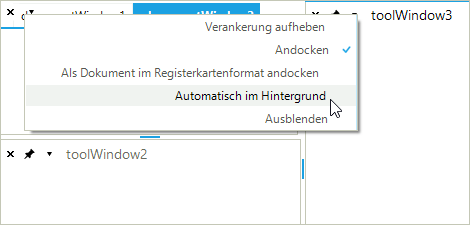
- Floating, docked, hidden, pinned, or tabbed states for each dock window. Depending on the relation of the window to the form, the window's state button shows the available state choices;
- The built-in Redock support (or the transition to the previous docked or floating state of a Dock Window) saves a window’s state just before any dock operation is about to occur, and this state can easily be restored later on, upon user request (such as double-clicking on the window’s caption area). This allows for exact transition to previous state - floating to docked, and vice versa. Even better, if an application requires completely custom redock semantic, it may be easily replaced by registering a custom service, which handles internal Save/Restore requests, made by the framework;
- Different Document Windows can be docked within the Document container itself, meaning that the user can view two or more documents at a time. This feature is very handy for large screen monitors;
- Double-clicking on the titlebar of a floating container with dock all contained windows to their previous position on the form and will restore each window's size and location settings;
- While dragging a floating window, the window's content is fully visible for improved usability;
- Horizontal and vertical splitters help with the dynamic resizing of each section.
-
Keyboard Navigation Support
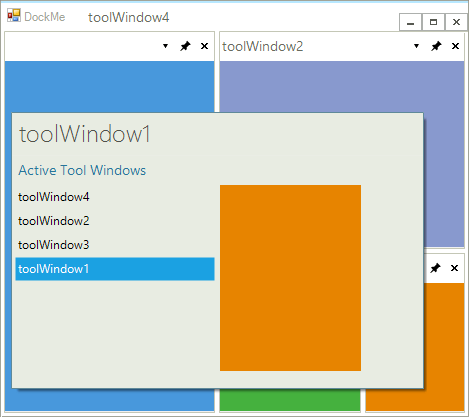
You can navigate between Tool and Document windows in Windows-like fashion by pressing Ctrl+Tab. A Quick Navigation Window will open listing all available windows. Switching between windows happens the same way your users are accustomed to:
- by either pressing the Tab key while Ctrl is held down;
- by using the mouse to select the window they need to navigate to while Ctrl is held down, even if is hidden;
- by using the arrow keys while Ctrl is held down.
-
Architecture
Telerik Dock uses a simple and completely transparent architecture based on a single interface - IDockWindow - which offers direct access to all logical objects. IDockWindow is backed up by an internal HostDockWindow which guarantees the correct behavior of hosted or hosting control(s).
Hosting and treating Control and/or Form objects is fully automated and include a simple and unified API for handling each case. In addition, RadDock provides real control over the active document (tool window, component, and/or panel) and will return correct information on which one is active.
The Load/Save layout is based on Name for determining the content. Similar to XAML, the XML code corresponds to the logical objects in RadDock. -
Extensive VS.NET Design-time Support
Telerik Dock comes with a fully interactive and advanced layout designer with complete control over the number, position, and properties of DockWindows within RadDock. You can visually design the initial size and position of DockWindows on your form without writing a single line of code, all by using the smart tag and the enhanced splitter behavior available within the Visual Studio designer. The layouts of the DockWindows can be saved to XML files for easy loading at run-time.
In addition, RadDock features the most advanced Dock Layout Manager on the market, which allows you to create your layout in a visual and easy manner directly in Visual Studio, again without the need to write any code. The layout is persisted (and can be saved to a XML file) for quick and easy loading at run-time: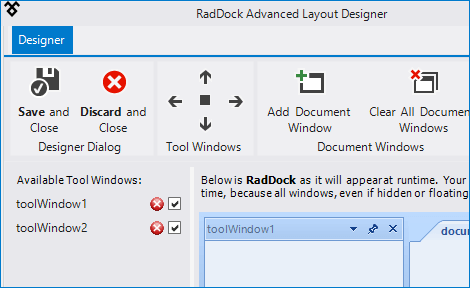
-
Appearance
The component is shipped with a rich set of themes that allow you to easily build slick interfaces with the look-and-feel of Windows 8, Office 2010, Office 2013, Metro, etc. The themes can be easily switched using a single property.
-
CAB Integration
Docking for Windows Forms provides seamless integration with the Composite UI Application Block (CAB) smart client and its underlying infrastructure. The Composite UI Application Block is designed to help in building complex, enterprise-ready Windows Forms solutions by providing a proven architecture and implementation, based on common patterns found in line-of-business front-end applications. For more information please review Telerik UI for WinForms CAB Support. -
Right-to-left Language and Localization Support
Due to business globalization, the need for multi-lingual applications is a must. Telerik Windows Forms Dock supports all RTL languages, such as Hebrew and Arabic. RadDock's window captions, drop-down menus and action buttons (close, pin/unpin, etc) are fully localizable through a simple and intuitive localization provider, or through resources.