Custom Windows Security Dialog Could Not Be Automated
PROBLEM
The application I am testing prompts with custom Windows Security Dialog to login. For some reason all actions against the dialog are not recorded in Test Studio.
SOLUTION
The Windows Security Dialog could be a custom one although it does not differ from the standard one. If it is a custom one it might not be detected from Test Studio and handled with the built-in Dialog handlers.
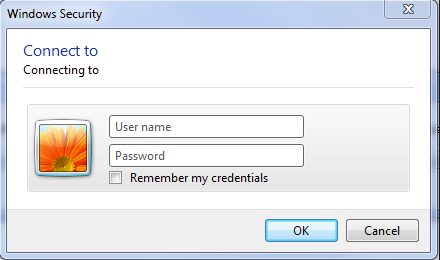
The standard coded approach to handle a Logon Dialog in code could not work for such custom dialogs.
If the tested application uses similar dialog and fails to be automated the Windows API could be used in code to workaround the issue. The navigate step might also be required to be handled with the same approach. Please see the code below which handles the scenario end-to-end.
Note: The code might need to be adjusted according the active element once the dialog appears. It might be required to hit Tab until the active element is the one required.
For example the username and password might be stored and only the Ok button needs to be hit. If it is the active one and pressing Enter will confirm the dialog then only this part of the code is required after the URL is entered.
        [CodedStep(@"New Coded Step")]
        public void WindowsSecurityDialog_CodedStep()
		{
			Manager.Desktop.KeyBoard.KeyPress(Keys.F6); //pressing F6 makes the address bar of each browser active
			Manager.Desktop.KeyBoard.TypeText("http://myApp.com"); //passing the URL to be loaded
			Manager.Desktop.KeyBoard.KeyPress(Keys.Enter); // confirm the URL

			System.Threading.Thread.Sleep(3000); //set a delay to ensure the security logon is on screen

			Manager.Desktop.KeyBoard.TypeText("username"); //sending the username ID to the currently active element (assuming it is the respective field in the dialog box)
			Manager.Desktop.KeyBoard.KeyPress(Keys.Tab); //switch the active element on screen to the password field
			Manager.Desktop.KeyBoard.TypeText("password"); //typing the password

			Manager.Desktop.KeyBoard.KeyPress(Keys.Tab); //switch the focus to the OK button
			Manager.Desktop.KeyBoard.KeyPress(Keys.Enter); //confirm the OK button
}To be able to use the code above the assembly System.Windows.Forms.dll needs to be referenced in the Project settings.
Note: The code might need to be adjusted according the active element once the dialog appears. It might be required to hit Tab until the active element is the one required.
For example the username and password might be stored and only the Ok button needs to be hit. If it is the active one and pressing Enter will confirm the dialog then only this part of the code is required after the URL is entered.