jQuery Events Do Not Fire During Test Execution
In some cases, Test Studio does not automatically call local jQuery events. You must add a coded step to make the local jQuery event fire manually.
Inputting text into this simple HTML text box triggers a jQuery event that changes the background color of the text box.
|
|
|
|



This is the HTML for the text input element:
Enter your name: <input class="field" type="text">Invoke the script that changes the background color with the following coded step:
Pages.TryitEditorV220.FrameIframeResult.Text.AsjQueryControl().InvokejQueryEvent(ArtOfTest.WebAii.jQuery.jQueryControl.jQueryControlEvents.change);-
The guideline is to always pair the two steps together. Immediately after performing the change step (input, radio button, etc.), run the coded step that calls the .change function for that element.
-
Although .change is the most frequent jQuery event, your application might be attaching to a different event. Another common example is .select. If those two do not work, ask your developers which jQuery event is attached to the element.
-
If you have a choice between using id and name on an element, we recommend using id. It is usually a unique value which will make your tests run more reliably. Name is sometimes duplicated, which can cause your test to find and act on the wrong element, since the selector will act on the first element it finds matching the selector criteria.
Here are test steps recorded against the demo page above:
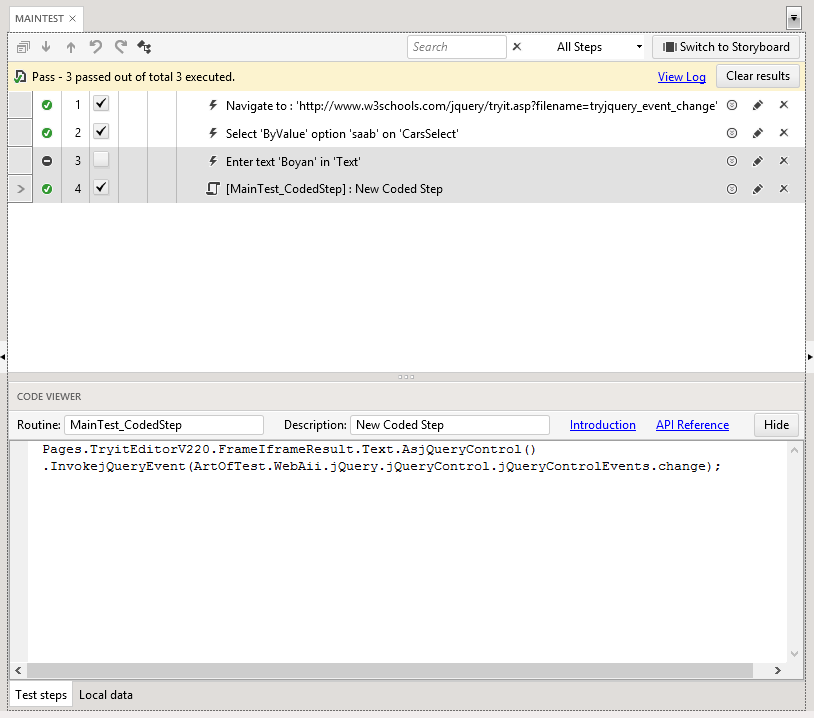
Even there is no selection/typing in the field step 4 will triggers .change event and the input filed will become violet.