Random Row from Excel Data Source
Is there a way to data drive a step in a test script so that each time the script is run, the test step will select a random row from the Excel data source?
Solution
In code, generate a random number based on the number of rows. Then use the corresponding text from that row's cell in the applicable test step.
-
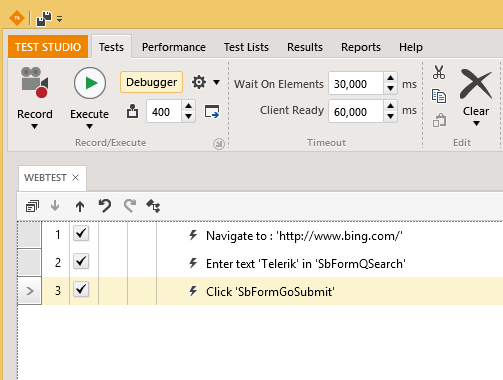
Create a basic test against Bing.com.
-
Right click step 2 and select Edit in Code.
-
Enter the below code into the coded step. The searchQuery.xlsx Excel file contains five rows of data.
- Note: Ensure you Add an Assembly Reference to Microsoft.Office.Interop.Excel. You can download a version of that file on Microsoft's website that matches your version of MS Office.
Random random = new Random();
int num = random.Next(1, 6);

string input = @"C:\Data\searchQuery.xlsx";

Microsoft.Office.Interop.Excel.Application app = new Microsoft.Office.Interop.Excel.Application();
Microsoft.Office.Interop.Excel.Workbook inputBook = app.Workbooks.Open(input, 0, false, 5, "", "", false, Microsoft.Office.Interop.Excel.XlPlatform.xlWindows, "", true, false, 0, true, false, false);
Microsoft.Office.Interop.Excel.Worksheet inputSheet = (Microsoft.Office.Interop.Excel.Worksheet)((inputBook.Worksheets).get_Item(1));

string value = ((Microsoft.Office.Interop.Excel.Range)inputSheet.Cells[num, 1]).Text as string;
app.Quit();
app = null;

Pages.Bing.SbFormQText.Text = value;How to find and use Office PIA's without Visual Studio installed
-
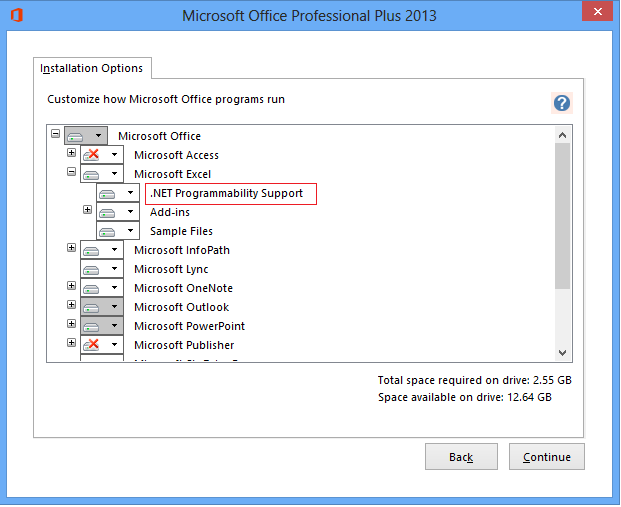
Make sure that during the installation of Microsoft Office .NET Programmability Support was selected.
-
Then you will find the interop assemblies in the Windows Global Assembly Cache, specifically the folder: *C:\Windows\assembly\GAC_MSIL\Microsoft.Office.Interop.Excel*
This is a hidden protected system folder which won't show up in an ordinary hard drive search. If you try to go to "C:\Windows\assembly" Windows recognizes this as a special folder and will show you the full contents of the GAC in a flattened list instead of the individual folders that make up the GAC.