New to Telerik UI for .NET MAUI? Start a free 30-day trial
.NET MAUI DropDownButton Command
Updated on Aug 11, 2026
The Telerik .NET MAUI DropDownButton allows you to attach a command that executes when the button is clicked.
Command(ICommand)—Defines the command which executes when the button is clicked.CommandParameter(object)—Specifies the parameter of the command which executes when the button is clicked.
Using the Command
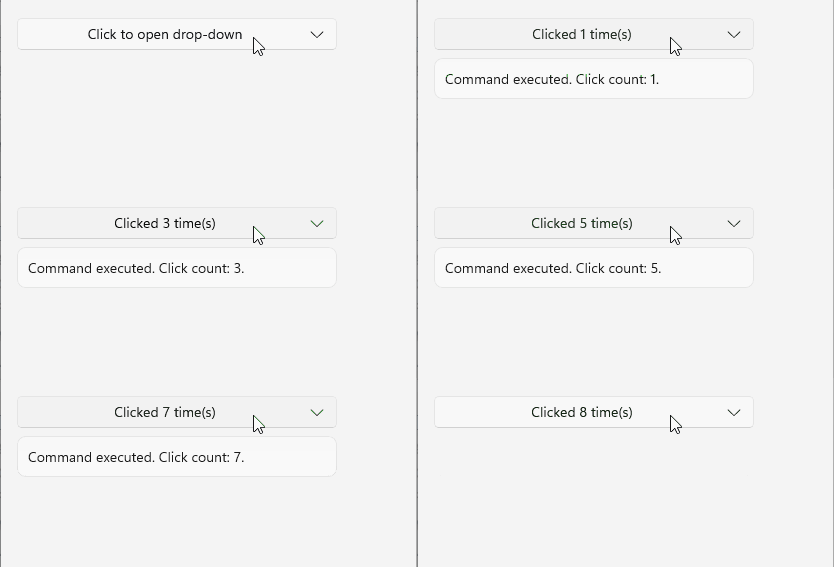
The following example demonstrates how to use the Command to change the text displayed within the DropDownButton on click.
1. Define the DropDownButton in XAML:
XAML
<telerik:RadDropDownButton Content="{Binding ButtonText}"
                           Command="{Binding ToggleCommand}">
    <telerik:RadDropDownButton.DropDownContent>
        <Label Text="{Binding StatusText}"
               Padding="8" />
    </telerik:RadDropDownButton.DropDownContent>
</telerik:RadDropDownButton>
2. Add the telerik namespace:
XAML
xmlns:telerik="http://schemas.telerik.com/2022/xaml/maui"3. Add the ViewModel:
C#
public class ViewModel : NotifyPropertyChangedBase
{
    private string buttonText = "Click to open drop-down";
    private string statusText = "The Command has not been executed yet.";
    private int clickCount;

    public ViewModel()
    {
        this.ToggleCommand = new Microsoft.Maui.Controls.Command(this.OnToggleExecute);
    }

    public Microsoft.Maui.Controls.Command ToggleCommand { get; }

    public string ButtonText
    {
        get => this.buttonText;
        set => this.UpdateValue(ref this.buttonText, value);
    }

    public string StatusText
    {
        get => this.statusText;
        set => this.UpdateValue(ref this.statusText, value);
    }

    private void OnToggleExecute(object parameter)
    {
        this.clickCount++;
        this.ButtonText = $"Clicked {this.clickCount} time(s)";
        this.StatusText = $"Command executed. Click count: {this.clickCount}.";
    }
}
This is the result on WinUI:
For a runnable example demonstrating the DropDownButton Command, see the SDKBrowser Demo Application and go to the DropDownButton > Features category.