.NET MAUI DropDownButton Events
The .NET MAUI DropDownButton emits a set of events that allow you to configure the component's behavior in response to specific user actions.
The .NET MAUI DropDownButton exposes the following events:
-
Opening—Raised when theRadDropDownButton.IsOpenproperty is changing totrue. TheOpeningevent handler receives two parameters:- The
senderargument which is of typeRadDropDownButton. - A
CancelEventArgsobject which provides an option to cancel theOpeningevent by using theCancel(bool) property.
- The
-
Opened—Raised when the drop-down is fully opened, including the completion of any open animation. TheOpenedevent handler receives two parameters:- The
senderargument which is of typeRadDropDownButton. - An
EventArgsobject which provides information about theOpenedevent.
- The
-
Closed—Raised when the drop-down is fully closed, including the completion of any close animation. TheClosedevent handler receives two parameters:- The
senderargument which is of typeRadDropDownButton. - An
EventArgsobject which provides information about theClosedevent.
- The
The RadDropDownButton inherits the Clicked, Pressed, and Released events from the RadTemplatedButton.
Using the Opening, Opened and Closed Events
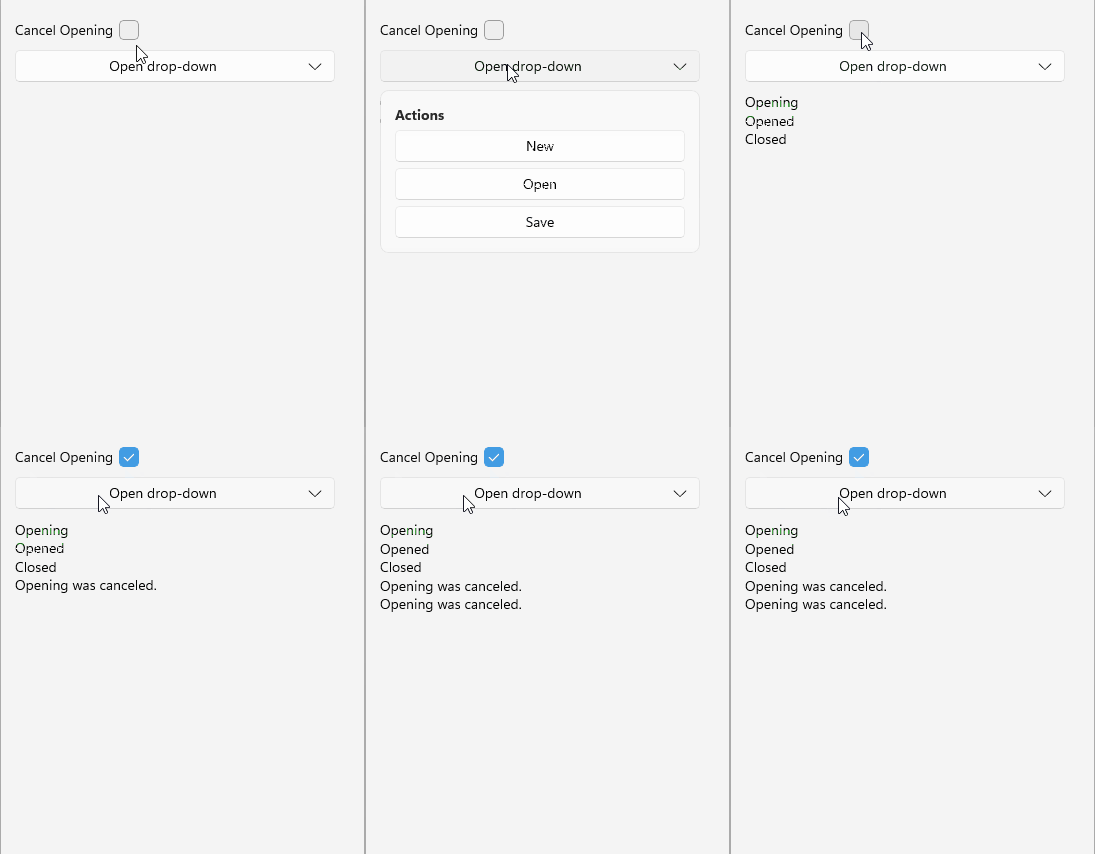
The following example demonstrates how to use the Opening, Opened, and Closed events.
1. Define the button in XAML:
<telerik:RadDropDownButton Content="Open drop-down"
                           Opening="OnDropDownOpening"
                           Opened="OnDropDownOpened"
                           Closed="OnDropDownClosed">
    <telerik:RadDropDownButton.DropDownContent>
        <VerticalStackLayout Padding="12" Spacing="6">
            <Label Text="Actions"
                   FontAttributes="Bold" />
            <telerik:RadTemplatedButton Content="New" />
            <telerik:RadTemplatedButton Content="Open" />
            <telerik:RadTemplatedButton Content="Save" />
        </VerticalStackLayout>
    </telerik:RadDropDownButton.DropDownContent>
</telerik:RadDropDownButton>
2. Add the telerik namespace:
xmlns:telerik="http://schemas.telerik.com/2022/xaml/maui"3. Add the Opening, Opened and Closed event handlers:
private void OnDropDownOpening(object sender, CancelEventArgs e)
{
    if (this.cancelOpeningCheckBox?.IsChecked == true)
    {
        e.Cancel = true;
        this.AppendLog("Opening was canceled.");
        return;
    }

    this.AppendLog("Opening");
}

private void OnDropDownOpened(object sender, System.EventArgs e)
{
    this.AppendLog("Opened");
}

private void OnDropDownClosed(object sender, System.EventArgs e)
{
    this.AppendLog("Closed");
}

private void AppendLog(string message)
{
    this.eventsLog.Text = string.IsNullOrEmpty(this.eventsLog.Text)
        ? message
        : $"{this.eventsLog.Text}\n{message}";
}
This is the result on WinUI:
For a runnable example demonstrating the DropDownButton events, see the SDKBrowser Demo Application and go to the DropDownButton > Features category.