Using AI to Build a Blazor App 4: Architect and Build the First Feature

Summarize with AI:
How do you get AI to iteratively work on your feature without losing track of its progress? Give it a way to track its progress!
Now, at this point we’re clear on scope and UI/UX, and we have a first thin slice (tracer bullet) to build.
But this first feature is where all those little niggly decisions show up. We’re using Blazor, but which version, render mode, CSS framework?
First we need to get clear on those:
We want to build 0001-open-existing-astro-draft-and-save-edits.md. Let’s start by planning this - grill me on every key technical choice needed to get this built, include your recommended answer for each question, ask me one thing at a time until you have enough to proceed with the build of this tracer bullet.
Time for some more back and forth with the GPT 5.5.
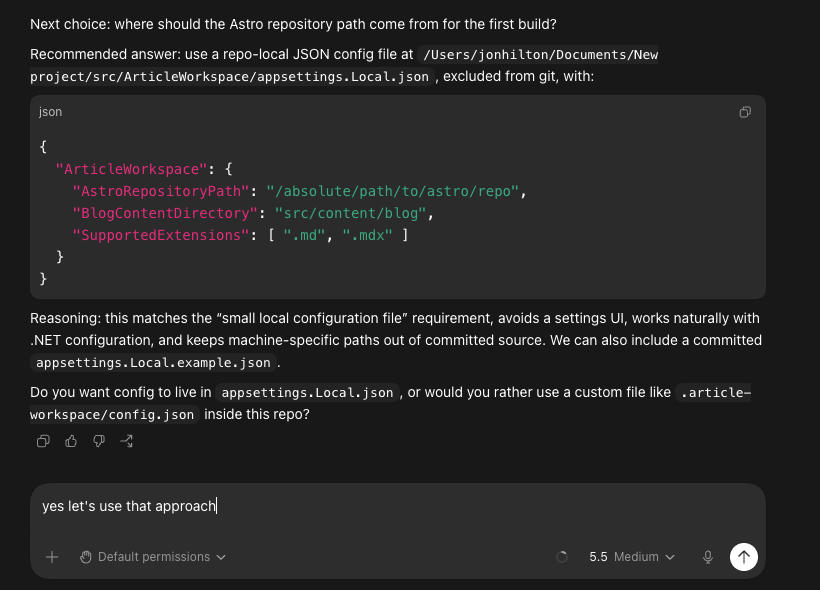
Including some key decisions around making sure we don’t lose changes:
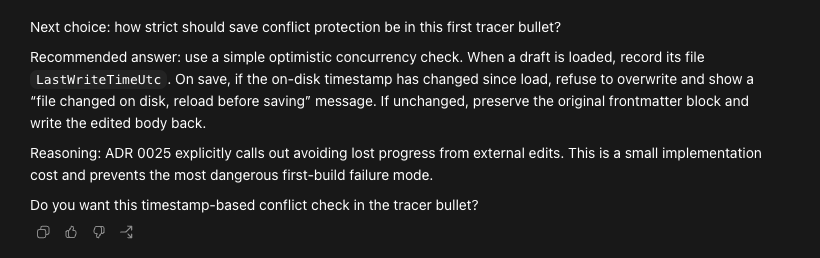
Notice how we’re now firmly into implementation details.
Every step before this was about the requirement, the overall business goal we’re reaching for, the headline feature(s) that help us meet those goals. Now we’re getting into the core details about how we implement this (where do we store data, what do we store, how do we handle concurrency).
Again, this is not a linear process. Technical limitations here could mean the original feature is compromised and needs to be rethought.
Ultimately you—the human developer—are the key to unlocking this feature. When you decide you’ve got enough detail, the problem scope is clear and the key implementation decisions have been made, you can instruct AI to start building.
Smaller Slices
AI works best when you give it less to think about in one go. In this case, our tracer bullet is arguably quite large still (there are a few moving parts and it arguably does more than one thing).
This is entirely subjective, but I decided to have it break the work down into slightly smaller steps.
I want to create tasks for this, rather than just go ahead. Given the context of the tracer bullet, and the technical decisions, let’s create one or more tasks. Propose how we can slice this work up, then get my approval before writing the individual tasks. They key is to keep each individual task so it delivers a vertical slice through the app, and value that could be shipped.
Ensure we use the visual prototype we created, and match that for this implementation
This resulted in a few separate tasks:
- 0002 Boot Local Blazor Workspace With Validated Config
- 0003 Discover And Open Existing Astro Draft
- 0004 Save Draft Body Back To Astro File
- 0005 Restore Last Active Draft
- 0006 Protect Against External File Changes
Here’s part of 002:
# Task 0002: Boot Local Blazor Workspace With Validated Config

## Goal

Create the first runnable Article Workspace app shell as a .NET 10 Blazor Web App and validate that it can be configured to point at the Astro repository.

This is the first vertical slice of [Task 0001](0001-open-existing-astro-draft-and-save-edits.md). It should not read or edit article files yet; it should prove the app can launch and clearly report whether the local workspace is configured.

## User Story

As the writer, I want to open Article Workspace and know whether it is connected to my Astro repository, so I can fix setup problems before the app reads or writes content.

## Technical Decisions
...

## Scope
...

## Visual Reference
Use `prototypes/article-workspace/index.html` as the visual reference for layout, spacing, typography, colors, and overall product feel.

This slice should adapt the prototype to a narrow setup/connected-workspace screen. It should not look like the default Blazor template.

## Acceptance Criteria
...

## Non-Goals
...

## Implementation Notes
...
You Can Still Do Things Manually
This may come as a surprise, but sometimes it’s still better to do things yourself!
Every time I create a new Blazor project with AI, it seems to overreach and/or get itself into a muddle trying to set the project up, configure Tailwind CSS, etc.
So I opted to spin up the new project myself and check it all worked first. Then I added my Tailwind NuGet package, which I tend to use for integrating Tailwind with Blazor.
I did get AI to help with parts of this (like then migrating from Bootstrap to Tailwind), but it’s worth noting that sometimes it’s still quicker to do things yourself (rather than burn AI tokens looping around to get their in eight steps when you can do it in one or two).
With the new project set up, AI was able to work through the first task (now confusingly numbered 0002).
let’s implement the next available task
With this, we ended up with a simple screen that showed the app was configured (if we remove the config, it shows a warning and instructions to configure the paths to Astro, etc.).
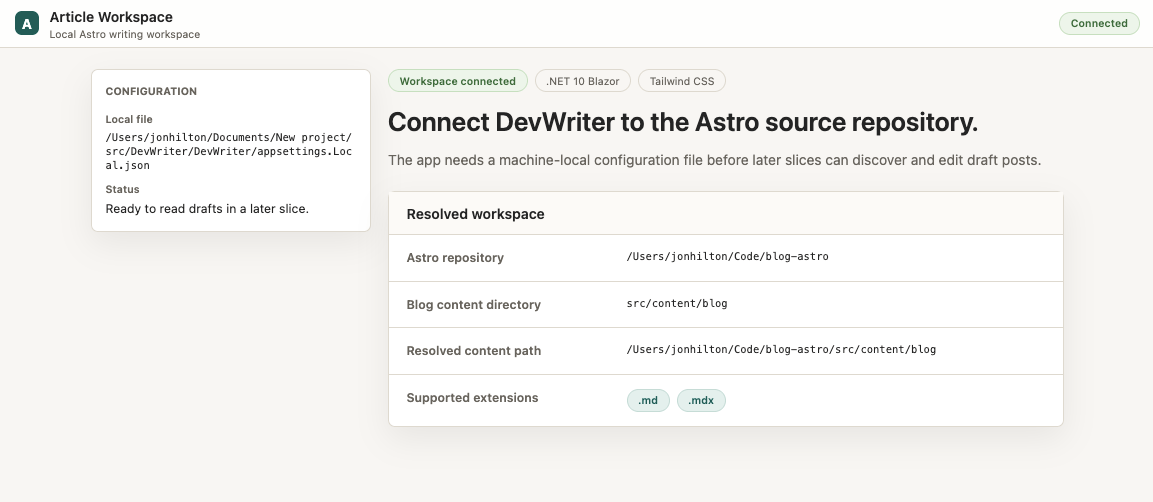
Now at this point, I was tempted to just open up a new session (important, for keeping that context down) and tell it to start Task 2. But there’s an issue with that approach.
Keep Tabs on Your Progress
If I just say “implement the next feature,” the LLM has to trawl through the code and the tasks list (which it won’t know about, so has to look for), see what’s already been built and figure out which task to handle next.
This is an expensive way to figure something out that we already know. We already know we just did feature 0002 and just need to tell the LLM where we got to and how to take the next step.
Knowing we’re going to be doing this a lot, I asked the LLM to create a skill for implementing tasks that also keeps a lightweight progress log that new LLM chats can reference when they come to pick up new tasks.
let’s create a skill to implement each task. It should ensure we write a simple progress log so the next session knows (roughly) what’s been done, and potential next tasks to pick up. So the flow will be to check progress, identify next task to work on, then set to work on that task until its acceptance criteria are met
This resulted in a task-runner Codex skill.
With that in place, I opened up a new chat and asked it to implement the next feature.
I’ll use the task-runner skill to find the local backlog, identify the next pending task, and carry it through implementation and verification.
I found a Blazor solution with a numbered task backlog and an existing progress log. I’m reading the task state and the next task’s criteria before touching code.
Task 0003 is next. Its slice is read-only: scan configured Astro content, parse draft frontmatter, list drafts, and load the selected body without modifying source files.
The existing UI is still the setup screen from 0002, and the code has no draft discovery layer yet. I’m going to add a small read-only workspace service, then adapt the home page into the prototype-style sidebar plus editor once config is valid.
From here, I kept going, starting new chats for each task, and Codex kept using the new skill to execute that task (and update the progress log).
Here’s part of the running progress log.
# Progress

## Status

| Task | State | Notes |
| --- | --- | --- |
| 0001 | Done | Umbrella tracer bullet is covered by tasks 0002 through 0006: configure, discover, edit, preview, save, restore last active draft, startup reload, and stale-save protection. |
| 0002 | Done | Local Blazor setup screen validates Astro repository config and shows connected/blocking states. |
| 0003 | Done | Discovers configured Astro draft files and opens the selected body read-only. |
| 0004 | Done | Saves the selected draft body back to disk, tracks dirty state, supports save shortcut, and renders sanitized Markdown preview. |
| 0005 | Done | Persists the last selected draft in Astro repo metadata and restores it on startup with fallback handling. |
| 0006 | Done | Blocks stale saves when the selected draft changed on disk and exposes reload before saving. |

## Task Session Convention

- Before working on a task, check whether the app is already listening on `http://localhost:5012/`.
- If it is not running, start it from `src/DevWriter/DevWriter` with `dotnet watch run --urls http://localhost:5012`.
- Keep a single app instance running during task work; if another process is already listening on `5012`, reuse it rather than starting a second instance.
- If the watched app crashes during a task, restart the same `dotnet watch` command and continue verification in the browser.

## Latest Session

- Date: 2026-05-07
- Task: 0001 - Open Existing Astro Draft And Save Edits
- Result: Done
- Changed:
  - Marked the umbrella tracer bullet complete after checking its acceptance criteria against completed slices 0002 through 0006.
- Verified:
  - Reviewed `tasks/0001-open-existing-astro-draft-and-save-edits.md` against the implemented code paths and previous verification from tasks 0002 through 0006.
  - Confirmed the app has no commit, push, publish, or newsletter code paths in the tracer bullet implementation.
- Notes:
  - `0001` is an umbrella task; no code changes were needed for this check.
  - Remaining work should be captured as new backlog slices rather than keeping `0001` open.
Did AI Get Everything Right? Not Exactly
LLMs rarely get everything “right.”
For most of the work, it did a good job. But occasionally the UI was a bit “off” (part of the screen overlapping another part, superfluous elements that didn’t really do anything).
Overall, it created a functional (and visually faithful to the prototype) app that satisfied everything we’d agreed for the initial feature.
There was just one step left to do. GPT had put all the markup and UI logic for this feature in one file. I don’t mind this as a first step, but would always opt to then break that down into smaller components (each with their own data, parameters, logic).
You can see from this code, we’ve a few different concerns muddled up in one component.
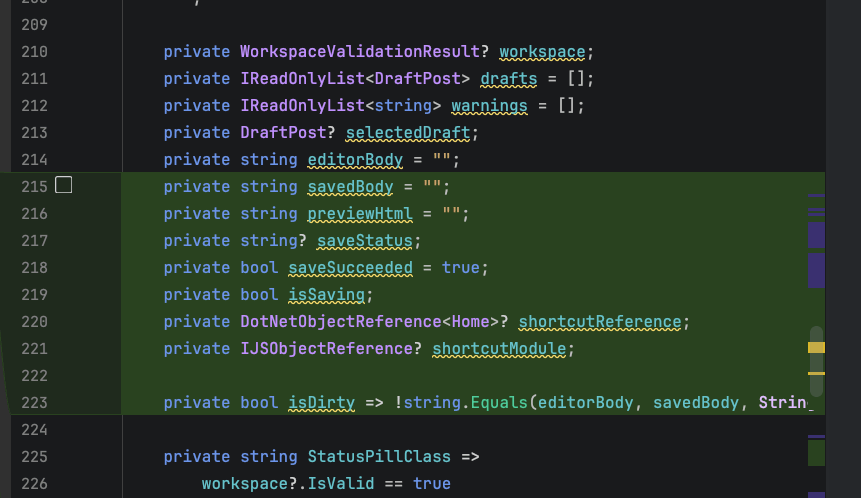
Time to get the LLM to clean up its mess with a quick refactor.
The home component in this project is now doing too much. Can we refactor it, specifically looking for seams, so we can identify potential components to extract - suggest refactorings as you go and I will approve or course correct
It proposed several refactoring steps, all of which looked reasonable to me.
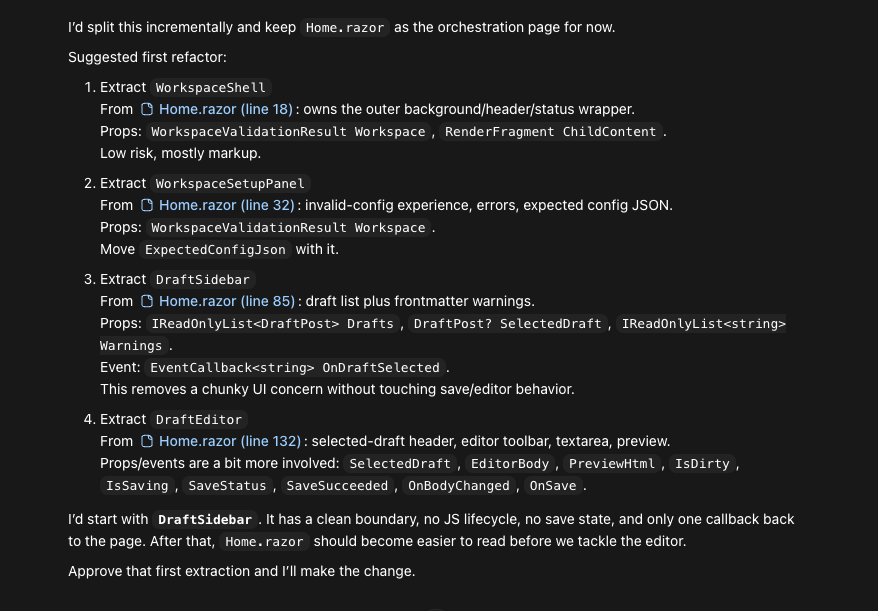
We stepped through those (and one or two more that I identified after this was done) and, with that, we had our V1 of a functional app for easily managing and capturing blog/newsletter ideas via an Astro blog.
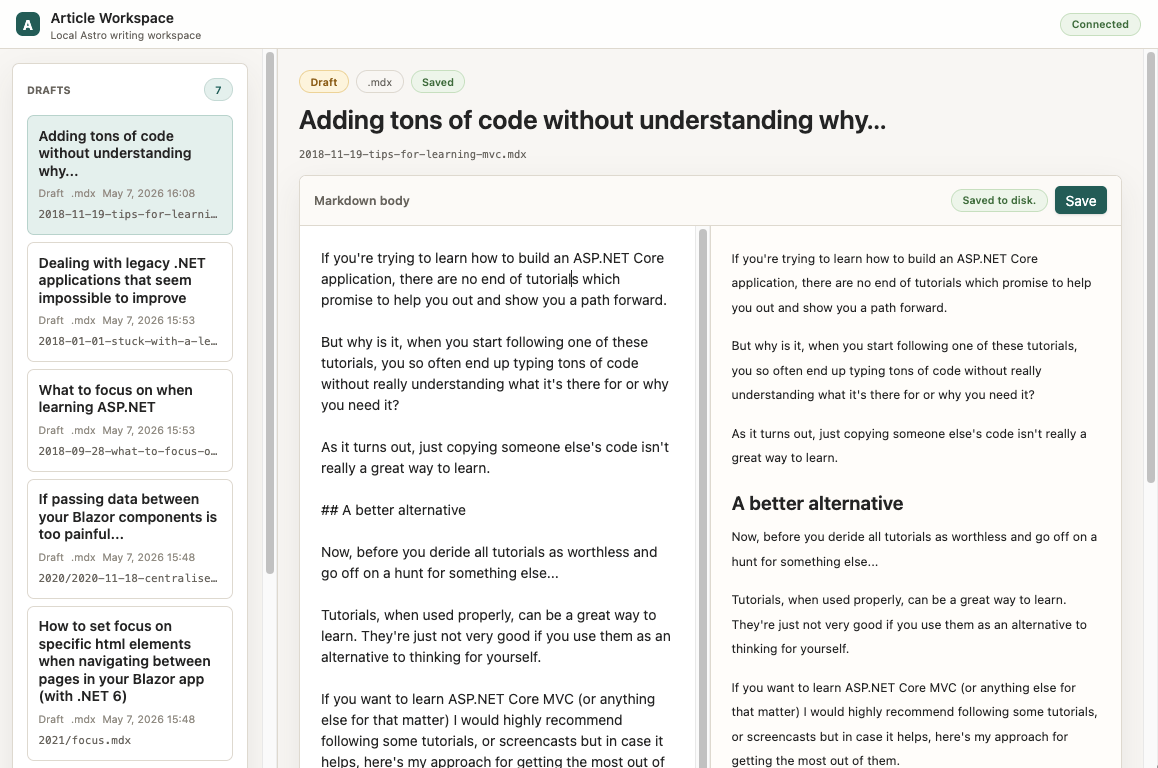
Fun fact, it also surfaced a number of draft blog posts I apparently never finished.
In Summary
Software design is a messy, iterative affair where you often go round in circles, moving from the fuzzy to the concrete.
AI can help you with this. It works best when you keep things relatively fluid (grill me on requirements, now let’s prototype that part of the UI, perhaps we need a technical spike for this part).
Once you reach a shared understanding of what you’re building (and ideally why), it’s time to slice that work up. LLMs work best with small amounts of context, so these slices want to reflect that, but still deliver value. The litmus test is: what’s small enough to build quickly, which is technically shippable (doesn’t mean you have to ship it, but you could).
If you find yourself doing something more than once, get the LLM to turn it into a skill (as we did here, with the task-runner skill).
Finally, where possible, leave some breadcrumbs so the LLM doesn’t have to start over each time (ADRs, progress log). It saves tokens, and context, and means you can pick up where you left off for every new chat session.
That app that surfaced a pile of forgotten draft posts? It’s already doing its job. Now over to me to commit to that weekly cadence. (There’s some things AI can’t do, like provide the willpower to build good habits!)

Jon Hilton
Jon spends his days building applications using Microsoft technologies (plus, whisper it quietly, a little bit of JavaScript) and his spare time helping developers level up their skills and knowledge via his blog, courses and books. He's especially passionate about enabling developers to build better web applications by mastering the tools available to them. Follow him on Twitter here.
Related Posts
Comments
All articles
Topics
Web MobileMobile
Desktop
Design
Productivity
People