Telerik UI for Blazor Meets A2UI: The Next Step Toward Dynamic UI Generation

Summarize with AI:
Learn how A2UI enables AI systems to generate interactive, dynamically generated Blazor interfaces and how Progress Telerik UI for Blazor will help.
Imagine this: instead of clicking through a travel app—picking dates, applying filters, scrolling results, opening tabs to compare—you type one sentence:
“I want to get a flight from London to New York. Give me a plan as a dashboard with important data about the flight.”
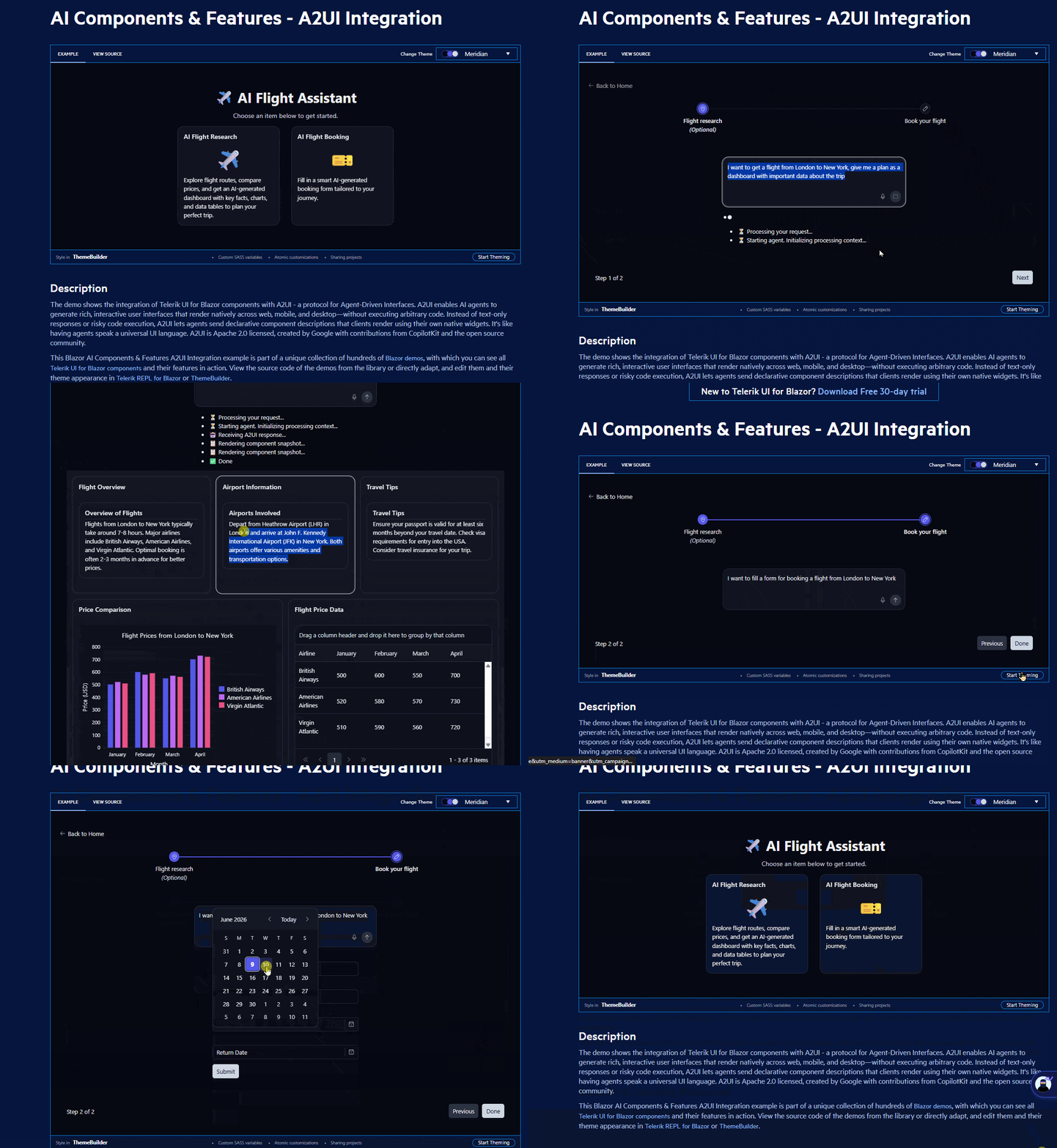
What comes back is more than a paragraph explaining the basics. It’s a whole interface with a structured results grid showing airline, price, duration and departure time. It’s a comparison view so you can weigh your options, all assembled on the spot. No predefined screen needed. Just intent and a UI that responds to it.
That is the experience shift A2UI creates. And it is coming to Progress Telerik UI for Blazor.
Don’t miss the live demo! Register for the Telerik and Kendo UI 2026 Q2 release webinar on June 16 to see A2UI transforming intent into interactive Blazor UI in real time.
What Is A2UI?
A2UI (Agent-to-User Interface) is an open protocol introduced by Google that defines a standard way for AI agents to communicate their intent to generate a user interface. Think of it as a universal UI language that agents can speak to any client application.
Rather than describing insights, AI describes interfaces. The application then renders those interfaces using its own UI framework, styling and interaction model.
In this model:
- AI facilitates the UI composition layer. It reasons over context and emits a structured definition—a declarative JSON format describing which components to render and what data to populate them with.
- The application remains the source of truth for rendering and behavior. The client maintains a catalog of pre-approved components.
- The user experiences fully interactive interfaces generated from intent. Not static mockups. Not screenshots. Real components with real data.
A2UI effectively shifts AI from being a narrator to being a composer of user experiences.
A2UI in Telerik UI for Blazor
Within Telerik UI for Blazor, A2UI introduces an additional layer on top of the existing component ecosystem. Components are no longer only developer-defined. They become composable primitives available for AI-driven interface construction.
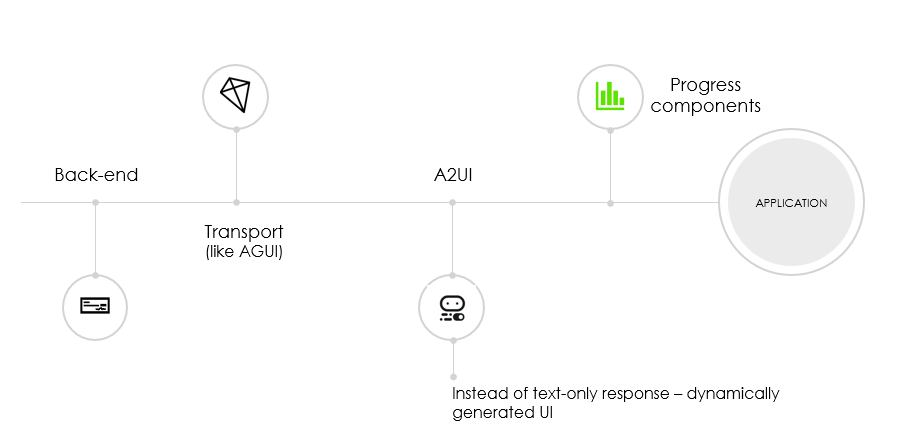
In effect, the library becomes a structured palette for dynamic interface generation. Your design system stays intact. Your business logic does not move.
Why A2UI Makes Sense: Agents Think in Text; Users Work in Interfaces
AI is rapidly reshaping how software is built and consumed. Over the past year, we have seen an acceleration of copilots, agents and large language models capable of reasoning over data, executing workflows and assisting users in ways that were previously out of reach.
Yet, one fundamental limitation remains.
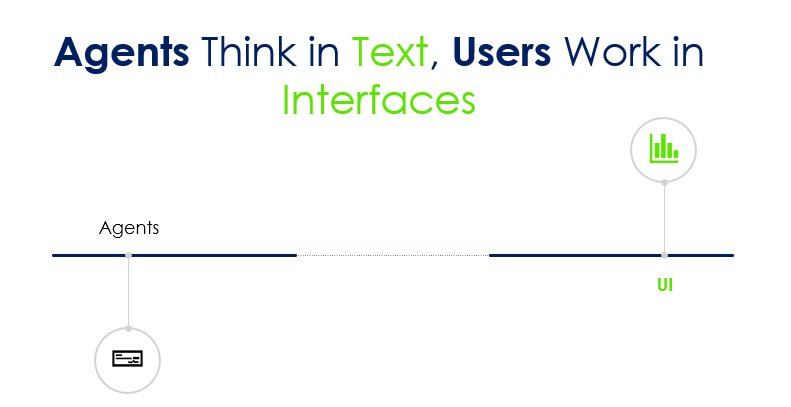
AI is exceptionally good at producing text. But applications are not built around text. They are built around interfaces.
People perceive and interact more easily through visuals—dashboards, forms, grids, charts, filters, and workflows they can interact with directly. They want to see, explore and act. This is why A2UI has so much potential.
Modern enterprise applications have long assumed that UI is static. Developers define screens. Users adapt to them. AI, when introduced, typically sits alongside the application as a conversational layer rather than becoming part of the interface itself.
A2UI introduces the possibility to change that. When AI systems generate structured UI definitions that adapt to context and data, rather than just a block of text, we aren’t just enabling what the system says, but what the user sees.
A single request like “analyze my sales performance this quarter” can translate into multiple valid experiences depending on who is asking and why—an executive KPI dashboard, a detailed filterable data grid, a chart-centric exploratory view or a hybrid analytical workspace. The underlying data is the same, but the intent is different. And AI is uniquely positioned to interpret it.
A2UI in Practice
Use cases for A2UI implementation are as myriad as you can imagine.
Let’s go back to the example of booking a flight. Instead of tedious stepping through pages, one by one, filling and selecting values, you can type: “I want to fill a form for booking a flight from London to New York.”
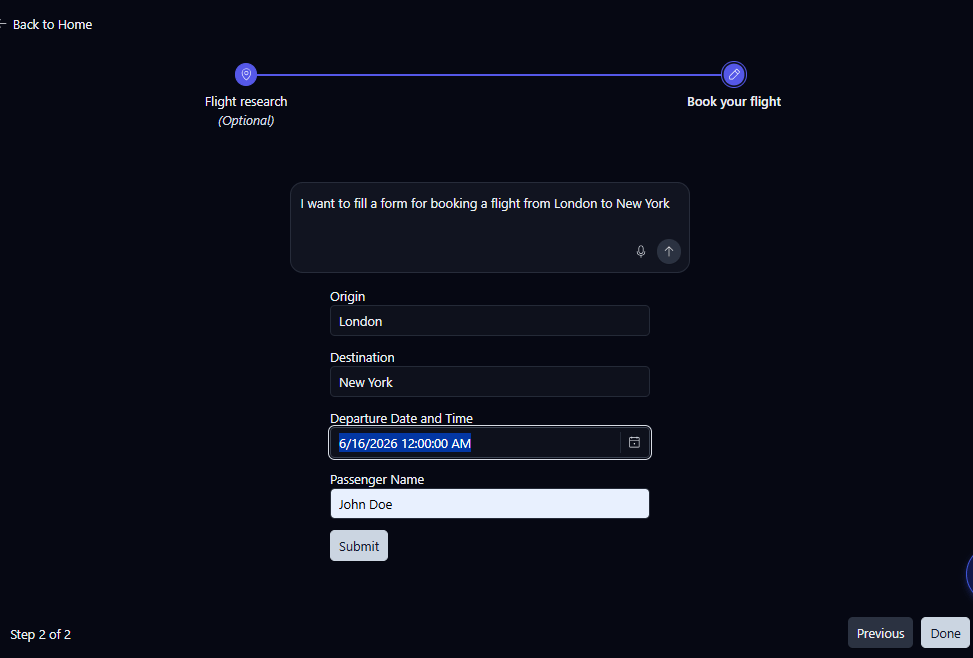
The AI interprets that intent and emits a UI definition—a JSON description of a data form (pre-filled with data where possible and using the right components), a results grid (columns: airline, price, departure, duration, stops) and a comparison chart with the top options.
The Blazor renderer receives that definition and displays the interface using real Telerik UI for Blazor components. The Grid, the Form, the Charts—all themed and all enabling you to interpret and visualize data as naturally as possible.
Different users expressing the same intent might receive different representations depending on context, preferences or available data. Maybe one person gets a chart-first view and another gets a table. That is dynamic UI generation in practice.
A Step Further: Building on an Emerging AI Ecosystem
The flight-booking scenario reflects a much broader shift happening across the AI ecosystem. Applications are moving from static interactions toward dynamic, personalized, agent-driven experiences where intent, reasoning and UI composition are tightly connected.
This is where the A2UI approach becomes part of a larger architecture rather than a standalone concept.
In the current implementation, the demo builds on complementary layers that are increasingly relevant in modern AI systems:
- AI interprets user intent, translating natural language into structured goals and constraints.
- The Microsoft Agent Framework orchestrates reasoning and execution, coordinating tools, workflows and multi-step decision-making across systems.
- AG-UI provides the interaction contract for agent-driven interfaces, so UI intent and structure are expressed in a consistent, agent- and renderer-agnostic way.
- The A2UI layer for Telerik components for Blazor defines the structure of the user experience, describing how the outcome of that reasoning should be expressed as a dynamic, interactive UI rather than plain text.
- Telerik UI for Blazor renders the final experience, materializing that structure using enterprise-grade components such as grids, forms and charts with full theming, interactivity and performance.
Together, these components enable AI systems to move beyond conversational output and participate directly in application workflows. Instead of producing text responses, agents can reason over data and shape the user experience itself.
Telerik A2UI Renderer for Blazor—Availability: Preview
A2UI is still an emerging concept and ecosystem. Standards, protocols, component contracts and implementation patterns are actively evolving as the industry explores what dynamic UI generation should look like in production applications.
We are approaching A2UI with the same mindset. The feature is still experimental. As the implementation is evolving, feedback is actively shaping its direction.
During this phase, we are actively observing real-world usage patterns, gathering feedback from early adopters and refining how intent translates into UI structure. Specifically, we are exploring where AI-generated UI delivers real value and how much control users need to retain over generated interfaces.
The A2UI specification itself is at v0.8 stable, and the ecosystem around it—transport layers like AG-UI, Agent Frameworks from Microsoft (hint: we are exploring those too) and others and renderers for different frameworks—is all moving quickly. This is the right moment to explore the pattern, give us feedback and understand how the renderer model fits your architecture. And get to the next level of creating great UI and UX experience.
The current A2UI Preview for Telerik UI for Blazor focuses on a constrained but high-impact set of building blocks:
- Input components – text fields, date pickers, numeric inputs, dropdowns
- Data Grid – data exploration, visualization and comparison
- Charts – visual representations that adapt to what the data warrants
These are intentionally chosen because they represent the backbone of most business applications. This Preview is opinionated by design. Rather than attempting to support every UI pattern, it focuses on exploring how intent can reliably map to structured, usable interfaces. Go straight to the demo, click and prompt around on an easy-to-follow use case and get in touch with feedback.
If your organization is exploring AI-powered applications in 2026, this is the ideal time to start a pilot. Use our Support system to tell us more about your use case or drop us a line in our Blazor Feedback Portal or in the Telerik Forums.
The goal isn’t to replace your existing application. The goal is to explore how AI can augment it through interfaces that adapt to the user, the context and the task at hand.
WebMCP vs. A2UI: What’s the Difference?
If you’ve been following our recent AI initiatives, you may have also seen our Preview support for WebMCP, which enables AI agents to interact with applications through standardized tools and capabilities.
While both WebMCP and A2UI are part of the broader movement toward AI-native applications, they address different parts of the big picture.
You can think of them as complementary layers: WebMCP focuses on how AI agents interact with applications. A2UI focuses on how applications interact with users through AI-generated experiences.
Together, they create a powerful foundation for AI-native applications and are an extension of our commitment to great UI and UX.
With WebMCP, an AI agent can discover available actions, execute workflows, retrieve data and interact with business functionality exposed by an application.
With A2UI, that same agent can dynamically generate forms, grids, charts, dashboards and other user experiences that help users understand, validate and act on the results.
An AI agent can use WebMCP to retrieve information, execute actions and understand business capabilities, while A2UI can transform those results into dynamic user experiences built with Telerik UI for Blazor components.
To learn more about our WebMCP Preview support, check out our blog post: Telerik and Kendo UI Meet WebMCP.
The current capabilities represent only the beginning. The beauty of dynamic UI generation is that the number of possible use cases is virtually unlimited. AI maps context and intent, while Telerik UI for Blazor provides the components that bring those experiences to life.
Want to shape how A2UI support for Telerik UI for Blazor develops? Share your thoughts on the Blazor Feedback Portal or in the Telerik forums. We are reading everything.
And don’t forget to join the webinar for a live demo of A2UI.

Maya Mateva
Maya is a Software Engineering Manager at Progress, leading the Telerik UI for Blazor components with a focus on delivering enterprise-grade and AI-enhanced user experiences. Previously, she has been a Principle Software Engineer in the teams developing Telerik components for WPF and NativeScript.
Related Posts
Comments
All articles
Topics
Web MobileMobile
Desktop
Design
Productivity
People