
Stop Paying for the Same Answer Twice: Agent Cache in Fiddler Everywhere

Summarize with AI:
Agent Caching in Fiddler Everywhere allows you to iterate as you build an agent without having to pay for every response when it hasn’t changed.
If you have ever built a model-powered agent, you know the development loop. Write some code, fire it at the endpoint, check the response, tweak the parsing, fire it again. Repeat until the output looks right. It is a perfectly normal workflow—and it quietly drains your token budget with every single iteration.
The new Progress Telerik Fiddler Everywhere Agent Cache feature is designed to break that cycle. Once you capture a response from a model-provider endpoint, you can flip a single switch and have Fiddler software replay that response for every subsequent matching call—without the request ever leaving your machine. Same output, zero additional tokens consumed on the provider side.
This post walks through exactly how that works, using a small open-source demo project to make everything concrete.
The Hidden Cost of Agent Development
Building an agent that calls a completion endpoint involves a lot of repetition that has nothing to do with the model itself. You are iterating on:
- How you construct the prompt
- How you parse and validate the structured response
- How you surface the result to the rest of your system
- How your error handling behaves when the response is malformed
None of those iterations require a new, unique response from the model. You already have a good one from the first call. But unless you manually save the raw response and mock it yourself, every invocation sends a fresh request, and the provider charges for it.
Once agents move beyond demos, three pressures show up together and stay for the duration of development:
- Cost – Repeated runs during development burn budget. For a simple agent that exchanges a few hundred tokens per call, this might feel negligible. But development sessions involve dozens of sequential runs, teams have multiple developers iterating in parallel, and the costs compound quickly.
- Latency – Every round trip to the provider stretches the feedback loop. When you are tweaking prompt construction or adjusting response parsing, waiting on a live call each time slows everything down.
- Determinism – The same input does not always produce the same output. That variability makes it harder to isolate whether a difference in behavior came from your code change or from the model.
This is especially visible in teams that build many small, task-specific agents rather than one large agent. Even small per-run costs compound when iteration is constant—and none of that spend actually improves the agent.
What Teams Already Do
Most teams already compensate for this manually. Common patterns include separating development runs from real execution, validating agent wiring before triggering model calls, reusing mocked or previously captured responses, and avoiding live execution early to keep iteration fast.
These approaches work, but they are fragmented. Provider-level caching helps in some cases but is limited. Custom mocks and fixtures are costly to maintain. Replay logic often lives outside the main development flow, and different teams end up solving the same problem with different local tooling.
The problem is not a lack of solutions. It is the lack of a low-friction one that fits naturally into everyday iteration.
What Agent Cache Does
Fiddler Everywhere acts as a proxy that sits between your agent and the remote endpoint. When your agent makes an HTTPS call to, say, api.anthropic.com, Fiddler software intercepts it, forwards it and logs the full request-response pair in the Traffic pane.
The new Agent Calls tab is a focused view inside that pane. It automatically filters and displays HTTPS sessions that target supported model-provider endpoints—such as OpenAI, Anthropic and Gemini—so you are not wading through noise from other traffic. Every captured call gets a Caching toggle.
Enable the toggle, and Fiddler software starts intercepting any outbound call that matches that session’s request. Instead of forwarding the request, it immediately returns the cached response. The endpoint never receives the duplicate call. Your agent sees the exact same payload it would have received from a live call. Token count: zero.
Disable the toggle at any time and live traffic resumes, no restarts required.
How Agent Calls and Caching Behave
A few details that matter when you start using it:
- Deterministic filtering: Sessions appear in Agent Calls automatically when Fiddler software detects traffic to a supported agentic endpoint. You do not need to configure which endpoints to watch.
- First-match caching: If two or more sessions target the same endpoint (for example, https://api.anthropic.com/v1/messages) and both are cached, Fiddler software returns the response from the first cached session.
- No rule interference: Fiddler rules are executed only for non-cached sessions. Cached responses are returned as-is, without rule evaluation.
- Visibility split: After a session is cached, subsequent matching requests appear only in Live Traffic. The Agent Calls tab continues to show the original non-cached captures.
Why It Matters During Development
Agent Cache is built around three practical benefits that matter most during active development.
- Faster iterations: Replaying a cached response is instant. Instead of waiting on a round trip to the provider on every run, you get a result back immediately—shortening the feedback loop so you can move through prompt and code changes without unnecessary delays.
- Lower execution costs: Each cached run consumes zero tokens on the provider side. During active development, where the same request may be triggered dozens of times, this directly reduces the token spend that accumulates before a feature is even complete.
- More predictable behavior: A cached response is fixed and repeatable. Running the same agent logic against the same response on every iteration makes it straightforward to verify that a code change had the intended effect, without having to account for variability in live model output.
Demo: Bug Report Analyzer
To make this tangible, walk through the agent-cache-demo—a minimal Python agent that takes a fixed bug report and returns a structured analysis (severity, category, a plain-English summary and a suggested next step).
The input never changes between runs, which makes it a perfect showcase for Agent Cache: the model’s answer to an identical prompt is always reusable, so there is genuinely no reason to pay for it more than once.
What the Agent Does
The core of agent.py is straightforward:
message = client.messages.create(
model=MODEL,
max_tokens=256,
system=SYSTEM_PROMPT,
messages=[
{"role": "user", "content": f"Analyze this bug report:\n\n{report}"}
],
)
It sends the bug report to the Claude API and expects a JSON response like this:
{
"severity": "high",
"category": "crash",
"summary": "App crashes with a NullPointerException when attempting to log in under no network connectivity.",
"suggested_next_step": "Add a null or connectivity check in NetworkManager.checkConnectivity() before network calls."
}
That response is then formatted and printed to the terminal:
── Bug Report Analysis ─────────────────────────────────────
Severity  : HIGH
Category  : crash
Summary  : App crashes with a NullPointerException when attempting to
log in under no network connectivity.
Next step : Add a null or connectivity check in
NetworkManager.checkConnectivity() before network calls.
─────────────────────────────────────
Setup
Clone the repository and install dependencies:
git clone [https://github.com/NickIliev/agent-cache-demo](https://github.com/NickIliev/agent-cache-demo)
cd agent-cache-demo

python -m venv .venv
source .venv/bin/activate  # macOS / Linux
.venv\Scripts\activate  # Windows

pip install -r requirements.txt
export ANTHROPIC_API_KEY=sk-ant-... # macOS / Linux (Git Bash)
set ANTHROPIC_API_KEY=sk-ant-... # Windows (CMD)
The demo supports routing traffic through the Fiddler proxy or running directly against the provider. It also covers SSL/TLS trust configuration for HTTPS interception. See the repository README for full details on proxy setup, environment variables and certificate options.
Step 1: The First Live Call
Start Fiddler Everywhere and run the agent:
python agent.py
The terminal shows the result and, crucially, the token consumption:
[tokens] Input: 312 | Output: 68 | Total: 380
Switch to Fiddler Everywhere and open Traffic > Agent Calls. You will see the captured call to api.anthropic.com with the full request and response visible.
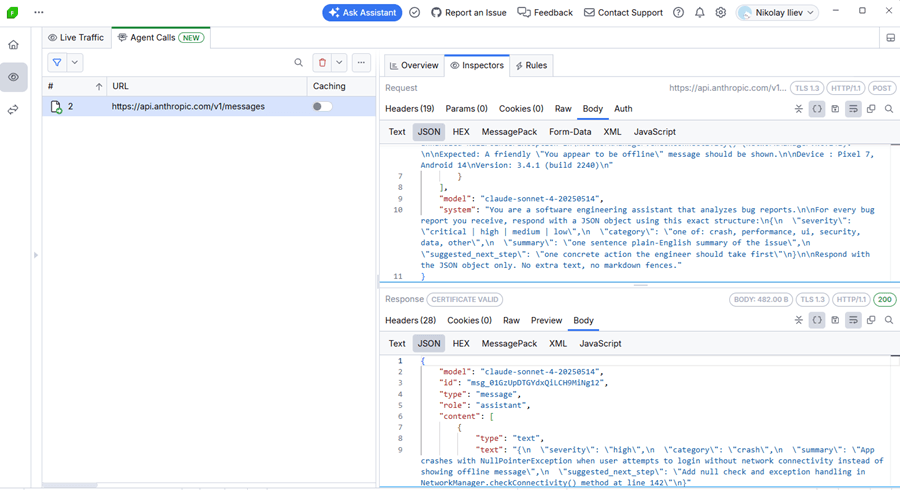
This is your baseline. You paid for 380 tokens. That is fair—you needed the live call to validate the end-to-end flow.
Step 2: Enable the Cache
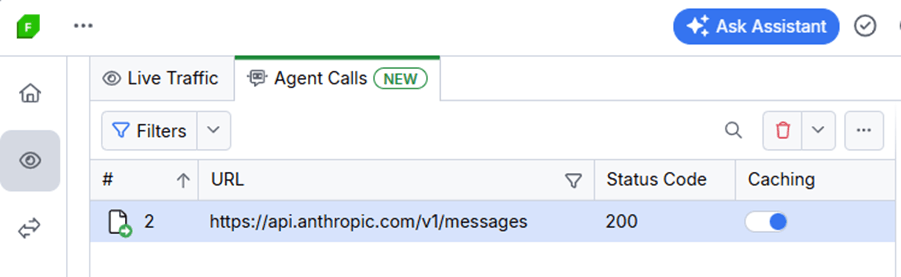
In the Agent Calls grid, find the captured session and flip its Caching switch to on. That is the entire configuration step.
Step 3: All Subsequent Runs Are Free
Run the agent again:
python agent.py
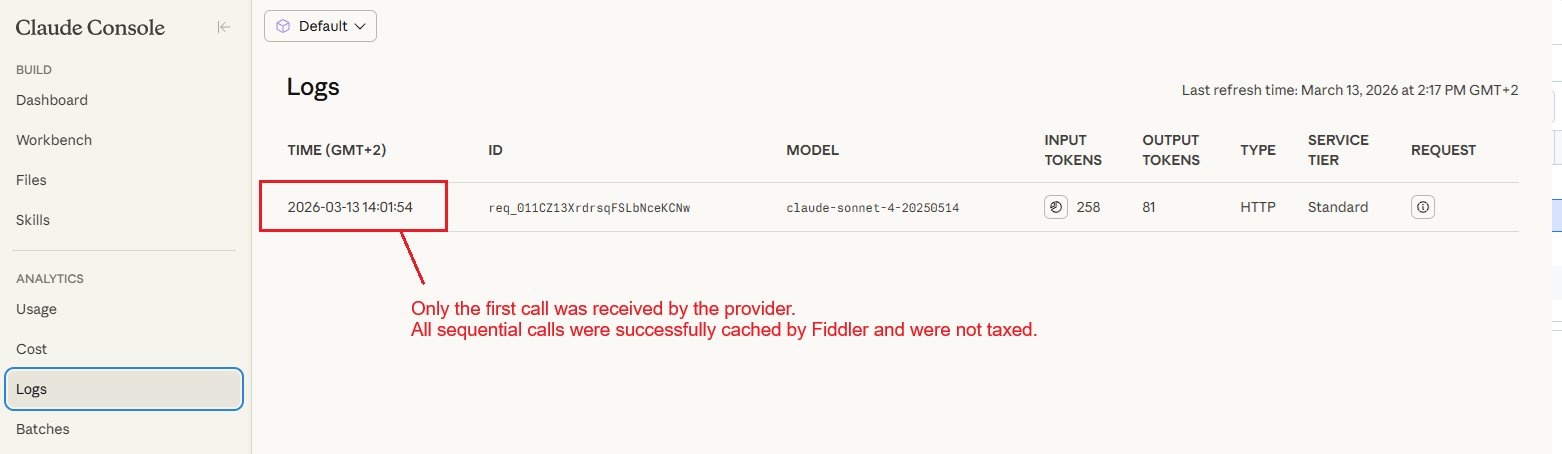
The output in the terminal is byte-for-byte identical to the first run, including the token count display. Because the Caching switch was on, Fiddler software served the stored response immediately and never forwarded the request to the provider. The endpoint never saw the call.
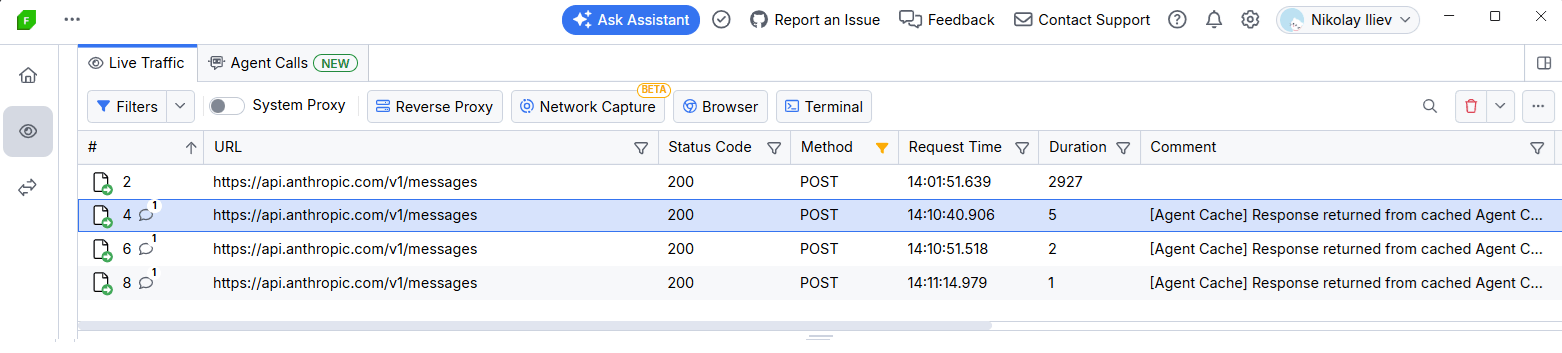
You can now iterate on agent.py as many times as you need—refactor the display logic, adjust the JSON parsing, add logging—and none of those runs cost a single token.
When to Use Agent Cache
Agent Cache is a development-stage tool. It is particularly valuable when:
- Iterating on response handling: Your agent already returns a correct response from the model. You are now working on how your code handles that response—formatting, validation, error recovery. None of that work requires fresh model calls.
- Sharing a working state with teammates: Cache a known-good response and share the Fiddler session. Everyone on the team can iterate against the same replay without burning tokens or depending on network access to the provider.
- Working offline or in restricted environments: Once the cache is populated, your agent keeps working even without connectivity to the provider.
Things to Keep in Mind
- Cache matching is request-based. If your agent changes the prompt, the model or any request headers, the cached session will no longer match. Capture and cache the updated variant separately.
- The cache lives in the current Fiddler session. Closing and reopening Fiddler clears the cache state, so the next run after a restart will make a live call. Review cached sessions periodically to keep stored responses aligned with your current workflow.
- Cache is for development, not production. Agent Cache is designed for development workflows where deterministic, repeatable responses are the goal. When you are ready to validate against a live endpoint, disable the cache and resume live calls.
Availability
Agent Cache is available on Fiddler Everywhere Trial, Pro and Enterprise tiers. The feature is not included in Lite licenses.
Try It Yourself
The full demo is on GitHub: github.com/NickIliev/agent-cache-demo. Clone it, set your Anthropic API key, and you can see the before-and-after token counts yourself in under five minutes.
The point is not really the 380 tokens saved in a single run. It is the dozens of runs you make in a typical development session, the parallel runs across a team—all of which can stop paying for answers they already have.
Agent Cache does not change how you build agents. It just removes the tax on iterating.
If you aren’t already using Fiddler Everywhere, it does come with a free trial:
Leave Feedback
Agent development workflows are still evolving quickly, and your feedback shapes what comes next. If you try Agent Cache during development—or if there is something you wish it did differently—we want to hear about it.
- Email: fiddler-support@progress.com
- GitHub issues: github.com/telerik/fiddler-everywhere/issues
- Demo repository: github.com/NickIliev/agent-cache-demo

Nikolay Iliev
Nikolay Iliev is a senior technical support engineer and, as such, is a part of the Fiddler family. He joined the support team in 2016 and has been striving to deliver customer satisfaction ever since. Nick usually rests with a console game or a sci-fi book.
Related Posts
Comments
All articles
Topics
Web MobileMobile
Desktop
Design
Productivity
People
-network-issues-like-a-pro-250x250.png?sfvrsn=710a0cb8_6 "Fiddler EverywhereB_Troubleshoot HTTP(S) Network Issues Like a Pro-250x250")