Agent Cache
Reuse prior agent responses during development and testing to shorten the feedback loop and speed up iterations—while keeping execution costs under control. This is Agent Cache.
When building and testing automated agents that communicate with model-provider endpoints over HTTPS, every test run sends a live request and consumes tokens. Agent Cache breaks that cycle by letting you cache a captured endpoint response and have Fiddler Everywhere replay it for matching calls—so your testing no longer incurs token costs after the first capture, and repeated runs against the same cached response stay fast and deterministic.
Overview
Fiddler Everywhere surfaces an Agent Calls section in the grouped traffic panel on the left-hand side of the Traffic pane, alongside sections such as All Traffic, Apps, and Domains.
The Agent Calls section is a focused view over sessions already captured in Live Traffic. It automatically filters and displays HTTPS sessions that target supported model-provider endpoints.
The Agent Calls section reflects sessions that have already been captured. You must have active traffic capture running, or previously captured sessions present in Live Traffic, before any sessions appear in Agent Calls.
The Agent Calls Section
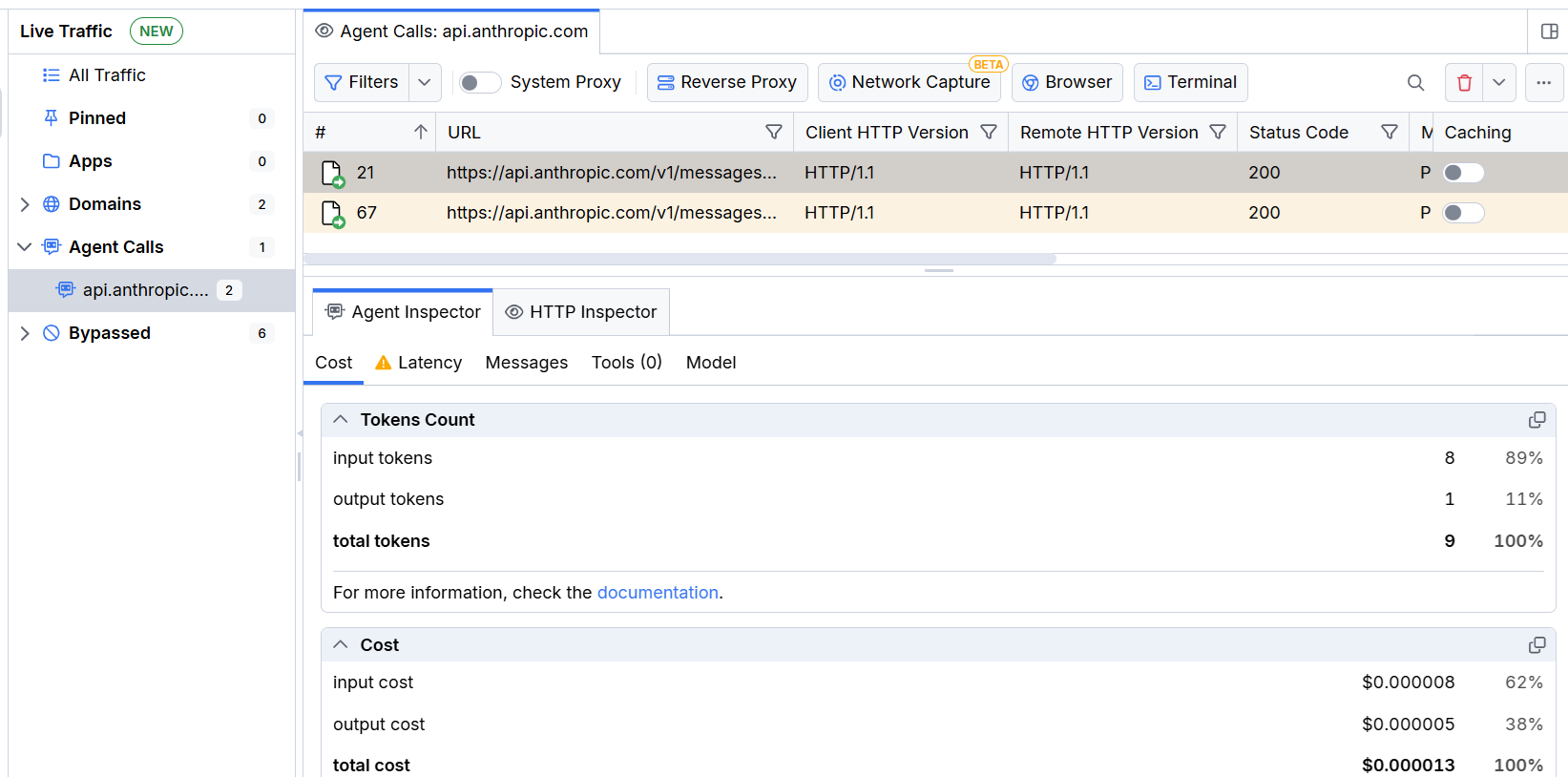
When you select the Agent Calls section, the Live Traffic grid shows the same key columns as usual—for example, #, Host, URL, Method, Status, Body, and Duration—giving you full visibility into each captured endpoint call.
Additional behaviors to keep in mind:
- Sessions appear in Agent Calls automatically when Fiddler detects traffic to supported agentic endpoints.
- If two or more identical endpoints are cached, Fiddler returns the response from the first cached session.
- Fiddler rules apply only to non-cached sessions. Cached responses are returned as-is without rule evaluation.
- After a session is cached, subsequent requests to that endpoint appear only in All Traffic. Agent Calls shows the original non-cached requests.
The grid adds one dedicated sticky column:
| Column | Description |
|---|---|
| Caching | A toggle switch per session. Enable it to cache the session's recorded response. Disable it to stop intercepting and resume live calls to that endpoint. |
When the Caching switch is enabled for a session, Fiddler Everywhere intercepts matching outbound calls and returns the cached response instead of forwarding the request to the remote endpoint. When the switch is disabled, requests pass through normally.
Selecting any session in the Agent Calls section opens the Agent Inspector in the details pane. The Agent Inspector provides structured analysis of the selected session across five sub-tabs: Cost (token usage and monetary cost, including cache savings), Latency (response time and cache-avoided latency), Messages (the full user/agent conversation), Tools (all available tools and any tool calls made during the session), and Model (provider, model version, and system prompt).
Get Started
The following scenario demonstrates how Agent Cache eliminates redundant token usage during the development of an agent that calls a model-provider endpoint.
Scenario: You are building an agent that sends a structured HTTPS request to a completion endpoint (for example, api.openai.com). During development you repeatedly trigger the same call to verify your agent's parsing and response-handling logic. Without caching, each run consumes tokens.
- Start capturing traffic in Fiddler Everywhere—click Start Capture in the toolbar.
- Run your agent to trigger an HTTPS call to the model-provider endpoint.
- In the Traffic pane, select the Agent Calls section in the grouped traffic panel.
- Locate the captured session in the grid (use the Host or URL columns to identify it).
- Select the session to open the Agent Inspector in the details pane—review the Cost, Latency, Messages, Tools, and Model sub-tabs to confirm the captured response meets your expectations before caching it.
- Enable the Caching switch for that session in the sticky Caching column.
- Run your agent again with the same request.
- Verify in the Live Traffic grid that Fiddler Everywhere served the cached response for all subsequent requests.
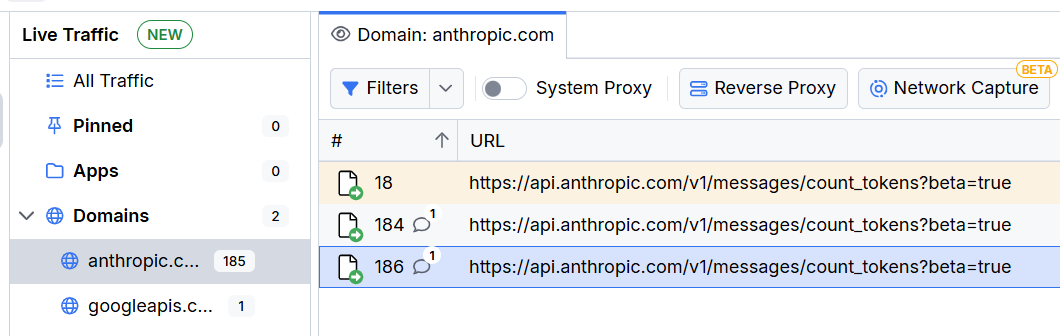
A quick check in the agent provider confirms that no new live calls were made and no tokens were consumed.

You can disable the Caching switch at any time to resume live calls to the endpoint.
Supported Endpoints
The Agent Calls section automatically detects and displays sessions targeting a broad range of model-provider and inference-gateway endpoints—including major providers, cloud-hosted inference services, and local runners—without any manual configuration.
Adding Endpoints Manually
If a session does not appear in Agent Calls automatically—for example, when working with a locally hosted API, an internal gateway, or a newer provider not yet in the built-in detection list—you can promote it manually:
- In All Traffic, right-click the session.
- Select Add to Agent Calls from the context menu.
The session then appears in the Agent Calls section and can be cached like any automatically detected session.
How It Works
The following diagram shows the request flow when Agent Cache is active.
┌─────────────────────┐
│    Your Agent       │
└──────────┬──────────┘
           │ HTTPS request (proxied)
           ▼
┌─────────────────────┐
│ Fiddler Everywhere  │
│(Agent Calls section)│
└──────────┬──────────┘
           │
      Cache ON?
           │
    ┌──────┴──────┐
    │             │
   YES           NO
    │             │
    ▼             ▼
┌─────────┐  ┌─────────┐
│ Return  │  │ Forward │
│ cached  │  │ request │
│response │  └────┬────┘
└────┬────┘       │ HTTPS
     │            ▼
     │    ┌──────────────┐
     │    │   Provider   │
     │    └──────┬───────┘
     │           │ response
     │           │
     └───────────┤
                 ▼
          ┌─────────────┐
          │ Your Agent  │
          │  (response) │
└─────────────┘- Your agent routes HTTPS traffic through Fiddler Everywhere, either by configuring a proxy in code, by using system proxy settings, or by launching the agent from the Fiddler built-in terminal.
- Fiddler captures the call and displays it in the Agent Calls section.
- When the Caching switch is enabled for that session, Fiddler replays the stored response for any matching subsequent call.
- The provider endpoint never receives the duplicate request—no tokens are charged.
MCP Tools for Agent Cache
The Fiddler Everywhere MCP server exposes dedicated tools for programmatic interaction with Agent Cache directly from your coding assistant. These tools allow you to manage cached sessions, check cache status, and toggle caching without leaving your IDE.
Dedicated Agent Cache Tools
| Tool | Description |
|---|---|
cache_agent_calls | Enables or disables caching for a specific session in the Agent Calls section. Required parameters: sessionId (integer — the target session ID) and enableCache (boolean — true to enable caching, false to disable it). When caching is enabled, the session's response is served from cache for matching future requests. When caching is disabled, the session remains in the Agent Calls section but stops serving cached responses. |
check_cache_status | Checks whether a specific session in the Agent Calls section is currently cached. Required parameter: sessionId (integer — the target session ID). Returns the cache status for the requested session. |
Session Management Tools with Agent Calls Support
When prompting your coding assistant, explicitly specify "Agent Calls" as the sessions source in your request. The
sessionsSourceparameter is required for all session management tools. Set it toAgentCallsto target the Agent Calls section or toLiveTrafficfor the Live Traffic grid.
| Tool | Description |
|---|---|
get_sessions | Gets sessions from the specified Fiddler sessions source. When sessionsSource is set to AgentCalls, each session includes additional Agent Cache-specific fields: isCached status, model (the LLM model name), and promptPreview (a preview of the last user prompt). Active filters are applied if any. Required parameter: sessionsSource. |
get_sessions_count | Gets the number of sessions in the specified Fiddler sessions source. Required parameter: sessionsSource. |
get_session_details | Gets detailed information about a specific session in the specified Fiddler sessions source. Required parameters: sessionId (integer) and sessionsSource. |
apply_filters | Applies filter criteria to the specified Fiddler sessions source to narrow down visible sessions. Applying filters wipes all existing filters. To clear all filters, call this tool with an empty filter collection. Required parameters: filters (object) and sessionsSource. |
clear_sessions | Clears all sessions in the specified Fiddler sessions source. Agent calls are also HTTP traffic so they appear in both sources. Required parameter: sessionsSource. |
Example MCP Prompts for Agent Cache
Use these prompts with your coding assistant to interact with Agent Cache through the MCP server:
#fiddler Check the cache status of session {sessionId} in the Agent Calls section#fiddler Enable caching for session {sessionId} in the Agent Calls section#fiddler Show me all sessions in the Agent Calls section#fiddler How many sessions are currently in the Agent Calls section?For the full list of available prompts, refer to the Prompt Library.
Notes
- Agent Cache is available on Trial, Pro, and Enterprise plans. It is not available on Lite licenses.
- Agent Cache is intended for development and verification workflows where deterministic responses are required.
- Matching is based on the captured request details. If your agent changes the request payload, headers, or target path, capture and cache the updated variant separately.
- Review cached sessions periodically to keep the stored responses aligned with your current workflow expectations.
- Cached sessions are stored within the current Fiddler Everywhere session. Closing and reopening the application clears the cache state.
Feedback
We welcome your feedback on Agent Cache and any other features you would like to see. You can reach the team by:
- Email fiddler-support@progress.com
- Opening a GitHub issue at https://github.com/telerik/fiddler-everywhere/issues