
Fiddler Everywhere MCP Agent Skills
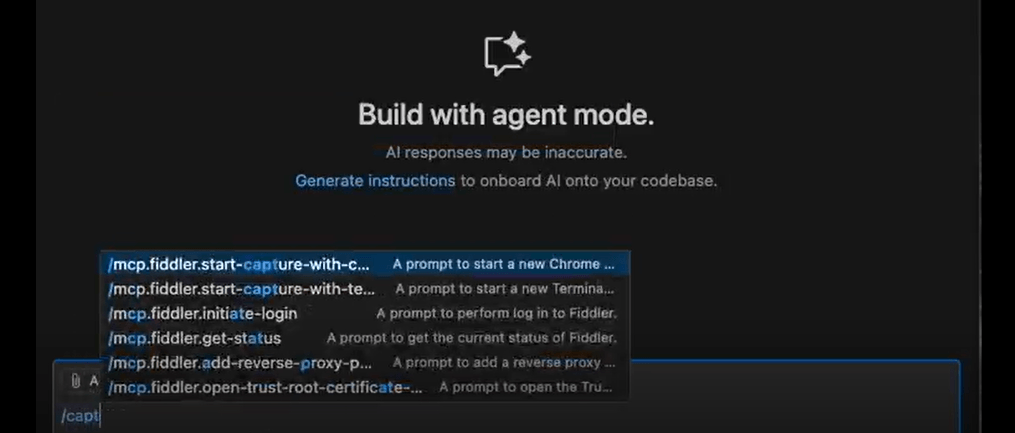
Fiddler Everywhere introduces Agent Skills, extending Fiddler MCP with instruction-driven workflows that orchestrate setup and HTTP traffic debugging. These skills define how the coding agent should invoke MCP tools to install and configure Fiddler, establish the MCP connection, and execute structured debugging steps—automating traffic inspection and analysis so developers get consistent, reproducible results directly from their editor.
Fiddler Everywhere: Agent Cache
See the Fiddler Everywhere: Agent Cache Documentation

Fiddler MCP Integration
The Fiddler MCP (Model Context Protocol) integration is specifically designed to make Fiddler Everywhere’s powerful debugging and traffic-inspection data accessible to AI assistants, right where developers work. This ensures you can identify, analyze and resolve issues faster, without even leaving your favourite IDE. It’s like having an extra team member who:
- Talks your language, turning debugging into a conversation. Need to find sessions that are taking too long? Just ask.
- Debugs during development, helping you identify and resolve issues before they reach testing or production.
- Keeps your data secure, automatically sanitizing sensitive information before anything is shared with the model.
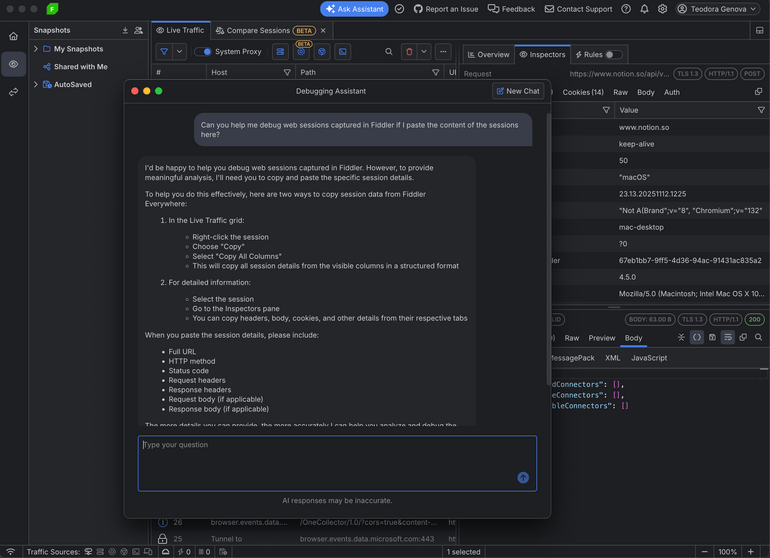
Debugging Assistant
The all new Fiddler Debugging Assistant lets you chat with your preferred LLM directly inside the tool, helping you debug traffic faster with real-time insights and smart suggestions.
- Get instant answers to common debugging questions. The assistant helps you interpret traffic, identify issues, and suggests best practices to resolve problems quickly.
- Learn how to make the most of Fiddler Everywhere. Ask about features, settings, and workflows, and receive clear guidance to optimise your debugging experience.
- Dive deep into individual sessions. The assistant provides real-time insights, explains anomalies, and offers tailored suggestions to fix issues faster.
The Fiddler Debugging Assistant streamlines your processes and allows you to be even more productive.




Next Steps
With dedicated technical support.
Purchase individual products or any of the bundles
Help us shape our roadmap