Nuxt 4 Server Routes vs. Fetch Composables

Summarize with AI:
See a Nuxt app load data from the server in a Server Component and using useFetch to see how Server Components and fetch mechanisms compare.
There are currently two ways to load data from the server and hydrate it. Nuxt has Server Components, just like React, as well as fetch mechanisms API route hydration.
TL;DR
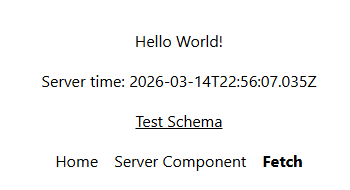
This app will load data from the server in a Server Component and using useFetch. Both mechanisms work similarly from the server perspective, but one method hydrates data from the server and sets it as reactive, while the other caches data from the server. Both components can be validated with schema.org to verify the data is properly loaded.
Nuxt Setup
We must properly config the layout and components.
Configure Tailwind
Follow the Nuxt 4 Tailwind Guide for the latest instructions.
Nuxt Config
Make sure to enable component islands with deep selective client. This enables server components and client components inside of them. For more on Nuxt Server Components, see my other article Nuxt 3 Server Components Rock.
import tailwindcss from "@tailwindcss/vite";

export default defineNuxtConfig({
  compatibilityDate: "2025-07-15",
  devtools: { enabled: true },
  css: ['./app/assets/css/main.css'],
  experimental: {
    componentIslands: {
      selectiveClient: 'deep',
    },
  },
  vite: {
    plugins: [
      tailwindcss(),
    ],
  },
});
Configure app/app.vue for Pages and Layouts
<template>
  <NuxtLayout>
    <NuxtPage />
  </NuxtLayout>
</template>
Configure the Layout at app/layouts/default.vue
<template>
  <div class="flex flex-col items-center gap-4 p-10">
    <slot />
    <nav class="flex gap-4">
      <NuxtLink to="/" active-class="font-bold" exact-active-class="font-bold">
        Home
      </NuxtLink>
      <NuxtLink
        to="/server"
        active-class="font-bold"
        exact-active-class="font-bold"
      >
        Server Component
      </NuxtLink>
      <NuxtLink
        to="/fetch"
        active-class="font-bold"
        exact-active-class="font-bold"
      >
        Fetch
      </NuxtLink>
    </nav>
  </div>
</template>
This allows bolded current routes.
Homepage at app/pages/index.vue
<template>
  <div class="border p-4 rounded-xl">
    Welcome to the Server Components VS Fetch demo!
  </div>
</template>
Validate Component at app/components/validate.vue
This is used to create a dynamic link to schema.org.
 <script lang="ts" setup>
const currentUrl = useRequestURL();

const href = computed(
  () =>
    `https://validator.schema.org/#url=${encodeURIComponent(currentUrl.href)}`,
);
</script>

<template>
  <a class="underline hover:no-underline" :href>Test Schema</a>
</template>
Notice
useRequestURL()can get the current URL safely.
Meta Data and Schema
Nuxt has a built-in composable, useHead, that allows you to set data directly in the header on the server.
useHead({
  meta: [
    {
      property: "article:modified_time",
      content: modifiedTime.data.value,
    },
    {
      name: "last-modified",
      content: modifiedTime.data.value,
    },
  ],
  script: [
    {
      type: "application/ld+json",
      textContent: () =>
        JSON.stringify({
          "@context": "https://schema.org",
          "@type": "WebPage",
          dateModified: modifiedTime.data.value,
        }),
    },
  ],
});
You can create a meta tag with the meta property, and set the data that you see fit. This is imperative for SEO. Modern search engines group data using JSON-LD and schema.org, which requires a formatted script tag.
The following examples will set the modified date as the fetch date. This is technically incorrect, as you would want this static, but you can see the usefulness of this for dynamically generated pages with good SEO techniques.
Fetch with useAsyncData
You can fetch data with useFetch if you have an endpoint, or useAsyncData if you just want to run a safe function directly on the server.
Basic Fetch Page at app/pages/fetch.vue
<template>Hello World! <Server-Time-Client /></template>
I love not having to manually import components in the
componentsdirectory!
Here We Create app/components/server-time-client.vue
<script setup lang="ts">
const modifiedTime = await useAsyncData("time", async () => {
  return new Date().toISOString();
});

useHead({
  meta: [
    {
      property: "article:modified_time",
      content: modifiedTime.data.value,
    },
    {
      name: "last-modified",
      content: modifiedTime.data.value,
    },
  ],
  script: [
    {
      type: "application/ld+json",
      textContent: () =>
        JSON.stringify({
          "@context": "https://schema.org",
          "@type": "WebPage",
          dateModified: modifiedTime.data.value,
        }),
    },
  ],
});
</script>

<template>
  <div v-if="modifiedTime.data">Server time: {{ modifiedTime.data.value }}</div>
  <Validate />
</template>
- We don’t have to have
clientin the name, but it is good to differentiate in this example. - With
useAsyncData, we load data on the server and hydrate it to the browser keeping it reactive. We could have equally created an endpoint atserver/api/time.tsand called it withuseFetch. - Your real data will probably be async and will pull from a database.
Server Component
We can also load the data directly in the HTML on the server, similar to PHP. It will NOT be reactive.
Basic Server Page at app/pages/server.vue
<template>Hello World! <Server-Time><Validate /></Server-Time></template>
We are loading a client component, validate, inside a server component. This is reactive and depends on the current URL. It must use a <slot /> to work correctly. This is why we enabled deep in nuxt.config.ts. Again, see Nuxt 3 Server Components Rock.
Server Time Component at app/components/server-time.server.vue
<script setup lang="ts">
const modifiedTime = new Date().toISOString();

useHead({
  meta: [
    {
      property: "article:modified_time",
      content: modifiedTime,
    },
    {
      name: "last-modified",
      content: modifiedTime,
    },
  ],
  script: [
    {
      type: "application/ld+json",
      textContent: () =>
        JSON.stringify({
          "@context": "https://schema.org",
          "@type": "WebPage",
          dateModified: modifiedTime,
        }),
    },
  ],
});
</script>

<template>
  <div class="flex flex-col gap-4 items-center">
    <div>Server time: {{ modifiedTime }}</div>
    <slot />
  </div>
</template>
- A Server Component must have the
.server.tsextension to load correctly. - We can just put our server code directly in the header. None of the JavaScript gets loaded in the browser for this component.
Comparison
So what is the difference?
| Aspect | Server components | useFetch / useAsyncData |
|---|---|---|
| Main purpose | Render UI on server | Load reactive data |
| Output | HTML | Data refs |
| Client JS | Less / none for island | Normal hydrated component |
| Best for | Static or mostly static UI | Interactive data-driven UI |
| Data state | Props in, HTML out | data, pending, error |
| Refresh behavior | Re-render island | refresh() / reactive reload |
| Good example | Server-rendered timestamp block | Posts, user, notes, lists |
Generally speaking, Fetch Composables can be reactive and load JavaScript. Server Components just load the data as if it were static HTML. This is clear when you navigate between pages, the Server Component does not reload the date, while the Fetch Component does.
Testing Schema
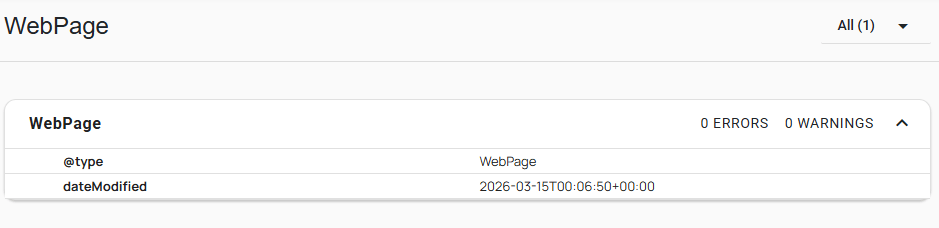
You can click the test schema button to verify the data is loaded from the server and not client, and that it loads correctly.
If you’re loading something quickly, use Server Components. If you need dynamic data, use Fetch Composables.
That’s a wrap!

Jonathan Gamble
Jonathan Gamble has been an avid web programmer for more than 20 years. He has been building web applications as a hobby since he was 16 years old, and he received a post-bachelor’s in Computer Science from Oregon State. His real passions are language learning and playing rock piano, but he never gets away from coding. Read more from him at https://code.build/.
Related Posts
Comments
All articles
Topics
Web MobileMobile
Desktop
Design
Productivity
People