Pure Surreal Database Authentication in Nuxt

Summarize with AI:
See how Nuxt pairs up with Surreal Database with a sample app enabling login, register, logout and password change options with route guards and server-safe APIs.
I am obsessed with Surreal Database. I love graph databases, and this database allows us to avoid joins forever!
TL;DR
This app allows you to connect to Surreal Database and use the first class login system with Nuxt 4. You can login, register, logout and change your password with route guards and server-safe APIs.
Surreal Database Setup
First, set up a cloud instance with Surreal Cloud. This example should also work with a local version.
📝 I’m using Surreal 2.3.10 or later.
Schema
We must declare our Surreal Schema with sign in and sign up functions.
-- 🔐 ACCESS RULE
DEFINE ACCESS user
    ON DATABASE
    TYPE RECORD
    SIGNUP (
        CREATE users SET
            username = $username,
            password = crypto::argon2::generate($password)
    )
    SIGNIN (
        SELECT * FROM users
        WHERE username = $username
          AND crypto::argon2::compare(password, $password)
    )
    WITH JWT
        ALGORITHM HS512
        KEY 'YOUR_SUPER_SECRET_KEY_HERE'
        DURATION
            FOR TOKEN 1h,
            FOR SESSION NONE;

-- 👤 USERS TABLE
DEFINE TABLE users
    TYPE NORMAL
    SCHEMAFULL
    PERMISSIONS
        FOR select, update WHERE id = $auth.id,
        FOR create, delete NONE;

-- 🧩 FIELD DEFINITIONS
DEFINE FIELD username
    ON users
    TYPE string
    ASSERT $value != ''
    PERMISSIONS FULL;

DEFINE FIELD password
    ON users
    TYPE string
    ASSERT $value != ''
    PERMISSIONS FULL;

-- 🔎 UNIQUE INDEX
DEFINE INDEX usernameIndex
    ON TABLE users
    COLUMNS username
    UNIQUE;
SIGNINandSIGNUPfunctions must be declared and will store theusernameand encryptedpasswordin the database.- We use
users, butusercould work as well, depending on your preference. - Currently, for proper permissions, you need a
SCHEMAFULLtable declared. I also added ausernameIndex, which also enables uniqueness.
🔓 Currently Surreal ONLY supports the before state in an update statement, so this could be a HUGE security risk. I have created an issue for it. You could work around this with a trigger function.
Surreal JS
Install the latest version. We are still in alpha here.
npm i surrealdb@alpha
Basic Nuxt Setup
I just created a blank Nuxt app and installed Tailwind.
npm create nuxt@latest
I didn’t use the package, but vanilla Tailwind installation.
Environment Variables
Put your database info in the .env file for easy access. You don’t want to push this up to GitHub, although it wouldn’t be the worst thing.
NUXT_SURREAL_URL=...
NUXT_SURREAL_NAMESPACE=...
NUXT_SURREAL_DATABASE=...
The NUXT_ prefix allows us to use the variables anywhere on the server.
nuxt.config.ts
We can add placeholders here that will automatically import the variables.
import tailwindcss from "@tailwindcss/vite"

// <https://nuxt.com/docs/api/configuration/nuxt-config>
export default defineNuxtConfig({
  compatibilityDate: '2025-07-15',
  devtools: { enabled: true },
  css: ['./app/assets/css/main.css'],
  vite: {
    plugins: [
      tailwindcss()
    ]
  },
  runtimeConfig: {
    surrealDatabase: '',
    surrealNamespace: '',
    surrealUrl: ''
  }
})
Surreal Functions
We must create a server instance.
Create a Server
export async function createSurrealServer(event: H3Event) {

    const config = useRuntimeConfig()

    const db = new Surreal()

    try {
        await db.connect(config.surrealUrl, {
            namespace: config.surrealNamespace,
            database: config.surrealDatabase
        })
    } catch (error) {
        if (error instanceof Error) {
            console.error(error)
            return {
                error,
                data: null
            }
        }
        return {
            error: new Error('Unknown connection error'),
            data: null
        }
    }

    const surrealToken = getCookie(
        event,
        SURREAL_COOKIE_NAME
    )

    if (surrealToken) {
        await db.authenticate(surrealToken)
    }

    return {
        data: db,
        error: null
    }
}
- We get the
useRuntimeConfig()for our database variables to connect. - Unfortunately, we have to use
try / catchfor error handling, but I’m hoping to get this fixed with Supabase-like error destructuring. - We create an class instance with
Surreal(). - We connect with
db.connect(). However, if we’re using http version, this just setups up our REST call. - Surreal is 100% compatible outside of Node.js with an HTTP version. We just don’t use
wss://and replace it withhttp://version of our URL. This is huge for Edge Computing, Bun, Deno, Cloudflare and any other V8 Isolates. - We check for a token, and if there is one, add it to the next authentication header with
db.authenticate().
Login and Register
The login and register functions are nearly identical.
export async function surrealLogin(event: H3Event, username: string, password: string) {

    const config = useRuntimeConfig()

    const { data: db, error: dbError } = await createSurrealServer(event)

    if (dbError) {
        if (dbError instanceof Error) {
            console.error(dbError)
            return {
                error: dbError,
                data: null
            }
        }
        return {
            error: new Error('Unknown login error'),
            data: null
        }
    }

    if (!db) {
        return {
            data: null,
            error: new Error("No SurrealDB instance")
        }
    }

    try {
        const auth = await db.signin({
            namespace: config.namespace,
            database: config.database,
            variables: {
                username,
                password
            },
            access: 'user'
        })

        const { token } = auth

        setCookie(
            event,
            SURREAL_COOKIE_NAME,
            token,
            COOKIE_OPTIONS
        )

        return {
            data: token,
            error: null
        }

    } catch (signInError) {

        surrealLogout(event)

        if (signInError instanceof Error) {
            console.error(signInError)
            return {
                error: signInError,
                data: null
            }
        }
        return {
            error: new Error('Unknown sign-in error'),
            data: null
        }
    }
}

export async function surrealRegister(event: H3Event, username: string, password: string) {

    const config = useRuntimeConfig()

    const { data: db, error: dbError } = await createSurrealServer(event)

    if (dbError) {
        return {
            data: null,
            error: dbError
        }
    }

    if (!db) {
        return {
            data: null,
            error: new Error("No SurrealDB instance")
        }
    }

    try {
        const auth = await db.signup({
            namespace: config.namespace,
            database: config.database,
            variables: {
                username,
                password
            },
            access: 'user'
        })

        const { token } = auth

        setCookie(
            event,
            SURREAL_COOKIE_NAME,
            token,
            COOKIE_OPTIONS
        )

        return {
            data: token,
            error: null
        }

    } catch (signUpError) {

        surrealLogout(event)

        if (signUpError instanceof Error) {
            console.error(signUpError)
            return {
                error: signUpError,
                data: null
            }
        }
        return {
            error: new Error('Unknown sign-up error'),
            data: null
        }
    }
}
- We get our server instance with our
createSurrealServer()function. - We configure our login:
{
    namespace: config.namespace,
    database: config.database,
    variables: {
        username,
        password
    },
    access: 'user'
}
This must match our configuration.
- We set the cookie and return the token.
- Same code for
signinandsignup.
Logout
We just delete the cookie.
export function surrealLogout(event: H3Event) {

    deleteCookie(
        event,
        SURREAL_COOKIE_NAME,
        COOKIE_OPTIONS
    )
}
Change Password
We need to be able to change our password.
export async function surrealChangePassword(
    event: H3Event,
    currentPassword: string,
    newPassword: string
) {

    const { data: db, error: dbError } = await createSurrealServer(event)

    if (dbError) {
        return {
            data: null,
            error: dbError
        }
    }

    if (!db) {
        return {
            data: null,
            error: new Error("No SurrealDB instance")
        }
    }

    try {

        const { data: userId } = await getCurrentUserId(event)

        if (!userId) {
            return {
                data: null,
                error: null
            }
        }

        const query = `
            UPDATE $id
            SET password = crypto::argon2::generate($new)
            WHERE crypto::argon2::compare(password, $old)
        `

        const [result] = await db.query(query, {
            id: new RecordId('users', userId),
            old: currentPassword,
            new: newPassword
        }).collect<[{ id: string, password: string, username: string }][]>()

        if (!result) {
            return {
                data: null,
                error: new Error("Password change failed")
            }
        }
        return {
            data: result[0],
            error: null
        }
    } catch (error) {
        if (error instanceof Error) {
            console.error(error)
            return {
                error,
                data: null
            }
        }
        return {
            error: new Error('Unknown query error'),
            data: null
        }
    }
}
- Our query updates the password where the current password and current user ID are equal.
- We use
db.query()to query the database and safely pass in ourid,old passwordandnew password. - The
collect()method helps us get the typing right. I will return an array with an array. - We use a
RecordIdinstance to handle ourusers:0001id query.
📝 There will be a db.select() function in the future, but it will not handle advanced queries yet, so I didn’t include it.
Get Current User ID
We need to get the user ID from our cookie token, or from the database itself.
export async function getCurrentUserId(event: H3Event, refetch = false) {

    const token = getCookie(event, SURREAL_COOKIE_NAME)

    if (!token) {
        return {
            data: null,
            error: null
        }
    }

    if (refetch) {

        const {
            data: db,
            error: dbError
        } = await createSurrealServer(event)

        if (dbError) {
            return {
                data: null,
                error: dbError
            }
        }

        if (!db) {
            return {
                data: null,
                error: new Error("No SurrealDB instance")
            }
        }

        try {
            const userId = (await db.auth())?.id.id.toString()

            if (!userId) {
                return {
                    data: null,
                    error: null
                }
            }
            return {
                data: userId,
                error: null
            }

        } catch (error) {
            if (error instanceof Error) {
                console.error(error)
                return {
                    error,
                    data: null
                }
            }
            return {
                error: new Error('Unknown authentication error'),
                data: null
            }
        }
    }

    const userId = parseToken(token)

    return {
        data: userId,
        error: null
    }
}
- We can fetch the logged-in user directly from the database with
db.auth()for the safest route. This is imperative for critical operations like password changes, deleting and certain updates.
However, to save us an extraneous database call for most non-critical operations, the cookie will suffice.
export function parseToken(token: string) {
    return JSON.parse(atob(token.split('.')[1])).ID.split(':')[1] as string
}
Nuxt Server APIs
Next, we must create our Nuxt Endpoints to handle the Surreal data.
Login / Redirect
// server/api/login.post.ts

import { parseToken, surrealLogin } from "../utils/surreal"

export default defineEventHandler(async (event) => {

    const body = await readBody<{
        username: string
        password: string
    }>(event)

    const { username, password } = body

    if (!username || !password) {
        throw createError({
            statusCode: 400,
            message: 'Missing credentials'
        })
    }

    const {
        data: token,
        error: loginError
    } = await surrealLogin(event, username, password)

    if (loginError) {
        throw createError({
            statusCode: 500,
            message: 'Login failed',
            data: loginError.message
        })
    }

    if (!token) {
        throw createError({
            statusCode: 401,
            message: 'Invalid credentials',
            data: token
        })
    }

    const userId = parseToken(token)

    if (!userId) {
        throw createError({
            statusCode: 401,
            message: 'Unauthorized',
            data: userId
        })
    }

    sendRedirect(event, '/')
})

// server/api/register.post.ts

import { parseToken, surrealRegister } from "../utils/surreal"

export default defineEventHandler(async (event) => {

    const body = await readBody<{
        username: string
        password: string
    }>(event)

    const { username, password } = body

    if (!username || !password) {
        throw createError({
            statusCode: 400,
            message: 'Missing credentials'
        })
    }

    const {
        data: token,
        error: registerError
    } = await surrealRegister(event, username, password)

    if (registerError) {
        throw createError({
            statusCode: 500,
            message: 'Registration failed',
            data: registerError.message
        })
    }

    if (!token) {
        throw createError({
            statusCode: 401,
            message: 'Invalid credentials',
            data: token
        })
    }

    const userId = parseToken(token)

    if (!userId) {
        throw createError({
            statusCode: 401,
            message: 'Unauthorized',
            data: userId
        })
    }

    sendRedirect(event, '/')
})
- We get our data from
readBodyand error out withcreateError. - A successful login redirects home with
sendRedirect. - We add
.post.tsto the end so that it gets called correctly. - Again, both
registerandloginare very similar.
Logout
Nothing to this but calling our logout function and redirecting.
// server/api/logout.get.ts

import { surrealLogout } from "../utils/surreal"

export default defineEventHandler((event) => {
    surrealLogout(event)
    sendRedirect(event, "/")
})
Password
You can start to see the pattern of calling our functions.
// server/api/password.post.ts

import { surrealChangePassword } from "../utils/surreal"

export default defineEventHandler(async (event) => {

    const body = await readBody<{
        current_password: string
        new_password: string
    }>(event)

    const { current_password, new_password } = body

    if (!current_password || !new_password) {
        throw createError({
            statusCode: 400,
            message: 'Missing credentials'
        })
    }

    const {
        data: newRecord,
        error: changePasswordError
    } = await surrealChangePassword(
        event,
        current_password,
        new_password
    )

    if (changePasswordError) {
        throw createError({
            statusCode: 500,
            message: 'Change password failed',
            data: changePasswordError.message
        })
    }

    if (!newRecord?.id) {
        throw createError({
            statusCode: 401,
            message: 'Invalid credentials',
            data: newRecord
        })
    }

    sendRedirect(event, '/')
})
- Same deal. Run function, redirect.
Get User
We must get the user, or user ID, from our function to have it available on the client.
// server/api/user.get.ts

import { getCurrentUserId } from "../utils/surreal"

export default defineEventHandler(async (event) => {
    const { data: userId } = await getCurrentUserId(event)
    return { userId }
})
Middleware and Composables
We must protect our routes and get our data.
useAuth
This runs on the server and client, but fetches from the server.
// composables/useAuth.ts

export async function useAuth() {

    const { data, error } = await useFetch<{ userId: string | null }>("/api/user", {
        server: true,
        default: () => ({ userId: null }),
        lazy: false
    })

    if (error.value) {
        console.error(error.value)
    }

    const userId = computed(() => data.value?.userId || null)

    return { userId }
}
- Run on server
- Block navigation until complete
- Default to
null - Get
userIdsignal
Guards
We must protect our routes before loaded on the client.
// middleware/authGuard.ts

export default defineNuxtRouteMiddleware(async () => {
  const { userId } = await useAuth()
  if (!userId.value) {
    return navigateTo('/login', { redirectCode: 302 })
  }
})
- Must be logged in to view page.
export default defineNuxtRouteMiddleware(async () => {
  const { userId } = await useAuth()
  if (userId.value) {
    return navigateTo('/dashboard', { redirectCode: 302 })
  }
})
- Should never see
loginorregisterif you’re signed in.
Pages in App
In Nuxt 4, we can put everything in the app folder.
Layout
We create our shared layout in app.vue.
<script setup lang="ts">
const { userId } = await useAuth()
</script>

<template>
  <main class="mt-10 flex flex-col items-center justify-center space-y-6">
    <NuxtLayout>
      <NuxtPage />
    </NuxtLayout>
    <nav class="flex space-x-6">
      <NuxtLink to="/">Home</NuxtLink>
      <template v-if="userId">
        <a href="/api/logout"> Logout </a>
      </template>
      <template v-else>
        <NuxtLink to="/login">Login</NuxtLink>
      </template>
      <NuxtLink to="/dashboard">Dashboard</NuxtLink>
    </nav>
  </main>
</template>
NuxtPageis our slot.NuxtLinkmakes sure we use our router.NuxtLayoutdecides where it goes.
Register and Login
Our register and login pages just display a form and our route guard.
// app/pages/register.vue

<script setup lang="ts">
definePageMeta({
  middleware: "guest-guard"
})
</script>

<template>
  <section>
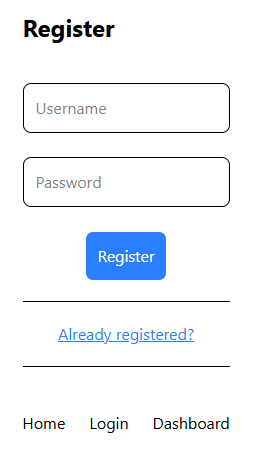
    <h1 class="text-2xl font-bold">Register</h1>

    <form
      class="mt-10 flex flex-col items-center justify-center space-y-6"
      action="/api/register"
      method="POST"
    >
      <input
        class="rounded-lg border p-3"
        placeholder="Username"
        name="username"
        type="text"
        readonly
        onfocus="this.removeAttribute('readonly')"
      />
      <input
        class="rounded-lg border p-3"
        placeholder="Password"
        name="password"
        type="password"
        readonly
        onfocus="this.removeAttribute('readonly')"
      />
      <button class="rounded-lg border bg-blue-500 p-3 text-white">
        Register
      </button>
    </form>
    <hr class="my-5" />
    <p class="text-center text-gray-600">
      <NuxtLink to="/login" class="text-blue-500 underline">
        Already registered?
      </NuxtLink>
    </p>
    <hr class="my-5" />
  </section>
</template>

// app/pages/login.vue

<script setup lang="ts">
definePageMeta({
  middleware: "guest-guard"
})
</script>

<template>
  <section>
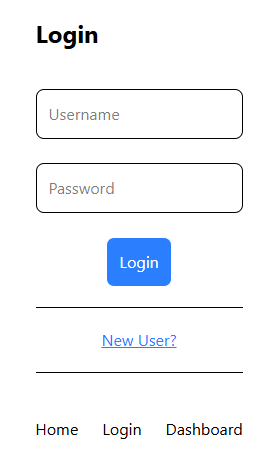
    <h1 class="text-2xl font-bold">Login</h1>

    <form
      class="mt-10 flex flex-col items-center justify-center space-y-6"
      action="/api/login"
      method="POST"
      autocomplete="off"
    >
      <input
        class="rounded-lg border p-3"
        placeholder="Username"
        name="username"
        type="text"
        readonly
        onfocus="this.removeAttribute('readonly')"
      />
      <input
        class="rounded-lg border p-3"
        placeholder="Password"
        name="password"
        type="password"
        readonly
        onfocus="this.removeAttribute('readonly')"
      />
      <button class="rounded-lg border bg-blue-500 p-3 text-white">
        Login
      </button>
    </form>
    <hr class="my-5" />
    <p class="text-center text-gray-600">
      <NuxtLink to="/register" class="text-blue-500 underline">
        New User?
      </NuxtLink>
    </p>
    <hr class="my-5" />
  </section>
</template>
definePageMetahelps us declare a route guard and runs first on the server.
Change Password
Just another form with opposite route guard.
<script setup lang="ts">
definePageMeta({
  middleware: "auth-guard",
})
</script>

<template>
  <section>
    <h1 class="text-2xl font-bold">Change Password</h1>

    <form
      class="mt-10 flex flex-col items-center justify-center space-y-6"
      action="/api/password"
      method="POST"
    >
      <input
        class="rounded-lg border p-3"
        placeholder="Current Password"
        name="current_password"
        type="password"
        readonly
        onfocus="this.removeAttribute('readonly')"
      />
      <input
        class="rounded-lg border p-3"
        placeholder="New Password"
        name="new_password"
        type="password"
        readonly
        onfocus="this.removeAttribute('readonly')"
      />
      <button class="rounded-lg border bg-blue-500 p-3 text-white">
        Change Password
      </button>
    </form>
  </section>
</template>
Dashboard
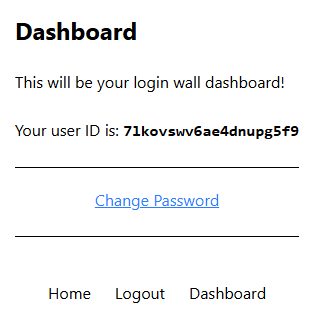
Our dashboard page can only be viewed when logged in, shows the user, and links to the change password page.
<script setup lang="ts">
definePageMeta({
  middleware: ["auth-guard"]
})
const { userId } = await useAuth()
</script>

<template>
  <section class="space-y-6">
    <h1 class="text-2xl font-bold">Dashboard</h1>
    <p>This will be your login wall dashboard!</p>
    <p>
      Your user ID is: <span class="font-mono font-bold">{{ userId }}</span>
    </p>
    <hr class="my-5" />
    <p class="text-center text-gray-600">
      <NuxtLink to="/password" class="text-blue-500 underline">
        Change Password
      </NuxtLink>
    </p>
    <hr class="my-5" />
  </section>
</template>
📝 We can have many guards in an array if necessary.
Usage
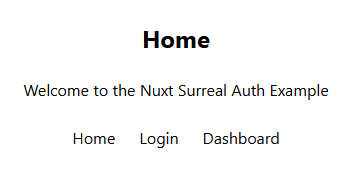
We log in to access the dashboard, then register first.
Final Notes
📝 I did not create a demo for this, as I didn’t want to pay for a new cloud instance.
Security
The login token only lasts 30 minutes and is not 100% secure for production apps. If you have a small app where you’re not worried about a token getting stolen, this is a login method for you.
Otherwise, use Surreal in conjunction with better-auth or firebase-auth. However, it should be good for any startup application.
Error Handling
The REST API endpoints throw errors. The error handling should be handled best in the forms. I didn’t include this as this app was already getting too complex. However, I do recommend handling this in a production app.
Repo: GitHub
Happy Nuxting!

Jonathan Gamble
Jonathan Gamble has been an avid web programmer for more than 20 years. He has been building web applications as a hobby since he was 16 years old, and he received a post-bachelor’s in Computer Science from Oregon State. His real passions are language learning and playing rock piano, but he never gets away from coding. Read more from him at https://code.build/.
Related Posts
Comments
All articles
Topics
Web MobileMobile
Desktop
Design
Productivity
People