Explore Helix DB Graph-Vector Database

Summarize with AI:
Let’s create a simple todo knowledge graph with the type-safe HelixDB TypeScript package and run some test queries.
HelixDB is wonderful database for graphs, vectors and objects. I am HUGE fan of graph databases, as I believe joins just make things complicated. In graph databases, all nodes, edges and properties are first-class citizens. You query directly by the location, not joining them.
TL;DR
Creating a simple todo knowledge graph is easy with the HelixDB TypeScript package. It does not use GQL Standard Language or Cypher, but its own HelixQL language.
Here we create and test queries for a todo app, and the database is type-safe by default. The TS package allows for complex queries without manually adding more query strings. You can also host on Helix Cloud for auto scaling applications.
Install Helix
For these tests, we are going to just use the basic in-memory Helix.
Install CLI
curl -sSL "https://install.helix-db.com" | bash
Create a folder and initialize it.
helix init local --name dev
Start Helix.
helix start dev
- This create an in-memory version. See installation for disk local development.
📝 In Windows, you need to update your ENV path for helix to work standalone.
- Search for “Environment Variables.”
- Open System Properties.
- Make sure
C:\Users\YOUR USER\.local\binis added to your path. This could be different depending on your default settings.
⚠️ Remember to stop the dev server when you’re done.
helix dev stop
- Our local connection is at
http://localhost:6969.
Install Helix TS Packages
npm i @helix-db/helix-db
npm i -D vitest
- We use
vitestfor testing.
Our package.json should have test scripts as well.
{
  "type": "module",
  "dependencies": {
    "@helix-db/helix-db": "^2.0.5"
  },
  "devDependencies": {
    "vitest": "^4.1.9"
  },
  "scripts": {
    "test": "vitest run"
  }
}
Create Our Test Queries
With a basic Todo App, we want to CRUD a user record and CRUD a todo record.
import {
	NodeRef,
	Predicate,
	PropertyInput,
	PropertyProjection,
	defineParams,
	defineQueries,
	g,
	param,
	readBatch,
	registerRead,
	registerWrite,
	writeBatch
} from '@helix-db/helix-db';

const userParams = defineParams({
	name: param.string()
});

const userIdParams = defineParams({
	id: param.i64()
});

const todoParams = defineParams({
	title: param.string()
});

const todoIdParams = defineParams({
	id: param.i64()
});

const addTodoParams = defineParams({
	title: param.string(),
	createdBy: param.string()
});

const todosByUserParams = defineParams({
	createdBy: param.string()
});

const addUser = registerWrite(
	() =>
		writeBatch()
			.varAs(
				'user',
				g()
					.addN('User', {
						name: PropertyInput.param('name')
					})
					.project([
						PropertyProjection.renamed('$id', 'id'),
						PropertyProjection.new('name')
					])
			)
			.returning(['user']),
	userParams
);

const findUser = registerRead(
	() =>
		readBatch()
			.varAs(
				'user',
				g()
					.nWithLabel('User')
					.where(Predicate.eqParam('name', 'name'))
					.project([
						PropertyProjection.renamed('$id', 'id'),
						PropertyProjection.new('name')
					])
			)
			.returning(['user']),
	userParams
);

const getUserById = registerRead(
	() =>
		readBatch()
			.varAs(
				'user',
				g()
					.n(NodeRef.param('id'))
					.project([
						PropertyProjection.renamed('$id', 'id'),
						PropertyProjection.new('name')
					])
			)
			.returning(['user']),
	userIdParams
);

const deleteUser = registerWrite(
	() =>
		writeBatch()
			.varAs(
				'user',
				g()
					.nWithLabel('User')
					.where(Predicate.eqParam('name', 'name'))
					.drop()
			)
			.returning(['user']),
	userParams
);

const addTodo = registerWrite(
	() =>
		writeBatch()
			.varAs(
				'todo',
				g()
					.addN('Todo', {
						title: PropertyInput.param('title'),
						createdBy: PropertyInput.param('createdBy'),
						completed: false
					})
					.project([
						PropertyProjection.renamed('$id', 'id'),
						PropertyProjection.new('title'),
						PropertyProjection.new('createdBy'),
						PropertyProjection.new('completed')
					])
			)
			.returning(['todo']),
	addTodoParams
);

const findTodo = registerRead(
	() =>
		readBatch()
			.varAs(
				'todo',
				g()
					.nWithLabel('Todo')
					.where(Predicate.eqParam('title', 'title'))
					.project([
						PropertyProjection.renamed('$id', 'id'),
						PropertyProjection.new('title'),
						PropertyProjection.new('createdBy'),
						PropertyProjection.new('completed')
					])
			)
			.returning(['todo']),
	todoParams
);

const getTodoById = registerRead(
	() =>
		readBatch()
			.varAs(
				'todo',
				g()
					.n(NodeRef.param('id'))
					.project([
						PropertyProjection.renamed('$id', 'id'),
						PropertyProjection.new('title'),
						PropertyProjection.new('createdBy'),
						PropertyProjection.new('completed')
					])
			)
			.returning(['todo']),
	todoIdParams
);

const getTodosByUser = registerRead(
	() =>
		readBatch()
			.varAs(
				'todos',
				g()
					.nWithLabel('Todo')
					.where(Predicate.eqParam('createdBy', 'createdBy'))
					.project([
						PropertyProjection.renamed('$id', 'id'),
						PropertyProjection.new('title'),
						PropertyProjection.new('createdBy'),
						PropertyProjection.new('completed')
					])
			)
			.returning(['todos']),
	todosByUserParams
);

const completeTodo = registerWrite(
	() =>
		writeBatch()
			.varAs(
				'todo',
				g()
					.nWithLabel('Todo')
					.where(Predicate.eqParam('title', 'title'))
					.setProperty('completed', true)
					.project([
						PropertyProjection.renamed('$id', 'id'),
						PropertyProjection.new('title'),
						PropertyProjection.new('createdBy'),
						PropertyProjection.new('completed')
					])
			)
			.returning(['todo']),
	todoParams
);

const deleteTodo = registerWrite(
	() =>
		writeBatch()
			.varAs(
				'todo',
				g()
					.nWithLabel('Todo')
					.where(Predicate.eqParam('title', 'title'))
					.drop()
			)
			.returning(['todo']),
	todoParams
);

export const queries = defineQueries({
	read: {
		findUser,
		getUserById,
		findTodo,
		getTodoById,
		getTodosByUser
	},
	write: {
		addUser,
		deleteUser,
		addTodo,
		completeTodo,
		deleteTodo
	}
});
Creating Breakdown
Add a User
const addUser = registerWrite(
	() =>
		writeBatch()
			.varAs(
				'user',
				g()
					.addN('User', {
						name: PropertyInput.param('name')
					})
					.project([
						PropertyProjection.renamed('$id', 'id'),
						PropertyProjection.new('name')
					])
			)
			.returning(['user']),
	userParams
);
Compiles to:
QUERY addUser(name: String) =>
    user <- AddN<User>({
        name: name
    })::{
        id: ID,
        name: name
    }

    RETURN user
Add a Todo
const addTodo = registerWrite(
	() =>
		writeBatch()
			.varAs(
				'todo',
				g()
					.addN('Todo', {
						title: PropertyInput.param('title'),
						createdBy: PropertyInput.param('createdBy'),
						completed: false
					})
					.project([
						PropertyProjection.renamed('$id', 'id'),
						PropertyProjection.new('title'),
						PropertyProjection.new('createdBy'),
						PropertyProjection.new('completed')
					])
			)
			.returning(['todo']),
	addTodoParams
);
Compiles to:
QUERY addTodo(title: String, createdBy: String) =>
    todo <- AddN<Todo>({
        title: title,
        createdBy: createdBy,
        completed: false
    })::{
        id: ID,
        title: title,
        createdBy: createdBy,
        completed: completed
    }

    RETURN todo
varAstells it what node to use.addNmeans create.PropertyInput.paramuses the parameters in the query for safety.projectpasses the variables in.PropertyProjectiontells it what to actual call the variable. The$idis the ID, a special case.
🚀 I find the queries to be easy to use and learn.
Reading Breakdown
Get a User
const findUser = registerRead(
	() =>
		readBatch()
			.varAs(
				'user',
				g()
					.nWithLabel('User')
					.where(Predicate.eqParam('name', 'name'))
					.project([
						PropertyProjection.renamed('$id', 'id'),
						PropertyProjection.new('name')
					])
			)
			.returning(['user']),
	userParams
);
Compiles to:
QUERY findUser(name: String) =>
    user <- N<User>
        ::WHERE(_::name == name)
        ::{ id: ID, name: name }

    RETURN user
Get a User By ID
const getUserById = registerRead(
	() =>
		readBatch()
			.varAs(
				'user',
				g()
					.n(NodeRef.param('id'))
					.project([
						PropertyProjection.renamed('$id', 'id'),
						PropertyProjection.new('name')
					])
			)
			.returning(['user']),
	userIdParams
);
Compiles to:
QUERY getUserById(id: ID) =>
    user <- N<id>::{
        id: ID,
        name: name
    }

    RETURN user
Get a Todo
const findTodo = registerRead(
	() =>
		readBatch()
			.varAs(
				'todo',
				g()
					.nWithLabel('Todo')
					.where(Predicate.eqParam('title', 'title'))
					.project([
						PropertyProjection.renamed('$id', 'id'),
						PropertyProjection.new('title'),
						PropertyProjection.new('createdBy'),
						PropertyProjection.new('completed')
					])
			)
			.returning(['todo']),
	todoParams
);
Compiles to:
QUERY findTodo(title: String) =>
    todo <- N<Todo>
        ::WHERE(_::title == title)
        ::{
            id: ID,
            title: title,
            createdBy: createdBy,
            completed: completed
        }

    RETURN todo
Get a Todo By ID
const getTodoById = registerRead(
	() =>
		readBatch()
			.varAs(
				'todo',
				g()
					.n(NodeRef.param('id'))
					.project([
						PropertyProjection.renamed('$id', 'id'),
						PropertyProjection.new('title'),
						PropertyProjection.new('createdBy'),
						PropertyProjection.new('completed')
					])
			)
			.returning(['todo']),
	todoIdParams
);
Compiles to:
QUERY getTodoById(id: ID) =>
    todo <- N<id>::{
        id: ID,
        title: title,
        createdBy: createdBy,
        completed: completed
    }

    RETURN todo
Get Todo By User
const getTodosByUser = registerRead(
	() =>
		readBatch()
			.varAs(
				'todos',
				g()
					.nWithLabel('Todo')
					.where(Predicate.eqParam('createdBy', 'createdBy'))
					.project([
						PropertyProjection.renamed('$id', 'id'),
						PropertyProjection.new('title'),
						PropertyProjection.new('createdBy'),
						PropertyProjection.new('completed')
					])
			)
			.returning(['todos']),
	todosByUserParams
);
Compiles to:
QUERY getTodosByUser(createdBy: String) =>
    todos <- N<Todo>
        ::WHERE(_::createdBy == createdBy)
        ::{
            id: ID,
            title: title,
            createdBy: createdBy,
            completed: completed
        }

    RETURN todos
nWithLabeldetermines an alias.Predicate.eqParamcan create WHERE clauses easily.nis used withNodeRef.param('id')for ID WHERE clauses.
Update Breakdown
Update a Todo
const completeTodo = registerWrite(
	() =>
		writeBatch()
			.varAs(
				'todo',
				g()
					.nWithLabel('Todo')
					.where(Predicate.eqParam('title', 'title'))
					.setProperty('completed', true)
					.project([
						PropertyProjection.renamed('$id', 'id'),
						PropertyProjection.new('title'),
						PropertyProjection.new('createdBy'),
						PropertyProjection.new('completed')
					])
			)
			.returning(['todo']),
	todoParams
);
Compiles to:
QUERY completeTodo(title: String) =>
    todo <- N<Todo>
        ::WHERE(_::title == title)
        ::UPDATE({
            completed: true
        })
        ::{
            id: ID,
            title: title,
            createdBy: createdBy,
            completed: completed
        }

    RETURN todo
setPropertyis used for updates instead ofaddN.
Delete Breakdown
Delete a User
const deleteUser = registerWrite(
	() =>
		writeBatch()
			.varAs(
				'user',
				g()
					.nWithLabel('User')
					.where(Predicate.eqParam('name', 'name'))
					.drop()
			)
			.returning(['user']),
	userParams
);
Compiles to:
QUERY deleteUser(name: String) =>
    user <- N<User>
        ::WHERE(_::name == name)
        ::DROP

    RETURN user
Delete a Todo
const deleteTodo = registerWrite(
	() =>
		writeBatch()
			.varAs(
				'todo',
				g()
					.nWithLabel('Todo')
					.where(Predicate.eqParam('title', 'title'))
					.drop()
			)
			.returning(['todo']),
	todoParams
);
Compiles to:
QUERY deleteTodo(title: String) =>
    todo <- N<Todo>
        ::WHERE(_::title == title)
        ::DROP

    RETURN todo
dropis delete.
Special Functions
const userParams = defineParams({
	name: param.string()
});

const userIdParams = defineParams({
	id: param.i64()
});

const todoParams = defineParams({
	title: param.string()
});

const todoIdParams = defineParams({
	id: param.i64()
});

const addTodoParams = defineParams({
	title: param.string(),
	createdBy: param.string()
});

const todosByUserParams = defineParams({
	createdBy: param.string()
});
- We can define our parameters to functions with
defineParams.
export const queries = defineQueries({
	read: {
		findUser,
		getUserById,
		findTodo,
		getTodoById,
		getTodosByUser
	},
	write: {
		addUser,
		deleteUser,
		addTodo,
		completeTodo,
		deleteTodo
	}
});
- These keep our queries type safe with
defineQueries.
Running Our Queries
Let’s create a vitest test file in the scripts folder called helix.test.ts.
import { Client } from '@helix-db/helix-db';
import { describe, expect, it } from 'vitest';
import { queries } from './queries';

const client = new Client('http://localhost:6969');

const user = {
	name: 'Jonathan'
};

const todos = [
	{
		title: 'Buy groceries',
		createdBy: user.name
	},
	{
		title: 'Wash the car',
		createdBy: user.name
	}
];

type Result<T> = {
	properties: T[];
};

type User = {
	id: number;
	name: string;
};

type Todo = {
	id: number;
	title: string;
	createdBy: string;
	completed: boolean;
};

let userId: number;
let lastTodoId: number;

describe('HelixDB', () => {
	it('adds a user', async () => {
		const result = await client
			.query<{ user: Result<User> }>()
			.dynamic(queries.call.addUser(user))
			.send();

		expect(result.user.properties[0]?.name).toBe(user.name);

		userId = result.user.properties[0]!.id;
	});

	it('gets the user by name', async () => {
		const result = await client
			.query<{ user: Result<User> }>()
			.dynamic(queries.call.findUser(user))
			.send();

		expect(result.user.properties).toContainEqual({
			id: userId,
			name: user.name
		});
	});

	it('adds two todos', async () => {
		const first = await client
			.query<{ todo: Result<Todo> }>()
			.dynamic(queries.call.addTodo(todos[0]))
			.send();

		const second = await client
			.query<{ todo: Result<Todo> }>()
			.dynamic(queries.call.addTodo(todos[1]))
			.send();

		expect(first.todo.properties[0]?.title).toBe(todos[0].title);
		expect(second.todo.properties[0]?.title).toBe(todos[1].title);

		lastTodoId = second.todo.properties[0]!.id;
	});

	it('gets the last todo by ID', async () => {
		const result = await client
			.query<{ todo: Result<Todo> }>()
			.dynamic(queries.call.getTodoById({ id: lastTodoId }))
			.send();

		expect(result.todo.properties[0]).toEqual({
			id: lastTodoId,
			title: todos[1].title,
			createdBy: user.name,
			completed: false
		});
	});

	it('gets all todos by user', async () => {
		const result = await client
			.query<{ todos: Result<Todo> }>()
			.dynamic(
				queries.call.getTodosByUser({
					createdBy: user.name
				})
			)
			.send();

		expect(result.todos.properties).toHaveLength(2);

		expect(result.todos.properties).toEqual(
			expect.arrayContaining([
				expect.objectContaining(todos[0]),
				expect.objectContaining(todos[1])
			])
		);
	});

	it('deletes the todos', async () => {
		await client
			.query()
			.dynamic(
				queries.call.deleteTodo({
					title: todos[0].title
				})
			)
			.send();

		await client
			.query()
			.dynamic(
				queries.call.deleteTodo({
					title: todos[1].title
				})
			)
			.send();

		const result = await client
			.query<{ todos: Result<Todo> }>()
			.dynamic(
				queries.call.getTodosByUser({
					createdBy: user.name
				})
			)
			.send();

		expect(result.todos.properties).toEqual([]);
	});

	it('deletes the user', async () => {
		await client
			.query()
			.dynamic(queries.call.deleteUser(user))
			.send();

		const result = await client
			.query<{ user: Result<User> }>()
			.dynamic(queries.call.findUser(user))
			.send();

		expect(result.user.properties).toEqual([]);
	});
});
We run our queries with:
// Connect
const client = new Client('http://localhost:6969');

// Query
const result = await client
			.query<RETURN_TYPE>()
			.dynamic(queries.call[QUERY_NAME](QUERY_PARAMS))
			.send();

// returns
// "result.TYPE"
💫 And it is type-safe!!!
Bonus: Complex Queries
I generated some more complex queries to see what is possible.
Get Todos by User with Count
const getTodosByUserWithCount = registerRead(
	() =>
		readBatch()
			.varAs(
				'todos',
				g()
					.nWithLabel('Todo')
					.where(Predicate.eqParam('createdBy', 'createdBy'))
					.skip(StreamBound.expr(Expr.param('offset')))
					.limit(StreamBound.expr(Expr.param('limit')))
					.project([
						PropertyProjection.renamed('$id', 'id'),
						PropertyProjection.new('title'),
						PropertyProjection.new('createdBy'),
						PropertyProjection.new('completed')
					])
			)
			.varAs(
				'count',
				g()
					.nWithLabel('Todo')
					.where(Predicate.eqParam('createdBy', 'createdBy'))
					.count()
			)
			.returning(['todos', 'count']),
	todosByUserWithCountParams
);
- We can return a count with pagination!
offsetandlimitare there for us!- Multiple
varAsallow for multiple queries in one.
Fuzzy Search
const noParams = defineParams({});

// Need index to search

const createUserNameTextIndex = registerWrite(
    () =>
        writeBatch()
            .varAs(
                'index',
                g().createTextIndexNodes('User', 'name', null)
            )
            .returning(['index']),
    noParams
);

const fuzzyUserParams = defineParams({
    query: param.string(),
    limit: param.i64()
});

const findUsersFuzzy = registerRead(
    () =>
        readBatch()
            .varAs(
                'users',
                g()
                    .textSearchNodesWith(
                        'User',
                        'name',
                        PropertyInput.param('query'),
                        StreamBound.expr(Expr.param('limit')),
                        null
                    )
                    .project([
                        PropertyProjection.renamed('$id', 'id'),
                        PropertyProjection.new('name'),
                        PropertyProjection.renamed('$distance', 'score')
                    ])
            )
            .returning(['users']),
    fuzzyUserParams
);
- We must first create an index for fuzzy search like any other database.
- We
textSearchNodesWithfor matching.
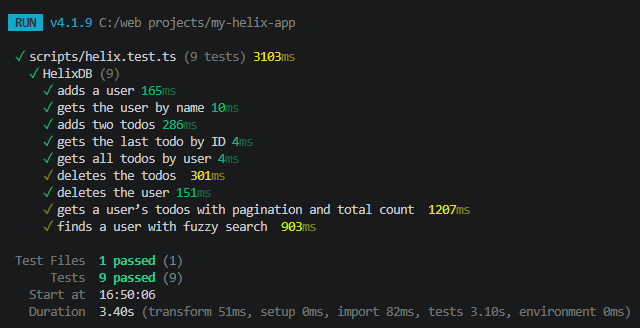
🚨 These queries show up a little slower in testing because individual queries are sent to the server one by one. But in a real-world app you could just run one batch of queries with multiple varAs.
Helix Cloud
If you love the database like I do, and you want to use it in production, you can host on Helix Cloud. Not only does it auto-scale on demand, which is awesome, it is robust, highly available, and extremely fast.
Final Verdict
I’m super impressed with Helix. I like graph databases that could be used for regular apps or more complex use cases. There is no need to host five databases for one app (unless you’re a tech giant!). And yes, this supports vectors for AI, as all databases should.
More Graph Databases
- TypeDB
- SurrealDB
- Gel / EdgeDB (now open-source only)
Repo: GitHub

Jonathan Gamble
Jonathan Gamble has been an avid web programmer for more than 20 years. He has been building web applications as a hobby since he was 16 years old, and he received a post-bachelor’s in Computer Science from Oregon State. His real passions are language learning and playing rock piano, but he never gets away from coding. Read more from him at https://code.build/.
Related Posts
Comments
All articles
Topics
Web MobileMobile
Desktop
Design
Productivity
People