Creating More Realistic Tests with In-Memory Databases in ASP.NET Core
 by Assis Zang

Summarize with AI:
Testing ASP.NET Core APIs with in-memory SQLite and JustMock enables validation of real-world scenarios like pagination, keys and rules without a real database.
Testing a web API involves much more than simply checking whether methods return or send data correctly. It requires validating real-world behaviors like pagination, unique keys, data persistence and other database rules. Anticipating and reproducing these scenarios can be challenging, especially when they depend on specific query behaviors or stored data.
To address this, the .NET ecosystem provides powerful tools for unit testing. In this post, we explore how in-memory SQLite serves as an effective solution for testing ASP.NET Core APIs, enabling developers to simulate common scenarios without deploying a real database. Additionally, we demonstrate how tools like Progress Telerik JustMock can streamline test implementation and help validate business rules efficiently.
The Importance of Testing in Real-World Environments
A common example of functionality in web APIs is paginated search, which at first glance is quite simple. We receive parameters such as page and pageSize, apply a Skip and a Take, return the data and move on. In a controlled scenario, with few records, it’s difficult for something to go wrong.
The problem begins when this code reaches production or even test environments, without having been validated with a real database. Consider a common scenario: in a paginated search, sorting is essential for it to function correctly. Without an explicit OrderBy, the database does not guarantee the order of the returned records.
In in-memory lists, the result usually appears stable, which completely masks the problem. Without tests running this query on a relational database, the error goes unnoticed, resulting in inconsistent pagination with duplicate records between pages, items “disappearing” when navigating between pages or different results for the same request. This type of bug is especially difficult to reproduce locally when not using a real database or even a simulation of one.
This is where the in-memory database plays a very important role. It allows the query to be executed exactly as it will be executed in production, revealing flaws that only appear when pagination, sorting and the database work together.
Understanding In-Memory SQLite
In-memory SQLite is a way to use the SQLite database entirely in memory. Instead of saving data to a .db file, SQLite creates the database only while the application or connection is active. When the connection is closed, all data is discarded.
In-memory SQLite is widely used in automated testing, especially in ASP.NET Core applications in conjunction with Entity Framework Core, as it has advanced features such as simulating a real database and executing real SQL (constraints, indexes, unique keys, FK and others).
Testing with SQLite in Memory
Next, we’ll look at some examples of unit tests in common web API scenarios where in-memory SQLite excels. But first, let’s create the basic application and then add the tests.
You can access all the code discussed in this post in this GitHub repository: Memo Order source code.
To create the application you can use the command below:
dotnet new web -o MemoOrder
To add the NuGet packages you can use the following commands:
dotnet add package Microsoft.EntityFrameworkCore --version 10.0.1
dotnet add package Microsoft.EntityFrameworkCore.Sqlite --version 10.0.1
Then, open the application and create the following classes:
namespace MemoOrder;

public class Order
{
    public int Id { get; set; }
    public string Number { get; set; } = string.Empty;
    public decimal TotalAmount { get; set; }
    public DateTime CreatedAt { get; set; }
    public bool IsDeleted { get; set; }
}
namespace MemoOrder;

public class OrderSummaryDto
{
    public string Number { get; set; }
    public decimal Total { get; set; }
}
using Microsoft.EntityFrameworkCore;

namespace MemoOrder;

public class AppDbContext : DbContext
{
    public AppDbContext(DbContextOptions<AppDbContext> options)
        : base(options) { }

    public DbSet<Order> Orders => Set<Order>();

    protected override void OnModelCreating(ModelBuilder modelBuilder)
    {
        modelBuilder.Entity<Order>(entity =>
        {
            entity.HasKey(o => o.Id);
            entity.Property(o => o.Number).IsRequired();
            entity.HasIndex(o => o.Number).IsUnique();
	entity.HasQueryFilter(o => !o.IsDeleted);
        });
    }
}
using Microsoft.EntityFrameworkCore;

namespace MemoOrder;

public class OrderRepository
{
    private readonly AppDbContext _context;

    public OrderRepository(AppDbContext context)
    {
        _context = context;
    }

    public async Task AddAsync(Order order)
    {
        _context.Orders.Add(order);
        await _context.SaveChangesAsync();
    }

    public async Task<List<Order>> Pagination(AppDbContext context, int skip, int take)
    {
        return await context.Orders
                    .OrderBy(o => o.Id)
                    .Skip(skip)
                    .Take(take)
                    .ToListAsync();
    }
}
Now let’s create a special factory class that will be used in the tests to create the in-memory database and keep the connection open while the tests are running. Create the following class in the application:
namespace MemoOrder;

using Microsoft.Data.Sqlite;
using Microsoft.EntityFrameworkCore;

public static class SqliteInMemoryFactory
{
    public static AppDbContext Create()
    {
        var connection = new SqliteConnection("DataSource=:memory:");
        connection.Open();

        var options = new DbContextOptionsBuilder<AppDbContext>()
            .UseSqlite(connection)
            .Options;

        var context = new AppDbContext(options);
        context.Database.EnsureCreated();

        return context;
    }
}
Note that to tell SQLite to use an in-memory database, we use DataSource=:memory: in the connection string.
Creating the Test Project
All the code needed to implement the unit tests is ready, so let’s create the test project and download the NuGet packages for it. To do this, you can use the following commands, simply run them in a terminal in the application’s root directory:
dotnet new xunit -n MemoOrder.Tests
cd MemoOrder.Tests
dotnet add package Microsoft.NET.Test.Sdk --version 18.0.1
dotnet add package xunit --version 2.9.3
dotnet add package xunit.runner.visualstudio --version 3.1.5
dotnet add package coverlet.collector --version 6.0.4
dotnet add reference ../MemoOrder/MemoOrder.csproj
Next, inside the project MemoOrder.Tests, create a new class called OrderRepositoryTests and let’s add tests to it.
Testing Persistence
The first test will be used to validate persistence—that is, to insert data into the database (which in this case will be the in-memory database). To do this, simply add the following test method to the OrderRepositoryTests class:
[Fact]
public async Task AddAsync_ShouldPersistOrder()
{
    // Arrange
    using var context = SqliteInMemoryFactory.Create();
    var repository = new OrderRepository(context);

    var order = new Order
    {
        Number = "ORD-2026-0001",
        TotalAmount = 200m,
        CreatedAt = DateTime.UtcNow
    };

    // Act
    await repository.AddAsync(order);

    // Assert
    var savedOrder = await context.Orders.FirstAsync();

    Assert.Equal("ORD-2026-0001", savedOrder.Number);
    Assert.Equal(200m, savedOrder.TotalAmount);
}
Note that we use var context = SqliteInMemoryFactory.Create(); to create and represent the database in memory. It works exactly like the EF Core context that maps database tables to class entities.
Testing Constraint UNIQUE
Another common mistake is allowing duplicate records to reach the production environment, which in many cases can have catastrophic impacts. With in-memory testing, we can anticipate problems like this. Simply create a test that verifies inserting a duplicate record will generate an exception. In this case, we could do the following:
[Fact]
public async Task Should_Throw_When_Duplicated_Order_Number()
{
    using var context = SqliteInMemoryFactory.Create();

    context.Orders.Add(new Order
    {
        Number = "ORD-001",
        TotalAmount = 100,
        CreatedAt = DateTime.UtcNow
    });

    await context.SaveChangesAsync();

    context.Orders.Add(new Order
    {
        Number = "ORD-001",
        TotalAmount = 200,
        CreatedAt = DateTime.UtcNow
    });

    await Assert.ThrowsAsync<DbUpdateException>(() => context.SaveChangesAsync());
}
In this test, we created an instance of the database in memory, added an item to the table and saved it.
Then, we tried to add the same item, which generates an exception because, in the dbContext configuration, we declared the Number property of the Order entity as Unique: entity.HasIndex(o => o.Number).IsUnique();.
Thus, we have a real-world scenario, demonstrating that duplicate records will not reach the production environment, as the unit test is able to reproduce exactly the same result.
Testing Pagination
To test pagination using an in-memory database, we could do the following:
[Fact]
public async Task Should_Return_Paginated_Orders()
{
    using var context = SqliteInMemoryFactory.Create();
    var repository = new OrderRepository(context);

    for (int i = 1; i <= 10; i++)
    {
        context.Orders.Add(new Order
        {
            Number = $"ORD-{i}",
            TotalAmount = i * 10,
            CreatedAt = DateTime.UtcNow
        });
    }

    await context.SaveChangesAsync();

    List<Order> page = await repository.Pagination(context, 5, 5);

    Assert.Equal(5, page.Count);
    Assert.Equal("ORD-6", page.First().Number);
}
Note that here we create 10 items and insert them into the in-memory database. Then, we use the Pagination(context, 5, 5) method to perform the pagination and finally verify if the expected quantity and item are correct.
An in-memory database wouldn’t be mandatory to test pagination. This could be done using only regular in-memory lists. However, in this way, we can reproduce the same production scenario.
Testing Soft Delete
Soft-delete is a technique where data is not physically removed from the database, but rather marked as inactive through a flag, such as an isDeleted or deleted_at column. This allows you to keep the entire transaction history in the database.
The problem is that in some cases soft delete can leak unwanted data into reports, new endpoints or even refactored queries. To prevent this from happening, we can use the in-memory database and simulate a search with and without soft-delete:
[Fact]
 public async Task SoftDeleted_Orders_Should_Not_Appear_In_Default_Queries()
 {
     using var context = SqliteInMemoryFactory.Create();

     context.Orders.AddRange(
         new Order
         {
             Number = "ORD-001",
             TotalAmount = 100,
             CreatedAt = DateTime.UtcNow,
             IsDeleted = false
         },
         new Order
         {
             Number = "ORD-002",
             TotalAmount = 200,
             CreatedAt = DateTime.UtcNow,
             IsDeleted = true
         }
     );

     await context.SaveChangesAsync();

     var orders = await context.Orders.ToListAsync();

     Assert.Single(orders);
     Assert.Equal("ORD-001", orders.First().Number);
 }
In this test, the list returns only one item because the second one is marked as deleted. This happens because we declared the query filter entity.HasQueryFilter(o => !o.IsDeleted); when the database is created. By using an in-memory database, we can verify this mechanism works.
It’s also possible to ignore the query filter and still verify it works:
[Fact]
public async Task Admin_Query_Should_See_SoftDeleted_Orders()
{
    using var context = SqliteInMemoryFactory.Create();

    context.Orders.AddRange(
        new Order
        {
            Number = "ORD-001",
            TotalAmount = 100,
            CreatedAt = DateTime.UtcNow,
            IsDeleted = false
        },
        new Order
        {
            Number = "ORD-002",
            TotalAmount = 200,
            CreatedAt = DateTime.UtcNow,
            IsDeleted = true
        }
    );

    await context.SaveChangesAsync();

    var orders = await context.Orders.IgnoreQueryFilters().ToListAsync();

    Assert.Equal(2, orders.Count);
}
Testing Rollback
When performing multiple operations, we run the risk of something failing during the process and the data becoming inconsistent. To keep this from happening, we can use the in-memory database to test if the rollback operation solves this problem.
[Fact]
public async Task Transaction_Should_Rollback_When_Error_Occurs()
{
    using var context = SqliteInMemoryFactory.Create();

    using var transaction = await context.Database.BeginTransactionAsync();

    context.Orders.Add(new Order
    {
        Number = "ORD-NMBR-1",
        TotalAmount = 100,
        CreatedAt = DateTime.UtcNow
    });

    await context.SaveChangesAsync();

    await transaction.RollbackAsync();

    var count = await context.Orders.CountAsync();

    Assert.Equal(0, count);
}
In this test, we added an item to the order list, saved it and then performed a rollback. Finally, we verified that the list was empty, checking that the operation was undone.
Testing Query Refactoring
Refactoring queries is often necessary, whether to improve performance or simply to make the code cleaner. The problem is that this can break queries that previously worked.
To see that both the old and new queries have the same result, we can use an in-memory database as demonstrated in the example below:
   [Fact]
    public async Task Refactored_Query_Should_Return_Same_Result()
    {
        using var context = SqliteInMemoryFactory.Create();

        var oldResult = await context.Orders
            .Where(o => o.TotalAmount > 100)
            .Select(o => o.Id)
            .ToListAsync();

        var newResult = await context.Orders
            .Select(o => new { o.Id, o.TotalAmount })
            .Where(o => o.TotalAmount > 100)
            .Select(o => o.Id)
            .ToListAsync();

        Assert.Equal(oldResult, newResult);
    }
In this example, we verify that both queries have the same result, so even after refactoring, the old logic will continue to work.
Query Test with Projection to DTO
When using Data Transfer Objects (DTOs) for data transport, we are subject to errors that can silently break our queries. Again, with an in-memory database, we can simulate a query using a DTO.
   [Fact]
    public async Task Projection_To_Dto_Should_Work()
    {
        using var context = SqliteInMemoryFactory.Create();

        var result = await context.Orders
            .Select(o => new OrderSummaryDto
            {
                Number = o.Number,
                Total = o.TotalAmount
            })
            .ToListAsync();

        Assert.NotNull(result);
    }
Note that through this test, we can be sure that our DTOs will function correctly.
Not All Tests Need a Database
Until now, we’ve used in-memory SQLite to validate constraints (UNIQUE), global filters (Soft Delete), real pagination, GroupBy, Sum, transactions and rollback.
Tests like these depend on database behavior, but it’s common to encounter scenarios where the database isn’t present, and only business rules are involved. In this case, to facilitate our work and validate our tests, we can use tools like JustMock and simulate a production-facing environment.
Next, we’ll look at some examples of business rule tests where we can use JustMock to easily create mocks for our tests.
Verifying the Repository Will Be Called
[Fact]
public async Task CreateAsync_Should_Call_Repository_AddAsync()
{
    // Arrange
    var repository = Mock.Create<IOrderRepository>();

    var order = new Order
    {
        Id = 1,
        Number = "ORD-001"
    };

    Mock.Arrange(() => repository.AddAsync(order))
        .Returns(Task.CompletedTask)
        .MustBeCalled();

    var service = new OrderService(repository);

    // Act
    await service.CreateAsync(order);

    // Assert
    Mock.Assert(repository);
}
Verifying the GetHighValueOrders Method Returns Only Orders Above the Minimum Value
[Fact]
public void GetHighValueOrders_Should_Return_Only_Orders_Above_MinValue()
{
    // Arrange
    var repository = Mock.Create<IOrderRepository>();

    var orders = FakeOrders()
        .Where(o => o.TotalAmount >= 150 && !o.IsDeleted)
        .ToList();

    Mock.Arrange(() => repository.GetHighValueOrders(150))
        .Returns(orders);

    var service = new OrderService(repository);

    // Act
    var result = service.GetHighValueOrders(150);

    // Assert
    Assert.AreEqual(1, result.Count);
    Assert.IsTrue(result.First().TotalAmount >= 150);
}
Verifying the Service Forwards Exactly the Filter Received
       [Fact]
        public void GetHighValueOrders_Should_Call_Repository_With_Same_MinValue()
        {
            // Arrange
            var repository = Mock.Create<IOrderRepository>();

            Mock.Arrange(() => repository.GetHighValueOrders(500))
                .Returns(new List<Order>())
                .MustBeCalled();

            var service = new OrderService(repository);

            // Act
            service.GetHighValueOrders(500);

            // Assert
            Mock.Assert(repository);
        }
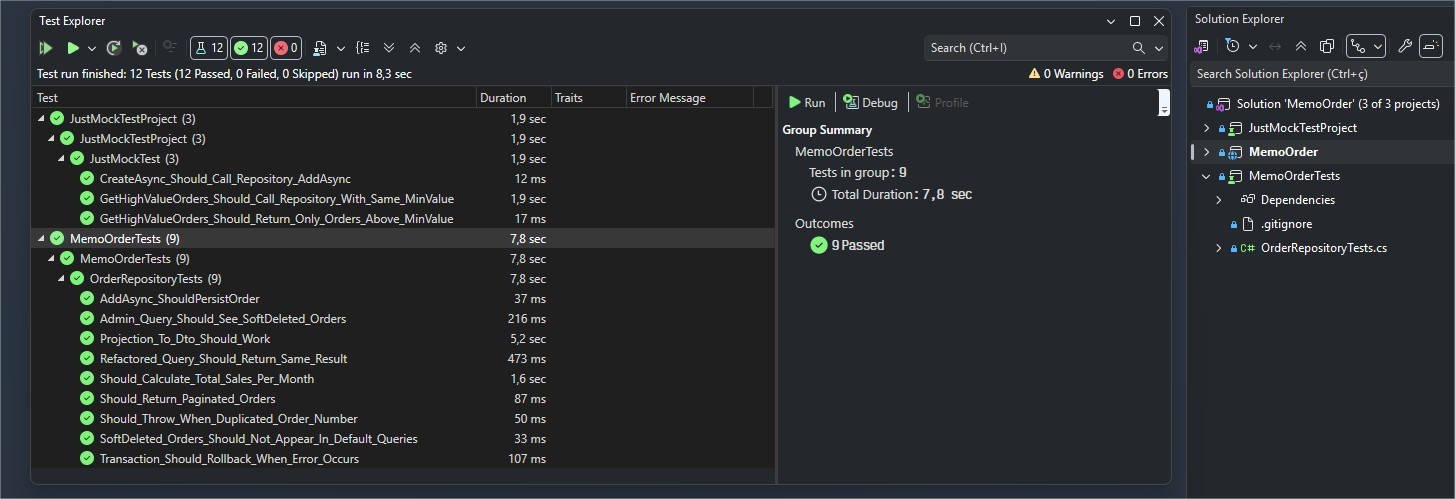
If you run all the tests, you can verify that they all passed:
Conclusion
Testing web applications is common in software development, but these tests don’t always guarantee that errors won’t occur in the production environment. Using in-memory databases, such as in-memory SQLite, allows you to reproduce scenarios closer to reality.
In this post, we saw how this approach helps identify common errors, such as persistence, pagination and projection issues. Furthermore, we explored how JustMock can help save time when validating business rules. I hope the content covered here helps you further improve your applications, making them more reliable through even more realistic testing.
Try JustMock free for 30 days, or try out the whole Telerik DevCraft suite for access to the ASP.NET Core component library and lots more (also a free 30-day trial).
Related Posts
Comments
All articles
Topics
Web MobileMobile
Desktop
Design
Productivity
People