AI UX Patterns for User Control

Summarize with AI:
Users who are using our AI tools need to know they are ultimately the ones in control.
AI tools are often framed as being a kind of personal assistant for the user, an intelligent junior coworker they can delegate tasks to. However, as anyone who’s ever delegated a task already knows … sometimes that means things won’t get done the way you would have done them.
When users are working with our AI tools, they need to know that they are still ultimately the ones in the driver’s seat. After all, there’s very little value in being able to assign the AI tasks if you can’t step in as you like to make adjustments, corrections and fixes yourself (just like you would with a real junior coworker).
UX Pattern: User Override
Sometimes, you know something is going to be wrong before the work is even complete. The sooner a user can step in to abort an obviously incorrect process, the better the experience will be all around: fewer wasted tokens, less wasted time and less repetitive work are all good things.
Wrong responses can (of course) be the result of AI hallucinations. But just as often they’re the fault of poor prompting, changing project specs or just straight up user error (typos, forgetting to include a requirement, etc.).
Realistically, the “why” isn’t really important here, other than to show just what a common scenario it is. What matters is how we empower users to handle it that matters.

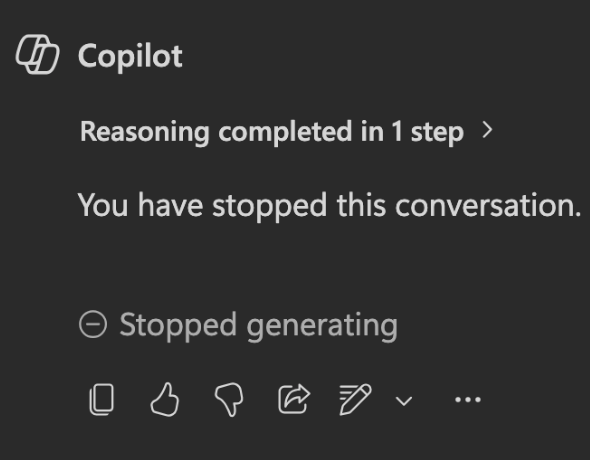
It’s important for the user to be able to stop or override an AI action at any point—whether that’s during content generation, partway through an agentic workflow, when running code or something else entirely. If the user is unable to abort the process, then they’re not truly the ones in control—and that, frankly, isn’t acceptable.
One of the most reassuring things we can offer our users is a clear and prominent “emergency brake” they can slam to bring everything to a halt for any reason. That means it can’t be hidden in a menu somewhere or involving some specific command they have to remember (which they won’t in a high-stress moment).
We need to give them the equivalent of a big red button they can slam and make everything stop when they need.
UX Pattern: Version Control
Of course, once a user has stopped a process, we can probably guess what they’ll want to do next, right? Undo the incorrect work.
Even way before AI, Nielsen’s heuristics listed “safe exploration” as one of the core principles required for a good user experience. That means that users should be able to navigate back and forth, click and unclick things, and generally just kind of mess around in a piece of software without getting stuck or unintentionally making permanent changes. Sometimes a user will try something and decide they don’t like it or it didn’t do what they thought it would—and in those cases, we want to make it as easy as possible for them to roll back to an earlier state.
This kind of safety net was always valuable, but now that we’re dealing with non-deterministic output, having some type of version history is pretty much a non-negotiable.

Of course, the level of “version history” that’s required will differ based on the task. The Git style of version control that we’re used to as developers is probably more than you’ll need in a user-facing application. If this is a simple conversational interface, you may not need this at all; the user can just rephrase their question and try again when they don’t get the results they wanted.
If your AI tool is doing something more complex, such as creating and editing a document, then simple undo and redo buttons that allow users to move back and forth within the last 10 (or so) steps might be enough. If your app is facilitating truly advanced work, then it may be worth building in the mechanisms for checkpoints, save states or true advanced version control.
Consider what kind of tasks your user will be working on with your AI tool and how significantly each step forward is likely to change the existing content.
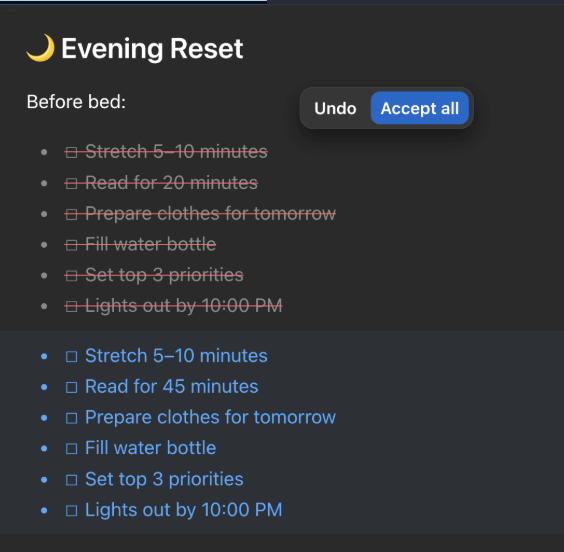
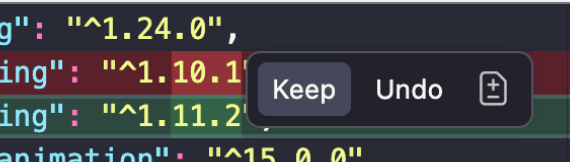
Ideally, this will also allow users the specificity to make targeted adjustments, rather than wiping out and replacing everything that happened in a given step. It’s common for AI-generated results to have a mix of quality in the output; users may want to keep some aspects while reverting others. The more control as we can give them over that creative process, the more enjoyable it will be to collaborate with our AI tools.
This is especially true now, as the cost of tokens is starting to tick up significantly. Having granular control over what gets reworked allows for more specific and productive iteration, rather than having to just say “try again” and effectively start over from scratch each time.
Read next: AI UX Patterns for User Transparency

Kathryn Grayson Nanz
Kathryn Grayson Nanz is a developer advocate at Progress with a passion for React, UI and design and sharing with the community. She started her career as a graphic designer and was told by her Creative Director to never let anyone find out she could code because she’d be stuck doing it forever. She ignored his warning and has never been happier. You can find her writing, blogging, streaming and tweeting about React, design, UI and more. You can find her at @kathryngrayson on Twitter.
Related Posts
Comments
All articles
Topics
Web MobileMobile
Desktop
Design
Productivity
People