AI UX Patterns for User Trust

Summarize with AI:
AI is still a black box to many users. If they don’t understand how AI works, it’s hard to trust the output. These UX patterns can help build user trust.
The number one, by-far biggest hurdle that we need to overcome in order for our users to engage with the AI features we’re building is trust.
Right now, to the average user, AI is a black box. Many users simply do not understand, from a technical perspective, how AI works. When you don’t understand how something works, it makes it very, very hard to trust the output.
On top of this, just about everyone who has interacted with an LLM (large language model) before has, at some point, seen them hallucinate. Even as the models keep getting better, we’re still not at the point where we can claim that any tool will be 100% hallucination-free. There’s always a chance—even if it’s just a small one—that the AI will provide an incorrect response. How many times can a user see output that’s clearly wrong and still trust it?
It’s easy to think that the answer to this is to try to position the feature you’re launching as the exception to the rule: “Other AI tools might not be trustworthy, but ours is different—higher quality, safer, more reliable,” so on and so forth.
However, not only is this questionably true (after all, not many of us are actually training our own models, so a lot of this is simply outside our control), but it’s also an extremely difficult thing to sell your users on. In situations where we cannot promise truth, we have to go above and beyond to earn it. Our honesty about the current capabilities and limitations of AI will go a lot further with our users than the denial of any potential problems.
Rather than trying to convince users that our solution is inherently trustworthy, we can instead build in patterns that empower users to see when incorrect information is returned and give them the tools to correct or mitigate it. You know the saying “trust but verify”? That’s the goal here.
UX Pattern: Citations
By citing the references in an AI-generated response and linking users directly back to the source material, we give users the information they need to validate AI output. The more a user is able to click through and see where an answer came from, the more they’ll be able to trust the content—even if they don’t check every source, every time.
In addition to allowing our users to vet the answers, citations also have a second important purpose: they allow users to repurpose the material in their own work while maintaining a trail of accuracy. This is important for their own credibility and reputation—after all, how often would you share content from an unverifiable source if you knew any errors would be ultimately attached to your own name?
Generating output for the user might be the last step in our process, but it’s just the beginning for them. Users want to take that content and turn it into a report, an email, a campaign, a presentation. But if the output can’t be cited and trusted, then it simply won’t be used.
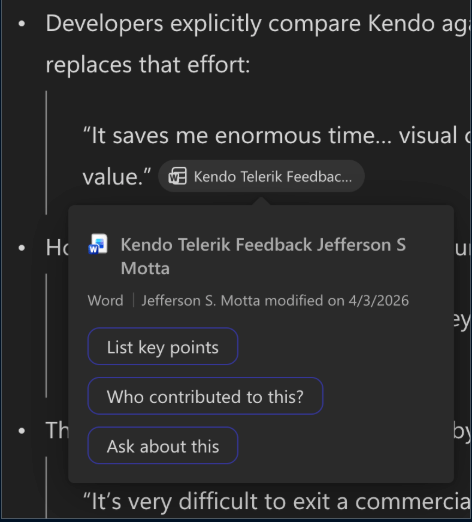
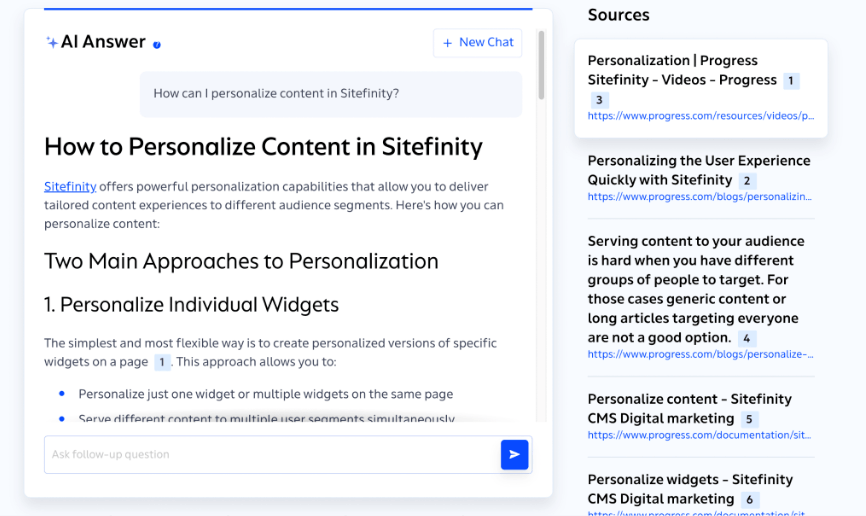

There are a handful of different ways we can implement this, and which one you pick will depend on the feature you’re building and the context in which it’s being used.
A few popular approaches include tooltips, in-line links and side panel reference windows. Tooltips will allow you to provide a small snippet of the relevant quote, which is great for increasing credibility. Links are, of course, ideal for when the content comes from an external source (like another webpage) as opposed to an internal source (like a document in a shared drive). If the feature you’re building is meant to support more research-oriented work, you might consider adding a side panel where the user can explore the source material in more detail, positioning the AI assistant as more of a librarian than a subject matter expert.
UX Pattern: Action Plans
The other place where trust factors heavily into AI work is agentic workflows, where the AI is “thinking” and executing work on its own. This, understandably, can be pretty concerning for users depending on the stakes of the project and how easy or hard it is to roll back incorrect actions—which is when keeping the “human in the loop” really becomes crucial.
One of the best ways to help users trust these systems enough to use them is to show an action plan to the user and allow them to approve it before the agent begins work.
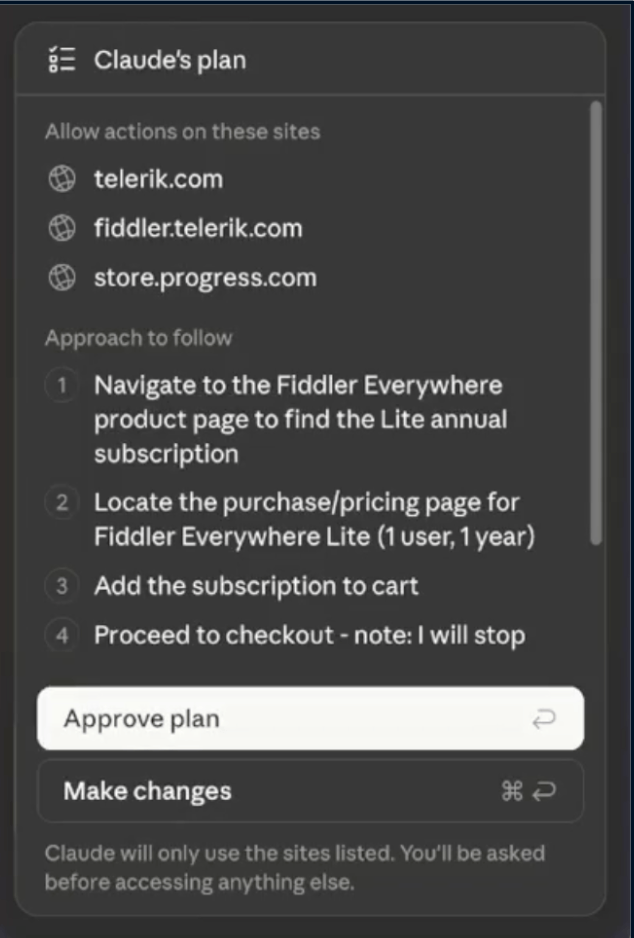
This has become a fairly common flow in many foundation models. If you’re using agentic features in Claude or ChatGPT, then you will have seen it create a list of the steps it will take to accomplish a given task, then ask for your confirmation before beginning.
Of course, there are settings you can change to toggle this off or always allow it—which is important if you’re going to be repeating a particular flow over and over and don’t want to have to babysit it. (Spoiler alert: we’ll talk more about permissions in the “AI UX Patterns for Transparency” article later in this series.) However, if no plan is ever shown to the user and an action happens without them understanding why or how, it’s awfully hard for them to trust both the result of that action and the agent, itself.
UX Pattern: AI Generated Content Markers
There is understandably—and I would even argue, correctly—quite a bit of skepticism right now around whether or not content is AI-generated (and just in case you’re curious: this post was 100% handwritten, haha). You’ve probably seen exchanges online where someone shares a photo or video and another person is immediately commenting to tell them it’s not actually “real.” When we spend so much of our time and energy second-guessing and investigating the content that’s shared with us, it doesn’t exactly foster an environment of trust.
For now, AI-generated content is highly polarizing. While some users have heavily leaned into using it in their daily lives, others will react to it negatively and dismiss it as “slop.”
The ability for AI to generate text, images and video that is nearly indistinguishable from human-created work is very new, and for many users it’s something that still feels uncanny and unsettling. I don’t say this to start any kind of debate. While it seems harsh to say it, our own personal opinions on AI-generated content don’t matter much in this context. What’s more important is the awareness that our users will react to AI-generated content in a wide variety of ways, and not all of those ways will be positive.
So, if we want to include AI-generated content in our applications and we’re not entirely sure how our users will feel about that, what can we do to retain their trust?
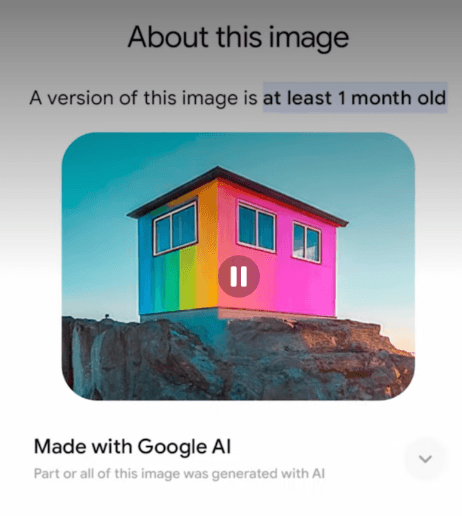
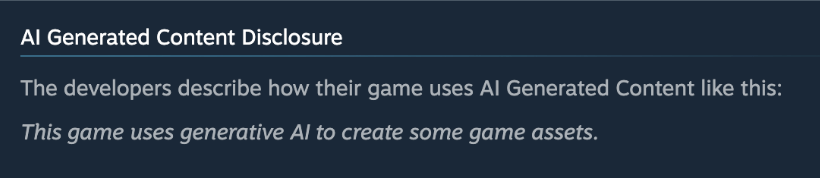
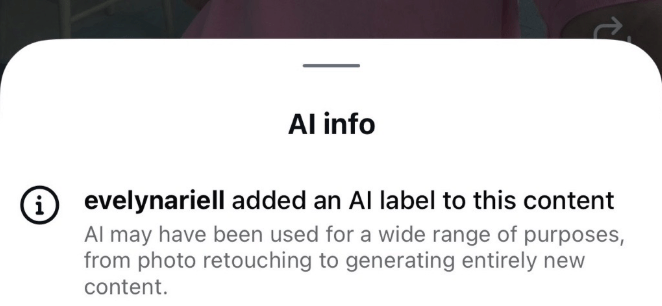
One of the easiest things is to just mark any AI-generated content as such. This can be as simple as a disclaimer in the app store description, a watermark on a photo or an asterisk at the end of a sentence.
When we do this, we remove the potential user perception of us trying to “sneak” AI-generated content into our software or somehow pull one over on them. If we’re using AI and we think it’s the right fit for our work, then there’s no shame at all in designating where it’s been used.
Depending on where the AI-generated content is being used, it also helps clue our users into aspects they may need to manually verify—rather than having to review everything as though it was AI-generated, if that’s not actually the case.
Read next: AI UX Patterns for User Clarity

Kathryn Grayson Nanz
Kathryn Grayson Nanz is a developer advocate at Progress with a passion for React, UI and design and sharing with the community. She started her career as a graphic designer and was told by her Creative Director to never let anyone find out she could code because she’d be stuck doing it forever. She ignored his warning and has never been happier. You can find her writing, blogging, streaming and tweeting about React, design, UI and more. You can find her at @kathryngrayson on Twitter.
Related Posts
Comments
All articles
Topics
Web MobileMobile
Desktop
Design
Productivity
People