Practicing Vertical Slice Architecture in ASP.NET Core
 by
by 
Summarize with AI:
Tired of organizing code through technical layers? How about going beyond the basics and “slicing” the system? Vertical Slice Architecture structures the application not by the type of code to be written, but by the problem to be solved. Let’s learn how to implement it in ASP.NET Core.
If you’ve ever created an API in ASP.NET Core using the classic approach of dividing it into Controllers, Services and Repositories, you’ve probably faced some difficulties in creating the necessary structure. With each new feature, more files are scattered, more cross-dependencies appear, and it becomes more difficult to understand what truly belongs to each use case.
But what if, instead of organizing the code by technical layers, you organized it by system functionalities? That’s exactly what Vertical Slice Architecture proposes.
Instead of a giant folder for Services and another for Repositories, each functionality becomes a vertical “slice” of the system, containing everything it needs: endpoint, business rules, validations, DTOs and data access. Each request then has its own isolated flow.
In this post, we’ll explore Vertical Slice Architecture and how to apply it in a practical ASP.NET Core project.
Layered Architecture and Its Trade-offs
Layered Architecture is one of the best-known and most widely used architectural styles in enterprise software development. It’s commonly found in ASP.NET Core, Java/Spring and other enterprise platforms. The main point of this style is that it organizes the system into horizontal layers, each with well-defined responsibilities.
The classic architecture typically divides the system into four main layers (despite variations):
- Presentation (UI / API): Controllers, endpoints, user interfaces
- Application / Service: Orchestrates use cases
- Domain / Business: Business rules
- Infrastructure / Data Access: Database, external integrations, files, etc.
Each layer depends only on the layer immediately below it (or on abstractions), creating a predictable flow of dependencies.
Despite its popularity, this approach has some drawbacks, such as flow coupling. Although the layers are separate, use cases traverse all of them: Controller -> Service -> Domain -> Repository -> Database. This creates structural flow coupling.
A simple change in one use case can require changes in multiple layers. This results in scattered files and constant navigation between projects/folders to find important parts of the code.
Another negative point is that this architecture organizes code by technical type, not by functionality. For example, if you want to understand the “Create Order” use case, you will need to open multiple files in different folders (Controllers, Services folder, Repositories folder, etc.).
When can Layered Architecture start to become a problem? In large systems with many use cases, a high volume of changes per feature, a complex domain that requires strong modeling, and large teams working on multiple fronts. In scenarios like this, an excellent alternative is Vertical Slice Architecture.
Vertical Slice Architecture as an Alternative
Vertical Slice Architecture is an architectural style where the system is designed and organized by features (functionalities), rather than by technical layers as in traditional layer-based approaches.
Vertical Slice emerged as an alternative to problems with traditional approaches, such as the difficulty in maintenance due to classes being scattered throughout the program.
The proposal of Vertical Slice is simple: organize the code by functionality (feature) and not by technical type. Imagine you need to create functionalities for creating and canceling an order.
In a layered approach, we would have the standard structure:
Controller
- OrderController
Service
- OrderService
Repository
- OrderRepository
Dtos
- OrderDto
In a Vertical Slice Architecture, you would organize things by use case:
Features/
CreateOrder/
CreateOrderEndpoint.cs
CreateOrderHandler.cs
CreateOrderRequest.cs
CreateOrderValidator.cs

CancelOrder/
CancelOrderEndpoint.cs
CancelOrderHandler.cs
CancelOrderRequest.cs
CancelOrderValidator.cs
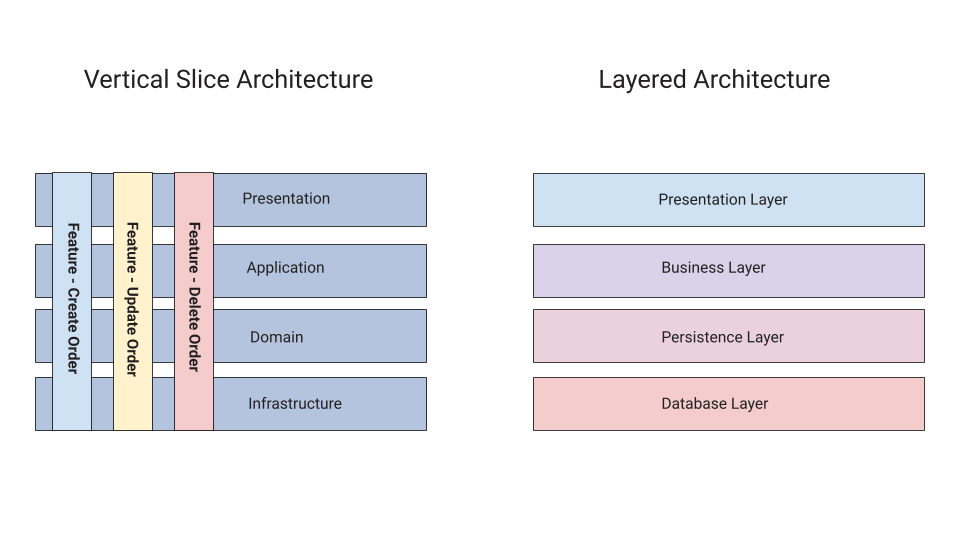
Much clearer now, isn’t it? The image below shows a simple comparison between Vertical Slice Architecture and Layered Architecture:
Implementing Vertical Slice Architecture
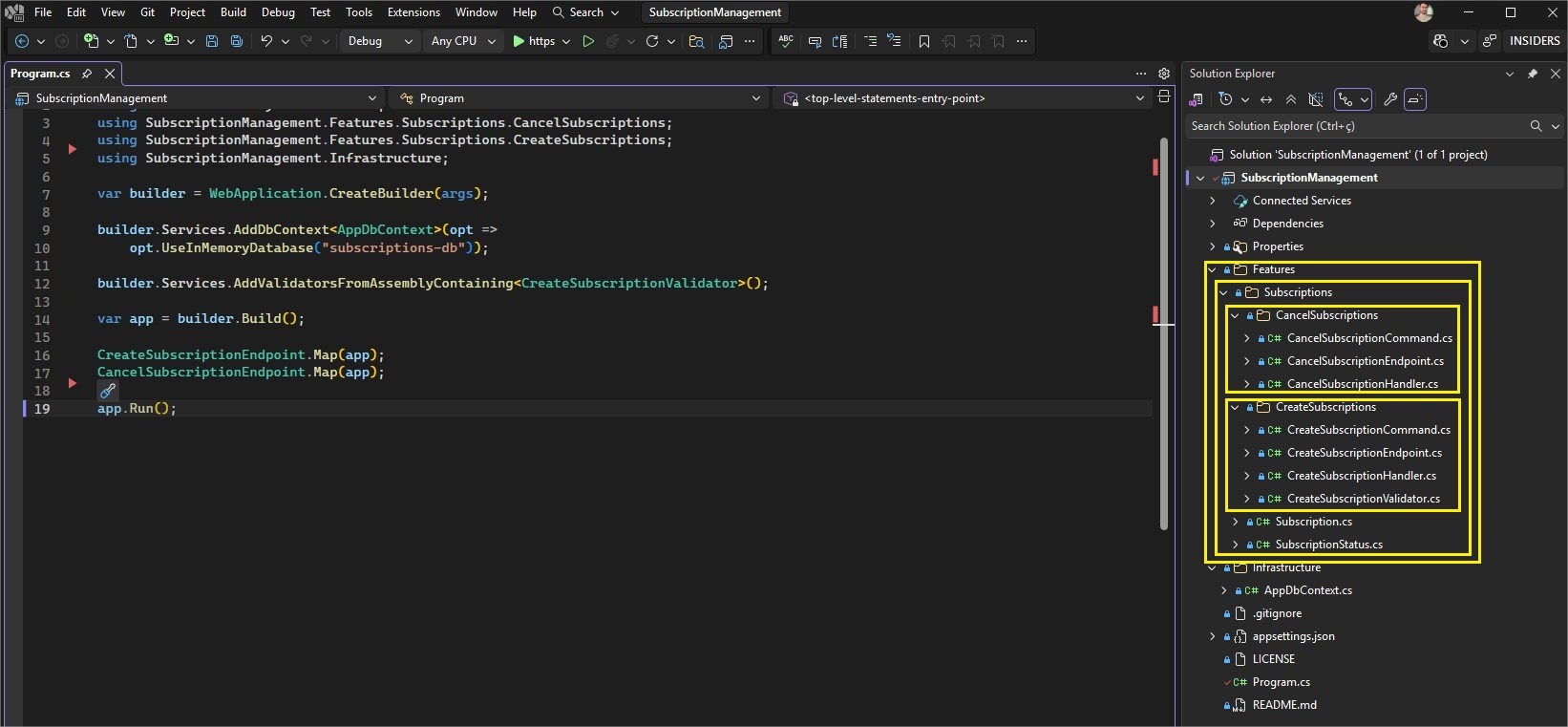
Now we’re going to create an API using Vertical Slice Architecture. Our API will be used to manage a subscription service. You can access the complete code in this GitHub repository: Vertical Slice Subs Source Code.
Our project will follow this structure:
Creating the Domain Model
To create the base application, you can use the following command in the terminal:
dotnet new web -o SubscriptionManagement
Then, inside the project, create a new folder called “Features,” and inside it another folder called “Subscriptions”. Add the following class and enum to the folder Subscriptions:
namespace SubscriptionManagement.Features.Subscriptions;

public class Subscription
{
    public Guid Id { get; private set; } = Guid.NewGuid();
    public string ServiceName { get; private set; } = default!;
    public decimal Price { get; private set; }
    public DateOnly StartDate { get; private set; }
    public DateOnly? TrialEndsAt { get; private set; }
    public SubscriptionStatus Status { get; private set; }

    private Subscription() { }

    public Subscription(string serviceName, decimal price, DateOnly startDate, DateOnly? trialEndsAt)
    {
        ServiceName = serviceName;
        Price = price;
        StartDate = startDate;
        TrialEndsAt = trialEndsAt;
        Status = SubscriptionStatus.Active;
    }

    public void Cancel()
    {
        if (Status == SubscriptionStatus.Canceled)
            throw new InvalidOperationException("Subscription already canceled.");

        Status = SubscriptionStatus.Canceled;
    }
}
namespace SubscriptionManagement.Features.Subscriptions;

public enum SubscriptionStatus
{
    Active = 1,
    Canceled = 2
}
The next step is to create the database related files. In the root of the project, create a new folder called “Infrastructure” and add the following class to it:
- AppDbContext
using Microsoft.EntityFrameworkCore;
using SubscriptionManagement.Features.Subscriptions;

namespace SubscriptionManagement.Infrastructure;

public class AppDbContext : DbContext
{
    public DbSet<Subscription> Subscriptions => Set<Subscription>();

    public AppDbContext(DbContextOptions<AppDbContext> options) : base(options)
    {
    }
}
🟢 Feature 1: CreateSubscription
Command
Our first feature will be used to create a new subscription. Inside the Features/Subscriptions/ folder, create a new folder called “CreateSubscriptions” (all the classes below should be created within this structure: Features/Subscriptions/CreateSubscriptions), and inside it, add the following record:
public record CreateSubscriptionCommand(
    string ServiceName,
    decimal Price,
    DateOnly StartDate,
    DateOnly? TrialEndsAt
);
Validator
Next, let’s create a validator. Create the class below:
using FluentValidation;

namespace SubscriptionManagement.Features.Subscriptions.CreateSubscriptions;

public class CreateSubscriptionValidator : AbstractValidator<CreateSubscriptionCommand>
{
    public CreateSubscriptionValidator()
    {
        RuleFor(x => x.ServiceName)
            .NotEmpty()
            .MaximumLength(100);

        RuleFor(x => x.Price)
            .GreaterThan(0);

        RuleFor(x => x.TrialEndsAt)
            .GreaterThan(x => x.StartDate)
            .When(x => x.TrialEndsAt.HasValue);
    }
}
Handler
The concept of a Handler is common in projects that use Vertical Slice Architecture. A Handler is the component responsible for executing the application’s use case—that is, it contains the logic of the functionality.
Typically, the Handler is the class or function that receives a command or query and executes the corresponding operation, coordinating business rules, database access, calls to other services and response return.
Handlers work well in architectures that use Command Query Responsibility Segregation (CQRS), especially when using MediatR. Here, the concept doesn’t depend on MediatR; it already exists simply with the organization by slices.
Now, let’s create our first Handler. To do this, create the classes below:
namespace SubscriptionManagement.Features.Subscriptions.CreateSubscriptions;

public record CreateSubscriptionCommand(
    string ServiceName,
    decimal Price,
    DateOnly StartDate,
    DateOnly? TrialEndsAt
);
using SubscriptionManagement.Infrastructure;

namespace SubscriptionManagement.Features.Subscriptions.CreateSubscriptions;

public static class CreateSubscriptionHandler
{
    public static async Task<IResult> Handle(CreateSubscriptionCommand command, AppDbContext dbContext)
    {
        var subscription = new Subscription(
            command.ServiceName,
            command.Price,
            command.StartDate,
            command.TrialEndsAt
        );

        dbContext.Subscriptions.Add(subscription);
        await dbContext.SaveChangesAsync();

        return Results.Created($"/subscriptions/{subscription.Id}", subscription);
    }
}
Note that the handler class has a method to create a new subscription, and returns an HTTP Created status.
Endpoint
In Vertical Slice Architecture, it’s also common to declare separate endpoints. In this case, we’ll have one endpoint for each use case. Create the following class:
using FluentValidation;
using SubscriptionManagement.Infrastructure;

namespace SubscriptionManagement.Features.Subscriptions.CreateSubscriptions;

public class CreateSubscriptionEndpoint
{
    public static void Map(WebApplication app)
    {
        app.MapPost("/subscriptions",
            async (CreateSubscriptionCommand command,
                AppDbContext dbContext,
                IValidator<CreateSubscriptionCommand> validator) =>
            {
                var validation = await validator.ValidateAsync(command);

                if (!validation.IsValid)
                    return Results.ValidationProblem(validation.ToDictionary());

                return await CreateSubscriptionHandler.Handle(command, dbContext);
            });
    }
}
Here we are defining an endpoint for creating a new subscription. It starts by validating the data, and if it’s valid, it uses the handler to create the new record and return the expected status.
🔴 Feature 2: CancelSubscription
The subscription creation flow is ready. Now let’s consider the cancellation use case. Following the same logic as before, within the Features/Subscriptions structure, create a new folder called CancelSubscriptions and add the following classes to that folder:
Command
namespace SubscriptionManagement.Features.Subscriptions.CancelSubscriptions;

public record CancelSubscriptionCommand(Guid Id);
Handler
using Microsoft.EntityFrameworkCore;
using SubscriptionManagement.Infrastructure;

namespace SubscriptionManagement.Features.Subscriptions.CancelSubscriptions;

public static class CancelSubscriptionHandler
{
    public static async Task<IResult> Handle(
        CancelSubscriptionCommand command,
        AppDbContext dbContext)
    {
        var subscription = await dbContext.Subscriptions
            .FirstOrDefaultAsync(x => x.Id == command.Id);

        if (subscription is null)
            return Results.NotFound();

        try
        {
            subscription.Cancel();
            await dbContext.SaveChangesAsync();
        }
        catch (InvalidOperationException ex)
        {
            return Results.BadRequest(new { error = ex.Message });
        }

        return Results.NoContent();
    }
}
Endpoint
using SubscriptionManagement.Infrastructure;

namespace SubscriptionManagement.Features.Subscriptions.CancelSubscriptions;

public static class CancelSubscriptionEndpoint
{
    public static void Map(WebApplication app)
    {
        app.MapDelete("/subscriptions/{id:guid}",
            async (Guid id, AppDbContext dbContext) =>
            {
                var command = new CancelSubscriptionCommand(id);
                return await CancelSubscriptionHandler.Handle(command, dbContext);
            });
    }
}
Program Class
The final step is to configure the Program class to use the endpoints we created above, to save time, we’ll use an in-memory database. So add the following code to the Program class:
using FluentValidation;
using Microsoft.EntityFrameworkCore;
using SubscriptionManagement.Features.Subscriptions.CancelSubscriptions;
using SubscriptionManagement.Features.Subscriptions.CreateSubscriptions;
using SubscriptionManagement.Infrastructure;

var builder = WebApplication.CreateBuilder(args);

builder.Services.AddDbContext<AppDbContext>(opt =>
    opt.UseInMemoryDatabase("subscriptions-db"));

builder.Services.AddValidatorsFromAssemblyContaining<CreateSubscriptionValidator>();

var app = builder.Build();

CreateSubscriptionEndpoint.Map(app);
CancelSubscriptionEndpoint.Map(app);

app.Run();
Note that the Program class is quite simple, only creating configurations such as the use of the in-memory database, validations and the calling of the endpoint methods: CreateSubscriptionEndpoint.Map(app); and CancelSubscriptionEndpoint.Map(app);.
🧪 Testing the Application
Now, let’s run the endpoints and verify that the application is functional.
Run the application and make a POST request to the route http://localhost:5127/subscriptions using the JSON below as the body:
{
  "serviceName": "Aspflix",
  "price": 39.90,
  "startDate": "2026-03-01",
  "trialEndsAt": "2026-03-15"
}
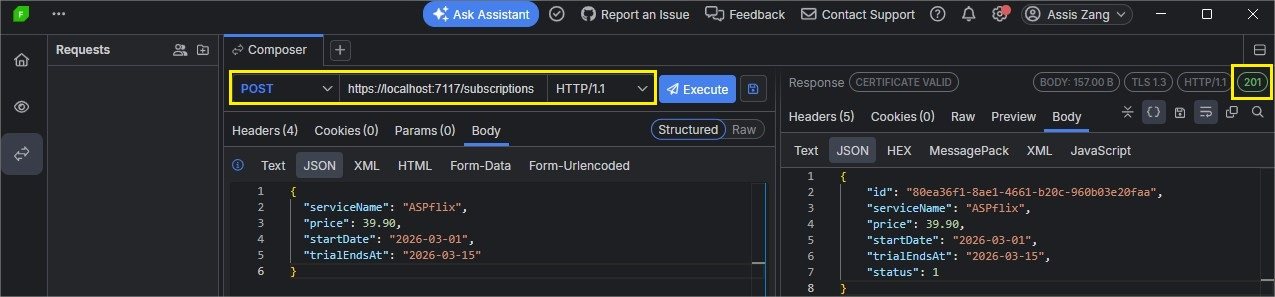
If everything goes well, you will receive the following response in a debugger like Progress Telerik Fiddler Everywhere:
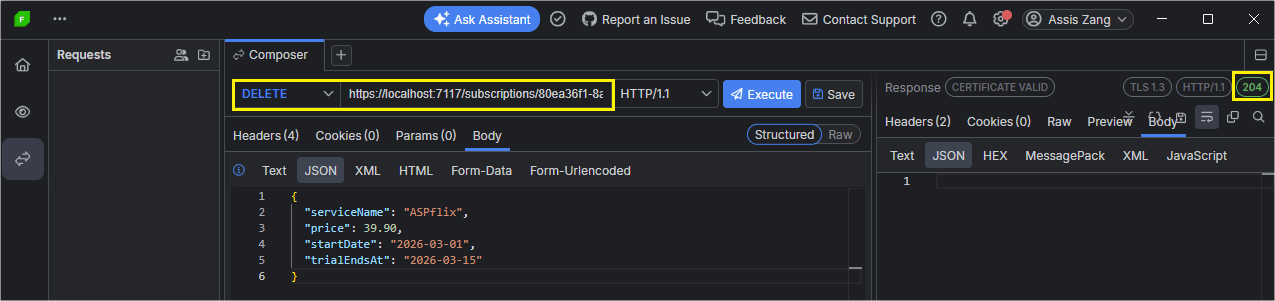
And to test the cancellation, simply execute a DELETE request to the route: http://localhost:5127/subscriptions/ID_HERE.
And you will receive the following response:
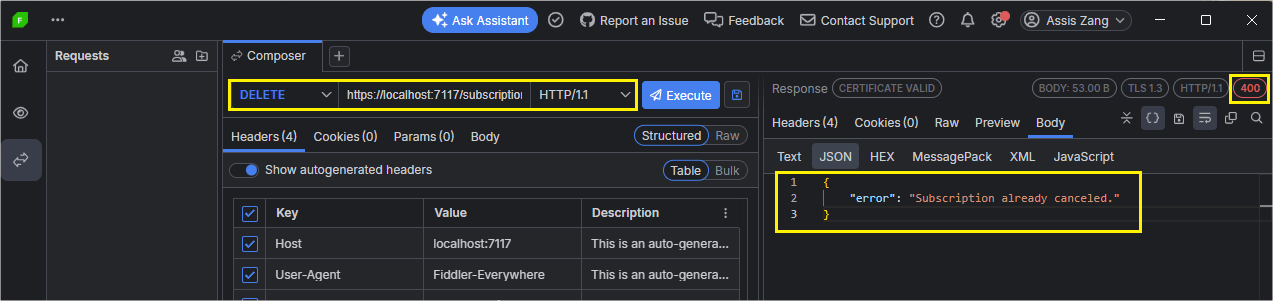
If you try to cancel again, you will receive a validation error.
Conclusion
Vertical Slice Architecture offers an alternative approach focused on system functionalities, rather than predefined structures.
As we saw in the article, this brings advantages such as ease of maintenance, due to the low cognitive requirements for understanding the project. It also offers agility in finding functions, as business rules are separated by use case. Furthermore, we implemented a subscription project in ASP.NET Core using Slice Architecture.
I hope this post helps you decide which architectural approach to use when creating or refactoring your projects.
Related Posts
Comments
All articles
Topics
Web MobileMobile
Desktop
Design
Productivity
People