Async Validation in Angular Signal Forms

Summarize with AI:
Learn how to implement async validation in Angular Signal Forms using the validateHttp function, for example to check whether a username is already taken.
Signal Forms create a form from a writable signal model, where the model is the source of truth, and any change in the form or the model is automatically reflected in the other.
Read more about Signal Forms here.
In this article, we will explore async validation in Signal Forms. You perform async validation for various purposes, such as to:
- Check if usernames or emails are already taken
- Look up data in the database to confirm values
- Use external services (APIs) to verify things like addresses or tax IDs
- Apply business rules that only the server can validate
When creating a signup form, you need to check whether the email is already in use by calling a database via an API. Since this takes time, you should use Signal Forms async validation to handle it.
To validate against an API or HTTP endpoint, Angular provides the validateHttp() function. Let’s explore how to use that.
Create a Signup Form
To begin, create a signup form by first defining an interface to represent the signup type.
export interface SignupFormValue {
  readonly email: string;
  readonly password: string;
}
Next, use it to create the signal-based Signup form as shown in the next code listing:
  signupModel: WritableSignal<SignupFormValue> = signal<SignupFormValue>({
    email: '',
    password: '',
  });

  signupForm = form(this.signupModel);
Then, in the template, bind it to the controls as shown below.
<form (submit)="onSubmit($event)">
  <p>
    <label for="signup-email">Email</label><br />
    <input id="signup-email" type="email" [formField]="signupForm.email" />
  </p>
  <p>
    <label for="signup-password">Password</label><br />
    <input id="signup-password" type="password" [formField]="signupForm.password" />
  </p>
  <p>
    <button type="submit">Sign up</button>
  </p>
</form>
Next, create the submit function as shown below.
protected onSubmit(event: Event): void {
    event.preventDefault();
    submit(this.signupForm, async () => {
      const credentials = this.signupModel();
      console.log('Signup submitted:', credentials);
    });
  }
As of now, we have created the signal-based signup form.
Adding Sync Validations
To make it more usable, let us add some validations to the email field. We are going to add the validations below to the email field.
- Required
  signupForm = form(this.signupModel, (schemaPath) => {
    required(schemaPath.email, { message: 'Email is required' });
    email(schemaPath.email, { message: 'Please enter a valid email address' });

  });
Both required and email are synchronous validators, and they run on each value change of controls. The required() validates that the control value is neither null nor an empty string (''), and email() validates the control value against a standard email regular expression pattern.
Both validators execute synchronously on each value change of the control.
We can conditionally show error messages for sync validators in the template using the field-state signals touched(), invalid() and errors().
@if (signupForm.email().touched() && signupForm.email().invalid()) {
    <ul class="error-list">
      @for (error of signupForm.email().errors(); track error) {
        <li>{{ error.message }}</li>
      }
    </ul>
  }
The touched() && invalid() signals are used to show errors only after the user focuses and then blurs the field, so the form does not show errors on initial load.
Adding Async Validations
There are two ways you can add async validation to a signal form.
- Using
validateHttp() - Using
validateAysnc()
In most cases, applications should use validateHttp() for asynchronous validation, as it simplifies HTTP-based validation with minimal configuration and supports most common scenarios.
validateAsync() is a lower-level API that directly exposes Angular’s resource primitive, providing full control over the validation process but requiring more implementation effort and a deeper understanding of the resource API.
Let’s see how we can use validateHttp() to check whether an email exists or not .
validateHttp(schemaPath.email, {
      request: ({ value }) => {
        const emailValue = value();
        if (!emailValue) return undefined; // skip when empty
        return `http://localhost:3000/user/check?email=${emailValue}`;
      },
      onSuccess: (response: { exists: boolean }) => {
        return response.exists
          ? {
              kind: 'emailTaken',
              message: 'This email is already registered',
            }
          : null;
      },
      onError: () => ({
        kind: 'serverError',
        message: 'Could not verify email. Please try again later.',
      }),
    });
We have an API that returns a response indicating whether the email already exists in the database, and we use the response’s exists property to determine whether the email is already registered.
{
  "exists": true,
  "user": {
    "id": 1,
    "name": "User 1",
    "email": "user1@example.com"
  }
}
We can show the pending state and error message from both sync and async validator as shown below:
@if (signupForm.email().pending()) {
    <span class="pending">Checking email availability...</span>
  }
  @if (signupForm.email().touched() && signupForm.email().invalid()) {
    <ul class="error-list">
      @for (error of signupForm.email().errors(); track error) {
        <li>{{ error.message }}</li>
      }
    </ul>
  }
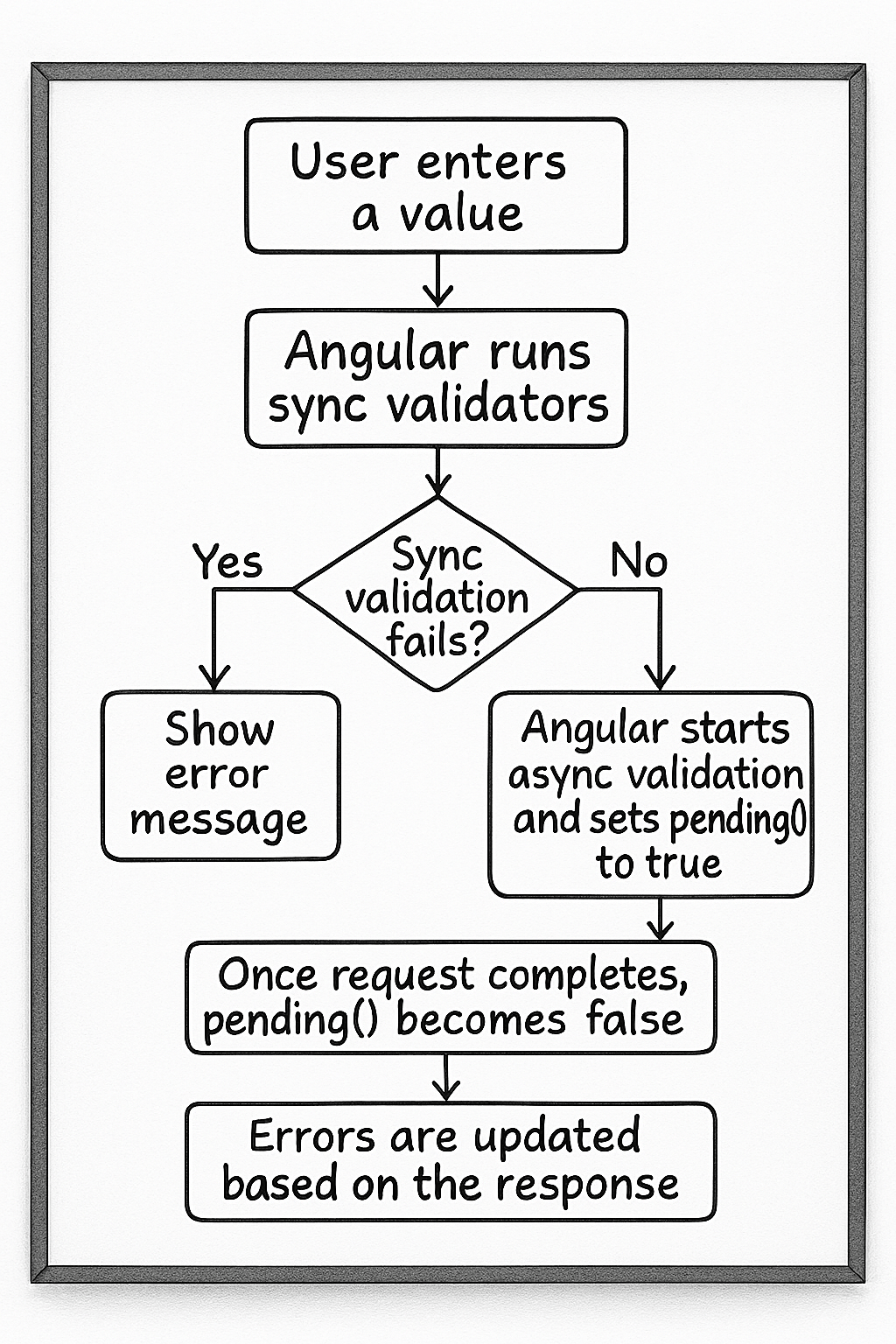
The validation flow works like this:
- User enters a value.
- Synchronous validators run first.
- If sync validation fails, async validation does not run.
- If sync validation passes, async validation starts, and
pending()becomes true. - Once the request completes,
pending()becomes false. - Errors are updated based on the response.
This can be put in a flow chart as shown below:
Putting everything together, a signal-based signup form with both synchronous and asynchronous validators will look like this:
signupModel: WritableSignal<SignupFormValue> = signal<SignupFormValue>({
    email: '',
    password: '',
  });

  signupForm = form(this.signupModel, (schemaPath) => {
    required(schemaPath.email, { message: 'Email is required' });
    email(schemaPath.email, { message: 'Please enter a valid email address' });
    validateHttp(schemaPath.email, {
      request: ({ value }) => {
        const emailValue = value();
        if (!emailValue) return undefined; // skip when empty
        return `http://localhost:3000/user/check?email=${emailValue}`;
      },
      onSuccess: (response: { exists: boolean }) => {
        return response.exists
          ? {
              kind: 'emailTaken',
              message: 'This email is already registered',
            }
          : null;
      },
      onError: () => ({
        kind: 'serverError',
        message: 'Could not verify email. Please try again later.',
      }),
    });

  });

  protected onSubmit(event: Event): void {
    event.preventDefault();
    submit(this.signupForm, async () => {
      const credentials = this.signupModel();
      console.log('Signup submitted:', credentials);
    });
  }
And on the template, the pending state and error messages can be shown as below:
<form (submit)="onSubmit($event)">
  <p>
    <label for="signup-email">Email</label><br />
    <input id="signup-email" type="email" [formField]="signupForm.email" />

  </p>
  @if (signupForm.email().pending()) {
    <span class="pending">Checking email availability...</span>
  }
  @if (signupForm.email().touched() && signupForm.email().invalid()) {
    <ul class="error-list">
      @for (error of signupForm.email().errors(); track error) {
        <li>{{ error.message }}</li>
      }
    </ul>
  }
  <p>
    <label for="signup-password">Password</label><br />
    <input id="signup-password" type="password" [formField]="signupForm.password" />
  </p>
  <p>
    <button type="submit">Sign up</button>
  </p>
</form>
validateHttp Function
The validateHttp function contains three components:
- Request function
- Success handler function
- Error handler function
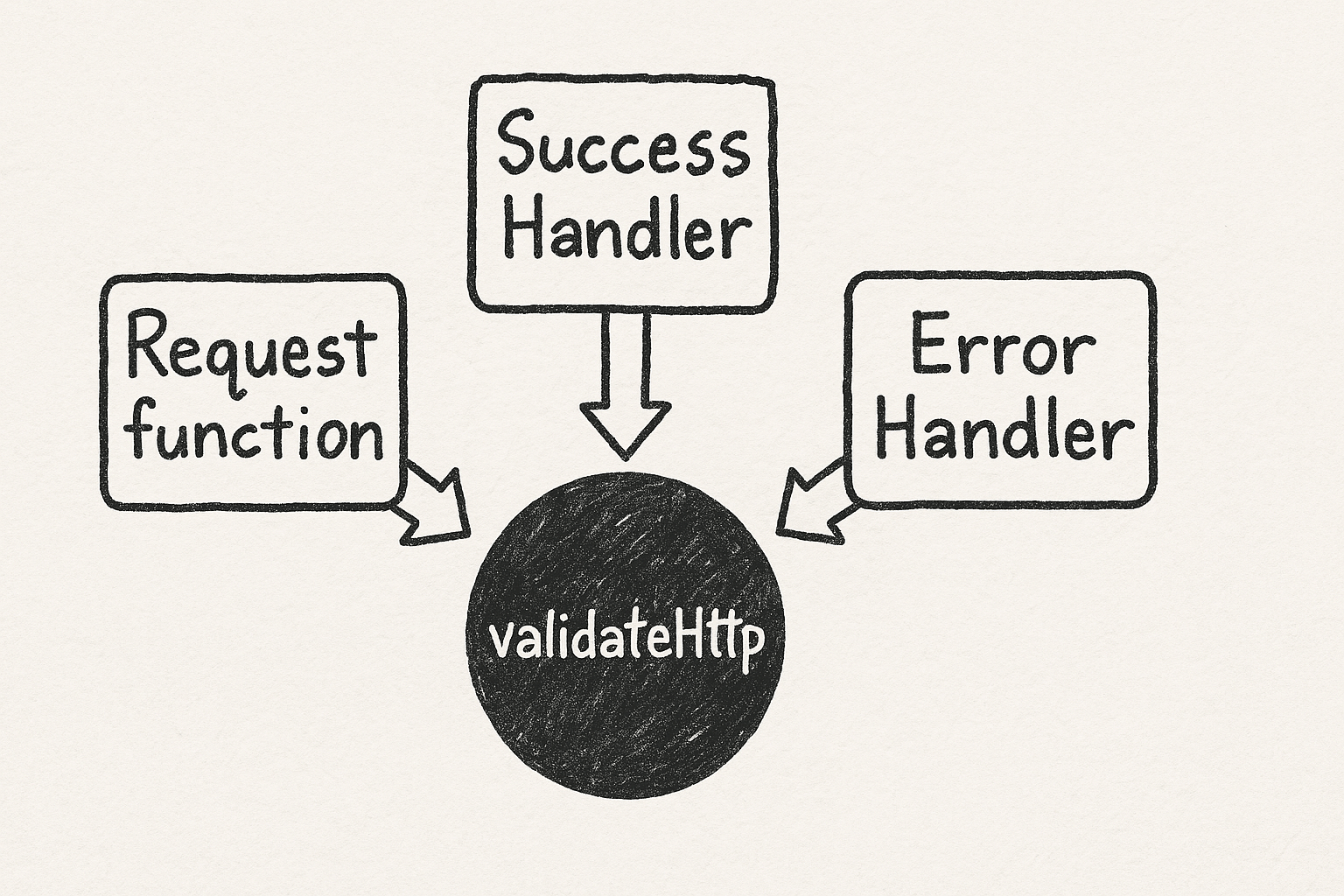
In the validateHttp, we have set the request function. It returns one of these three values:
- Undefined to skip the validation.
- A URL for performing the validation using the GET operation.
- An
HttpResourceRequestif you need to set additional request options, such as the verb header, etc. This is the same object you use withhttpResourceto configure the request object.
Read more about the httpResource here.
The onSuccess function receives the HTTP response and returns validation errors or undefined for valid values. It can also return multiple errors when needed.
The onError function handles request failures like network errors or HTTP errors.
If you need to validate an email using an endpoint with a POST request, custom headers and the email in the request body, you can do so by returning an httpResourceRequest from validateHttp, as shown below.
signupForm = form(this.signupModel, (schemaPath) => {
    required(schemaPath.email, { message: 'Email is required' });
    email(schemaPath.email, { message: 'Please enter a valid email address' });

    validateHttp(schemaPath.email, {
      request: ({ value }) => {
        const emailValue = value();
        if (!emailValue) return undefined;
        return {
          url: 'http://localhost:3000/user/check',
          method: 'POST',
          body: { email: emailValue },
          headers: { 'x-api-key': 'my-secret-key' },
        };
      },
      onSuccess: (response: { exists: boolean }) => {
        return response.exists
          ? { kind: 'emailTaken', message: 'This email is already registered' }
          : null;
      },
      onError: () => ({
        kind: 'serverError',
        message: 'Could not verify email. Please try again later.',
      }),
    });
  });
The other function for async validation is validateAsync() function. It is a lower-level API that exposes Angular’s resource primitive directly. It offers complete control but requires more code and familiarity with Angular’s resource API. Most applications should use validateHttp().
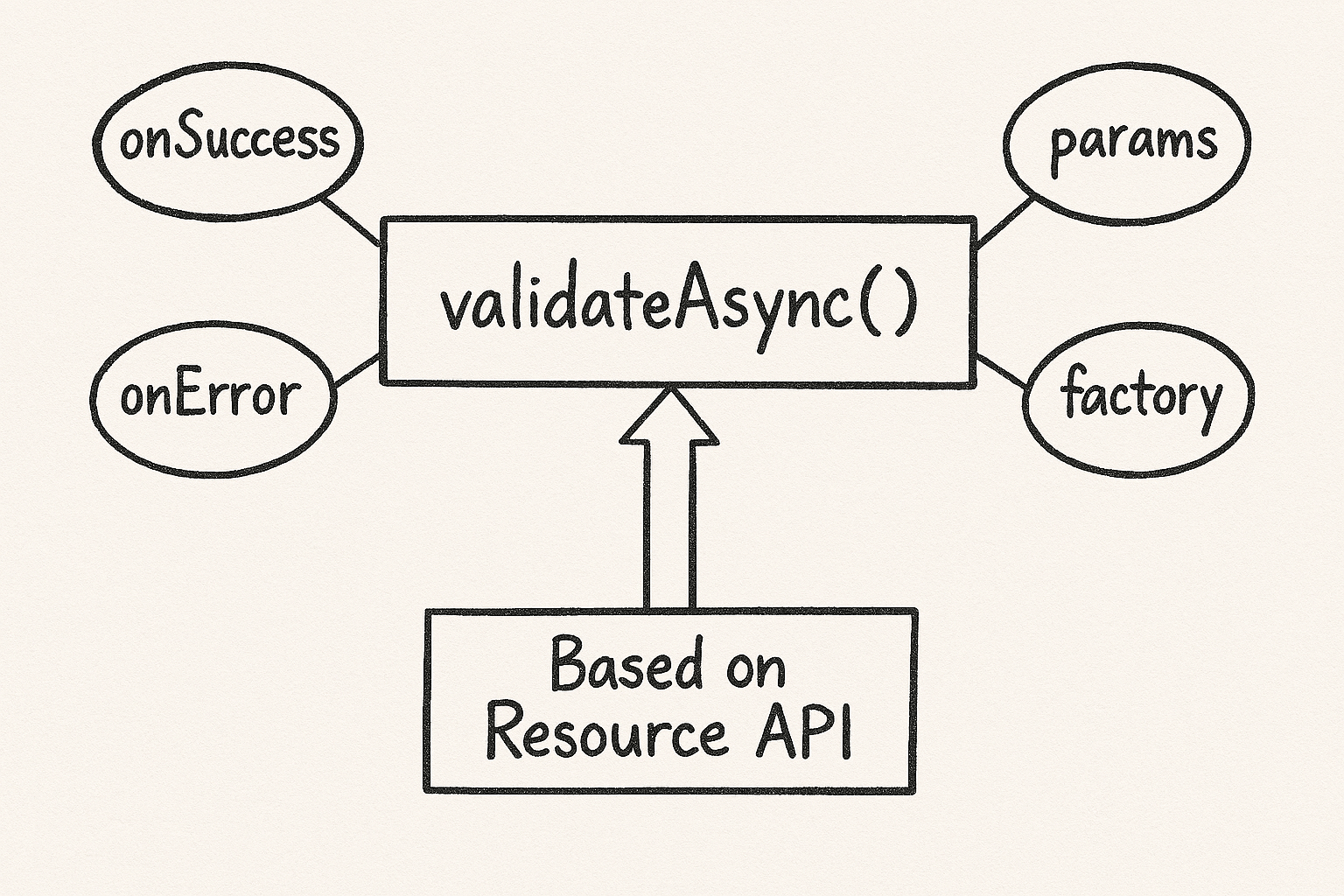
You should use validateAsync() for these purposes:
- Non-HTTP validation – WebSocket connections, IndexedDB lookups or Web Worker computations
- Custom caching strategies – Application-specific caching beyond simple memorization
- Complex retry logic – Custom backoff strategies or conditional retries
- Direct resource access – When you need the full resource lifecycle
In a future article, we’ll take a deeper look at validateAsync. For now, I hope this gives you a clear understanding of how to implement async validation in Angular Signal Forms using the validateHttp function. Thanks for reading!

Dhananjay Kumar
Dhananjay Kumar is the founder of nomadcoder, an AI-driven developer community and training platform in India. Through nomadcoder, he organizes leading tech conferences such as ng-India and AI-India. He partners with startups to rapidly build MVPs and ship production-ready applications. His expertise spans Angular, modern web architecture and AI agents, and he is available for training, consulting or product acceleration from Angular to API to agents.
Related Posts
Comments
All articles
Topics
Web MobileMobile
Desktop
Design
Productivity
People