Angular 22: The Evolution of Modern Angular
 by Dany Paredes

Summarize with AI:
Signals, OnPush, declarative async resources: Angular 22 makes standard several features that help developers build better apps.
A few days ago, we checked out Google I/O 2026, and today we need to talk about our favorite framework: Angular. Why? Because version 22 is here!
Angular v22 is a major update focused on stability, performance and ergonomic APIs. It brings a more polished signal-driven platform and better data loading primitives that make modern apps feel faster and simpler to build.
Before we look at the most interesting changes, let’s talk about the foundation. Angular v22 stabilizes the features we have been testing in the last few versions. If you want to build a high-performance app today, these are the new standards.
Stable Signal Forms and httpResource
Reactive Forms were great, but they often felt separate from the modern Signal-based reactivity. In v22, Signal Forms are officially stable.
What does this mean for us?
- Better reactivity: No more unnecessary updates when a single field changes.
- Better type safety: We finally have a form system that works perfectly with TypeScript.
Do you remember HttpClient and the manual toSignal conversions? They worked, but they added extra code. Now we have httpResource.
It is the new standard for fetching data. It treats your HTTP requests as signals, automatically handling the loading, error, and data states for you.
Learn more: Dive deeper into Getting Started with httpResource API and learn more about Angular Signal Forms vs. Reactive Forms.
But what if your request depends on another signal? In v22, we have the new chain() method. It allows you to link resources together. If the first resource is loading, the second one waits automatically. This is a big win for complex data!
Wait, what if you are already using RxJS? Don’t worry, Angular has a solution for that too. Let’s see how v22 handles the transition from Observables to Resources.
RxResource vs. httpResource
A common question is: “Should I stop using RxJS?” The answer is no. Angular v22 introduces rxResource as the perfect partner for your existing Observable streams.
httpResource: Use this for standard API calls. It is optimized for the Fetch API and handles JSON automatically.rxResource: Use this when your data source is an existing Observable. It allows you to use the power of RxJS operators inside the clean, Signal-based Resource API.
Now that we have our data fetching ready, how do we make sure our users and agents can navigate efficiently? Let’s talk about the new smart navigation features in the Router.
Smart Navigation and Incremental Hydration
The Angular Router received some updates in v22 that solve common problems.
- URL decoupling: You can now keep a clean URL in the address bar while the app shows a different state. With the new
browserUrlinput onRouterLink, you can show/settingswhile the router actually uses/account/advanced-preferences. - Parameter inheritance: Child routes now inherit parameters from their parents by default, and you don’t need extra configuration to get an ID from a parent route.
But a great UI and smart routing mean nothing if the page is slow to load. This brings us to the most impressive performance update in v22: incremental hydration.
Server-Side Rendering (SSR) is no longer a problem. In v22, incremental hydration is the default.
Angular now loads your application in small parts as they become visible. Combined with resource caching, the client can use the data fetched on the server without making a second API call. The user sees the data instantly, and the “flicker” of reloading data is gone.
Learn more: Explore The New Angular Hydration for in-depth details.
But performance is also about how the browser handles changes. This is where the biggest change in Angular’s history reaches its peak.
OnPush by Default
For years, ChangeDetectionStrategy.Eager (previously known as `Default`) was the standard for Angular’s change detection. With v22, ChangeDetectionStrategy.OnPushis now the default for new components!
By using ChangeDetectionStrategy.OnPush as the default, we get:
- Better performance: The framework only checks what it needs to, exactly when it needs to, avoiding unnecessary checks.
- A step closer to Zoneless: This sets the stage for eventually dropping
zone.jsin the future.
If you have an older app, don’t worry! There is a migration tool that adds ChangeDetectionStrategy.Eager (the new name for the old behavior) to your existing components exactly as before.
Now, how do we make sure our fast code actually works? Let’s talk about the new speed king of testing.
Vitest
Testing used to be the slow part of our work. Not anymore. Angular v22 officially replaces Karma/Jasmine with Vitest as the default test runner.
It is very fast and shares the same configuration as your build pipeline. Also, the new migrate-karma-to-vitest tool makes the change very easy, even for complex tests!
Do you want to try Vitest?
Angular Aria: Accessibility for Everyone
Building custom components with correct ARIA roles and focus management can be difficult. In v22, Angular Aria is officially stable.
Think of it as “headless accessibility.” It provides the logic you need to build your own accessible components. It handles the complicated parts of ARIA attributes and keyboard interactions for you.
Why does this matter for AI? Because accessible apps are much easier for AI Agents to understand!
Check this example about how to build accessible components with Angular Aria.
Async Dependency Injection
The injectAsync() function allows us to lazy-load services only when they are actually needed, while still creating the instance with Angular dependency injection. This keeps your app small and fast.
export class CheckoutComponent {
  // We declare the lazy injection in the injection context (class field)
  private paymentGatewayLoader = injectAsync(() =>
    import('./payment-gateway.service').then(m => m.PaymentGatewayService)
  );

  async onCheckoutCompleted() {
    // We only load the heavy PaymentGatewayService when the user actually checks out!
    const paymentGateway = await this.paymentGatewayLoader();
    await paymentGateway.processTransaction();
  }
}
Building a Dashboard with Angular 22
Instead of just explaining features, let’s build a practical dashboard example that uses the stable core of Angular v22: @Service(), httpResource() and the new template syntax.
Want to follow along? You can clone the complete project from GitHub: angular-22-nba-finals. Just run
npm startand you’ll have the dashboard running locally.
The Data Service with @Service
Now, let’s create our service. We will use the new @Service() decorator (which replaces @Injectable()) and httpResource to fetch the games. Notice how httpResource handles loading and error states for you.
// src/app/nba.service.ts
import { Service } from '@angular/core';
import { httpResource } from '@angular/common/http';

export interface NbaGame {
  id: number;
  gameNumber: number;
  homeTeam: string;
  homeScore: number | null;
  awayTeam: string;
  awayScore: number | null;
  status: 'Final' | 'Scheduled';
  date: string;
  location: string;
}

@Service()
export class NbaService {
  // httpResource is the standard for fetching data
  gamesResource = httpResource<NbaGame[]>('/api/nba-finals');
}
The UI Layer & Error States
We display the data using the new @for block and keep the error handling inside the component template. This keeps the example focused on stable Angular v22 behavior.
// src/app/app.ts
@Component({
  template: `
    <app-dashboard></app-dashboard>
    <router-outlet></router-outlet>
  `
})
Our Dashboard component remains simple:
// src/app/dashboard.component.ts
import { Component, inject } from '@angular/core';
import { NbaService } from './nba.service';

@Component({
  selector: 'app-dashboard',
  template: `
    <div class="dashboard">
      <h1>NBA Finals 2026: Knicks vs Spurs</h1>

      @if (nbaService.gamesResource.isLoading()) {
         <p>Loading game data...</p>
      } @else {
        <div class="cards">
          @for (game of nbaService.gamesResource.value(); track game.id) {
            <div class="card">
              <div class="meta">Game {{ game.gameNumber }} • {{ game.date }}</div>
              <div class="score">
                {{ game.homeTeam }} {{ game.homeScore }} vs {{ game.awayScore }} {{ game.awayTeam }}
              </div>
              <div class="status">{{ game.status }}</div>
            </div>
          }
        </div>
      }
    </div>
  `
})
export class DashboardComponent {
  nbaService = inject(NbaService);
}
Save changes and run ng server navigate in the browser and tada!!!
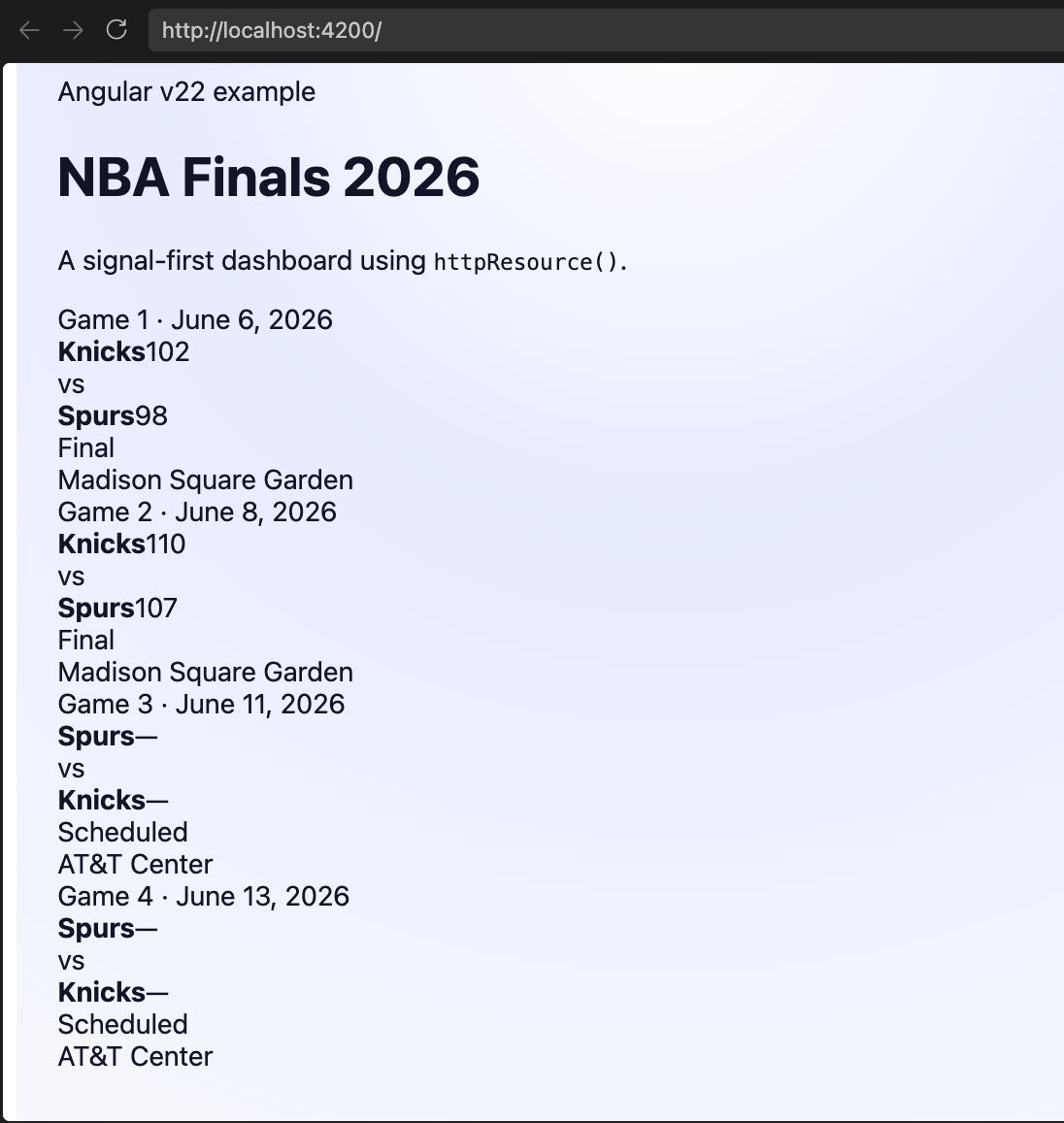
Done!! We play with the stable part of Angular v22 using @Service() for a clean singleton service definition, httpResource() for declarative, signal-based HTTP loading and @for with @if in templates to render loading and data states.
And, of course, AI is not forgotten by the Angular team. They updated and added new tools for Angular MCP and Skills. Let’s see them!
Angular MCP and Skills
Of course, Angular continues embracing AI. The Angular MCP exposes app state and builds workflows for tools that understand Angular projects. That includes server-side MCP tools such as devserver.wait_for_build, devserver.start and devserver.stop.
Version 22 also introduces Agent Skills for Angular, a lightweight set of skill definitions that give AI assistants direct knowledge of modern Angular idioms and best practices. These skills are useful for teams that want to integrate agent-assisted coding into their workflow without pain.
- Learn more about Angular MCP: angular.dev/ai/mcp
- Learn more about Agent Skills for Angular: github.com/angular/skills
Recap
Angular 22 is a declaration that the way we build for the web has evolved. And by using Signals, OnPush performance and declarative async resources, we can build applications that are faster, simpler and easier to maintain.
This release is about making stable patterns:
- Use
httpResource()for fetch-heavy components. - Use
@Service()for singleton services. - Use
injectAsync()when you want to defer heavy service loading. - Let template syntax like
@forand@ifkeep your view code readable. - Embrace the AI era with Agent Skills and MCP tools.
My advice is don’t just read this article—build something! Take the dashboard we sketched and turn it into an interactive experience with Progress Kendo UI for Angular AI Chat. A chat interface is a powerful way to explore the series score in real time and it’s a great way to test Angular 22 with a modern Kendo UI scenario.
Feel free to watch for all the new features in Angular 22:
For a complete overview and to verify all the new features, you can check the official release post: Announcing Angular v22.
Happy coding!
Dany Paredes
Dany Paredes is a Google Developer Expert on Angular and Progress Champion. He loves sharing content and writing articles about Angular, TypeScript and testing on his blog and on Twitter (@danywalls).
Related Posts
Comments
All articles
Topics
Web MobileMobile
Desktop
Design
Productivity
People