Angular Signals: The Essentials You Need to Know

Summarize with AI:
Angular Signals mark a significant shift for the framework, not an optional feature. Learn more so you can keep up!
As developers, we often get to choose which features we want to master. However, every once in a while, a feature comes along that fundamentally changes how a framework works, redefining the entire developer experience.
Let me explain what I mean. For example, if your project doesn’t use SSR, you can choose not to learn it. But Angular Signals is different; it’s not optional. It’s becoming the backbone of every modern Angular application. To stay productive and efficient, mastering it will be essential.
In this article, I will give you a quick introduction to the core concepts behind Angular Signals. You’ll learn about:
- Signals
- Computed signals
- Effects
- Linked signals
- Equality functions
Let’s dive in. Angular Signals were introduced to simplify and modernize Angular’s reactivity model. They offer a fine-grained, predictable and framework-integrated approach to managing and reacting to state changes, eliminating the need for complex change detection mechanisms, NgZone or manual RxJS subscriptions.
With Signals, Angular enables local change detection, meaning only the components affected by a state change are updated. This is a significant shift from the traditional model, where Angular runs the change detector for the entire component tree on every update. As a result, the framework becomes significantly more efficient, reactive and developer-friendly.
If I had to summarize the paradigm shift introduced by Angular Signals, it would come down to how they affect the following key points:
- A new model of reactivity – Simpler, more predictable and fully integrated into the Angular framework
- Improved developer experience – Eliminate much of the complexity traditionally associated with RxJS
- Fewer APIs, greater simplicity – Accomplish most reactive tasks without relying on a large set of RxJS operators
- Local change detection – Update only the affected components instead of traversing the entire component tree
- No need for subscribe, async pipe, markForCheck() or detectChanges() – Reactivity happens automatically
- Functional and declarative approach to logic – Encourage cleaner, more maintainable reactive patterns
There are three core concepts in Angular Signals:
- Signal
- Computed
- Effect
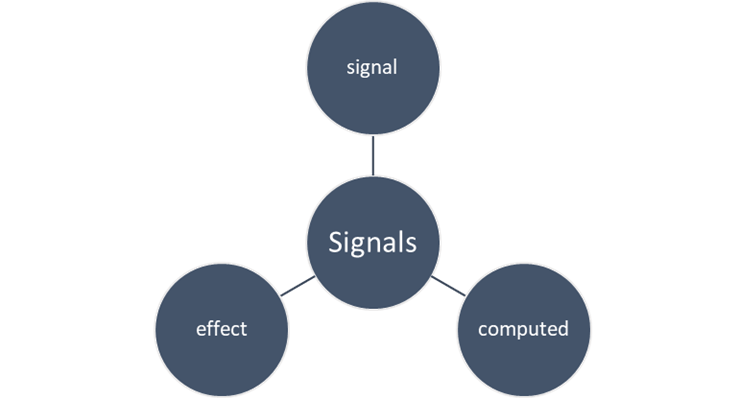
Essentially, these are functions for working with signals. Let’s explore each one in detail.
A signal is a wrapper around any value that notifies interested consumers. You can wrap any value within a signal. Those values could be
- String
- Number
- Array
- Object
- Etc.
Angular supports two types of signals:
- Writable signals
- Read-only signals
You can create a writable signal using the signal() function and a read-only signal using the computed() function.
Writable Signals
You can use the signal() function to create writable signals.
count : WritableSignal<number> = signal(0);
On the template, you can use the count signal as shown below:
<p>count = {{count()}}</p>
As you can see, we call the count signal as a function in the template because accessing a signal’s value requires invoking it like a function.
The writable signal has two methods:
set()– to directly set the signal to a new valueupdate()– to update the value of the signal based on its current value
Both these methods notify interested consumers.
updateCount() {
  this.count.update((current) =>  current + 1);
}

setCount() {
  this.count.set(5);
}
Besides these two methods, writable signals also have one more function called asReadonly().
- It returns a read-only version of the signal.
- This value can be read but cannot be set or updated with the
set()orupdate()function. - Deep mutation of value cannot be prevented if the signal is exposed as
asReadonly().
When you try to update the value with the update() method, Angular gives you compilation error.
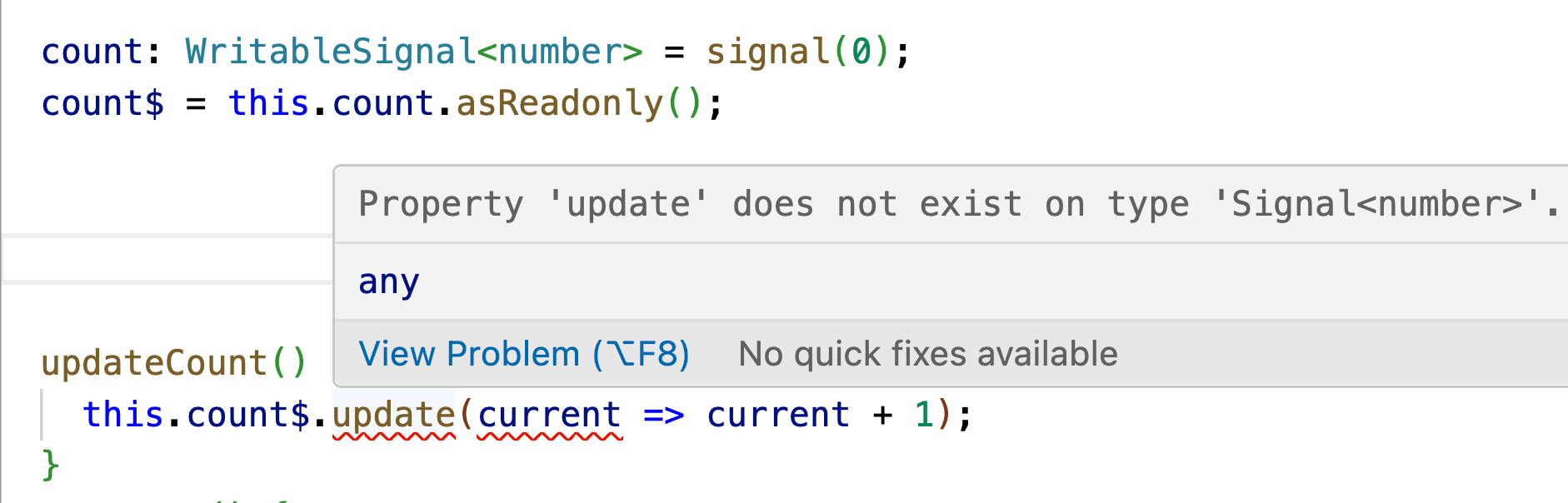
Now, let’s look at an example to understand how deep mutations of a signal’s value cannot be prevented even when using asReadonly().
Let’s assume you have a signal defined as shown below. When you attempt to update it as illustrated earlier, Angular will throw an error indicating that the operation isn’t allowed.
private  userSignal: WritableSignal<any> = signal({
  id:  1,
  name:  'dj',
  profile: {
    email:  'dhananjay@nomadcoder.ai',
    mode: ['light-mode', 'notifications']
  }
});

updateUser(){
  this.user = { ...this.user(), name:  'dhananjay' }; // TypeScript error
}
Angular should give you an error as shown below:

However, you should be able to perform the deep mutation of the signal value, as shown below:
updateUser(){
  this.user().name = 'dhananjay';
}
So, in summary:
asReadonly()prevents calling.set()or.update()on the signal.asReadonly()prevents reassigning the signal reference.asReadonly()does not prevent mutating object properties.asReadonly()does not prevent modifying array contents.asReadonly()does not prevent deep or nested value changes.
Computed Signals
You can use the computed() function to create computed signals. These signals derive their values from existing signals.
Some key characteristics of computed signals include:
- They are read-only.
- They depend on existing signals.
- They are lazy in nature, meaning they compute their value only when needed.
isEven: Signal<boolean> = computed(() => {
  if (this.count() % 2 == 0) {
    return  true;
  }
  else {
    return  false;
  }
})
On the template, you can use the isEvent computed signal as shown below:
<p>count = {{count()}} is {{isEven() ? 'even':'odd'}}</p>
One of the most important characteristics of computed signals is that they are not live consumers. This means Angular does not compute their value unless they are used within a reactive context, such as a template.
Consider the example below:
count = signal(10);

isEven: Signal<boolean> = computed(() => {
  console.log('isEven computed called');
    if (this.count() % 2 == 0) {
      return  true;
    }
    else {
      return  false;
    }
})
Let’s assume the isEven computed signal is not used in the template. In this case, you’ll notice that Angular does not log any message from the computed function. This indicates that the computed signal code is not executed because it is not consumed anywhere in the reactive context.
Also, Angular does not allow writing to other signals within a computed signal. Let’s consider the example below:
count = signal(10);
  a = signal(6);

isEven: Signal<boolean> = computed(() => {
  console.log('isEven computed called');
  this.a.set(99);
  if (this.count() % 2 == 0) {
    return  true;
  }
  else {
    return  false;
  }
})
So when writing to a signal inside a computed signal, Angular throws a run-time error as shown in the image below:

So, to summarize:
- Computed signals are read-only.
- They are based on an existing signal.
- Computed signals should not write to other signals.
Based on our understanding of signals and computed signals, let’s consider a practical example—implementing a Country–State dropdown scenario. While implementing, we need to:
- Provide a dropdown menu for the user to select a country
- Recalculate the list of states based on the selected country
- Bind the state field to the updated list of states
- If the selected country has no available states, assign a default state value
In the final requirement, we need to set the state value manually. If it is bound to a computed signal, this is not possible because computed signals are read-only and cannot be directly set or updated.
To solve the above problem, Angular provides a new type of signal called LinkedSignal.
Linked Signals
Linked signals are writable computed signals, meaning they derive their values from other signals but can still be updated directly.
- A linked signal is a WritableSignal, allowing you to set and update the value directly.
- It depends on the existing signal, so its value is recomputed whenever the source signal changes.
- It is different than the computed signals, as they are read-only.
Let’s say you have a signal based on the book array as shown below.
bookData: IBook[] = [
  {
    Id:  1,
    Title:  'Angular Essentials',
  },
  {
    Id:  2,
    Title:  'React Masterclass',
  },
];

books: WritableSignal<IBook[]> = signal<IBook[]>(this.bookData);
You need to manage the user’s selected book, and for that you can create a selectedBook linked signal that:
- Depends on the
bookssignal - Automatically recomputes its value whenever the
bookssignal changes - Still allows you to update its value when needed manually
selectedBook = linkedSignal({
  source:  this.books,
  computation: (a) => {
    console.log('hello');
    return  a[0];
  },
});
You create a linked signal using the linkedSignal function.
- A linkedSignal can be created using the
linkedSignalfactory function. - You can define it by explicitly passing the
sourcesignal and thecomputationfunction. - You can use the shorthand syntax, which is simpler and more concise:
selectedBook = linkedSignal(() => this.books()[0]);
Like writable signals, linked signals also provide set and update methods. You can manually set the value of the selectedBook linked signal using the set method, as shown in the following code example.
updateSelectedBook() {
  this.selectedBook.set({
    Id:  1,
    Title:  'You Do not know JavaScript',
  });
}
Also, whenever the value of the books signal is updated, the value of the **selectedBook** linked signal is recomputed and set to the new value. As shown in the following code listing, the books signal is set to the new books array, and the value of selectedBook linkedSignal will be automatically recomputed to the new book .NET.
changeBook() {
  this.bookData = [
    {
      Id:  1,
      Title:  '.NET',
    },
    {
      Id:  2,
      Title:  'Java',
    },
    {
      Id:  3,
      Title:  'Angular Essentials',
    },
  ];

  this.books.set(this.bookData);
}
You can use the linkedSignal in the template, precisely like a signal or computed signal
<ul>
  @for (book  of  bookData; track  book.Title) {
    <li>{{book.Title}}</li>
  }
</ul>

<h3>Selected Books : {{seletedBook().Title}}</h3>

<button  (click)="changeBook()">Change Books</button>
<button  (click)="updateSelectedBook()">update selected book</button>
Effects
Signals are useful because they notify any interested consumers when their values change. An effect is an operation that automatically runs whenever one or more of those signal values update. You can create an effect using the effect factory method.
An effect can be created using the effect factory method.
CountSignal = signal<number>(0);

  constructor() {
    effect(() => {
      console.log('effect called for CountSignal ', this.CountSignal());
    })
  }
Angular reruns an effect whenever any of the signals it depends on change. An effect is a side-effect–producing function that reads one or more signals and is automatically scheduled to run again when those signals update. Unlike a computed signal, an effect is not executed immediately; it is queued to run later.
Every effect is guaranteed to run at least once.
Angular defines two types of effects, distinguished by the way each one is scheduled for execution.
- Root effects
- View effects
Root effects are top-level effects defined within a service. They are:
- Independent of component updates
- Scheduled to run as a macrotask on each
ApplicationRef.tick - Executed in FIFO order, meaning the effects that become dirty first are run first
Root effects are best for handling work that isn’t tied to any specific component. They help you update other signals, sync data with a backend or local storage, run global rendering tasks, and do things like logging or debugging.
View effects are created within a component and scheduled to execute during the next change detection cycle.
- View effects run inside the component tree and execute during Angular’s change-detection cycle.
- They are useful for reacting to input signal changes or updating the state that child components use.
- Their exact execution timing is not guaranteed, so your code should not rely on when they run.
- View effects always run at least once and only rerun the minimum number of times needed.
Angular only allows effects to be created inside an injection context, since the effect() function requires one. This means you can create an effect in a component’s constructor, as a component property or by manually providing an injector.
In the constructor, an effect can be created as below:
CountSignal = signal<number>(0);

  constructor() {
    effect(() => {
      console.log('effect called for CountSignal ', this.CountSignal());

    )
  }
An effect can be created as a property, as shown below:
CountSignal = signal<number>(0);
CounterEffect = effect(()=>{
  console.log('effect called for CountSignal ', this.CountSignal());
})
You can also create an effect inside a custom function by explicitly passing the injector, as shown in the example below.
private  injector = inject(Injector);
  CountSignal = signal<number>(0);

  log() {
    effect(() => {
      console.log('effect called for CountSignal ', this.CountSignal());
    }, { injector:  this.injector });
  }
Effects created in components, directives or services are normally destroyed with them because their life span follows Angular’s DestroyRef, but you can override this by enabling manualCleanup.
countEffectRef: EffectRef;
  CountSignal = signal<number>(0);
  constructor() {
    this.countEffectRef = effect(() => {
      console.log('effect called for CountSignal ', this.CountSignal());
    })
  }

  ngOnDestroy() {
    if (this.countEffectRef) {
      this.countEffectRef.destroy();
    }
  }
Effects are not needed very often, but they can be helpful in some instances, such as:
- Logging displayed data or tracking when it changes
- Syncing data with
localStorage - Adding custom DOM behavior so that templates cannot be done on the template.
- Doing custom rendering for a
<canvas> - Doing rendering of heavy libraries such as chart library or other third-party UI controls
To propagate data changes, use computed signals rather than effects.
Equality Function
All Angular signal factory methods—such as signal(), computed() and linkedSignal() accept an optional equality function. This function allows you to define how Angular should determine whether a signal’s new value is the same as its previous value.
To understand the purpose of the equality function, let’s assume you have a signal defined as shown in the next code listing.
product : IPrduct = {
  id:  1,
  name :  'Laptop',
  price :  50000,
  description:  'A high performance laptop'

  }
  ProductSignal = signal<IPrduct>(this.product);
And IProduct is defined as the next code listing:
export  interface  IPrduct{
  id:number;
  name : string;
  price : number;
  description?: string;
}
And then if you create an effect to read the value change in the Product Signal:
productEffect = effect(() => {
  console.log('effect called');
  console.log(this.ProductSignal());
});
And update the signal with the same value of the Product:
setProduct() {
  let  p: IPrduct =
  {
    id:  1,
    name:  'Laptop',
    price:  50000,
    description:  'A high performance laptop'
  };
  this.ProductSignal.set(p);
}
You will notice that even when you assign the same value as the signal’s previous value, Angular still treats it as a new value and propagates the update to the effect and the entire reactive context.
To control how Angular determines whether the previous and current values are considered the same, you can define your own equality function.
function  ProductSignalEqualityFunction(previous: IPrduct, current: IPrduct) {
  console.log("previous value",previous);
  console.log("current value",current);
  if (JSON.stringify(previous) === JSON.stringify(current)) {
    return  true;
  }
  return  false;
}
The signal equality function is a simple function that takes two parameters—the previous and current signal values. You can implement your own logic inside it to decide whether the two values should be treated as the same or not.
You can use the equality function by passing it as the second parameter to the signal, computed and linkedSignal functions. So, we can pass it to the ProductSignal as shown below,
ProductSignal = signal<IPrduct>(this.product,{equal: ProductSignalEqualityFunction});
Now, when you update the signal with the same product object value, the effect will not run and the changes will not propagate to the relevant reactive context.
Summary
In this article, you learned everything needed to write a modern Angular app using signals. We covered signals, computed signals, linked signals and effects. I hope you find this helpful. Thanks for reading.

Dhananjay Kumar
Dhananjay Kumar is the founder of nomadcoder, an AI-driven developer community and training platform in India. Through nomadcoder, he organizes leading tech conferences such as ng-India and AI-India. He partners with startups to rapidly build MVPs and ship production-ready applications. His expertise spans Angular, modern web architecture and AI agents, and he is available for training, consulting or product acceleration from Angular to API to agents.
Related Posts
Comments
All articles
Topics
Web MobileMobile
Desktop
Design
Productivity
People