Building Component-Aware Production UIs with Angular and Kendo UI MCP

Summarize with AI:
Through MCP, we can use component-aware AI to help us build user interfaces in conjunction with our favorite component libraries. See it in Angular!
We as developers use AI tools like Cursor, Claude Code and Copilot; they have changed how we write code. We delegate entire sections of our applications to an agent, and for many tasks, this works really well.
But when it comes to building user interfaces with a specific framework, things get complicated fast. Results are unpredictable, the code feels incomplete and we end up spending more time fixing than building.
If you have felt that, you are not alone. The good news is that the problem is not the AI. The problem is how we are using it.
We will see why AI struggles with UI development and how a new approach called “component-aware AI” changes everything. But first, let’s understand what is really missing.
The Problem
In the world of AI, we read about context all the time, which is the key problem when things go wrong. When you ask your AI assistant to use a component from a specific framework, it relies on its training data. It does not know:
- The exact version of Angular you are using
- The best practices for your library
- The specific design rules of your organization
Do you want to learn more about the context problem?
So the AI starts guessing. And that guessing creates real problems:
- High costs and effort: We waste many tokens just explaining our UI library to the AI. We end up copying and pasting manuals, providing code examples and fixing mistakes, making the whole process slow and expensive.
- The “fix and repeat” loop: We copy the code, find a small bug, ask the AI to fix it and repeat the cycle.
- Low-quality code: The code the AI gives us is often incomplete or outdated. We spend more time fixing it than it would have taken to write it from scratch.
But we have good news: using a new approach called “component-aware AI” changes everything.
The Shift to MCP
We need a new way for the AI to work. We need “component-aware AI.” This shift is made possible by the Model Context Protocol (MCP). Instead of the AI trying to remember code from its training data, it can read the live documentation of your library in real time.
Think of it like the difference between following a recipe from memory versus using a smart kitchen robot with everything preconfigured. It is automated, precise and much freer from errors.
When you use an MCP like the Progress Kendo UI for Angular MCP, the AI assistant queries the official library data before it writes any code. This verifies that every property and every method is correct.
The best way to understand the difference is to see it in action. I have experienced the shift from working with blind AI to giving agents the right tools to deliver code with confidence and without technical debt. Let’s do it!
Want to build your own MCP server? Check this out: https://www.youtube.com/watch?v=mM8T8bSCTyk
The Traditional Way (The “Blind” AI)
Let’s start with the scenario you probably already know.
Open your terminal and run these two commands to create the project and install the Kendo UI for Angular Grid:
# Create the project
ng new accounting-app --style=scss --ssr=false

# Install Kendo UI Grid
ng add @progress/kendo-angular-grid
Then, you ask your AI assistant (without specialized context) to build the interface:
Prompt: “Create a General Ledger grid with Kendo UI for Angular. Show Date, Description, Debit, and Credit. Add footer totals.”
The project compiles and runs, but the result is full of immediate technical debt. Here is what the AI generates:
// ❌ BLIND AI: Ignores Kendo built-in aggregation utilities
export class App {
 protected readonly ledgerItems: LedgerEntry[] = [...];

 // Manual logic the developer must maintain forever
 protected get totalDebit(): number {
   return this.ledgerItems.reduce((sum, item) => sum + item.debit, 0);
 }

 protected get totalCredit(): number {
   return this.ledgerItems.reduce((sum, item) => sum + item.credit, 0);
 }
}
Let’s look at the problems here. For totalDebit, if you add more columns with totals, you have to manually write a .reduce() for each one. The AI does not know that Kendo UI already has aggregateBy built in.
Another common inconsistency is with colors. Instead of using design tokens, it uses hard-coded values like #f5f7fb, which breaks visual coherence across the app.
The worst part is the lack of accessibility. There are no ARIA attributes or semantic roles, which Kendo UI handles automatically when configured correctly.
<!-- ❌ BLIND AI: Hardcoded color, no accessibility, no built-in features -->
<kendo-grid [data]="ledgerItems">
 <kendo-grid-column color="#f5f7fb" field="debit" title="Debit">
 </kendo-grid-column>
</kendo-grid>
In the end, you spend more time cleaning up AI code than you would have spent writing it from scratch. The real issue is that we are not giving the AI the right tools to perform at its best.
We can fix that, because the solution is simpler than you might think.
The Agentic Way: Using the Power of Kendo UI MCP
Now, let’s move to the productive workflow and combine the power of Kendo UI MCP with our agents.
Instead of the manual configuration and the “blind” approach, we start with a single command. Open your terminal and run:
npx kendo angular setup

Here is where the magic happens. It automatically installs the license and registers the Kendo UI MCP Server across your IDEs and AI agents (VS Code, Cursor, Claude Code). From this point on, your agent has full context and no longer has to guess.
Now we ask the same AI agent to build the same application with the same prompt. This time our agent, thanks to MCP, uses the Kendo UI Generator tool to generate the code.
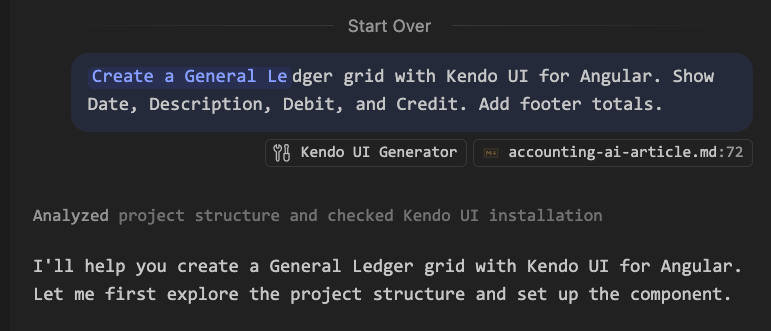
Let’s look at the generated code and why it is production-ready.
// ✅ COMPONENT-AWARE AI: Uses Signals, Modern Angular Patterns, and Kendo's aggregateBy
import { aggregateBy, AggregateResult } from '@progress/kendo-data-query';

export class GeneralLedgerComponent {
 private ledgerService = inject(LedgerService);

 // Modern signal-based state
 protected ledgerEntries = signal<LedgerEntry[]>(this.ledgerService.getLedgerEntries());

 // Kendo's aggregateBy handles all column totals in one call, no manual .reduce() needed
 protected totals = computed<AggregateResult>(() =>
   aggregateBy(this.ledgerEntries(), [
     { field: 'debit', aggregate: 'sum' },
     { field: 'credit', aggregate: 'sum' },
   ])
 );
}
The AI now uses Signals (signal, computed) and proper dependency injection (inject), which are the recommended modern Angular patterns. And instead of a manual .reduce() per column, it uses Kendo UI aggregateBy. Add a new column with a total, and you just add one line to the array, nothing else.
In the SCSS file, instead of hard-coding colors, it uses official Kendo UI Design Tokens such as var(--kendo-color-surface-alt) and var(--kendo-color-success).
And in the template, the difference is clear:
<!-- ✅ COMPONENT-AWARE AI: Design tokens, accessibility, full features enabled -->
<kendo-grid
   [data]="ledgerEntries()"
   [reorderable]="true"
   [navigable]="true"
   role="table"
   aria-label="General Ledger Entries"
>
</kendo-grid>
That is the key difference. When we use Kendo UI for Angular MCP, our agents do not just generate code. They generate the right code, follow best practices and deliver to a high standard.
Here are the three benefits I value most:
- Significantly reduced hallucinations: The AI does not guess property names. It reads the actual documentation in real time.
- Accessible by default: Kendo UI components are built to follow accessibility standards. When the AI uses these components correctly, your app is automatically inclusive.
- Token efficiency: No more copying large lines of documentation into your chat. The AI fetches only what it needs, saving you tokens and money.
Go deeper and explore everything that Kendo UI MCP can do.
Now that we have seen both worlds side by side, let’s talk about what this really means for how we choose our tools going forward.
Conclusion
Simply using AI is not enough. And simply using a component library is not enough anymore, either.
This is the paradigm shift. We are moving from a world where a library just gives you components to one where a library also provides the context layer that makes modern development possible. Kendo UI MCP is exactly that: it acts as a bridge between your agents and the library so that the AI can do its job properly rather than guessing.
By bridging that context gap, we move from “guessing” to “knowing” and agents stop hallucinating APIs and start delivering production-ready code.
My personal take: Next time you evaluate a UI library, do not just look at the component catalog. Ask if your framework has the tools for the way we build software today. Because that is the question I ask myself now, every time.
BTW, if you want to work less and ship more, it is time to make your agents work for you so you can focus on building what really matters.
Resources
- Kendo UI for Angular
- MCP Protocol: Learn more about MCP
Try Now
Remember, Kendo UI for Angular comes with a free 30-day trial, so you can explore all these goodies yourself.

Dany Paredes
Dany Paredes is a Google Developer Expert on Angular and Progress Champion. He loves sharing content and writing articles about Angular, TypeScript and testing on his blog and on Twitter (@danywalls).
Related Posts
Comments
All articles
Topics
Web MobileMobile
Desktop
Design
Productivity
People