Getting Started
This tutorial walks you through the creation of a RadContextMenu.
Before reading this tutorial you should get familiar with the Visual Structure of the standard RadContextMenu control.
Adding Telerik Assemblies Using NuGet
To use RadContextMenu when working with NuGet packages, install the Telerik.Windows.Controls.Navigation.for.Wpf.Xaml package. The package name may vary slightly based on the Telerik dlls set - Xaml or NoXaml
Read more about NuGet installation in the Installing UI for WPF from NuGet Package article.
With the 2025 Q1 release, the Telerik UI for WPF has a new licensing mechanism. Learn more in Installing the License Key.
Adding Assembly References Manually
If you are not using NuGet packages, you can add a reference to the following assemblies:
- Telerik.Licensing.Runtime
- Telerik.Windows.Controls
- Telerik.Windows.Controls.Navigation
You can find the required assemblies for each control from the suite in the Controls Dependencies help article.
Attaching Context Menu to UI Element
In order to add a RadContextMenu control to your UserControl you have to declare the following namespace:
Declare the Telerik Namespace
xmlns:telerik="http://schemas.telerik.com/2008/xaml/presentation"This tutorial will show you how to attach a RadContextMenu to a TextBox control. Here is the TextBox control definition.
Define the TextBox
<Grid x:Name="LayoutRoot"
      Background="White">
    <TextBox x:Name="InputBox"
             Width="200"
             VerticalAlignment="Top">
    </TextBox>
</Grid>
The next step is to set the ContextMenu attached property of the RadContextMenu class to the TextBox control.
ContextMenu="{x:Null}" is needed to override the default context menu of the textbox.
Attach RadContextMenu to the TextBox
<Grid xmlns:telerik="http://schemas.telerik.com/2008/xaml/presentation"
    Background="White">
    <TextBox Width="200"
             VerticalAlignment="Top"
             ContextMenu="{x:Null}">
        <telerik:RadContextMenu.ContextMenu>
            <telerik:RadContextMenu />
        </telerik:RadContextMenu.ContextMenu>
    </TextBox>
</Grid>
If you run the application and right-click on the TextBox you will see an empty context menu.
RadContextMenu with an Empty Context Menu

Adding Menu Items
The class that represents the menu item is Telerik.Windows.Controls.RadMenuItem. To learn more about it, please take a look at the RadMenu help content.
The RadContextMenu accepts RadMenuItems as child items. Here is a sample declaration of several child menu items.
Define RadMenuItems
<TextBox xmlns:telerik="http://schemas.telerik.com/2008/xaml/presentation"
         Width="200"
         VerticalAlignment="Top"
         ContextMenu="{x:Null}">
    <telerik:RadContextMenu.ContextMenu>
        <telerik:RadContextMenu>
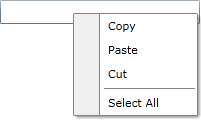
            <telerik:RadMenuItem Header="Copy" />
            <telerik:RadMenuItem Header="Paste" />
            <telerik:RadMenuItem Header="Cut" />
            <telerik:RadMenuItem IsSeparator="True" />
            <telerik:RadMenuItem Header="Select All" />
        </telerik:RadContextMenu>
    </telerik:RadContextMenu.ContextMenu>
</TextBox>
Here is a snapshot of the result.
RadContextMenu with Menu Items
Populating the RadContextMenu with Data
The scenario described in the previous sections covers the usage of static items, declared directly in XAML.
However, in most of the cases you have to bind your RadContextMenu to a collection of business objects. Check out the Data Binding article which describes in detail how to work with dynamic data, including the supported data sources and the ItemContainerStyle mechanism.
To adjust the appearance of the RadContextMenu's items depending on the data they hold, read the Item Template and Style Selectors article.
Working with the RadContextMenu
In order to learn how to use the RadContextMenu and what capabilities it holds, read the various topics that describe its features.
Telerik UI for WPF Learning Resources
- Telerik UI for WPF ContextMenu Component
- Getting Started with Telerik UI for WPF Components
- Telerik UI for WPF Installation
- Telerik UI for WPF and WinForms Integration
- Telerik UI for WPF Visual Studio Templates
- Setting a Theme with Telerik UI for WPF
- Telerik UI for WPF Virtual Classroom (Training Courses for Registered Users)
- Telerik UI for WPF License Agreement