Drag and Drop of Grid Items
This article explains how to enable and handle drag-and-drop operations for grid items. It includes the following sections.
Overview
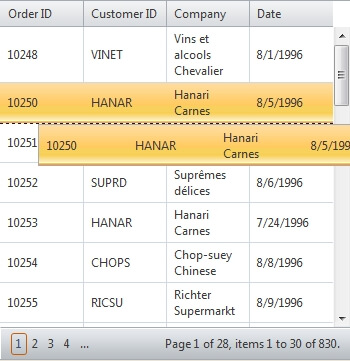
RadGrid provides an event-driven mechanism for reordering records within the same grid, moving records between grid instances, or dropping records on another HTML element. Set AllowRowsDragDrop to true to enable row drag-and-drop. If the operation also requires row selection, set AllowRowSelect to true.
<telerik:RadGrid runat="server" RenderMode="Lightweight">
    <ClientSettings AllowRowsDragDrop="true">
        <Selecting AllowRowSelect="True" />
    </ClientSettings>
</telerik:RadGrid>
This makes the data rows draggable. You can also define a GridDragDropColumn in the GridTableView Columns collection to make items draggable only when the user grabs the drag handle. For a live demo, see the RadGrid Items Drag-and-Drop live example.
Depending on whether you drag an item above or below another record, it is placed above or below the corresponding grid item. This placement applies when you reorder rows within the same RadGrid or move rows from one RadGrid to another.
The event-driven model for processing a drag-and-drop operation has two phases: client-side and server-side.
Handling Drag-and-drop
When a user drags and drops rows, the client-side action occurs first. If the operation is not canceled, RadGrid makes a postback so the server can process the data change, such as updating the data source. The following sections explain what you can do in each phase.
Client-side phase
There are three client grid events exposed to handle drag/drop action: OnRowDragStarted (cancelable), OnRowDropping (cancelable) and OnRowDropped.
-
Use the cancelable OnRowDragStarted event to perform a conditional check before the drag operation begins. The row being dragged is available through the get_gridDataItem() method on the event arguments.
-
Use the cancelable OnRowDropping event to inspect the target element. If the target is not valid, cancel the operation by calling
args.set_cancel(true). Useargs.get_destinationHtmlElement()to get the destination element orargs.set_destinationHtmlElement()to set it explicitly. -
Use OnRowDropped to execute additional client-side logic before the server-side OnRowDrop event is raised. This event cannot be canceled and has the same arguments as OnRowDropping.
Server-side phase
On the server, the OnRowDrop event lets you reorder items in the source grid or remove them and append them to a destination grid. The exact data operations depend on the underlying data source and data model. The event arguments provide the information needed to complete the operation:
-
e.HtmlElement - contains the ID of the HTML element that received the drop, when the destination is not a grid item
-
e.DestDataItem - the destination GridDataItem, or
nullwhen the row is dropped where no data item is targeted -
e.DraggedItems - a collection of GridDataItem objects representing the rows in the current drop operation
-
e.DestinationGrid - a reference to the grid instance to which the row was dragged
-
e.DestinationTableView - a reference to the table to which the row was dragged, such as the MasterTableView or a detail table in a hierarchical grid
Combining the client- and server-side logic completes the drag-and-drop operation. For a richer user experience, you can ajaxify the grid with RadAjaxManager and use RadAjaxLoadingPanel indicators. Otherwise, the operation uses a regular postback.
Scrolling
When dragging an item within the grid to reposition it, the grid can scroll automatically with the drag operation. The only requirement is that you enable scrolling. When configuring scrolling, you may also find useful the Height vs. ScrollHeight article.
You can stop the automatic scrolling by setting ClientSettings.AllowAutoScrollOnDragDrop="false".
The user can drag an item to an arbitrary element on the page or to another grid. The originating grid cannot know about the other HTML structure or its scrolling setup, so automatic scrolling is available only within the source grid.
On mobile devices, row drag-and-drop and scrolling use the same touch gesture on the grid content area. When both features are enabled, RadGrid cannot determine which action the user intends. To distinguish them, use a GridDragDropColumn. Dragging the row handle performs the drag-and-drop operation, while dragging elsewhere in the content area scrolls the grid.
Row Selection
With single row selection enabled (AllowMultiRowSelection="false") the items will be automatically selected when a drag action is triggered.
With multi-row selection enabled (AllowMultiRowSelection="true") a prerequisite is first to select row(s) and then drag to reorder them/drop them over other grid/html element.
Examples
The following example is extracted from the item drag-and-drop online demo:
<asp:ScriptManager ID="ScriptManager1" runat="server" />
<telerik:RadAjaxLoadingPanel ID="RadAjaxLoadingPanel" runat="server" Transparency="30" CssClass="LoadingPanel_Hay"></telerik:RadAjaxLoadingPanel>
<telerik:RadAjaxManager runat="server" ID="radAjax" DefaultLoadingPanelID="RadAjaxLoadingPanel">
    <AjaxSettings>
        <telerik:AjaxSetting AjaxControlID="grdPendingOrders">
            <UpdatedControls>
                <telerik:AjaxUpdatedControl ControlID="grdPendingOrders" />
                <telerik:AjaxUpdatedControl ControlID="grdShippedOrders" />
                <telerik:AjaxUpdatedControl ControlID="msg" />
            </UpdatedControls>
        </telerik:AjaxSetting>
        <telerik:AjaxSetting AjaxControlID="grdShippedOrders">
            <UpdatedControls>
                <telerik:AjaxUpdatedControl ControlID="grdPendingOrders" />
                <telerik:AjaxUpdatedControl ControlID="grdShippedOrders" />
                <telerik:AjaxUpdatedControl ControlID="msg" />
            </UpdatedControls>
        </telerik:AjaxSetting>
    </AjaxSettings>
</telerik:RadAjaxManager>
<telerik:RadScriptBlock runat="server" ID="scriptBlock">
    <script type="text/javascript">
        function onRowDropping(sender, args) {
            if (sender.get_id() == "grdPendingOrders") {
                var node = args.get_destinationHtmlElement();
                if (!isChildOf('<%=grdShippedOrders.ClientID %>', node) && !isChildOf('<%=grdPendingOrders.ClientID %>', node)) {
                    args.set_cancel(true);
                }
            }
            else {
                var node = args.get_destinationHtmlElement();
                if (!isChildOf('trashCan', node)) {
                    args.set_cancel(true);
                }
                else {
                    if (confirm("Are you sure you want to delete this order?"))
                        args.set_destinationHtmlElement('trashCan');
                    else
                        args.set_cancel(true);
                }
            }
        }
         function isChildOf(parentId, element) {
            while (element) {
                if (element.id && element.id.indexOf(parentId) > -1) {
                    return true;
                }
                element = element.parentNode;
            }
            return false;
        }
    </script>
</telerik:RadScriptBlock>

<div class="exWrap">
     <p class="howto">Drag orders from pending to shipped when dispatched<br />
     Reorder pending orders on priority<br />
     Drop a shipped order over the recycle bin to delete it</p>
     <div style="float:left; padding:0 6px 0 10px">
         <h2 style="color:#9c3608">Pending Orders</h2>
         <telerik:RadGrid RenderMode="Lightweight" runat="server" ID="grdPendingOrders" Skin="Silk" OnNeedDataSource="grdPendingOrders_NeedDataSource"
             AllowPaging="True" Width="350px" OnRowDrop="grdPendingOrders_RowDrop"
             AllowMultiRowSelection="true">
             <MasterTableView DataKeyNames="OrderId">
             </MasterTableView>
             <ClientSettings AllowRowsDragDrop="True">
                   <Selecting AllowRowSelect="True" EnableDragToSelectRows="true"/>
                   <ClientEvents OnRowDropping="onRowDropping" />
             </ClientSettings>
         </telerik:RadGrid>
     </div>
     <div style="float:right; padding:0 10px 0 6px">
         <h2 style="color:#3c8b04">Shipped Orders</h2>
         <telerik:RadGrid RenderMode="Lightweight" runat="server" AllowPaging="True" ID="grdShippedOrders" Skin="Silk"
              OnNeedDataSource="grdShippedOrders_NeedDataSource" Width="350px"
              OnRowDrop="grdShippedOrders_RowDrop" AllowMultiRowSelection="false">
             <MasterTableView DataKeyNames="OrderId">
             </MasterTableView>
             <ClientSettings AllowRowsDragDrop="True">
                 <Selecting AllowRowSelect="True" EnableDragToSelectRows="false"/>
                 <ClientEvents OnRowDropping="onRowDropping" />
             </ClientSettings>
         </telerik:RadGrid>
     </div>
     <div style="clear:both;"><!-- --></div>
     <div class="exFooter">
         <div id="trashCan">Recycle Bin</div>
         <div class="exMessage" runat="server" id="msg" visible="false" enableviewstate="false">
              Order(s) successfully deleted!
         </div>
 </div>
</div>protected IList<Order> PendingOrders
{
get
{
try
{
object obj = Session["PendingOrders"];
if (obj == null)
{
obj = GetOrders();
if (obj != null)
{
Session["PendingOrders"] = obj;
}
else
{
obj = new List<Order>();
}
}
return (IList<Order>)obj;
}
catch
{
Session["PendingOrders"] = null;
}
return new List<Order>();
}
set
{
Session["PendingOrders"] = value;
}
}
protected IList<Order> ShippedOrders
{
get
{
try
{
object obj = Session["ShippedOrders"];
if (obj == null)
{
Session["ShippedOrders"] = obj = new List<Order>();
}
return (IList<Order>)obj;
}
catch
{
Session["ShippedOrders"] = null;
}
return new List<Order>();
}
set
{
Session["ShippedOrders"] = value;
}
}
protected void grdPendingOrders_NeedDataSource(object source, GridNeedDataSourceEventArgs e)
{
grdPendingOrders.DataSource = PendingOrders;
}
protected IList<Order> GetOrders()
{
IList<Order> results = new List<Order>();
using (IDbConnection connection = DbProviderFactories.GetFactory("System.Data.SqlClient").CreateConnection())
{
connection.ConnectionString = ConfigurationManager.ConnectionStrings["NorthwindConnectionString"].ConnectionString;
using (IDbCommand command = connection.CreateCommand())
{
command.CommandText = "SELECT o.OrderID, o.CustomerID, o.RequiredDate, c.CompanyName FROM orders o INNER JOIN customers c on o.customerID = c.customerID";
connection.Open();
try
{
IDataReader reader = command.ExecuteReader();
while (reader.Read())
{
int id = (int)reader.GetValue(reader.GetOrdinal("OrderID"));
string customerID = (!reader.IsDBNull(reader.GetOrdinal("CustomerID"))) ? (string)reader.GetValue(reader.GetOrdinal("CustomerID")) : string.Empty;
DateTime requiredDate = (!reader.IsDBNull(reader.GetOrdinal("RequiredDate"))) ? (DateTime)reader.GetValue(reader.GetOrdinal("RequiredDate")) : DateTime.MinValue;
string companyName = (!reader.IsDBNull(reader.GetOrdinal("CompanyName"))) ? (string)reader.GetValue(reader.GetOrdinal("CompanyName")) : string.Empty;
results.Add(new Order(id, customerID, companyName, requiredDate.ToShortDateString()));
}
}
catch
{
results.Clear();
}
}
}
return results;
}
protected void grdShippedOrders_NeedDataSource(object source, GridNeedDataSourceEventArgs e)
{
grdShippedOrders.DataSource = ShippedOrders;
}
protected void grdPendingOrders_RowDrop(object sender, GridDragDropEventArgs e)
{
if (string.IsNullOrEmpty(e.HtmlElement))
{
if (e.DraggedItems[0].OwnerGridID == grdPendingOrders.ClientID)
{ // items are drag from pending to shipped grid
if ((e.DestDataItem == null && ShippedOrders.Count == 0) || e.DestDataItem != null && e.DestDataItem.OwnerGridID == grdShippedOrders.ClientID)
{
IList<Order> shippedOrders = ShippedOrders;
IList<Order> pendingOrders = PendingOrders;
foreach (GridDataItem draggedItem in e.DraggedItems)
{
Order tmpOrder = GetOrder(pendingOrders, (int)draggedItem.GetDataKeyValue("OrderId"));
if (tmpOrder != null)
{
shippedOrders.Add(tmpOrder);
pendingOrders.Remove(tmpOrder);
}
}
ShippedOrders = shippedOrders;
PendingOrders = pendingOrders;
grdPendingOrders.Rebind();
grdShippedOrders.Rebind();
}
else if (e.DestDataItem != null && e.DestDataItem.OwnerGridID == grdPendingOrders.ClientID)
{ //reorder items in pending grid
IList<Order> pendingOrders = PendingOrders;
Order order = GetOrder(pendingOrders, (int)e.DestDataItem.GetDataKeyValue("OrderId"));
int destinationIndex = pendingOrders.IndexOf(order);
List<Order> ordersToMove = new List<Order>();
foreach (GridDataItem draggedItem in e.DraggedItems)
{
Order tmpOrder = GetOrder(pendingOrders, (int)draggedItem.GetDataKeyValue("OrderId"));
if (tmpOrder != null)
ordersToMove.Add(tmpOrder);
}
foreach (Order orderToMove in ordersToMove)
{
pendingOrders.Remove(orderToMove);
pendingOrders.Insert(destinationIndex, orderToMove);
}
PendingOrders = pendingOrders;
grdPendingOrders.Rebind();
e.DestDataItem.Selected = true;
}
}
}
}
private static Order GetOrder(IEnumerable<Order> ordersToSearchIn, int orderId)
{
foreach (Order order in ordersToSearchIn)
{
if (order.OrderID == orderId)
{
return order;
}
}
return null;
}
protected void grdShippedOrders_RowDrop(object sender, GridDragDropEventArgs e)
{
if (!string.IsNullOrEmpty(e.HtmlElement) && e.HtmlElement == "trashCan")
{
IList<Order> shippedOrders = ShippedOrders;
bool deleted = false;
foreach (GridDataItem draggedItem in e.DraggedItems)
{
Order tmpOrder = GetOrder(shippedOrders, (int)draggedItem.GetDataKeyValue("OrderId"));
if (tmpOrder != null)
{
shippedOrders.Remove(tmpOrder);
deleted = true;
}
}
if (deleted)
{
msg.Visible = true;
}
ShippedOrders = shippedOrders;
grdShippedOrders.Rebind();
}
}
protected class Order
{
private string _companyName;
private string _customerId;
private int _orderId;
private string _date;
public Order(int orderId, string customerId, string companyName, string requiredDate)
{
_orderId = orderId;
_customerId = customerId;
_companyName = companyName;
_date = requiredDate;
}
public int OrderID
{
get
{
return _orderId;
}
}
public string CustomerID
{
get
{
return _customerId;
}
}
public string Company
{
get
{
return _companyName;
}
}
public string Date
{
get
{
return _date;
}
}
}