Data Items
Rows in RadGrid are represented by the GridItem class and its descendants. There are two types of rows:
-
Static rows
-
Dynamic rows
Static Rows
Static rows are always present in the grid structure, regardless of whether they are visible. Their number is known in advance. This group includes header and footer rows, the CommandItem, the status bar item, and the pager row.
Dynamic Rows
Each dynamic row in the grid represents a record from the specified data source. Dynamic rows are represented by the GridDataItem class, which derives from GridItem.
Each GridTableView has a set of rows in its Items collection. These rows are GridDataItem instances. The collection does not provide methods to add or remove items, but you can control an item’s content by handling the ItemCreated event.
- Only Items bound to the data source (such as normal and alternating rows) are kept in the Items collection. The header, footer, pager, filter and separator are not included in this collection.
- The ItemsHierarchy collection contains all Items of the owner's GridTableView and all Items of the child views nested in that table view.
- The Items property of RadGrid is a reference to the ItemsHierarchy property of its MasterTableView .>
The number of dynamic rows depends on the number of records in the data source and the number of groups, if grouping is enabled. Dynamic rows consist of data items, nested-view items, group-header items, and edit-form items. For examples of these row types, see Overview of Telerik RadGrid structure.
Data items can come in two types:
-
Normal Rows - these are the odd rows of the grid (see rows 1 and 3 below). The appearance of the normal rows is controlled by the ItemStyle property.
-
Alternating Rows - these are the even rows of the grid (see rows 2 and 4 below). The appearance of the alternating rows is controlled by the AlternatingItemStyle property.
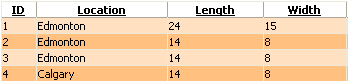
Both ItemStyle and AlternatingItemStyle are of type GridTableItemStyle. For skins with different normal and alternating row styles, you can disable the zebra effect by setting ClientSettings > EnableAlternatingItems to false.