.NET MAUI SegmentedControl Keyboard Navigation Support on Desktop
The Telerik UI for .NET MAUI SegmentedControl provides keyboard navigation support on WinUI and MacCatalyst.
The table below lists the available keyboard combinations and their corresponding actions:
| Hotkey | Action |
|---|---|
Tab | Enters or exits the SegmentedControl and navigates between segments. |
Shift + Tab | Enters or exits the SegmentedControl. |
Left Arrow | Navigates to the previous item in the SegmentedControl. |
Right Arrow | Navigates to the next item in the SegmentedControl. |
Enter | Selects the currently focused segment. |
Track the Current and Selected Items
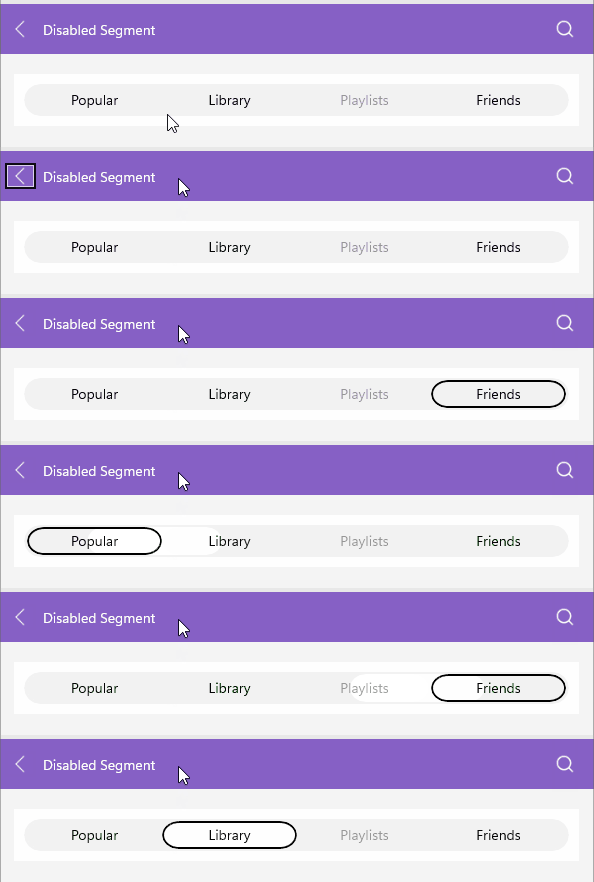
During keyboard navigation, the CurrentItem property identifies the segment that currently has keyboard focus. The SelectedItem property identifies the committed selection. Arrow keys can change CurrentItem without changing SelectedItem; pressing Enter or Space selects the current segment.
The SegmentedControl does not expose a dedicated CurrentItemChanged event. To observe changes to the current item in code, handle the control's PropertyChanged event and check for the CurrentItem property name:
private void OnSegmentedControlPropertyChanged(object sender, System.ComponentModel.PropertyChangedEventArgs e)
{
	if (e.PropertyName == nameof(RadSegmentedControl.CurrentItem) && sender is RadSegmentedControl segmentedControl)
	{
		object currentItem = segmentedControl.CurrentItem;
	}
}
You can also bind CurrentItem to a view-model property. Use the SelectionChanged event to respond to changes in the committed selection.
Here is how the keyboard navigation support looks on WinUI: