Selection in .NET MAUI SegmentedControl
The SegmentedControl exposes a rich set of properties, events, and commands for working with the selection of its segments.
Selection Properties
The SegmentedControl provides the following properties for working with the current selection:
SelectedIndex(int)—Specifies the index of the first item in the current selection, or-1if the selection is empty.SelectedItem(object)—Defines the first item in the current selection, ornullif the selection is empty.
Selection Modes
The segment selection behavior is defined by the SelectionMode (Telerik.Maui.Controls.SegmentedControl.SegmentedControlSelectionMode) property, which determines how items can be selected by user interaction. The control supports three selection modes:
- (Default)
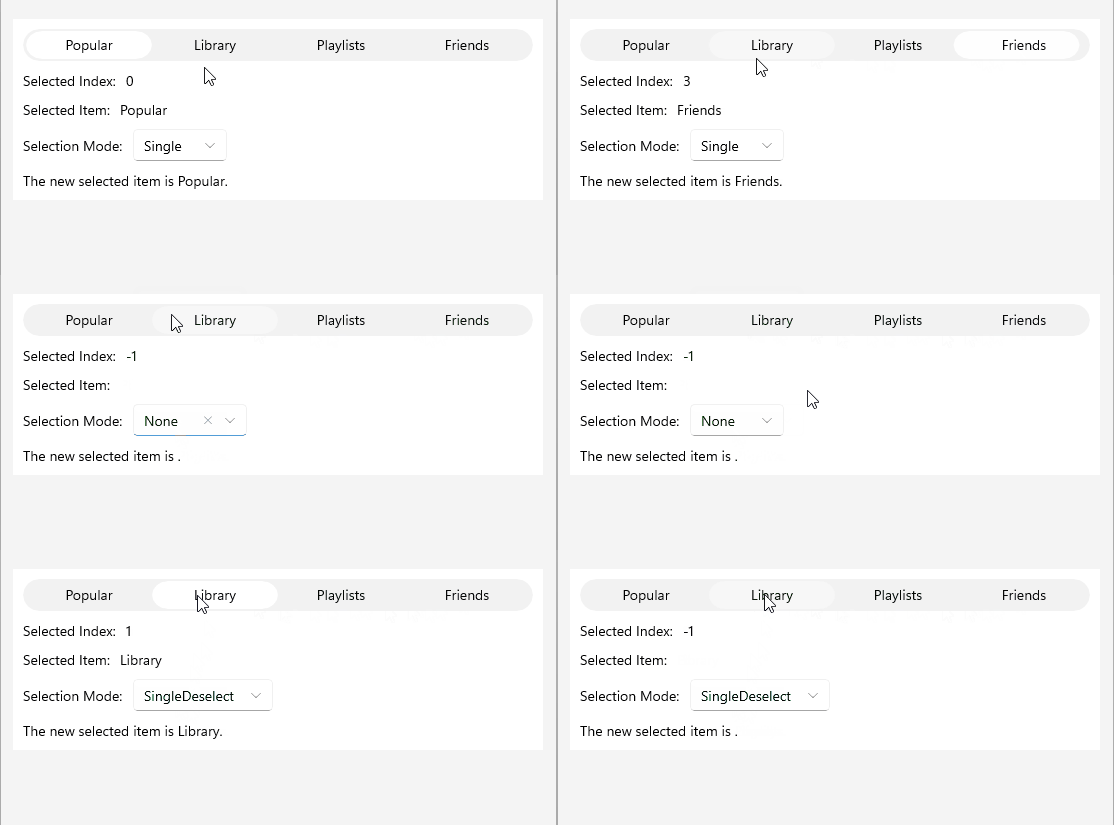
Single—Only one segment can be selected at a time. Tapping the selected segment again keeps it selected. SingleDeselect—Only one segment can be selected at a time. Tapping the selected segment again deselects it.None—Tapping a segment performs no selection. Programmatic values assigned toSelectedIndexandSelectedItemare coerced to-1andnull, respectively.
Selection Event
The SegmentedControl raises the SelectionChanged event when the current selection changes, either programmatically or as a result of user interaction. The event handler receives a RadSelectionChangedEventArgs argument that exposes the added and removed items.
To respond to tap interactions regardless of the current selection, use the
ItemTappedevent or theItemTappedCommandcommand. For more information, see the Item Tapped article.
Example
The following example demonstrates how to use the selection feature of the SegmentedControl.
1. Create a ViewModel with SelectedItem and SelectedIndex properties bound to the SegmentedControl:
public class ViewModel : NotifyPropertyChangedBase
{
    private object selectedItem;
    private int selectedIndex;

    public ViewModel()
    {
        this.Categories = new ObservableCollection<string>() { "Popular", "Library", "Playlists", "Friends" };
        this.SelectedItem = this.Categories[2];
        this.SelectedIndex = 2;
    }

    public ObservableCollection<string> Categories { get; set; }

    public object SelectedItem
    {
        get { return this.selectedItem; }
        set { this.UpdateValue(ref this.selectedItem, value); }
    }

    public int SelectedIndex
    {
        get { return this.selectedIndex; }
        set { this.UpdateValue(ref this.selectedIndex, value); }
    }
}
2. Add the SegmentedControl definition in XAML:
<telerik:RadSegmentedControl x:Name="segmentControl"
                             ItemsSource="{Binding Categories}"
                             SelectedItem="{Binding SelectedItem, Mode=TwoWay}"
                             SelectionChanged="OnSelectionChanged"
                             SelectedIndex="{Binding SelectedIndex, Mode=TwoWay}"
                             SelectionMode="SingleDeselect" />
3. Set the BindingContext of the control:
this.BindingContext = new ViewModel();4. Handle the SegmentedControl SelectionChanged event:
private void OnSelectionChanged(object sender, Telerik.Maui.RadSelectionChangedEventArgs e)
{
    var item = e.AddedItems.FirstOrDefault();
    this.selectionItemLabel.Text = $"The new selected item is {item}.";
}
This is the result:
For a runnable example demonstrating the SegmentedControl Selection scenarios, see the SDKBrowser Demo Application and go to the SegmentedControl > Selection category.