.NET MAUI RefreshView Templates
The RefreshView templates let you replace the built-in indicator with custom content. Use templates when the Circular, Spinner, and Arrow indicators don't match your design, for example, to show a progress bar and a text message.
Define Custom Indicator Content
To define custom indicator content, use the following properties:
PullingTemplate(DataTemplate)—Defines the content shown while the user pulls. If the value isnull, the RefreshView shows the built-in indicator selected byIndicatorType.RefreshingTemplate(DataTemplate)—Defines the content shown while a refresh is in progress. If the value isnull, the RefreshView shows the built-in indicator selected byIndicatorType.
If the root element of a template doesn't have an explicitly set BindingContext, the RefreshView sets the binding context to the RadRefreshView instance. As a result, you can bind elements in the template to RefreshView properties, for example, to Progress, which returns the pull progress from 0.0 to 1.0.
To set the size of the area that hosts the template, use the IndicatorAreaLength property. For more information, see Thresholds.
Show a Progress Bar While Pulling
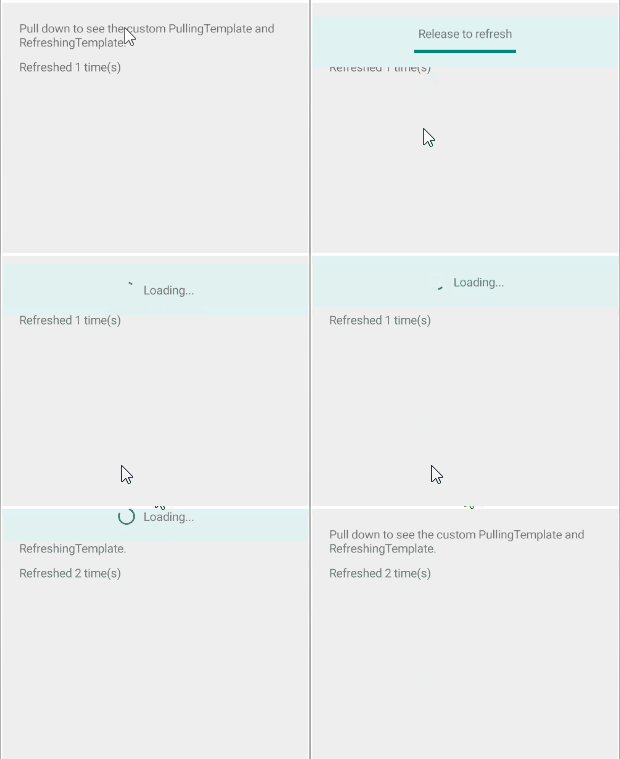
The following example demonstrates how to show a label and a progress bar while pulling and an activity indicator while refreshing.
-
Define the RefreshView with the
PullingTemplateandRefreshingTemplatein XAML:XAML<telerik:RadRefreshView x:Name="refreshView" IndicatorAreaLength="60" Refreshing="OnRefreshing"> <telerik:RadRefreshView.PullingTemplate> <DataTemplate> <telerik:RadBorder BackgroundColor="#E0F2F1"> <VerticalStackLayout HorizontalOptions="Center" VerticalOptions="Center" Spacing="4" BackgroundColor="#E0F2F1"> <Label Text="Release to refresh" HorizontalOptions="Center" Opacity="{Binding Progress}" /> <ProgressBar Progress="{Binding Progress}" WidthRequest="120" ProgressColor="#00897B" /> </VerticalStackLayout> </telerik:RadBorder> </DataTemplate> </telerik:RadRefreshView.PullingTemplate> <telerik:RadRefreshView.RefreshingTemplate> <DataTemplate> <telerik:RadBorder BackgroundColor="#E0F2F1"> <HorizontalStackLayout HorizontalOptions="Center" VerticalOptions="Center" Spacing="8"> <ActivityIndicator IsRunning="True" Color="#00897B" WidthRequest="24" HeightRequest="24" /> <Label Text="Loading..." VerticalOptions="Center" /> </HorizontalStackLayout> </telerik:RadBorder> </DataTemplate> </telerik:RadRefreshView.RefreshingTemplate> <VerticalStackLayout Padding="20" Spacing="10" BackgroundColor="#EEEEEE"> <Label Text="Pull down to see the custom PullingTemplate and RefreshingTemplate." /> <Label x:Name="statusLabel" Text="Not refreshed yet" /> </VerticalStackLayout> </telerik:RadRefreshView> -
Add the
teleriknamespace:XAMLxmlns:telerik="http://schemas.telerik.com/2022/xaml/maui" -
Handle the
Refreshingevent and end the refresh when the data is loaded:C#private async void OnRefreshing(object sender, EventArgs e) { await Task.Delay(2000); this.refreshCount++; this.statusLabel.Text = $"Refreshed {this.refreshCount} time(s)"; this.refreshView.IsRefreshing = false; }
The following image shows the result:
For a runnable example with the RefreshView Templates scenario, see the SDKBrowser Demo Application and go to the RefreshView > Features category.