or
1 answer
140 views
On you example of the my portal site you don't really destroy the objects after closing em! What i want to know is, is it possible to close a dock, remove it from the server side dock state list and recreate it with his old id?
An example would be to show only one calculator or only one horoscope and this widget should always have the same id.
An example would be to show only one calculator or only one horoscope and this widget should always have the same id.

Petya
Telerik team

answered
on
16 Aug 2007
3 answers
226 views
I am using the full featured Rad Editor for MOSS and have enabled it for list items. When I add/edit a list item the text appears in Times New Roman inside the editor but when I view the list item it appears in the default font Tahoma. How can I change it to Tahoma 11px inside the editor?
I am using IE 6.
I am using IE 6.
Georgi Tunev
Telerik team
answered
on
16 Aug 2007
1 answer
130 views
Is rad Slider supported in firefox? I cant get the sample prometheus app work. (image below)
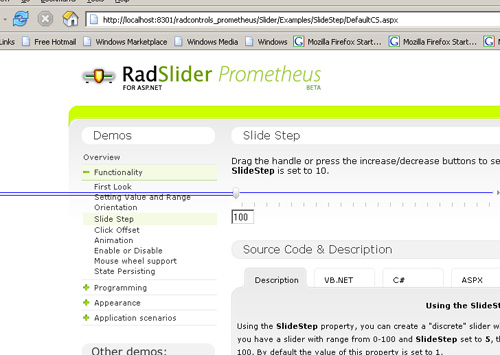
where the slider head is in this picture is as far to the right as i can move it and it ads the blue lines. I am using ff 1.0.7
where the slider head is in this picture is as far to the right as i can move it and it ads the blue lines. I am using ff 1.0.7
Petio Petkov
Telerik team
answered
on
16 Aug 2007
1 answer
252 views
Hello,
I changed my project to Prometheus and I start getting a error like:
"Cannot find update panel with id: ctl00_ctl00_Content1_Button1"
The update control ControlID server side is ctl00_Content1_Button1 but in client side it’s wrongly formed. It seems to me that it depends from the relative path between the AjaxManager and the control to update.
Later I understood that this happens because I had the AjaxSetting on the AjaxRequest handler. The previous version of RadAjaxManager supported this perfectly, Prometheus does not. I must add the setting during OnLoad.
In my project the control to update depends of AjaxRequestEventArgs Argument. I think this is an important feature that you should implement in the future.
I added a small example showing the problem I described.
Best regards,
Tiago Veiga.
Master.master
| <%@ Master Language="C#" AutoEventWireup="true" CodeFile="MasterPage.master.cs" Inherits="MasterPage" %> |
| <!DOCTYPE html PUBLIC "-//W3C//DTD XHTML 1.0 Transitional//EN" "http://www.w3.org/TR/xhtml1/DTD/xhtml1-transitional.dtd"> |
| <html xmlns="http://www.w3.org/1999/xhtml" > |
| <head runat="server"> |
| <title>Untitled Page</title> |
| </head> |
| <body> |
| <form id="form1" runat="server"> |
| <asp:ScriptManager ID="ScriptManager1" runat="server" /> |
| <telerik:RadAjaxManager ID="AjaxManager" runat="server" ></telerik:RadAjaxManager> |
| <div> |
| <asp:contentplaceholder id="ContentPlaceHolder1" runat="server"> |
| </asp:contentplaceholder> |
| <asp:contentplaceholder id="ContentPlaceHolder2" runat="server"> |
| </asp:contentplaceholder> |
| <asp:contentplaceholder id="ContentPlaceHolder3" runat="server"> |
| </asp:contentplaceholder> |
| </div> |
| </form> |
| <telerik:RadCodeBlock ID="cb1" runat="server"> |
| <script type="text/javascript"> |
| function DoCallBack(panelnumber) |
| { |
| <%= AjaxManager.ClientID %>.AjaxRequest(panelnumber); |
| } |
| </script> |
| </telerik:RadCodeBlock> |
| </body> |
| </html> |
Default.aspx
| <%@ Page Language="C#" AutoEventWireup="true" CodeFile="Default.aspx.cs" Inherits="_Default" MasterPageFile="~/MasterPage.master" %> |
| <asp:Content ID="Content1" ContentPlaceHolderID="ContentPlaceHolder1" runat="Server"> |
| <asp:LinkButton ID="lb1" Text="Update Content1!" runat="server" OnClientClick="DoCallBack('1'); return false;" /> |
| <asp:LinkButton ID="lb2" Text="Update Content2!" runat="server" OnClientClick="DoCallBack('2'); return false;" /> |
| </asp:Content> |
| <asp:Content ID="Content2" ContentPlaceHolderID="ContentPlaceHolder2" runat="Server"> |
| <asp:Label ID="lab1" runat="server" Text="Label1"; /> |
| </asp:Content> |
| <asp:Content ID="Content3" ContentPlaceHolderID="ContentPlaceHolder3" runat="Server"> |
| <asp:Label ID="lab2" runat="server" Text="Label2"; /> |
| </asp:Content> |
Default.aspx.cs
| using System; |
| using System.Data; |
| using System.Configuration; |
| using System.Web; |
| using System.Web.Security; |
| using System.Web.UI; |
| using System.Web.UI.WebControls; |
| using System.Web.UI.WebControls.WebParts; |
| using System.Web.UI.HtmlControls; |
| using Telerik.Web.UI; |
| public partial class _Default : System.Web.UI.Page |
| { |
| protected void Page_Load(object sender, EventArgs e) |
| { |
| RadAjaxManager ajaxmanager = (RadAjaxManager)Page.Master.FindControl("AjaxManager"); |
| ajaxmanager.AjaxRequest += new RadAjaxControl.AjaxRequestDelegate(ajaxmanager_AjaxRequest); |
| ajaxmanager.AjaxSettings.AddAjaxSetting(ajaxmanager, lab2); |
| } |
| void ajaxmanager_AjaxRequest(object sender, AjaxRequestEventArgs e) |
| { |
| switch (e.Argument) |
| { |
| case "1": |
| lab1.Text = "Label1 " + DateTime.Now.Ticks; |
| (sender as RadAjaxManager).AjaxSettings.AddAjaxSetting((Control)sender, lab1); |
| break; |
| case "2": |
| lab2.Text = "Label2 " + DateTime.Now.Ticks; |
| break; |
| default: |
| break; |
| } |
| } |
| } |
Steve
Telerik team
answered
on
16 Aug 2007
3 answers
369 views
Hello,
I have a Menu. I am able to drag and drop a menu item to the content area of the master page. On the drop of the menu item I make a client-side Ajax Request to the server. The request goes successfully.
On the server-side in the AjaxManager_AjaxRequest event, I render a few controls at runtime. Unfortunately, all the code executes successfully but, nothing is rendered in the content area.
I have tried adding the Ajax Settings using code as I am using a User Control at runtime. Please help!!
Regards,
William
I have a Menu. I am able to drag and drop a menu item to the content area of the master page. On the drop of the menu item I make a client-side Ajax Request to the server. The request goes successfully.
On the server-side in the AjaxManager_AjaxRequest event, I render a few controls at runtime. Unfortunately, all the code executes successfully but, nothing is rendered in the content area.
I have tried adding the Ajax Settings using code as I am using a User Control at runtime. Please help!!
Regards,
William
Yavor
Telerik team
answered
on
15 Aug 2007
4 answers
258 views
Hi there,
I have a couple of problems that I hope you can assist me with:
1.
I would like to insert the r.a.d. editor in my master template as the default editor. I do not want the editor in a web part zone (I want it as a static element). Now if I insert the editor in the master template I am using, it does not show up, it just generates an empty table.
I have inserted other webparts in this manner in the same template without issue (a custom menu wepart for example).
2.
My second issue regards the automatic insertion of Microsofts editor when I create a new page. That page that is used to create a basic webpage is actually here: C:\Program Files\Common Files\Microsoft Shared\web server extensions\12\TEMPLATE\1033\STS\DOCTEMP\BLANKPGS\bpstd.aspx, and I have modified it to only use the content from my master. However, the Microsoft editor is always present on a new basic web page.
Any ideas how to solve these issues would be very much appreciated
Regards
Gary Hayes
I have a couple of problems that I hope you can assist me with:
1.
I would like to insert the r.a.d. editor in my master template as the default editor. I do not want the editor in a web part zone (I want it as a static element). Now if I insert the editor in the master template I am using, it does not show up, it just generates an empty table.
I have inserted other webparts in this manner in the same template without issue (a custom menu wepart for example).
2.
My second issue regards the automatic insertion of Microsofts editor when I create a new page. That page that is used to create a basic webpage is actually here: C:\Program Files\Common Files\Microsoft Shared\web server extensions\12\TEMPLATE\1033\STS\DOCTEMP\BLANKPGS\bpstd.aspx, and I have modified it to only use the content from my master. However, the Microsoft editor is always present on a new basic web page.
Any ideas how to solve these issues would be very much appreciated
Regards
Gary Hayes
nahrar
Top achievements
 Rank 1
Rank 1
answered
on
15 Aug 2007
1 answer
194 views
We just installed the RadEditor on our SharePoint WSS server and everyone loves it! Is there a way to make it be the default editor on new SharePoint Basic Web Pages?
Georgi Tunev
Telerik team
answered
on
15 Aug 2007
8 answers
190 views
Hi,
We had MCMS before and used the Rad Editor for MCMS, but now we have installed MOSS and want to use Rad Editor for that. I have installed it and used the <radE:RadHtmlField .... it works fine in the pages.
My question is how I can set different toolsfile for these? We want different "button settings" in different fields.
Best Regards
Maria
We had MCMS before and used the Rad Editor for MCMS, but now we have installed MOSS and want to use Rad Editor for that. I have installed it and used the <radE:RadHtmlField .... it works fine in the pages.
My question is how I can set different toolsfile for these? We want different "button settings" in different fields.
Best Regards
Maria
Maria
Top achievements
Rank 1
Rank 1
answered
on
15 Aug 2007
6 answers
193 views
This has an effect on only update-panel based controls (Prometheus Ajax items and the Update Panel itself) from AjaxToolkit.
When an item is placed within the sliding pane, and that item (not the pane) updated by an update panel, the pane collapses and reopens (quickly). It's disconcerting, to say the least.
This can be seen not only with the mentioned Ajax from Prometheus, but also from the Ajax (Update Panel) in the ToolTipManager.
I believe this also happens whether or not the element is on the Pane or outside the pane, but since I have just reverted to the old control, I don't have the time really to go back and iterate through the examples. If a developer wishes for more information or a demonstration I can do such, but it's as simple as this:
<splitter>
<pane>
<zone>
<sPane>
<updatePanel>
<trigger> button </trigger>
<content> <item/> </content>
</updatePanel>
</sPane>
</zone>
</pane>
</splitter>
<button>
When an item is placed within the sliding pane, and that item (not the pane) updated by an update panel, the pane collapses and reopens (quickly). It's disconcerting, to say the least.
This can be seen not only with the mentioned Ajax from Prometheus, but also from the Ajax (Update Panel) in the ToolTipManager.
I believe this also happens whether or not the element is on the Pane or outside the pane, but since I have just reverted to the old control, I don't have the time really to go back and iterate through the examples. If a developer wishes for more information or a demonstration I can do such, but it's as simple as this:
<splitter>
<pane>
<zone>
<sPane>
<updatePanel>
<trigger> button </trigger>
<content> <item/> </content>
</updatePanel>
</sPane>
</zone>
</pane>
</splitter>
<button>
MarkInTexas
Top achievements
Rank 1
Rank 1
answered
on
15 Aug 2007
0 answers
125 views
Hi,
I am using Slider to enlarge or shrink some images in the div as like PhotoGallery example. Here i need to set the width and height of the image so that it displays in proper way.
But when i shrink the image using the slider control, it is just reducing the width. is there any property to set the height also.
Regards,
Raja.
I am using Slider to enlarge or shrink some images in the div as like PhotoGallery example. Here i need to set the width and height of the image so that it displays in proper way.
But when i shrink the image using the slider control, it is just reducing the width. is there any property to set the height also.
Regards,
Raja.





