or
1 answer
203 views
Hi,
I have a number of clients (IE 6) that for some reason fail to display the menu using the built in or customised styles. They appear / render as a bulleted list of options rather than a horizontal menu.
On investigation it looks as if the webresouce css file that is sent to the browser is being ignored by some IE 6 browsers. Could this be related to the RadStyleSheetManager? Would you have any idea why this may be happening?
I have tried both V2 and V3 and V3 SP1 Prometheus controls.
Thanks
Mark
I have a number of clients (IE 6) that for some reason fail to display the menu using the built in or customised styles. They appear / render as a bulleted list of options rather than a horizontal menu.
On investigation it looks as if the webresouce css file that is sent to the browser is being ignored by some IE 6 browsers. Could this be related to the RadStyleSheetManager? Would you have any idea why this may be happening?
I have tried both V2 and V3 and V3 SP1 Prometheus controls.
Thanks
Mark

Veselin Vasilev
Telerik team

answered
on
17 Jan 2008
1 answer
114 views
Hello!
When i localized inline the header items (day,week,month) i cant get scheduler working (it inserts the '#' ine url on header item click). Thank You for help!
regards
Radek
When i localized inline the header items (day,week,month) i cant get scheduler working (it inserts the '#' ine url on header item click). Thank You for help!
regards
Radek
T. Tsonev
Telerik team
answered
on
17 Jan 2008
4 answers
193 views
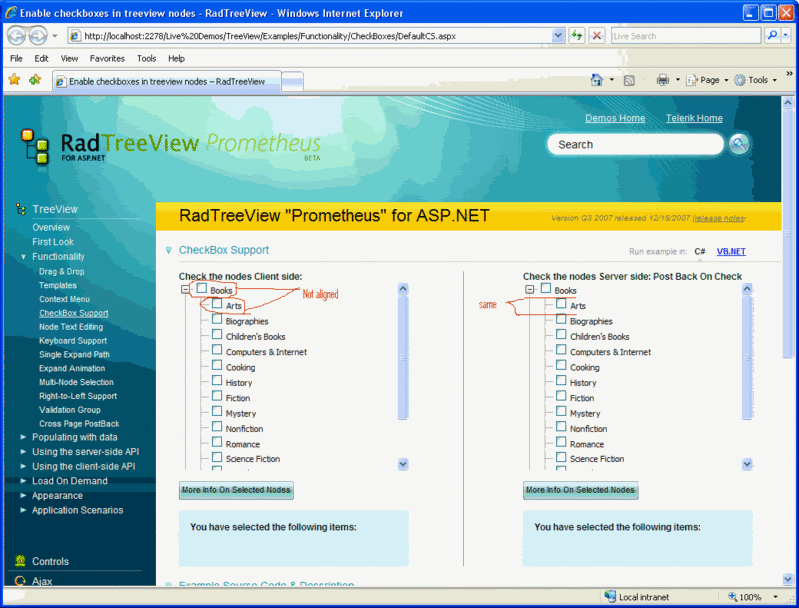
Hello there, im using the TreeView for the first time today, and i've got a problem that is major to me and my client.
The problem is pretty simple : i use the treeview with checkbox and the text of the nodes is NOT aligned with the checkbox, the text appear a little 'lower' than the checkbox. The problem seems to appear on my computer while using the Live demo solution in c# that comes with the Prometheus package.
When i see your demo on my computer, text is not aligned, when i see it on YOUR website's online demo, text is aligned.
The wrong alignement seems more visible with IE6, with firefox its a little more acceptable. Is there anything im doing wrong ? I tried to use style sheets to resolve the problem without success.
I've not modified anything in the demo so it should be working on my computer as it is working on your website :/
Here's a screenshot of what i see with IE6
http://i35.photobucket.com/albums/d164/zheos/Pictures/telerik_treeview.gif
The problem is pretty simple : i use the treeview with checkbox and the text of the nodes is NOT aligned with the checkbox, the text appear a little 'lower' than the checkbox. The problem seems to appear on my computer while using the Live demo solution in c# that comes with the Prometheus package.
When i see your demo on my computer, text is not aligned, when i see it on YOUR website's online demo, text is aligned.
The wrong alignement seems more visible with IE6, with firefox its a little more acceptable. Is there anything im doing wrong ? I tried to use style sheets to resolve the problem without success.
I've not modified anything in the demo so it should be working on my computer as it is working on your website :/
Here's a screenshot of what i see with IE6
http://i35.photobucket.com/albums/d164/zheos/Pictures/telerik_treeview.gif

3 answers
130 views
Admission:
I'm a brand new user of the product line and decided to start off with Prometheus rather than using the established RAD product line -- that may well have been a mistake.
Setup:
RadGrid in primary ASPX page (UpdateContent.aspx) and is populated using a simple SQLServer 2005 query. The RadGrid Select event calls an ASCX file (ContentEditControl.ascx) which contains a couple of text boxes and a RadEditor. I want to edit the grid row dataitems using the web control.
I understand that the update procedure must be part of UpdateContent.aspx (where the RadGrid resides).
What works:
1. The ContentEditControl textboxes and RadEditor are populated with the correct values.
2. Values can be edited.
3. The Update button triggers properly and can be trapped in UpdateContent.ASPX.RadGrid1_ItemCommand
From there, the next steps are to obtain the new values and update the database.
What I could use some help with:
1. I can not see how to use FindControl to locate the ContentEditControl's textbox and RadEditor controls and text values.
Could you provide a quick VB example?
2. Example content obtained from the RadEditor includes lines like: <h5><p>TextHere</p></h5>
Is there an integrated method to cleaning that up or do I need to devise one?
Thank you.

2 answers
151 views
Hi,
I'm using Prometheus Treeview including the Hotfix dll released yesterday. My code is VB and I'm populating the treeview in the codebehind.
Using an aspx page works just fine. When I move the code to a user control the treeview is empty. No errors, just empty. The user control is loading because I can see treeview in the html sourcecode.
Here are more details if that helps. I'm happy to provide more if needed.
--- aspx codebehind (works) ----
Imports System
Imports System.Data
Imports Telerik.Web.UI
Imports System.Data.SqlClient
Imports System.Configuration
Namespace Telerik.Web.Examples.TreeView.Databinding
Partial Public Class DefaultVB
Inherits System.Web.UI.Page
Private Sub Page_Load(ByVal sender As Object, ByVal e As EventArgs)
If Not Page.IsPostBack Then
Dim adapter As New SqlDataAdapter("SELECT * FROM tbl_content", System.Configuration.ConfigurationManager.ConnectionStrings("cnstr").ConnectionString)
Dim links As New DataSet()
adapter.Fill(links)
RadTreeView1.DataTextField = "menuTitle"
RadTreeView1.DataFieldID = "id"
RadTreeView1.DataFieldParentID = "parent"
RadTreeView1.DataSource = links
RadTreeView1.DataBind()
End If
End Sub
End Class
End Namespace
--- user control codebehind (does not work) ----
Imports System
Imports System.Data
Imports Telerik.Web.UI
Imports System.Data.SqlClient
Imports System.Configuration
Partial Public Class webadmin_controls_pages_treeview
Inherits System.Web.UI.UserControl
Private Sub Page_Load(ByVal sender As Object, ByVal e As EventArgs)
If Not Page.IsPostBack Then
Dim adapter As New SqlDataAdapter("SELECT * FROM tbl_content", System.Configuration.ConfigurationManager.ConnectionStrings("cnstr").ConnectionString)
Dim links As New DataSet()
adapter.Fill(links)
RadTreeView1.DataTextField = "menuTitle"
RadTreeView1.DataFieldID = "id"
RadTreeView1.DataFieldParentID = "parent"
RadTreeView1.DataSource = links
RadTreeView1.DataBind()
End If
End Sub
End Class
Again, if I need to provide any more code please let me know.
Thanks for any help,
Joe

3 answers
193 views
I've been tring to get the new prometheus controls to work using VWDe 2008 (running on windows server 2003). At first I was having issues just dropping the RadGrid control onto a page. I seemed to have fixed that by adding the Dlls to the GAC.
Now i can see the RadGrid control initally when I drop it onto a page..but when I try to connect it to a datasource i get the following error.
Error Creating Control - RadGrid1Telerik.Web.UI.GridColumnCollection must have items of type 'Telerik.Web.UI.GridColumn'. 'telerik.web.ui.gridboundcolumn' is of type 'System.Web.UI.HtmlControls.HtmlGenericControl'.
I'm using the latest build (1314).
Now i can see the RadGrid control initally when I drop it onto a page..but when I try to connect it to a datasource i get the following error.
Error Creating Control - RadGrid1Telerik.Web.UI.GridColumnCollection must have items of type 'Telerik.Web.UI.GridColumn'. 'telerik.web.ui.gridboundcolumn' is of type 'System.Web.UI.HtmlControls.HtmlGenericControl'.
I'm using the latest build (1314).

rootberg
Top achievements
 Rank 2
Rank 2
answered
on
17 Jan 2008
11 answers
278 views
Hello,
Using the regular telerik asp.net grid, I had a RadWindow that contains detail items of a record. (opens when clicking an item in a grid).
On the RadWindow, there is a button "Close this window". When hitting this button, the grid on the parent page automatically reloads its records. (this was done using: CloseAndRebind() and refreshGrid (javascript) as described in the Help files.
My question is how to do this with the Prometheus grid ?
Thanks,
Using the regular telerik asp.net grid, I had a RadWindow that contains detail items of a record. (opens when clicking an item in a grid).
On the RadWindow, there is a button "Close this window". When hitting this button, the grid on the parent page automatically reloads its records. (this was done using: CloseAndRebind() and refreshGrid (javascript) as described in the Help files.
My question is how to do this with the Prometheus grid ?
Thanks,
1 answer
126 views
We are using RadControls for SharePoint 2007 (MOSS) .
In the flash manager/ media manager we are getting server error message while uploading file names with special characters like # % & * : < > ? / { | }
Error displayed in the flash manager/ media manager is as follows :
"Server Error" when uploading image with ~ in file name.
Is there any way to overcome this issue.
Thanks,
Praveen
Georgi Tunev
Telerik team
answered
on
17 Jan 2008
3 answers
148 views
Hi,
We are using RadControls for SharePoint 2007 (MOSS) .
Our application throws "Server Error" when uploading image with ~ in file name.Is there any way to dispalay graceful warnning message rather than "Server Error".
Thanks,
Praveen
We are using RadControls for SharePoint 2007 (MOSS) .
Our application throws "Server Error" when uploading image with ~ in file name.Is there any way to dispalay graceful warnning message rather than "Server Error".
Thanks,
Praveen
Georgi Tunev
Telerik team
answered
on
17 Jan 2008
8 answers
279 views
I added a radCombobox to a Fromtemplate, but the control is not listed in the combobox in the code-behing window where normal all controls are listed. So I can't use the ItemRequests event to fill the combbox list. What's wrong?