Meet Nub: A Bun-like TypeScript Toolkit, Running on Node.js

Summarize with AI:
Nub is a comprehensive JavaScript/TypeScript toolkit that brings Node.js developer experience closer to Deno or Bun. This post is an overview of Nub and the various ways you can use it.
I still have a few projects that use Bun, and I’ve written about using Bun as a runtime or tool. For a demo, a small internal tool or a one-off script, Bun let me write TypeScript and run it immediately. I did not need to choose between ts-node and tsx, set up TypeScript tooling or make a custom loader. Its package manager was also faster than npm, and its built-in test API meant I did not have to bring in Vitest for every small project.
The appeal was simple: fewer tools to configure before I could start writing code, and easy project tooling.
But most of those projects are not really Bun applications. They do not depend on Bun.serve(), Bun.file() or other Bun-specific APIs1. Bun is mainly the command I type to run or manage TypeScript projects.
That distinction matters, because Node.js has changed a lot.
Node.js Now Has More Modern Features
I previously wrote about Node.js gaining built-in support for environment files, watch mode and running package.json scripts. I also covered its early support for running TypeScript files directly and native SQLite bindings.
The built-in test runner through node:test was also an exciting one for me. For many of my projects, that removes one more reason to reach for another runtime or install a separate test framework.
Still, these features do not quite add up to a complete TypeScript project experience.
Node’s built-in TypeScript support is intentionally limited. It can remove types from a file and run the remaining JavaScript, but it does not read your tsconfig.json. It does not handle JSX, and TypeScript features that need to be converted into JavaScript require more than simple type removal. Import paths that work in your editor can also fail when the program starts.
That is a sensible boundary for Node.js. It is careful about changing how programs run, and that caution is part of why it is trusted in production.
The result, however, is that a normal TypeScript project can still collect several tools around Node: a TypeScript runner (e.g., tsx), a file watcher, a package manager, a script runner and/or a Node version manager. In my case, I might use pnpm for dependencies, n for selecting a Node version and another package for running TypeScript.
Each tool is useful. The combined setup is what I dislike.
Nub Is Not Another JavaScript Runtime
Nub is a comprehensive command-line toolkit for Node.js. It is written in Rust, but your application still runs on the normal Node.js runtime. It includes a script and file runner, package manager and Node version manager.
“How does it do that?” you may ask.
Nub prepares the TypeScript files, applies the project settings it needs, selects the correct Node.js version, loads the environment files and then hands the application (transpiled files) to Node.js. It works for both JavaScript and TypeScript projects and files.
You can install it using the command npm install --global @nubjs/nub, or brew install nubjs/tap/nub in Homebrew. There are other installation options which you’ll find in their documentation.
Here are the major commands that show most of its purpose:
nub scripts/migrate-db.ts
nub watch src/server.ts
nub run test
nubx prisma generate
nub install
The first command runs a TypeScript file directly. Unlike Node’s built-in type stripping, Nub supports the wider set of TypeScript features used in real projects. It can read path aliases from tsconfig.json, handle TSX and decorators, and make imports behave more like they do in the editor. The nubx is the alternative to npx or pnpx.
AFAIK Nub does not type-check your program. It prepares the file for execution. I would still keep TypeScript checking in development and CI:
tsc --noEmit
With tsc moving to Go, you’re assured that your CI remains fast.
Nub as a Node.js Utility
Running a TypeScript file is the clearest introduction to Nub, but the more interesting part is how it treats the whole project. The file watcher nub watch restarts the program when its code changes. It can also react to project files such as tsconfig.json, package.json and loaded environment files. This is more useful than watching a directory without understanding which files affect the running application.
The nubx command runs binary tools such as Prisma, ESLint or tsc. It checks the local project first. When a package is missing, Nub asks before downloading and running it. In CI, it will not quietly fetch a package unless that behavior was explicitly allowed.
It can also manage the Node version used by a project. It reads common sources such as .nvmrc, .node-version and the engines.node field in package.json. If the requested version is not available, Nub can download and cache the official Node.js build.
Nub may seem boring if you’re used to Bun, but may be a bigger benefit than it first appears. A new contributor can clone a repository and run the project with its intended Node version without first learning which version manager the team uses. CI and local development are also less likely to drift onto different versions.
Together, these features make Nub feel less like a replacement for tsx or pnpm, and more like having a 5x developer experience in Node.js.
You Can Keep pnpm
Or not.
Nub includes package-management features, but adopting Nub does not require replacing your existing package manager. For non-Bun projects, I normally use pnpm. I can continue using it for installation and lockfiles while using Nub to run TypeScript files, package scripts, local commands and the correct Node version.
However, I can switch to Nub for package management because Nub can read and write pnpm version-9 lockfile! There is just a tiny set of pnpm features that Nub can’t replace for pnpm (yet!), for example, pnpm deploy. If I don’t use such a feature, it becomes an easy switch.
There are various ways Nub supports you in working with or migrating off other package managers like npm, Bun and yarn. That makes Nub easier to try, and it shows the team took time to make it easy to work with. So do check out their documentation.
Could Nub Replace Bun in My Projects?
For some of them, yes.
The best candidates are projects where Bun is mainly being used for direct TypeScript execution, testing or package management. Those needs can now be covered by Nub and Node’s built-in test runner. This also means development and production can use the same runtime, and that matters on serious projects. Bun has made some progress on Node.js compatibility, but it is still a different runtime with incomplete Node compatibility. Many packages work, but less common behavior and native add-ons can still expose differences.
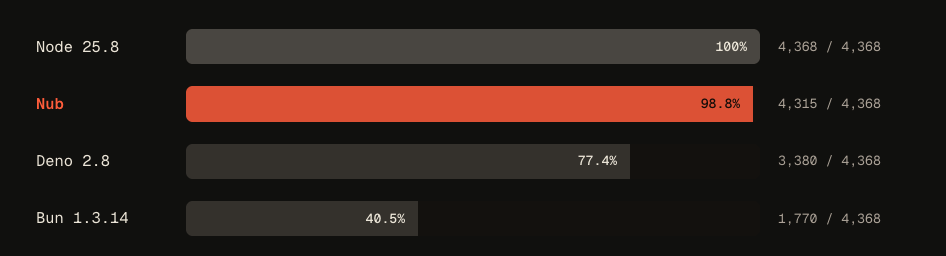
Image from Nub website
Nub avoids that class of mismatch because it does not imitate Node.js. It starts the Node.js process.
That does not make Nub a drop-in replacement for every Bun project. An application using Bun.serve(), Bun.file(), bun:sqlite, bun:test or other Bun-specific features has made a real runtime choice. Moving it to Node requires replacing those APIs, not merely changing the command in the terminal. Nub’s Bun migration guide has a migration guide for such a scenario.
So the practical question is not, “Can Nub replace Bun?” It is, “Why is this project using Bun? And do I really need the Bun-specific API?”
A Small Way to Start
You could test Nub on a low-risk part of an existing project if you’re curious to try it. It could be on a maintenance script, a small demo or as a Node version manager. That way you can keep the experiment small and reversible because Nub does not need to take over the whole project before it can be useful.
The interesting thing about Nub is not that it replaces Node.js, unlike Bun or Deno. It is that it makes the TypeScript-in-Node.js experience easy, and replaces a lot of distinct tools around managing the project. That is why it has made me reconsider my remaining Bun projects.
Give it a try and let me know how it works out for you.
You might be surprised given the runtime performance marketing for Bun. However, the Node-API compatibility and occasional stability issues meant I had to go back to Node.js for serious work, and many legacy projects still relied on Node.js compatibility. And many personal projects ran on Cloudflare Workers. ↩︎

Peter Mbanugo
Peter is a software consultant, technical trainer and OSS contributor/maintainer with excellent interpersonal and motivational abilities to develop collaborative relationships among high-functioning teams. He focuses on cloud-native architectures, serverless, continuous deployment/delivery, and developer experience. You can follow him on Twitter.
Related Posts
Comments
All articles
Topics
Web MobileMobile
Desktop
Design
Productivity
People