Is Convex Better Than Firebase?

Summarize with AI:
Convex comes with setup complexity, especially for non-React developers, but after that offers a great UX with capacity to scale. Firebase is easy to set up and manage, but gets more complex when scaling.
I have created a todo app many times. What seems like something very simple can get complicated really quickly when you have to learn a new stack, build your own backend or think differently than you are used to.
TL;DR
Convex is extremely difficult to set up, especially for non-React users. The Authentication package ONLY works for React, and had to be written from scratch, which is a big negative. It is missing basic features and is overly complicated.
However, once Convex is properly set up for development and production, the actual developer experience is amazing and has a lot of potential for scaling a real noSQL app with fewer hurdles.
Firebase is easier to set up, manage and deploy, but the learning curve grows when you need to manage security and scaling. Convex is the opposite, due to the TypeScript first ecosystem.
Prerequisite ✅
I’m going to assume you have basic knowledge of Nuxt 4, Tailwind and Firebase. I’m going to focus on Convex.
What Is Convex?
Convex is a noSQL database platform that allows you to consume real-time data on the client in any form that you like. It does NOT allow true relational data, but you can query several documents at once, very close to the data itself, emulating a join.
Everything is written in TypeScript, so you don’t have to worry about complex security rules. Instead of trigger functions, you directly write your complexities inside the mutation itself, which lives on the Convex server. Authentication is sparse, but if you use Google or GitHub with React, you should have no problems.
What Is Firebase?
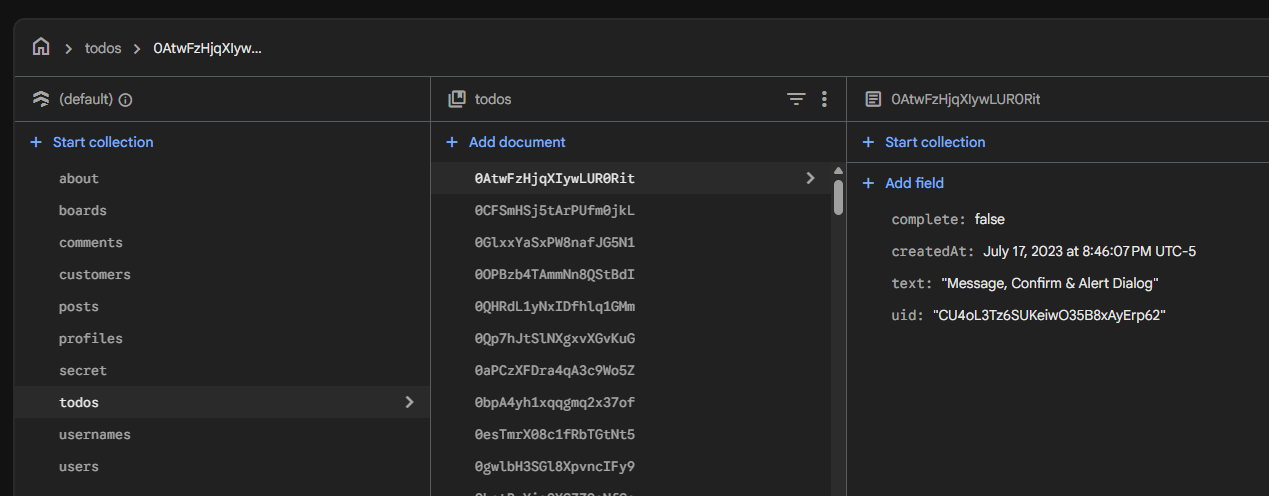
Firebase is a cloud platform with a noSQL database, authentication, security rules, cloud functions, etc. It is arguably the easiest database to learn, especially if you don’t need complex schemas or scaling. It has incredible querying capabilities for noSQL, second only to MongoDB.
Once you need tightened security, more complex data modeling or testing, the learning curve increases dramatically. It works out of the box in all frameworks.
Convex App Setup
Create a New Convex Project
Login to Convex and create a new project.
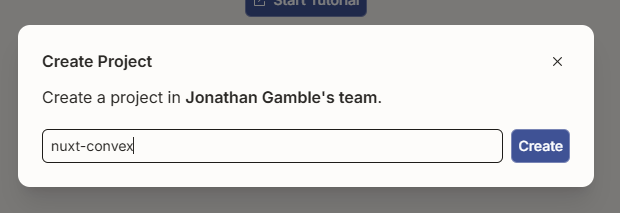
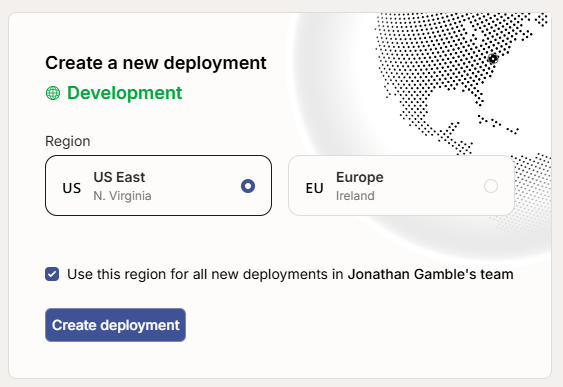
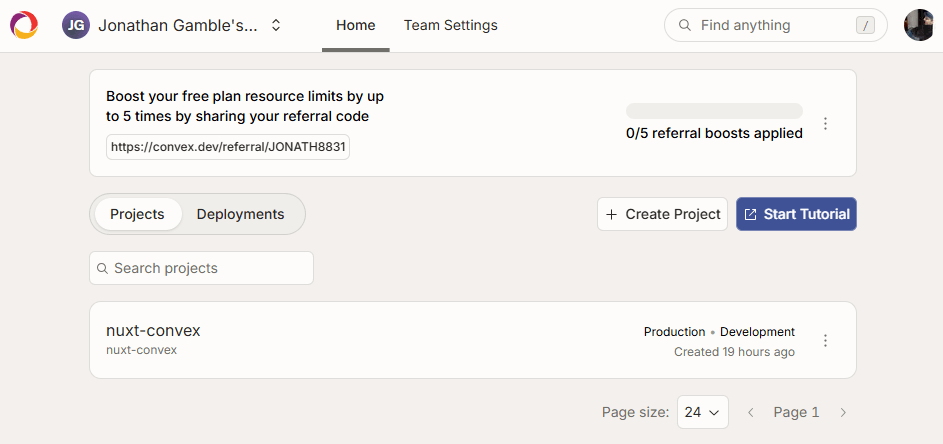
📝 Notice you have a production and development database by default.
📝 You also don’t have to worry about your free project auto-pausing, hence I have a demo below that can be free forever.
Create a Nuxt App
npm create nuxt@latest
Install Tailwind
Don’t use the package. Follow the official Tailwind Guide.
Install Convex
I’m modifying the official Nuxt Convex Quickstart.
- Install the Convex Library once in your new project.
npm install convex && npx nuxi module add convex-nuxt
- Add the Convex URL.
// nuxt.config.ts

import tailwindcss from "@tailwindcss/vite";

export default defineNuxtConfig({
  compatibilityDate: "2025-07-15",
  devtools: { enabled: true },
  css: ['~/assets/css/main.css'],
  vite: {
    plugins: [
      tailwindcss(),
    ],
  },
  modules: ["convex-nuxt"],
  convex: {
    url: process.env.CONVEX_URL,
  },
});
- Set up a Convex dev deployment.
npx convex dev
📝 This will be run in the background at all times to keep your app going.
You should see on .env.local variable:
NUXT_PUBLIC_CONVEX_URL=https://your-deployment.convex.cloud
- Set up Convex Auth.
npx @convex-dev/auth
📝 You may have to manually install @convex-dev/auth or @auth/core.
// convex/auth.config.ts

export default {
  providers: [
    {
      domain: process.env.CONVEX_SITE_URL,
      applicationID: "convex",
    },
  ],
};
4b. (Optional)
I had to create this file. It could also be http.js if not there. Again, the auth setup is not intuitive and I ran into several issues.
// convex/http.ts

import { httpRouter } from "convex/server";
import { auth } from "./auth";

const http = httpRouter();

auth.addHttpRoutes(http);

export default http;
- Set up GitHub
Log in to your GitHub. Then go to Settings → Developer Settings → OAuth Apps and create a new app.
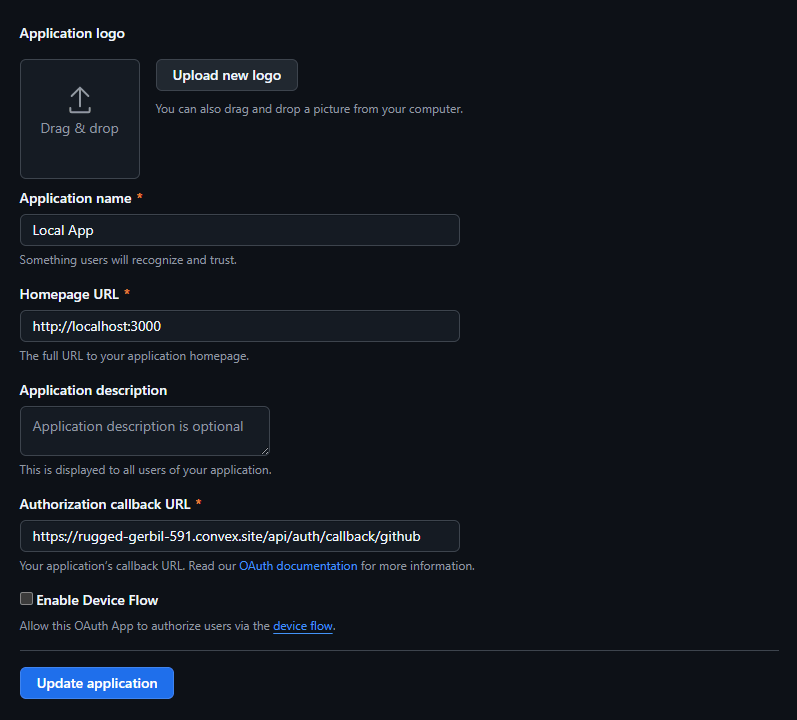
Copy your secret key and client key. Remember to save your secret key, as you can never get it back!
npx convex env set AUTH_GITHUB_ID your-github-client-id
npx convex env set AUTH_GITHUB_SECRET your-github-client-secret
📝 Your environment variables exist on the convex server, so these are NOT your app’s env variables!
// convex/auth.ts

import GitHub from "@auth/core/providers/github";
import { convexAuth } from "@convex-dev/auth/server";

export const {
  auth,
  signIn,
  signOut,
  store,
  isAuthenticated,
} = convexAuth({
  providers: [
    GitHub({
      clientId: process.env.AUTH_GITHUB_ID,
      clientSecret: process.env.AUTH_GITHUB_SECRET,
    }),
  ],
});
- Define your tasks schema.
// convex/schema.ts

import { defineSchema, defineTable } from "convex/server";
import { v } from "convex/values";
import { authTables } from "@convex-dev/auth/server";

export default defineSchema({
  ...authTables,
  tasks: defineTable({
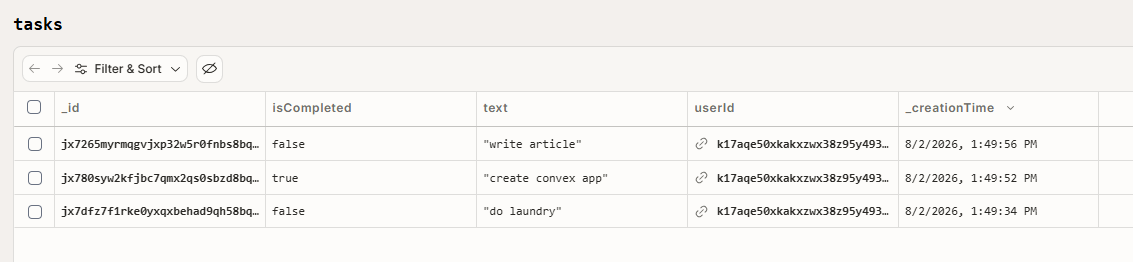
    userId: v.id("users"),
    text: v.string(),
    isCompleted: v.boolean(),
  }).index("by_user", ["userId"]),
});
- Expose your database queries.
// convex/tasks.ts

import { v } from "convex/values";
import { getAuthUserId } from "@convex-dev/auth/server";
import { mutation, query } from "./_generated/server";

export const get = query({
  args: {},
  handler: async (ctx) => {
    const userId = await getAuthUserId(ctx);

    if (!userId) {
      return [];
    }

    return await ctx.db
      .query("tasks")
      .withIndex("by_user", (q) => q.eq("userId", userId))
      .order("desc")
      .collect();
  },
});

export const create = mutation({
  args: {
    text: v.string(),
  },
  handler: async (ctx, args) => {
    const userId = await getAuthUserId(ctx);

    if (!userId) {
      return null;
    }

    return await ctx.db.insert("tasks", {
      userId,
      text: args.text,
      isCompleted: false,
    });
  },
});

export const toggleCompleted = mutation({
  args: {
    id: v.id("tasks"),
    isCompleted: v.boolean(),
  },
  handler: async (ctx, args) => {
    const userId = await getAuthUserId(ctx);

    if (!userId) {
      return;
    }

    const task = await ctx.db.get(args.id);

    if (!task || task.userId !== userId) {
      return;
    }

    await ctx.db.patch(args.id, {
      isCompleted: args.isCompleted,
    });
  },
});

export const remove = mutation({
  args: {
    id: v.id("tasks"),
  },
  handler: async (ctx, args) => {
    const userId = await getAuthUserId(ctx);

    if (!userId) {
      return;
    }

    const task = await ctx.db.get(args.id);

    if (!task || task.userId !== userId) {
      return;
    }

    await ctx.db.delete(args.id);
  },
});
- The query function returns all tasks by a certain user. We use our
by_userindex to filter, and order by_creationTime(internal variable) descending. - We create a new task by the user.
- We update the completed task by a user.
- We remove a task by a user.
🎇 All of these are secure, close to the database and extremely fast. The fact that we have to run multiple database calls is negligible in this case!
Creating Our App
Even though the convex folder is created on our server, it does not live there. The rest of the code actually lives in our app.
Composables
If you follow any of my articles, you know that I firmly believe your core code should ALWAYS be separate from the component, in a composable, not in the component.
// composables/useTask.ts

import { api } from "~~/convex/_generated/api";
import type { Doc, Id } from "~~/convex/_generated/dataModel";

export type TaskItem = Doc<"tasks">;

const queryArgs = {};

export function useTasks() {
  const { data, isPending, error } = useConvexQuery(api.tasks.get);

  const tasks = computed<TaskItem[]>(() => data.value ?? []);

  const {
    mutate: createTask,
    isPending: isCreating,
    error: createError,
  } = useConvexMutation(api.tasks.create, {
    optimisticUpdate: (localStore, args) => {
      const currentTasks = localStore.getQuery(api.tasks.get, queryArgs);

      if (!currentTasks) return;

      const now = Date.now();
      const optimisticTask: Doc<"tasks"> = {
        _id: `pending-${crypto.randomUUID()}` as Id<"tasks">,
        _creationTime: now,
        userId:
          currentTasks[0]?.userId ??
          (`pending-${crypto.randomUUID()}` as Id<"users">),
        text: args.text,
        isCompleted: false,
      };

      localStore.setQuery(api.tasks.get, queryArgs, [
        optimisticTask,
        ...currentTasks,
      ]);
    },
  });

  const { mutate: updateTask } = useConvexMutation(
    api.tasks.toggleCompleted,
    {
      optimisticUpdate: (localStore, args) => {
        const currentTasks = localStore.getQuery(api.tasks.get, queryArgs);

        if (!currentTasks) return;

        localStore.setQuery(
          api.tasks.get,
          queryArgs,
          currentTasks.map((task) =>
            task._id === args.id
              ? { ...task, isCompleted: args.isCompleted }
              : task,
          ),
        );
      },
    },
  );

  const { mutate: deleteTask } = useConvexMutation(api.tasks.remove, {
    optimisticUpdate: (localStore, args) => {
      const currentTasks = localStore.getQuery(api.tasks.get, queryArgs);

      if (!currentTasks) return;

      localStore.setQuery(
        api.tasks.get,
        queryArgs,
        currentTasks.filter((task) => task._id !== args.id),
      );
    },
  });

  async function addTask(text: string) {
    return await createTask({ text });
  }

  function toggleTask(task: TaskItem) {
    if (task._id.startsWith("pending-")) return;

    return updateTask({
      id: task._id,
      isCompleted: !task.isCompleted,
    });
  }

  function removeTask(task: TaskItem) {
    if (task._id.startsWith("pending-")) return;

    return deleteTask({ id: task._id });
  }

  return {
    tasks,
    isPending,
    error,
    isCreating,
    createError,
    addTask,
    toggleTask,
    removeTask,
  };
}
useConvexQueryis simple, has a pending and error state and can be passed directly to our app.useConvexMutationis more complicated. We want our apps to be immediate, so we must add the optimistic update strategy like Firebase has.- There is a
optimisticUpdateoption that gives you access tolocalStore.getQueryandlocalStore.setQuery. We can set our items optimistically, and Convex will automatically roll it back if there is an issue.
app.vue
<script setup lang="ts">
const { error: authError, isAuthenticated, isLoading, signIn, signOut } = useConvexAuth();
</script>

<template>
  <div class="min-h-screen bg-[radial-gradient(circle_at_top_left,#d8f3dc,transparent_32rem),linear-gradient(135deg,#fffaf0_0%,#f8fafc_48%,#e0f2fe_100%)] px-4 py-10 text-slate-950 sm:px-6 lg:px-8">
    <main class="mx-auto flex w-full max-w-2xl flex-col gap-6">
      <header class="space-y-3">
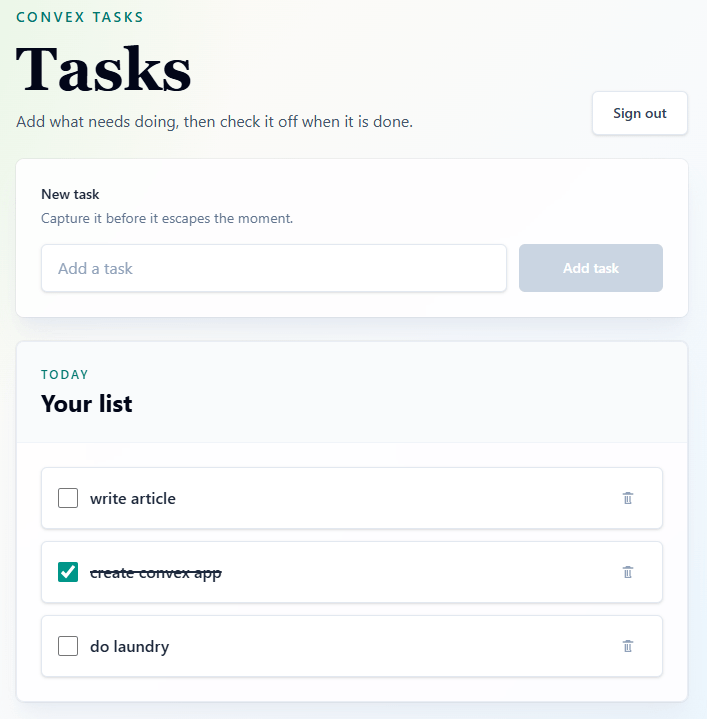
        <p class="text-sm font-semibold uppercase tracking-[0.18em] text-teal-700">Convex tasks</p>
        <div class="flex flex-col gap-3 sm:flex-row sm:items-end sm:justify-between">
          <div>
            <h1 class="font-serif text-5xl font-bold tracking-normal text-slate-950 sm:text-6xl">Tasks</h1>
            <p class="mt-2 max-w-xl text-base leading-7 text-slate-600">Add what needs doing, then check it off when it is done.</p>
          </div>
          <button
            v-if="isAuthenticated"
            class="flex min-h-11 min-w-24 items-center justify-center rounded-md border border-slate-200 bg-white px-4 text-sm font-semibold text-slate-700 shadow-sm transition hover:-translate-y-0.5 hover:border-rose-200 hover:bg-rose-50 hover:text-rose-700 focus:outline-none focus:ring-4 focus:ring-rose-100 disabled:translate-y-0 disabled:cursor-not-allowed disabled:text-slate-400"
            type="button"
            :disabled="isLoading"
            :aria-label="isLoading ? 'Signing out' : undefined"
            @click="signOut()"
          >
            <LoadingSpinner v-if="isLoading" class="size-5" />
            <span v-else>Sign out</span>
          </button>
        </div>
      </header>

      <section
        v-if="isLoading && !isAuthenticated"
        class="flex min-h-40 items-center justify-center rounded-lg border border-white/70 bg-white/85 p-8 shadow-xl shadow-slate-200/70 ring-1 ring-slate-900/5 backdrop-blur sm:p-10"
        role="status"
        aria-label="Loading your tasks"
      >
        <LoadingSpinner class="size-8" />
      </section>

      <LoginWithGithub
        v-else-if="!isAuthenticated"
        :error="authError"
        @sign-in="signIn('github')"
      />

      <template v-else>
        <div class="rounded-lg border border-white/70 bg-white/85 p-5 shadow-xl shadow-slate-200/70 ring-1 ring-slate-900/5 backdrop-blur sm:p-6">
          <AddTask />
        </div>

        <TaskList />
      </template>
    </main>
  </div>
</template>
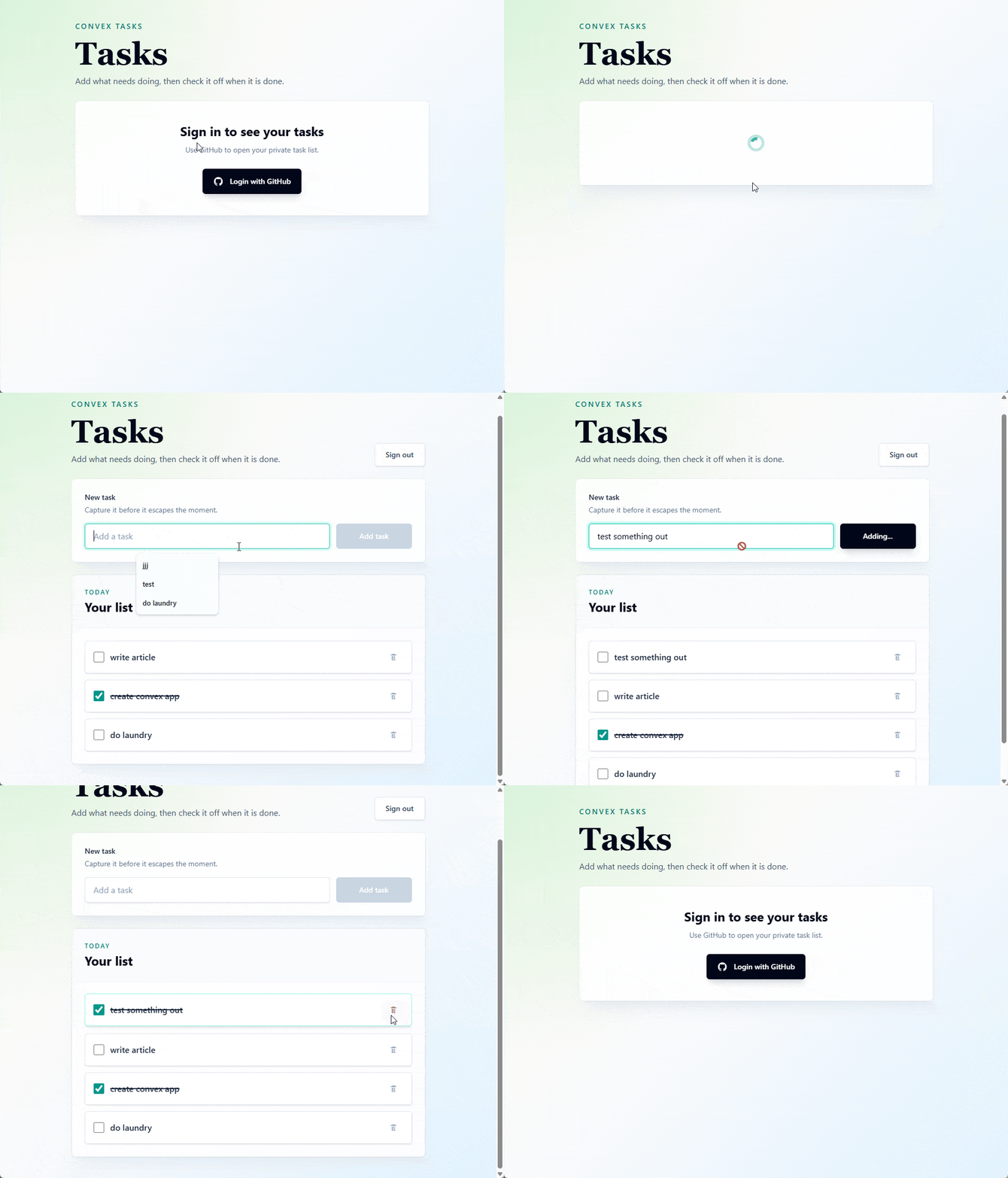
We show a loading spinner or a Sign In button.
AddTask.vue
<script setup lang="ts">
import { computed, ref } from "vue";

const text = ref("");
const trimmedText = computed(() => text.value.trim());
const { addTask: createTask, isCreating, createError } = useTasks();

async function addTask() {
  if (!trimmedText.value || isCreating.value) {
    return;
  }

  await createTask(trimmedText.value);
  text.value = "";
}
</script>

<template>
  <form class="space-y-4" @submit.prevent="addTask">
    <div class="flex flex-col gap-1">
      <label class="text-sm font-semibold text-slate-800" for="task-text">New task</label>
      <p class="text-sm text-slate-500">Capture it before it escapes the moment.</p>
    </div>

    <div class="flex flex-col gap-3 sm:flex-row">
      <input
        id="task-text"
        v-model="text"
        class="min-h-12 flex-1 rounded-md border border-slate-200 bg-white px-4 text-base text-slate-950 shadow-sm outline-none transition placeholder:text-slate-400 hover:border-slate-300 focus:border-teal-500 focus:ring-4 focus:ring-teal-100 disabled:cursor-not-allowed disabled:bg-slate-50 disabled:text-slate-400"
        type="text"
        placeholder="Add a task"
        :disabled="isCreating"
      >
      <button
        class="min-h-12 rounded-md bg-slate-950 px-5 text-sm font-semibold text-white shadow-lg shadow-slate-900/15 transition hover:-translate-y-0.5 hover:bg-teal-700 focus:outline-none focus:ring-4 focus:ring-teal-200 disabled:translate-y-0 disabled:cursor-not-allowed disabled:bg-slate-300 disabled:shadow-none sm:w-36"
        type="submit"
        :disabled="!trimmedText || isCreating"
      >
        {{ isCreating ? "Adding..." : "Add task" }}
      </button>
    </div>

    <p v-if="createError" class="rounded-md bg-rose-50 px-3 py-2 text-sm font-medium text-rose-700">
      Unable to add task.
    </p>
  </form>
</template>
Again, with our composable all we really need to do is show the input button and error.
TaskList.vue
<script setup lang="ts">
const { tasks, isPending, error, toggleTask, removeTask } = useTasks();
</script>

<template>
    <section class="overflow-hidden rounded-lg border border-slate-200/80 bg-white/90 shadow-xl shadow-slate-200/60 ring-1 ring-slate-900/5 backdrop-blur">
        <div class="border-b border-slate-100 bg-slate-50/80 p-5 sm:p-6">
            <div class="flex flex-col gap-4 sm:flex-row sm:items-end sm:justify-between">
                <div>
                    <p class="text-xs font-semibold uppercase tracking-[0.18em] text-teal-700">Today</p>
                    <h2 class="mt-1 text-2xl font-bold text-slate-950">Your list</h2>
                </div>
            </div>
        </div>

        <div class="p-5 sm:p-6">
            <div
                v-if="isPending"
                class="flex items-center justify-center rounded-md border border-dashed border-slate-300 bg-slate-50 px-4 py-8"
                role="status"
                aria-label="Loading tasks"
            >
                <LoadingSpinner />
            </div>
            <p v-else-if="error" class="rounded-md bg-rose-50 px-4 py-3 text-sm font-medium text-rose-700">
                Unable to load tasks.
            </p>
            <ul v-else-if="tasks.length" class="space-y-3">
                <li
                    v-for="task in tasks"
                    :key="task._id"
                    class="group rounded-md border border-slate-200 bg-white px-4 py-3 shadow-sm transition duration-200 hover:-translate-y-0.5 hover:border-teal-200 hover:shadow-md"
                >
                    <div class="flex items-center gap-3">
                    <label class="flex min-w-0 flex-1 cursor-pointer items-center gap-3">
                        <input
                            class="size-5 rounded border-slate-300 accent-teal-600 transition group-hover:scale-105"
                            type="checkbox"
                            :checked="task.isCompleted"
                            @change="toggleTask(task)"
                        >
                        <span
                            class="min-w-0 flex-1 wrap-break-word text-base font-medium text-slate-800 transition"
                            :class="task.isCompleted ? 'text-slate-400 line-through decoration-2' : ''"
                        >
                            {{ task.text }}
                        </span>
                    </label>
                    <button
                        class="flex size-9 shrink-0 items-center justify-center rounded-md text-slate-400 transition hover:bg-rose-50 hover:text-rose-700 focus:outline-none focus:ring-4 focus:ring-rose-100"
                        type="button"
                        :aria-label="`Delete ${task.text}`"
                        title="Delete task"
                        @click="removeTask(task)"
                    >
                        <span
                            class="size-4 bg-current"
                            aria-hidden="true"
                            style="mask: url('/delete.svg') center / contain no-repeat; -webkit-mask: url('/delete.svg') center / contain no-repeat;"
                        />
                    </button>
                    </div>
                </li>
            </ul>
            <div v-else class="rounded-md border border-dashed border-slate-300 bg-slate-50 px-4 py-10 text-center">
                <p class="text-sm font-semibold text-slate-700">No tasks yet</p>
                <p class="mt-1 text-sm text-slate-500">Add the first one above.</p>
            </div>
        </div>
    </section>
</template>
We can easily show our task, handle removing them with a button and toggle completed state.
LoginWithGithub.vue
<script setup lang="ts">
defineProps<{
  error: string | null;
}>();

defineEmits<{
  signIn: [];
}>();
</script>

<template>
  <section class="rounded-lg border border-white/70 bg-white/85 p-8 text-center shadow-xl shadow-slate-200/70 ring-1 ring-slate-900/5 backdrop-blur sm:p-10">
    <h2 class="text-2xl font-bold text-slate-950">Sign in to see your tasks</h2>
    <p class="mx-auto mt-2 max-w-md text-sm leading-6 text-slate-500">Use GitHub to open your private task list.</p>
    <button
      class="mx-auto mt-6 flex min-h-12 items-center justify-center gap-3 rounded-md bg-slate-950 px-5 text-sm font-semibold text-white shadow-lg shadow-slate-900/15 transition hover:-translate-y-0.5 hover:bg-teal-700 focus:outline-none focus:ring-4 focus:ring-teal-200"
      type="button"
      @click="$emit('signIn')"
    >
      <GithubIcon />
      Login with GitHub
    </button>
    <p v-if="error" class="mt-4 rounded-md bg-rose-50 px-3 py-2 text-sm font-medium text-rose-700">
      {{ error }}
    </p>
  </section>
</template>
Of course we have to show our GitHub login.
// GithubIcon.vue

<template>
  <svg
    class="size-5"
    viewBox="0 0 24 24"
    fill="currentColor"
    aria-hidden="true"
  >
    <path d="M12 2C6.48 2 2 6.58 2 12.23c0 4.52 2.87 8.35 6.84 9.71.5.09.68-.22.68-.49 0-.24-.01-1.04-.01-1.88-2.78.62-3.37-1.22-3.37-1.22-.45-1.18-1.11-1.49-1.11-1.49-.91-.64.07-.63.07-.63 1 .07 1.53 1.05 1.53 1.05.89 1.56 2.34 1.11 2.91.85.09-.66.35-1.11.63-1.36-2.22-.26-4.55-1.14-4.55-5.06 0-1.12.39-2.03 1.03-2.74-.1-.26-.45-1.3.1-2.71 0 0 .84-.27 2.75 1.05A9.29 9.29 0 0 1 12 6.97c.85 0 1.71.12 2.51.35 1.9-1.32 2.74-1.05 2.74-1.05.55 1.41.2 2.45.1 2.71.64.71 1.03 1.62 1.03 2.74 0 3.93-2.34 4.8-4.57 5.05.36.32.68.94.68 1.9 0 1.37-.01 2.47-.01 2.8 0 .27.18.59.69.49A10.14 10.14 0 0 0 22 12.23C22 6.58 17.52 2 12 2Z" />
  </svg>
</template>
And loading spinner.
// LoadingSpinner.vue

<template>
  <svg
    class="size-6 animate-spin text-teal-600"
    viewBox="0 0 24 24"
    fill="none"
    aria-hidden="true"
  >
    <circle
      class="opacity-25"
      cx="12"
      cy="12"
      r="10"
      stroke="currentColor"
      stroke-width="4"
    />
    <path
      class="opacity-75"
      fill="currentColor"
      d="M4 12a8 8 0 0 1 8-8v4a4 4 0 0 0-4 4H4Z"
    />
  </svg>
</template>
⚠️ No Convex Composable
Convex is meant for React. They don’t have the ability to log in or log out natively outside of React!!! If you dislike React as much as I do, you have to string together working auth client functions from their React codebase. This works, but is just generated slop code. Hopefully they fix this for Nuxt and SvelteKit at the very least.
// composables/useConvexAuth.ts

import { ConvexHttpClient } from "convex/browser";
import type { FunctionReference } from "convex/server";
import type { Value } from "convex/values";

type Tokens = {
  token: string;
  refreshToken: string;
};

type SignInResult = {
  redirect?: string;
  verifier?: string;
  tokens?: Tokens | null;
};

const signInAction =
  "auth:signIn" as unknown as FunctionReference<"action">;

const signOutAction =
  "auth:signOut" as unknown as FunctionReference<"action">;

export function useConvexAuth() {
  const client = useConvexClient();
  const config = useRuntimeConfig();

  const convexUrl = config.public.convex.url as string;
  const storageSuffix = convexUrl.replace(/[^a-zA-Z0-9]/g, "");

  const verifierKey = `__convexAuthOAuthVerifier_${storageSuffix}`;
  const jwtKey = `__convexAuthJWT_${storageSuffix}`;
  const refreshTokenKey = `__convexAuthRefreshToken_${storageSuffix}`;

  const isAuthenticated = useState(
    "convex-auth-authenticated",
    () => false,
  );

  const isLoading = useState(
    "convex-auth-loading",
    () => true,
  );

  const error = useState<string | null>(
    "convex-auth-error",
    () => null,
  );

  const initialized = useState(
    "convex-auth-initialized",
    () => false,
  );

  function clearTokens() {
    localStorage.removeItem(jwtKey);
    localStorage.removeItem(refreshTokenKey);
    isAuthenticated.value = false;
  }

  function saveTokens(tokens: Tokens) {
    localStorage.setItem(jwtKey, tokens.token);
    localStorage.setItem(refreshTokenKey, tokens.refreshToken);
  }

  async function exchangeAuthData(
    args:
      | { code: string; verifier?: string }
      | { refreshToken: string },
  ) {
    // Use a separate unauthenticated client so refreshing a token
    // does not recursively trigger the authenticated client.
    const httpClient = new ConvexHttpClient(convexUrl);

    const result = await httpClient.action(
      signInAction,
      "code" in args
        ? {
          params: { code: args.code },
          verifier: args.verifier,
        }
        : args,
    ) as { tokens: Tokens | null };

    if (!result.tokens) {
      clearTokens();
      return null;
    }

    saveTokens(result.tokens);

    return result.tokens.token;
  }

  async function fetchAccessToken({
    forceRefreshToken,
  }: {
    forceRefreshToken: boolean;
  }) {
    if (!forceRefreshToken) {
      return localStorage.getItem(jwtKey);
    }

    const refreshToken = localStorage.getItem(refreshTokenKey);

    if (!refreshToken) {
      clearTokens();
      return null;
    }

    return await exchangeAuthData({ refreshToken });
  }

  function configureClientAuth() {
    client.setAuth(fetchAccessToken, (authenticated) => {
      isAuthenticated.value = authenticated;

      if (!authenticated) {
        clearTokens();
      }
    });
  }

  async function initialize() {
    if (!import.meta.client || initialized.value) {
      return;
    }

    initialized.value = true;
    isLoading.value = true;

    try {
      const url = new URL(window.location.href);
      const code = url.searchParams.get("code");

      if (code) {
        const verifier =
          localStorage.getItem(verifierKey) ?? undefined;

        localStorage.removeItem(verifierKey);

        url.searchParams.delete("code");

        window.history.replaceState(
          {},
          "",
          `${url.pathname}${url.search}${url.hash}`,
        );

        await exchangeAuthData({ code, verifier });
      }

      if (localStorage.getItem(jwtKey)) {
        configureClientAuth();
      } else {
        isAuthenticated.value = false;
      }
    } catch (cause) {
      clearTokens();

      error.value =
        cause instanceof Error
          ? cause.message
          : "Authentication failed.";
    } finally {
      isLoading.value = false;
    }
  }

  async function signIn(provider = "github") {
    error.value = null;
    isLoading.value = true;

    try {
      const result = await client.action(signInAction, {
        provider,
        params: {
          redirectTo: window.location.pathname,
        },
      } satisfies Record<string, Value>) as SignInResult;

      if (result.redirect) {
        if (result.verifier) {
          localStorage.setItem(verifierKey, result.verifier);
        }

        window.location.assign(result.redirect);
        return;
      }

      if (result.tokens) {
        saveTokens(result.tokens);
        configureClientAuth();
      }
    } catch (cause) {
      error.value =
        cause instanceof Error
          ? cause.message
          : "Unable to sign in.";

      isLoading.value = false;
    }
  }

  async function signOut() {
    error.value = null;
    isLoading.value = true;

    try {
      await client.action(signOutAction, {});
    } finally {
      clearTokens();
      client.setAuth(async () => null);
      isLoading.value = false;
    }
  }

  onMounted(initialize);

  return {
    error: readonly(error),
    isAuthenticated: readonly(isAuthenticated),
    isLoading: readonly(isLoading),
    signIn,
    signOut,
  };
}
📝 These functions just handle signing in and out, loading and authenticated states.
👎 What bothers me the most about this is that this code doesn’t have to be React-specific. It just sets some storage states, etc. It doesn’t do anything special, as that is already handled in the core code. This is client-only, not even SSR. What’s worse is that this could easily have been built framework-agnostic anyway. Instead, we have another React-only database. ☹️ People hate JSX, it is a thing; they just deal with it.
Verdict
What Convex Says
Let’s start with Convex’s comparison:
| Feature | Convex | Firebase |
|---|---|---|
| Realtime apps | ✅ Yes | ✅ Yes |
| Datastore / Database | ✅ Yes | ✅ Yes |
| Cloud functions | ✅ Yes | ✅ Yes |
| File storage | ✅ Yes | ✅ Yes |
| React support | ✅ Yes | ❌ No |
| Relational DB support | ✅ Yes | ❌ No |
| Live development environment | ✅ Yes | ❌ No |
| Transactions by default | ✅ Yes | ❌ No |
| Schema enforcement | ✅ Yes | ❌ No |
However, I find this to be incomplete at best, and incorrect at worst. This is what the table should look like, only keeping those features
| Feature | Convex | Firebase |
|---|---|---|
| Realtime apps | ✅ Yes | ✅ Yes |
| Datastore / Database | ✅ Yes | ✅ Yes |
| Cloud functions | ✅ Yes | ✅ Yes |
| File storage | ✅ Yes | ✅ Yes |
| React support | ✅ Yes | ✅ Yes |
| Relational DB support | ❌ No | ❌ No |
| Local Development | ✅ Yes | ✅ Yes |
| Transactions Support | ✅ Yes | ✅ Yes |
| Schema Optional | ✅ Yes | ✅ Yes |
noSQL is NEVER relational, and you can emulate that with either database in different ways. They both have local development, which works differently.
Transactions and schemas are available in both. React support is definitely available in both, but Convex does NOT have first class support for Nuxt or SvelteKit, which I believe is a must these days, especially if you need authentication.
I would also argue that due to pipeline operators, Firebase can now handle relationships way better than Convex ever can.
Where Convex Wins
- TypeScript and React developers-first
- Just write trigger directly in TypeScript
- Better at handling security directly
- Better foreign key and creation time handling
Where Firebase Wins
- Very mature ecosystem for support and features
- Handles all frameworks
- Setup is seamless and very easy to use
- Has many querying capabilities and helpers for scaling
📝 Convex got some traction after Theo started using it for his t3.chat app. Theo is heavily into React and TypeScript, so this makes sense.
Final
Convex seems to prosper where Firebase is lacking. A lot of people don’t use Firebase Security Rules correctly, or at all, because they are hard to maintain. You get the same problem with Supabase RLS.
Convex is just TypeScript. The setup is terrible, but the developer experience after that was very intuitive once you understood it. I could see this really helping you build something that scales quickly.
Firebase still wins for me, but mainly due to maturity.
Here is what I would like to see in Convex for it to be a stronger contender for my needs:
- First-class support for SvelteKit, NextJS and Nuxt. Not everyone uses React.
- First-class support for authentication. The code that is written for React only can easily be modified to support all frameworks. The docs need to show setup once complete. This should also include server authentication with cookies etc.
- Convex is a noSQL database and its documentation shouldn’t confuse relations. It is not clear how you data model. It is also a plus for Convex how they explain how running multiple
awaitfor database calls can be done close to the database in a transaction to emulating a join… I just wish they didn’t confuse it for a join. It is OK that it is noSQL. - A simplified
.envmanagement, as it gets confusing where it lies, especially when with production and development databases as well as local and production hosting. - Examples for when you don’t need real time and you want to load on server only. This is just as important.
I think as Convex matures it could really be amazing, but it is not quite there if you want everything as plug-and-play as Firebase.
Repo: GitHub
Demo: Vercel Functions

Jonathan Gamble
Jonathan Gamble has been an avid web programmer for more than 20 years. He has been building web applications as a hobby since he was 16 years old, and he received a post-bachelor’s in Computer Science from Oregon State. His real passions are language learning and playing rock piano, but he never gets away from coding. Read more from him at https://code.build/.
Related Posts
Comments
All articles
Topics
Web MobileMobile
Desktop
Design
Productivity
People