How to Build a Multi-Tenant SaaS API with NestJS and Postgres Row-Level Security

Summarize with AI:
We’ll build a multi-tenant task management API where customer data is isolated automatically at the database level. We’ll use Postgres Row-Level Security to enforce tenant isolation, with NestJS as our application framework and TypeORM to interact with the database.
In this post, we will build a multi-tenant task management API where customer data is isolated automatically at the database level. We’ll use Postgres Row-Level Security to enforce tenant isolation, with NestJS as our application framework and TypeORM to interact with the database.
You’ll learn how to set up RLS policies that filter queries by tenant, extract tenant information from JWT tokens, manage tenant onboarding and test that isolation works even against direct ID access attempts. By the end, you’ll have a working multi-tenant SaaS API where tenants only see their own data, enforced at the database layer rather than in application code.
Prerequisites
To follow along, you’ll need:
- Node.js installed
- Postgres installed locally
- Basic knowledge of NestJS and TypeScript
- Basic knowledge of HTTP, RESTful APIs and cURL
- Basic knowledge of JWT authentication
What Is Multi-Tenancy?
Multi-tenancy is an architecture where one application instance serves multiple customers (tenants). Each tenant’s data is completely isolated from other tenants. If Company A creates a task, Company B should not be able to see it.
There are three main ways to achieve this:
- Database per tenant: Each tenant gets their own database. This provides maximum isolation but is expensive and difficult to maintain at scale.
- Schema per tenant: All tenants share one database, but each gets their own schema. This is cheaper than separate databases, but migration management becomes complex.
- Shared schema with RLS: All tenants share the same database and schema. Isolation is enforced by the database itself using Row-Level Security policies.
For a quick MVP build, the shared schema approach with RLS provides strong isolation without operational complexity.
What Is Row-Level Security?
Row-Level Security (RLS) is a Postgres feature that lets you define policies controlling which rows users can see or modify.
When RLS is enabled on a table, Postgres automatically filters query results based on the policies you define. Even if our application code doesn’t add WHERE tenant_id = ?, the database allows tenants to only see their own data.
When a query runs, Postgres checks the policy conditions and rewrites the query. If our policy says USING (tenant_id = current_setting('app.tenant_id')), then SELECT * FROM tasks becomes SELECT * FROM tasks WHERE tenant_id = current_setting('app.tenant_id').
This moves security from the application layer (where programmers might make mistakes) to the database layer (where it is enforced automatically).
Project Setup
First, create a NestJS project:
nest new task-management-api
cd task-management-api
Next, run the following command in your terminal to install our dependencies:
npm install @nestjs/config @nestjs/typeorm typeorm pg bcrypt @nestjs/jwt @nestjs/passport passport passport-jwt nestjs-cls uuid
npm install --save-dev @types/bcrypt @types/uuid @types/passport-jwt
Here’s what each package does:
- @nestjs/config: Manages environment variables
- @nestjs/typeorm and typeorm: ORM for Postgres
- pg: Postgres driver
- bcrypt: Password hashing
- @nestjs/jwt and @nestjs/passport: Create and validate JWT tokens
- passport and passport-jwt: Provide authentication strategies
- nestjs-cls: Request-scoped context storage for tracking tenants
- uuid: Creates unique IDs
Next, create a .env file at the root of your project and add the following to it:
DB_HOST=localhost
DB_PORT=5432
DB_USERNAME=app_user
DB_PASSWORD=newpassword123
DB_NAME=task_management

JWT_SECRET=your-secret-key-change-this-in-production
JWT_EXPIRATION=24h
The variables above configure our database connection and JWT settings.
Now update your app.module.ts file to load these variables:
import { Module } from '@nestjs/common';
import { ConfigModule } from '@nestjs/config';

@Module({
  imports: [
    ConfigModule.forRoot({
      isGlobal: true,
      envFilePath: '.env',
    }),
    // ... we will add other modules here later
  ],
})
export class AppModule {}
Database Setup
Let’s set up our Postgres database with the tables and RLS policies needed for tenant isolation.
Connect to Postgres
Open the psql shell (search for “SQL Shell (psql)” in your Start menu). When prompted:
- Server: localhost
- Database: postgres
- Port: 5432
- Username: postgres
- Password: [your postgres password]
Create Database and User
Run these commands in the psql shell:
CREATE DATABASE task_management;
CREATE USER app_user WITH PASSWORD 'newpassword123' NOSUPERUSER;
GRANT CONNECT ON DATABASE task_management TO app_user;
\c task_management
CREATE EXTENSION IF NOT EXISTS "uuid-ossp";
GRANT USAGE ON SCHEMA public TO app_user;
GRANT CREATE ON SCHEMA public TO app_user;
\q
We create app_user with NOSUPERUSER because superusers bypass RLS policies, which would completely break our isolation.
Create Tables and RLS Policies
Open psql again and connect as app_user:
Server: localhost
Database: task_management
Port: 5432
Username: app_user
Password: newpassword123
Now, run the complete SQL setup:
-- Create tenants table (no RLS needed here)
CREATE TABLE tenants (
  id UUID PRIMARY KEY DEFAULT uuid_generate_v4(),
  name VARCHAR(255) NOT NULL,
  created_at TIMESTAMP DEFAULT NOW()
);

-- Create users table (NO RLS - needed for login)
CREATE TABLE users (
  id UUID PRIMARY KEY DEFAULT uuid_generate_v4(),
  tenant_id UUID NOT NULL REFERENCES tenants(id) ON DELETE CASCADE,
  email VARCHAR(255) NOT NULL UNIQUE,
  password_hash VARCHAR(255) NOT NULL,
  created_at TIMESTAMP DEFAULT NOW()
);

-- Create tasks table
CREATE TABLE tasks (
  id UUID PRIMARY KEY DEFAULT uuid_generate_v4(),
  tenant_id UUID NOT NULL REFERENCES tenants(id) ON DELETE CASCADE,
  title VARCHAR(255) NOT NULL,
  description TEXT,
  status VARCHAR(50) DEFAULT 'pending',
  created_at TIMESTAMP DEFAULT NOW(),
  updated_at TIMESTAMP DEFAULT NOW()
);

-- Enable RLS ONLY on tasks table
ALTER TABLE tasks ENABLE ROW LEVEL SECURITY;

-- Force RLS even for table owner
ALTER TABLE tasks FORCE ROW LEVEL SECURITY;

-- Create RLS policy for tasks with both USING and WITH CHECK
CREATE POLICY tenant_isolation_tasks ON tasks
  USING (tenant_id = current_setting('app.current_tenant_id', true)::uuid)
  WITH CHECK (tenant_id = current_setting('app.current_tenant_id', true)::uuid);

-- Create indexes for performance
CREATE INDEX idx_users_tenant_id ON users(tenant_id);
CREATE INDEX idx_tasks_tenant_id ON tasks(tenant_id);
CREATE INDEX idx_tasks_tenant_status ON tasks(tenant_id, status);

-- Exit psql
\q
The ENABLE ROW LEVEL SECURITY command turns on RLS for the tasks table. The FORCE ROW LEVEL SECURITY command applies RLS even to the table owner, helping prevent unintended data exposure during manual database work.
The USING clause in our policy checks if the row’s tenant_id corresponds to the session variable app.current_tenant_id. The WITH CHECK clause validates INSERT and UPDATE operations to ensure the tenant_id matches. The true parameter in current_setting tells Postgres to return NULL instead of throwing an error if the variable isn’t set.
We’re using UUID primary keys instead of sequential integers because with integers, a malicious tenant could guess other tenants’ IDs and probe for data leaks through foreign key violations.
The users table doesn’t have RLS enabled. This is intentional because we need to query users across tenants during login, before we have a tenant context.
Project Structure
Our project structure will look like this:
src/
├── auth/
│   ├── guards/
│   │   └── jwt-auth.guard.ts
│   ├── strategies/
│   │   └── jwt.strategy.ts
│   ├── auth.controller.ts
│   ├── auth.controller.spec.ts
│   ├── auth.module.ts
│   ├── auth.service.ts
│   └── auth.service.spec.ts
├── database/
│   ├── database.module.ts
│   └── tenant-context.interceptor.ts
├── middleware/
│   └── tenant.middleware.ts
├── tasks/
│   ├── entities/
│   │   └── task.entity.ts
│   ├── tasks.controller.ts
│   ├── tasks.controller.spec.ts
│   ├── tasks.module.ts
│   └── tasks.service.ts
├── tenants/
│   ├── entities/
│   │   └── tenant.entity.ts
│   ├── tenants.controller.ts
│   ├── tenants.controller.spec.ts
│   ├── tenants.module.ts
│   └── tenants.service.ts
├── users/
│   ├── entities/
│   │   └── user.entity.ts
│   ├── users.module.ts
│   ├── users.service.ts
│   └── users.service.spec.ts
├── app.module.ts
└── main.ts
Use the commands below to create the basic structure:
nest g module tenants && \
nest g controller tenants && \
nest g service tenants && \
nest g module auth && \
nest g controller auth && \
nest g service auth && \
nest g module tasks && \
nest g controller tasks && \
nest g service tasks && \
nest g module users && \
nest g service users && \
nest g module database
We’ll also need to manually create the entities, guards, strategies, middleware and interceptor files later on.
Configure TypeORM
TypeORM needs to connect to Postgres and recognize our entities.
Update the src/app.module.ts file to add TypeORM:
import { Module, MiddlewareConsumer, RequestMethod } from '@nestjs/common';
import { ConfigModule, ConfigService } from '@nestjs/config';
import { TypeOrmModule } from '@nestjs/typeorm';
import { ClsModule } from 'nestjs-cls';
import { TenantMiddleware } from './middleware/tenant.middleware';
import { TenantsModule } from './tenants/tenants.module';
import { AuthModule } from './auth/auth.module';
import { UsersModule } from './users/users.module';
import { TasksModule } from './tasks/tasks.module';
import { DatabaseModule } from './database/database.module';

@Module({
  imports: [
    ConfigModule.forRoot({
      isGlobal: true,
      envFilePath: '.env',
    }),
    TypeOrmModule.forRootAsync({
      inject: [ConfigService],
      useFactory: (config: ConfigService) => ({
        type: 'postgres',
        host: config.get('DB_HOST'),
        port: config.get('DB_PORT'),
        username: config.get('DB_USERNAME'),
        password: config.get('DB_PASSWORD'),
        database: config.get('DB_NAME'),
        entities: [__dirname + '/**/*.entity{.ts,.js}'],
        synchronize: false,
      }),
    }),
    ClsModule.forRoot({
      global: true,
      middleware: { mount: true },
    }),
    AuthModule,
    TenantsModule,
    UsersModule,
    TasksModule,
    DatabaseModule,
  ],
})
export class AppModule {
  configure(consumer: MiddlewareConsumer) {
    consumer
      .apply(TenantMiddleware)
      .exclude(
        { path: 'tenants/register', method: RequestMethod.POST },
        { path: 'auth/login', method: RequestMethod.POST },
      )
      .forRoutes('*');
  }
}
We set synchronize: false because we created our tables manually with RLS policies. If we let TypeORM auto-generate tables, it won’t add the RLS policies.
The ClsModule provides request-scoped storage that persists across async operations. When we set a value in the CLS store, it is only accessible within that specific request’s execution context. The ClsModule is configured with global: true, so it is available throughout the entire application without importing it into every module. The middleware: { mount: true } setting tells CLS to automatically track the request context as it passes through our application.
The configure method at the bottom sets up our tenant middleware to run on all routes except registration and login. These two endpoints need to be public because users don’t have tokens yet when they’re signing up or logging in. We’ll create the middleware file and add the logic later.
Creating Entities
Tenant Entity
Create a file named tenant.entity.ts in the src/tenants/entities/ folder:
import { Entity, PrimaryGeneratedColumn, Column, CreateDateColumn } from 'typeorm';

@Entity('tenants')
export class Tenant {
  @PrimaryGeneratedColumn('uuid')
  id: string;

  @Column({ type: 'varchar', length: 255 })
  name: string;

  @CreateDateColumn({ name: 'created_at' })
  createdAt: Date;
}
User Entity
Create a file named user.entity.ts in the src/users/entities/ folder:
import { Entity, PrimaryGeneratedColumn, Column, CreateDateColumn } from 'typeorm';

@Entity('users')
export class User {
  @PrimaryGeneratedColumn('uuid')
  id: string;

  @Column({ name: 'tenant_id', type: 'uuid' })
  tenantId: string;

  @Column({ type: 'varchar', length: 255, unique: true })
  email: string;

  @Column({ name: 'password_hash', type: 'varchar', length: 255 })
  passwordHash: string;

  @CreateDateColumn({ name: 'created_at' })
  createdAt: Date;
}
Task Entity
Create a file named task.entity.ts in the src/tasks/entities/ folder:
import { Entity, PrimaryGeneratedColumn, Column, CreateDateColumn, UpdateDateColumn } from 'typeorm';

@Entity('tasks')
export class Task {
  @PrimaryGeneratedColumn('uuid')
  id: string;

  @Column({ name: 'tenant_id', type: 'uuid' })
  tenantId: string;

  @Column({ type: 'varchar', length: 255 })
  title: string;

  @Column({ type: 'text', nullable: true })
  description: string;

  @Column({ type: 'varchar', length: 50, default: 'pending' })
  status: string;

  @CreateDateColumn({ name: 'created_at' })
  createdAt: Date;

  @UpdateDateColumn({ name: 'updated_at' })
  updatedAt: Date;
}
Building the Tenant Context System
The main challenge in using RLS with Node.js is propagating the tenant ID through asynchronous operations.
Since Node.js handles multiple requests concurrently, we can’t use global variables, as they would be overwritten. We need request-scoped storage that persists across async boundaries.
Creating the Tenant Middleware
The middleware extracts the tenant ID from the JWT and stores it in the CLS context.
Create a file named tenant.middleware.ts in the src/middleware/ folder:
import { Injectable, NestMiddleware, UnauthorizedException } from '@nestjs/common';
import { Request, Response, NextFunction } from 'express';
import { ClsService } from 'nestjs-cls';
import { JwtService } from '@nestjs/jwt';

@Injectable()
export class TenantMiddleware implements NestMiddleware {
  constructor(
    private readonly cls: ClsService,
    private readonly jwtService: JwtService,
  ) {}

  use(req: Request, res: Response, next: NextFunction) {
    const authHeader = req.headers.authorization;
    if (!authHeader || !authHeader.startsWith('Bearer ')) {
      throw new UnauthorizedException('Missing or invalid authorization header');
    }

    const token = authHeader.substring(7);

    try {
      const payload = this.jwtService.verify(token);

      if (!payload.tenantId) {
        throw new UnauthorizedException('Token missing tenant context');
      }

      this.cls.set('TENANT_ID', payload.tenantId);
      this.cls.set('USER_ID', payload.sub);

      next();
    } catch (error) {
      throw new UnauthorizedException('Invalid token');
    }
  }
    }
This middleware runs on every request except the excluded routes (registration and login). It extracts the JWT from the Authorization header, verifies it and stores the tenantId in the CLS context. Any service can then retrieve this value using this.cls.get('TENANT_ID').
TypeORM with RLS: The Challenge
TypeORM manages a pool of database connections that are reused across requests. When you call repository.find(), TypeORM borrows a connection, runs our query, then returns that connection to the pool for the next request to use.
The issue is there’s no way to tell TypeORM “before you run this query, first execute SET app.current_tenant_id = ... on this specific connection.” By the time our service code runs, TypeORM has already grabbed the connection and is ready to execute.
The solution is to bypass TypeORM’s automatic connection management and use QueryRunner instead. This gives us manual control. We can grab a connection, set the tenant context, run queries and then release it—all within a single transaction.
Creating the Tenant Context Interceptor
Let’s create an interceptor that wraps every request in a transaction and sets the tenant context.
Create a file called tenant-context.interceptor.ts in the src/database/:
import {
  Injectable,
  NestInterceptor,
  ExecutionContext,
  CallHandler,
} from '@nestjs/common';
import { Observable, from, lastValueFrom } from 'rxjs';
import { DataSource } from 'typeorm';
import { ClsService } from 'nestjs-cls';

@Injectable()
export class TenantContextInterceptor implements NestInterceptor {
  constructor(
    private dataSource: DataSource,
    private cls: ClsService,
  ) {}

  intercept(context: ExecutionContext, next: CallHandler): Observable<any> {
    const tenantId = this.cls.get('TENANT_ID');

    if (!tenantId) {
      return next.handle();
    }

    return from(this.setupTransaction(tenantId, next));
  }

  private async setupTransaction(tenantId: string, next: CallHandler): Promise<any> {
    const queryRunner = this.dataSource.createQueryRunner();
    await queryRunner.connect();
    await queryRunner.startTransaction();

    try {
      await queryRunner.query(
        `SELECT set_config('app.current_tenant_id', $1, TRUE)`,
        [tenantId],
      );

      this.cls.set('QUERY_RUNNER', queryRunner);

      const result = await lastValueFrom(next.handle());

      await queryRunner.commitTransaction();
      return result;
    } catch (error) {
      await queryRunner.rollbackTransaction();
      throw error;
    } finally {
      await queryRunner.release();
      this.cls.set('QUERY_RUNNER', null);
    }
  }
}
This interceptor creates a new transaction for every request, sets the tenant ID using set_config, and stores the QueryRunner in CLS so services can access it.
The TRUE parameter in set_config is very important; it makes the setting local to this transaction. When the transaction commits or rolls back, the setting is automatically cleared. This prevents the “leaky tenant” problem, where one request’s tenant ID bleeds into another request using the same pooled connection.
Update the src/database/database.module.ts file with the following:
import { Module } from '@nestjs/common';
import { TenantContextInterceptor } from './tenant-context.interceptor';

@Module({
  providers: [TenantContextInterceptor],
  exports: [TenantContextInterceptor],
})
export class DatabaseModule {}
Building Services with RLS
Now, let’s set up our services to use the QueryRunner from CLS instead of the standard repository.
Tenants Service
Update the src/tenants/tenants.service.ts file with the following:
import { Injectable, ConflictException } from '@nestjs/common';
import { InjectRepository } from '@nestjs/typeorm';
import { Repository } from 'typeorm';
import { Tenant } from './entities/tenant.entity';

@Injectable()
export class TenantsService {
  constructor(
    @InjectRepository(Tenant)
    private tenantsRepo: Repository<Tenant>,
  ) {}

  async create(name: string): Promise<Tenant> {
    const existing = await this.tenantsRepo.findOne({ where: { name } });
    if (existing) {
      throw new ConflictException('Tenant name already exists');
    }

    const tenant = this.tenantsRepo.create({ name });
    return this.tenantsRepo.save(tenant);
  }

  async findById(id: string): Promise<Tenant | null> {
    return this.tenantsRepo.findOne({ where: { id } });
  }
}
The tenants table doesn’t have RLS enabled, so we can use the standard repository here.
Users Service
Update the src/users/users.service.ts file with the following:
import { Injectable } from '@nestjs/common';
import { InjectRepository } from '@nestjs/typeorm';
import { Repository } from 'typeorm';
import { User } from './entities/user.entity';
import * as bcrypt from 'bcrypt';

@Injectable()
export class UsersService {
  constructor(
    @InjectRepository(User)
    private usersRepo: Repository<User>,
  ) {}

  async create(tenantId: string, email: string, password: string): Promise<User> {
    const passwordHash = await bcrypt.hash(password, 10);
    const user = this.usersRepo.create({
      tenantId,
      email,
      passwordHash,
    });
    return this.usersRepo.save(user);
  }

  async findByEmail(email: string): Promise<User | null> {
    return this.usersRepo.findOne({ where: { email } });
  }
}
Update the src/users/users.module.ts file with the following:
import { Module } from '@nestjs/common';
import { TypeOrmModule } from '@nestjs/typeorm';
import { UsersService } from './users.service';
import { User } from './entities/user.entity';

@Module({
  imports: [TypeOrmModule.forFeature([User])],
  providers: [UsersService],
  exports: [UsersService],
})
export class UsersModule {}
Tasks Service
Update the src/tasks/tasks.service.ts file with the following:
import { Injectable, NotFoundException } from '@nestjs/common';
import { InjectRepository } from '@nestjs/typeorm';
import { Repository } from 'typeorm';
import { ClsService } from 'nestjs-cls';
import { Task } from './entities/task.entity';

@Injectable()
export class TasksService {
  constructor(
    @InjectRepository(Task)
    private tasksRepo: Repository<Task>,
    private cls: ClsService,
  ) {}

  private getManager() {
    const queryRunner = this.cls.get('QUERY_RUNNER');
    return queryRunner ? queryRunner.manager : this.tasksRepo.manager;
  }

  async create(title: string, description?: string): Promise<Task> {
    const tenantId = this.cls.get('TENANT_ID');
    const manager = this.getManager();

    const task = manager.create(Task, {
      tenantId,
      title,
      description,
    });

    return manager.save(task);
  }

  async findAll(): Promise<Task[]> {
    const manager = this.getManager();
    return manager.find(Task);
  }

  async findOne(id: string): Promise<Task> {
    const manager = this.getManager();
    const task = await manager.findOne(Task, { where: { id } });

    if (!task) {
      throw new NotFoundException('Task not found');
    }

    return task;
  }

  async update(id: string, title?: string, description?: string, status?: string): Promise<Task> {
    const manager = this.getManager();
    const task = await this.findOne(id);

    if (title) task.title = title;
    if (description !== undefined) task.description = description;
    if (status) task.status = status;

    return manager.save(task);
  }

  async remove(id: string): Promise<Task> {
    const manager = this.getManager();
    const task = await this.findOne(id);
    await manager.remove(task);
    return task;
  }
}
The getManager() helper checks if we have a QueryRunner in CLS. If we do, we use its manager (which has the tenant context set). If not, we fall back to the standard repository manager.
Note: RLS automatically filters all queries, so findAll() only returns tasks belonging to the current tenant even though we don’t explicitly filter by tenant_id. If the standard repository manager is used, however, we’ll get null (zero rows) instead of an error because of the true parameter in current_setting.
Update the src/tasks/tasks.module.ts file with the following:
import { Module } from '@nestjs/common';
import { TypeOrmModule } from '@nestjs/typeorm';
import { TasksController } from './tasks.controller';
import { TasksService } from './tasks.service';
import { Task } from './entities/task.entity';
import { DatabaseModule } from '../database/database.module';

@Module({
  imports: [TypeOrmModule.forFeature([Task]), DatabaseModule],
  controllers: [TasksController],
  providers: [TasksService],
})
export class TasksModule {}
Tenant Registration
The tenant registration endpoint creates a new tenant and its first user.
Update the src/tenants/tenants.controller.ts file with the following:
import { Controller, Post, Body } from '@nestjs/common';
import { TenantsService } from './tenants.service';
import { UsersService } from '../users/users.service';

@Controller('tenants')
export class TenantsController {
  constructor(
    private tenantsService: TenantsService,
    private usersService: UsersService,
  ) {}

  @Post('register')
  async register(
    @Body() body: { tenantName: string; email: string; password: string },
  ) {
    const tenant = await this.tenantsService.create(body.tenantName);
    const user = await this.usersService.create(
      tenant.id,
      body.email,
      body.password,
    );

    return {
      tenant: { id: tenant.id, name: tenant.name },
      user: { id: user.id, email: user.email },
    };
  }
}
Update the TenantsModule to import UsersModule:
import { Module } from '@nestjs/common';
import { TypeOrmModule } from '@nestjs/typeorm';
import { TenantsController } from './tenants.controller';
import { TenantsService } from './tenants.service';
import { Tenant } from './entities/tenant.entity';
import { UsersModule } from '../users/users.module';

@Module({
  imports: [TypeOrmModule.forFeature([Tenant]), UsersModule],
  controllers: [TenantsController],
  providers: [TenantsService],
  exports: [TenantsService],
})
export class TenantsModule {}
Authentication with JWT
Our JWT tokens need to include the tenant ID so the middleware can extract it.
JWT Strategy
Create the src/auth/strategies/jwt.strategy.ts file and add the following to it:
import { Injectable } from '@nestjs/common';
import { PassportStrategy } from '@nestjs/passport';
import { ExtractJwt, Strategy } from 'passport-jwt';
import { ConfigService } from '@nestjs/config';

@Injectable()
export class JwtStrategy extends PassportStrategy(Strategy) {
  constructor(configService: ConfigService) {
    super({
      jwtFromRequest: ExtractJwt.fromAuthHeaderAsBearerToken(),
      ignoreExpiration: false,
      secretOrKey: configService.getOrThrow('JWT_SECRET'),
    });
  }

  async validate(payload: any) {
    return {
      userId: payload.sub,
      tenantId: payload.tenantId,
      email: payload.email,
    };
  }
}
JWT Auth Guard
Create a src/auth/guards/jwt-auth.guard.ts file and add the following to it:
import { Injectable } from '@nestjs/common';
import { AuthGuard } from '@nestjs/passport';

@Injectable()
export class JwtAuthGuard extends AuthGuard('jwt') {}
Auth Service
Update the src/auth/auth.service.ts file with the following:
import { Injectable, UnauthorizedException } from '@nestjs/common';
import { JwtService } from '@nestjs/jwt';
import { UsersService } from '../users/users.service';
import * as bcrypt from 'bcrypt';

@Injectable()
export class AuthService {
  constructor(
    private usersService: UsersService,
    private jwtService: JwtService,
  ) {}

  async login(email: string, password: string) {
    const user = await this.usersService.findByEmail(email);

    if (!user) {
      throw new UnauthorizedException('Invalid credentials');
    }

    const isPasswordValid = await bcrypt.compare(password, user.passwordHash);

    if (!isPasswordValid) {
      throw new UnauthorizedException('Invalid credentials');
    }

    const payload = {
      sub: user.id,
      tenantId: user.tenantId,
      email: user.email,
    };

    return {
      access_token: this.jwtService.sign(payload),
      user: {
        id: user.id,
        email: user.email,
        tenantId: user.tenantId,
      },
    };
  }
}
Auth Controller
Update the src/auth/auth.controller.ts file with the following:
import { Controller, Post, Body } from '@nestjs/common';
import { AuthService } from './auth.service';

@Controller('auth')
export class AuthController {
  constructor(private authService: AuthService) {}

  @Post('login')
  async login(@Body() body: { email: string; password: string }) {
    return this.authService.login(body.email, body.password);
  }
}
Auth Module
Update the src/auth/auth.module.ts file with the following:
import { Module } from '@nestjs/common';
import { JwtModule } from '@nestjs/jwt';
import { PassportModule } from '@nestjs/passport';
import { ConfigModule, ConfigService } from '@nestjs/config';
import { AuthController } from './auth.controller';
import { AuthService } from './auth.service';
import { JwtStrategy } from './strategies/jwt.strategy';
import { UsersModule } from '../users/users.module';

@Module({
  imports: [
    UsersModule,
    PassportModule,
    JwtModule.registerAsync({
      imports: [ConfigModule],
      inject: [ConfigService],
      useFactory: (config: ConfigService) => ({
        secret: config.getOrThrow('JWT_SECRET'),
        signOptions: { expiresIn: config.get('JWT_EXPIRATION') },
      }),
    }),
  ],
  controllers: [AuthController],
  providers: [AuthService, JwtStrategy],
  exports: [JwtModule],
})
export class AuthModule {}
Building the Tasks API
Now we can build the actual task management endpoints.
Update the src/tasks/tasks.controller.ts file with the following:
import {
    Controller,
    Get,
    Post,
    Patch,
    Delete,
    Body,
    Param,
    UseGuards,
    UseInterceptors,
  } from '@nestjs/common';
  import { TasksService } from './tasks.service';
  import { JwtAuthGuard } from '../auth/guards/jwt-auth.guard';
  import { TenantContextInterceptor } from '../database/tenant-context.interceptor';

  @Controller('tasks')
  @UseGuards(JwtAuthGuard)
  @UseInterceptors(TenantContextInterceptor)
  export class TasksController {
    constructor(private tasksService: TasksService) {}

    @Get()
    async findAll() {
      return this.tasksService.findAll();
    }

    @Get(':id')
    async findOne(@Param('id') id: string) {
      return this.tasksService.findOne(id);
    }

    @Post()
    async create(@Body() body: { title: string; description?: string }) {
      return this.tasksService.create(body.title, body.description);
    }

    @Patch(':id')
    async update(
      @Param('id') id: string,
      @Body() body: { title?: string; description?: string; status?: string },) {
        return this.tasksService.update(id, body.title, body.description, body.status);
    }

    @Delete(':id') async remove(@Param('id') id: string) {
        return this.tasksService.remove(id);
    }
}
The @UseGuards(JwtAuthGuard) ensures all requests are authenticated. The @UseInterceptors(TenantContextInterceptor) wraps each request in a transaction with the tenant context set.
Testing Tenant Isolation
Start the server:
npm run start:dev
Register Two Tenants
Register the first tenant (Company A):
curl -X POST http://localhost:3000/tenants/register \
  -H "Content-Type: application/json" \
  -d "{\"tenantName\": \"Company A\", \"email\": \"admin@companyA.com\", \"password\": \"password123\"}"
You should get a response like this:

Register the second tenant (Company B):
curl -X POST http://localhost:3000/tenants/register \
  -H "Content-Type: application/json" \
  -d "{\"tenantName\": \"Company B\", \"email\": \"admin@companyB.com\", \"password\": \"password123\"}"
Login and Get Tokens
Log in as Company A:
curl -X POST http://localhost:3000/auth/login \
  -H "Content-Type: application/json" \
  -d "{\"email\": \"admin@companyA.com\", \"password\": \"password123\"}"
You should get a response like this with an access token:
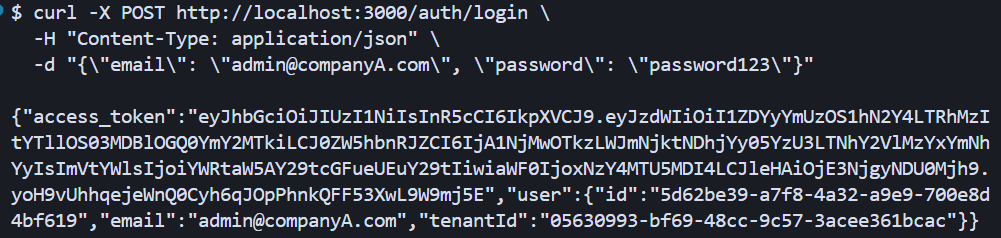
Copy the token; we’ll call it TOKEN_A. Do the same for Company B, and we’ll call its token TOKEN_B.
curl -X POST http://localhost:3000/auth/login \
  -H "Content-Type: application/json" \
  -d "{\"email\": \"admin@companyB.com\", \"password\": \"password123\"}"
Create Tasks
Create a task for Company A:
curl -X POST http://localhost:3000/tasks \
  -H "Content-Type: application/json" \
  -H "Authorization: Bearer TOKEN_A" \
  -d "{\"title\": \"Company A Task\", \"description\": \"This belongs to Company A\"}"
Create a task for Company B:
curl -X POST http://localhost:3000/tasks \
  -H "Content-Type: application/json" \
  -H "Authorization: Bearer TOKEN_B" \
  -d "{\"title\": \"Company B Task\", \"description\": \"This belongs to Company B\"}"
Verify Isolation
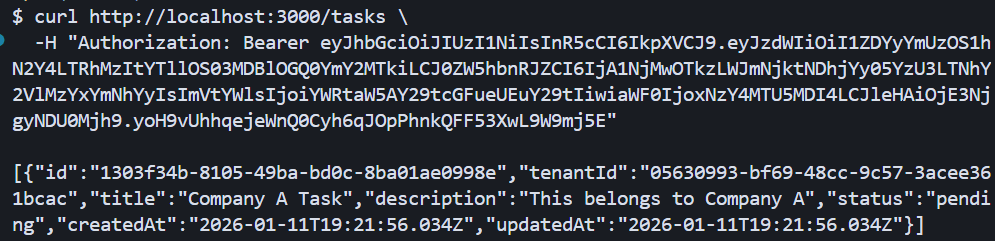
List tasks as Company A:
curl http://localhost:3000/tasks \
  -H "Authorization: Bearer TOKEN_A"
You should only see Company A’s task as seen below:
List tasks as Company B:
curl http://localhost:3000/tasks \
  -H "Authorization: Bearer TOKEN_B"
You should only see Company B’s task. This confirms that RLS is working, as each tenant only sees their own data.
Test Direct ID Access
Now try to access Company A’s task using Company B’s token. First, get Company A’s task ID from the previous response, then:
curl http://localhost:3000/tasks/ed396863-255f-49b4-a4c8-906f71465c9e \
  -H "Authorization: Bearer TOKEN_B"
You should get a 404 Not Found error like this:

Even though the task exists in the database, RLS prevents Company B from seeing it. This is the power of database-level isolation. Even if our application code has a bug, the database ensures tenants can’t access each other’s data.
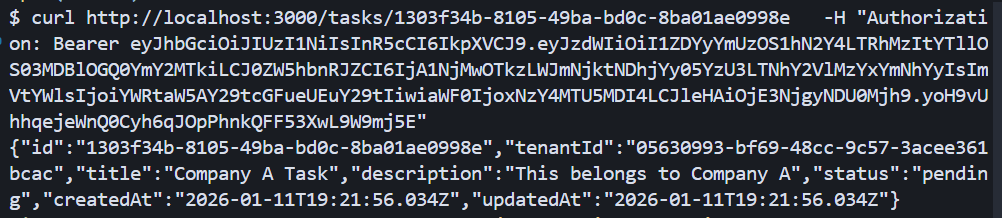
Verify Company A Can Access Its Own Task
Confirm the task exists and Company A can access it:
curl http://localhost:3000/tasks/ed396863-255f-49b4-a4c8-906f71465c9e \
  -H "Authorization: Bearer TOKEN_A"
You should get the full task details as shown below:
Conclusion
Now you can build a multi-tenant SaaS API using NestJS and Postgres Row-Level Security. We’ve covered how to set up RLS policies at the database level, extract tenant context from JWT tokens, use TypeORM with transaction-scoped session variables, and verify that data isolation works even against direct ID access attempts.
This approach provides strong security guarantees without complex application logic. The database enforces isolation automatically, reducing the risk of accidentally exposing data across tenants.
Possible next steps include adding tenant-specific rate limiting, implementing admin endpoints for cross-tenant reporting (using SECURITY DEFINER functions to bypass RLS safely), or exploring performance optimizations for high-scale scenarios with connection pooling strategies.
Read more: How to Build Semantic Search for Documentation with NestJS, Qdrant and Xenova

Christian Nwamba
Chris Nwamba is a Senior Developer Advocate at AWS focusing on AWS Amplify. He is also a teacher with years of experience building products and communities.
Related Posts
Comments
All articles
Topics
Web MobileMobile
Desktop
Design
Productivity
People