How to Build Semantic Search for Documentation with NestJS, Qdrant and Xenova

Summarize with AI:
In this post, we’ll build a semantic documentation search API that lets users ask natural-language questions instead of matching exact keywords. Let’s get started!
In this post, we’ll build a semantic documentation search API that lets users ask natural-language questions instead of matching exact keywords. We’ll use Qdrant as the vector database, Xenova/transformers to generate local text embeddings and NestJS as our API to tie everything together.
We will learn how to run Qdrant with Docker, generate embeddings in Node.js and index docs as vectors with metadata in Qdrant. Our documentation API will provide a pure semantic search endpoint and a hybrid search endpoint that combines filters for an even more effective search.
Prerequisites
- Basic knowledge of NestJS and TypeScript
- Basic knowledge of HTTP, RESTful APIs, and cURL
- Node.js and Docker should be installed
How Semantic Search Works
Semantic search focuses on meaning, not just words. It understands user intent and contextual meaning, then finds data with similar meaning rather than matching keywords. Semantic search solves this by converting text into vectors (arrays of numbers) that capture meaning, and then comparing these vectors to find related information.
For example, if our docs contain the phrase “How to authenticate users using JWT” and a user searches for “login security setup,” semantic search can infer they mean the same thing.
What Is Qdrant?
Qdrant is a vector database built for speed. It stores vectors and handles nearest neighbor calculations quickly. Qdrant uses the HNSW algorithm (Hierarchical Navigable Small World) to find similar vectors and return results in milliseconds. We’ll use the official Docker image to run it locally, which keeps our environment clean and makes the database easy to start and stop.
What Is Xenova?
Xenova lets you run machine learning models directly in Node.js. We’ll use it through the @xenova/transformers package to generate embeddings locally. This means no API calls, no rate limits and our data doesn’t leave our machine. The model downloads once (~23 MB) and caches locally for future use.
Project Setup
First, create a NestJS project:
nest new semantic-search-api
cd semantic-search-api
Next, run the command below to install our dependencies:
npm install @nestjs/config @qdrant/js-client-rest @xenova/transformers uuid \
  && npm install --save-dev @types/uuid
In our install command, @nestjs/config is used to import environment variables into our app, @qdrant/js-client-rest is the JavaScript client for interacting with the Qdrant vector database, @xenova/transformers is used to generate local text embeddings, and uuid is used to create unique identifiers for documents and embeddings.
Running Qdrant with Docker
Instead of installing Qdrant directly, we’ll use Docker Compose to keep our environment clean. Create a docker-compose.yml file at the root of your project and paste the code below:
version: '3.8'

services:
  qdrant:
    image: qdrant/qdrant:latest
    container_name: qdrant
    restart: unless-stopped
    ports:
      - "6333:6333"  # REST API port
    volumes:
      - ./qdrant_storage:/qdrant/storage
Start the database in the background:
docker-compose up -d
Next, create a .env file and paste your Qdrant connection settings and embedding configuration:
QDRANT_URL=http://localhost:6333
QDRANT_COLLECTION=documentation
QDRANT_VECTOR_DIMENSION=384
HF_MODEL_CACHE=./models
The variables above configure Qdrant’s URL and collection name, set the vector dimension to 384 (which matches our embedding model), and specify where Xenova caches the downloaded model.
Next, let’s update the app module to import the ConfigModule, so that we can load environment variables in our app:
Update your app.module.ts file with the following:
import { Module } from '@nestjs/common';
import { ConfigModule } from '@nestjs/config';

@Module({
  imports: [
    ConfigModule.forRoot({
      isGlobal: true,
      envFilePath: '.env',
    }),
    // ... we will add other modules here later
  ],
})
export class AppModule {}
Project Structure
Our project structure will look like this:
src/
├── qdrant/
│   ├── qdrant.module.ts
│   └── qdrant.service.ts
├── embeddings/
│   ├── embeddings.module.ts
│   └── embeddings.service.ts
├── documents/
│   ├── documents.module.ts
│   ├── documents.controller.ts
│   ├── document-ingestion/
│   │   ├── document-ingestion.service.ts
│   │   └── document-ingestion.service.spec.ts
│   └── document-processor/
│       ├── document-processor.service.ts
│       └── document-processor.service.spec.ts
└── search/
    ├── search.module.ts
    ├── search.service.ts
    ├── search.service.spec.ts
    └── search.controller.ts
Run the command below to generate the necessary files:
nest g module qdrant && \
nest g service qdrant && \
nest g module embeddings && \
nest g service embeddings && \
nest g module documents && \
nest g service documents/document-processor && \
nest g service documents/document-ingestion && \
nest g controller documents && \
nest g module search && \
nest g service search && \
nest g controller search
Choosing an Embedding Model
For this project, we’ll be using Xenova/all-MiniLM-L6-v2 for embeddings. This model is great at producing sentence-level embeddings, which work well for semantic search over documentation. It is relatively small and fast, and this makes it practical to run in Node.js without requiring a GPU. It outputs fixed 384-dimensional vectors (arrays with a fixed length of 384), which match our Qdrant collection configuration.
The model runs completely locally. On first use, Xenova downloads and caches it, and every subsequent run uses the cached version.
Building the Embedding Service
Our EmbeddingService will be responsible for converting text into vectors. Open the embeddings.service.ts file and update it with the following:
import { Injectable } from '@nestjs/common';
import { ConfigService } from '@nestjs/config';
import {
  pipeline,
  env,
  FeatureExtractionPipeline,
} from '@xenova/transformers';

export type EmbeddingVector = number[];

@Injectable()
export class EmbeddingsService {
  private extractor: FeatureExtractionPipeline | null = null;
  private readonly DIMENSION: number;

  constructor(private readonly configService: ConfigService) {
    const vectorDimensionEnv = this.configService.getOrThrow<string>(
      'QDRANT_VECTOR_DIMENSION',
    );
    this.DIMENSION = parseInt(vectorDimensionEnv, 10);
  }

  private async getExtractor(): Promise<FeatureExtractionPipeline> {
    if (!this.extractor) {
      env.localModelPath = this.configService.getOrThrow<string>(
        'HF_MODEL_CACHE',
      );

      console.log('Loading embedding model (first time only, ~5s)...');
      const pipe = await pipeline(
        'feature-extraction',
        'Xenova/all-MiniLM-L6-v2',
      );
      this.extractor = pipe;
      console.log('Embedding model loaded.');
    }

    return this.extractor;
  }

  async embed(text: string): Promise<EmbeddingVector> {
    const extractor = await this.getExtractor();
    const output = await extractor(text, {
      pooling: 'mean',
      normalize: true,
    });

    return Array.from(output.data as Float32Array);
  }

  async embedBatch(texts: string[]): Promise<EmbeddingVector[]> {
    const extractor = await this.getExtractor();
    const output = await extractor(texts, {
      pooling: 'mean',
      normalize: true,
    });

    const data = Array.from(output.data as Float32Array);
    return Array.from({ length: texts.length }, (_, i) =>
      data.slice(i * this.DIMENSION, (i + 1) * this.DIMENSION),
    );
  }

  async warmup(): Promise<void> {
    try {
      await this.embed('warmup');
      console.log('Embedding model warmup completed.');
    } catch (error) {
      console.error('Embedding model warmup failed:', error);
      throw error;
    }
  }
}
The extractor property stores our loaded embedding model. It is initialized as null and loaded lazily on first use. This means the model only downloads when it is actually needed, rather than slowing down application startup.
The getExtractor() method loads and caches the model. First, we check if this.extractor already exists. If it does, we return it. If not, we set env.localModelPath to tell Xenova where to cache the downloaded model files, then call pipeline('feature-extraction', 'Xenova/all-MiniLM-L6-v2') to download and load the model.
The embed() method calls the extractor with two options: pooling: 'mean', which averages all token embeddings into a single vector, and normalize: true, which scales the vector to unit length (required for cosine similarity in Qdrant). The extractor returns a Float32Array, which we convert to a regular array using Array.from().
For embedBatch(), we pass an array of texts to the extractor. The model returns a flattened array containing all vectors concatenated together. We split this back into individual vectors by slicing out chunks of 384 values (our vector dimension). The first text gets indices 0–383, the second gets 384–767 and so on.
The warmup() method runs a dummy embedding to preload the model, preventing the first real user request from experiencing a delay while the model loads. Be sure to export the EmbeddingsService in the EmbeddingsModule.
Building the Qdrant Service
This service wraps the vector database and handles creating the collection as well as reading and writing vectors. Update the qdrant.service.ts file with the following:
import { Injectable } from '@nestjs/common';
import { ConfigService } from '@nestjs/config';
import {
  QdrantClient,
  Schemas,
} from '@qdrant/js-client-rest';

export interface IQdrantPayload {
  title: string;
  category: string;
  url: string;
  text: string;
  chunkIndex: number;
  [key: string]: unknown;
}

export interface IQdrantPoint {
  id: string;
  vector: number[];
  payload: IQdrantPayload;
}

@Injectable()
export class QdrantService {
  private readonly client: QdrantClient;
  private readonly vectorDimension: number;
  private readonly collectionName: string;

  constructor(private readonly configService: ConfigService) {
    const url = this.configService.get<string>('QDRANT_URL');
    if (!url) {
      throw new Error('QDRANT_URL is not set in environment');
    }

    this.collectionName =
      this.configService.get<string>('QDRANT_COLLECTION') || 'documentation';

    const vectorDimensionEnv = this.configService.getOrThrow<string>('QDRANT_VECTOR_DIMENSION');
    this.vectorDimension = parseInt(vectorDimensionEnv, 10);

    this.client = new QdrantClient({ url });
  }

  getCollectionName(): string {
    return this.collectionName;
  }

  async setupCollection(): Promise<void> {
    const collections = await this.client.getCollections();
    const exists = collections.collections?.some(
      c => c.name === this.collectionName,
    );

    if (exists) {
      console.log(`✓ Collection "${this.collectionName}" already exists.`);
      return;
    }

    await this.client.createCollection(this.collectionName, {
      vectors: {
        size: this.vectorDimension,
        distance: 'Cosine',
      },
    });

    console.log(`✓ Created collection "${this.collectionName}".`);
  }

  async upsertPoints(points: IQdrantPoint[]): Promise<void> {
    await this.client.upsert(this.collectionName, {
      wait: true,
      points,
    });
  }

  async search(
    vector: number[],
    limit: number,
    filter?: Schemas\['SearchRequest'\]['filter'],
  ): Promise<Schemas\['ScoredPoint'\][]> {
    const params: Schemas['SearchRequest'] = {
      vector,
      limit,
      with_payload: true,
      with_vector: false,
      ...(filter && { filter }),
    };

    return this.client.search(this.collectionName, params);
  }
}
We define an interface for our vector points. Each point has an ID, a vector and a payload. The payload holds metadata such as the text content and URL.
Our constructor reads our environment variables and creates a Qdrant client. The setupCollection() method checks if our collection exists and creates it if it doesn’t. We use Cosine distance, which is the standard for semantic similarity.
The upsertPoints() method saves vectors and their metadata to Qdrant. Finally, the search() method finds similar vectors. We request the payload but not the vector itself, since we only need the metadata for displaying results.
Document Chunking
Document Processing Service
LLMs and vector databases work best with smaller chunks of text. When large text, such as a 10-page document, is embedded as a single vector, specific details get lost.
While our Xenova model has a safe upper bound limit of approximately 2,000 characters, for best search quality it is advised to embed text with a length of 400–600 characters. Therefore, we need to split documents into chunks; for this project, we’ll aim for around 500 characters.
Our chunking strategy will aim for the maximum number of complete paragraphs we can fit within the 500-character limit. Then we’ll start a new chunk with an overlap from the end of the previous chunk. The purpose of the overlap is to preserve context across chunk boundaries.
Update your document-processor.service.ts file with the following:
import { Injectable } from '@nestjs/common';

export interface IDocumentMetadata {
  title: string;
  category: string;
  url: string;
}

export interface IDocumentChunk {
  text: string;
  chunkIndex: number;
  metadata: IDocumentMetadata;
}

@Injectable()
export class DocumentProcessorService {
  private readonly CHUNK_SIZE = 500; // characters
  private readonly OVERLAP = 50;     // characters


  chunkDocument(
    content: string,
    metadata: IDocumentMetadata,
  ): IDocumentChunk[] {
    const chunks: IDocumentChunk[] = [];
    const paragraphs = content
      .split('\n\n')
      .map(p => p.trim())
      .filter(p => p.length > 0);

    let currentChunk = '';
    let chunkIndex = 0;

    for (const paragraph of paragraphs) {
      const potentialChunk = currentChunk
        ? `${currentChunk}\n\n${paragraph}`
        : paragraph;

      if (potentialChunk.length > this.CHUNK_SIZE && currentChunk) {
        // Current chunk is full; emit it
        chunks.push({
          text: currentChunk,
          chunkIndex,
          metadata,
        });

        // Start new chunk with overlap (prefer complete sentence, fallback to word boundary)
        const overlap = this.findOverlap(currentChunk);
        currentChunk = overlap + '\n\n' + paragraph;
        chunkIndex++;
      } else {
        currentChunk = potentialChunk;
      }
    }

    // Emit last chunk
    if (currentChunk.length > 0) {
      chunks.push({
        text: currentChunk,
        chunkIndex,
        metadata,
      });
    }

    return chunks;
  }

  private findOverlap(text: string): string {
    const searchWindow = text.slice(-this.OVERLAP * 2);

    // Try to find last complete sentence
    const sentenceMatch = searchWindow.match(/[.!?]\s+([^.!?]+)$/);
    if (sentenceMatch) {
      return sentenceMatch[1].trim();
    }

    // Fallback: find word boundary near target overlap length
    const tail = text.slice(-this.OVERLAP * 1.5);
    const wordMatch = tail.match(/\s+(\S+.*)$/);
    if (wordMatch) {
      return wordMatch[1].trim();
    }

    // Last resort: from last space
    const lastSpace = text.lastIndexOf(' ', text.length - this.OVERLAP);
    return lastSpace !== -1 ? text.slice(lastSpace + 1) : text.slice(-this.OVERLAP);
  }
}
In the code above, we set our chunk size to 500 characters with a 50-character overlap. The overlap helps preserve context across chunk boundaries.
The chunkDocument() method splits text by paragraph, then accumulates paragraphs until the next one would exceed our limit. It then saves the chunk and starts a new one with an overlap from the end of the chunk that was just saved.
The findOverlap() method tries to find a complete sentence for the overlap first. If that fails, it looks for a word boundary. This keeps the overlap readable rather than cutting words in half.
Document Ingestion Service
This service processes raw documents, converts them to vectors and saves them in Qdrant. Update your document-ingestion.service.ts file with the following:
import { Injectable } from '@nestjs/common';
import { v4 as uuidv4 } from 'uuid';
import { DocumentProcessorService, IDocumentMetadata, IDocumentChunk } from '../document-processor/document-processor.service';
import { EmbeddingsService, EmbeddingVector } from '../../embeddings/embeddings.service';
import { QdrantService, IQdrantPoint, IQdrantPayload } from '../../qdrant/qdrant.service';

export interface IRawDocument extends IDocumentMetadata {
  content: string;
}

@Injectable()
export class DocumentIngestionService {
  constructor(
    private readonly processor: DocumentProcessorService,
    private readonly embeddings: EmbeddingsService,
    private readonly qdrant: QdrantService,
  ) {}

  /**
   * Ingest one or more raw documents:
   * - Chunk content into smaller overlapping pieces.
   * - Embed all chunk texts in a batch.
   * - Upsert points (vector + payload) into Qdrant.
   */
  async ingestDocuments(docs: IRawDocument[]): Promise<{
    status: 'ok' | 'error';
    documents: number;
    totalChunks: number;
    skipped: number;
    error?: string;
  }> {
    try {
      if (!docs?.length) {
        return { status: 'ok', documents: 0, totalChunks: 0, skipped: 0 };
      }

      await this.qdrant.setupCollection();

      let totalChunks = 0;
      let skipped = 0;

      for (const doc of docs) {
        const result = await this.ingestDocument(doc);
        if (result.success) {
          totalChunks += result.chunks;
        } else {
          skipped++;
        }
      }

      return {
        status: 'ok',
        documents: docs.length - skipped,
        totalChunks,
        skipped,
      };
    } catch (error) {
      console.error('Fatal error during ingestion:', error);
      return {
        status: 'error',
        documents: 0,
        totalChunks: 0,
        skipped: docs?.length ?? 0,
        error: error instanceof Error ? error.message : 'Unknown error',
      };
    }
  }

  private async ingestDocument(doc: IRawDocument): Promise<{
    success: boolean;
    chunks: number;
  }> {
    try {
      if (!doc.title || !doc.content) {
        console.warn('Skipping document, missing title or content');
        return { success: false, chunks: 0 };
      }

      const metadata: IDocumentMetadata = {
        title: doc.title,
        category: doc.category || 'uncategorized',
        url: doc.url || '',
      };

      const chunks = this.processor.chunkDocument(doc.content, metadata);
      if (chunks.length === 0) {
        console.warn(`Skipping "${doc.title}" - produced no chunks`);
        return { success: false, chunks: 0 };
      }

      const vectors = await this.embeddings.embedBatch(
        chunks.map(chunk => chunk.text),
      );

      if (vectors.length !== chunks.length) {
        console.error(
          `Error ingesting "${doc.title}": expected ${chunks.length} vectors, got ${vectors.length}`,
        );
        return { success: false, chunks: 0 };
      }

      const points = this.createQdrantPoints(chunks, vectors);
      await this.qdrant.upsertPoints(points);

      console.log(`✓ Ingested "${doc.title}" (${chunks.length} chunks).`);
      return { success: true, chunks: chunks.length };
    } catch (error) {
      console.error(`Error ingesting "${doc.title}":`, error);
      return { success: false, chunks: 0 };
    }
  }

  private createQdrantPoints(
    chunks: IDocumentChunk[],
    vectors: EmbeddingVector[],
  ): IQdrantPoint[] {
    return chunks.map((chunk, index) => ({
      id: uuidv4(),
      vector: vectors[index],
      payload: {
        title: chunk.metadata.title,
        category: chunk.metadata.category,
        url: chunk.metadata.url,
        text: chunk.text,
        chunkIndex: chunk.chunkIndex,
      },
    }));
  }
}
In our constructor, we inject three services: the document processor for chunking, the embeddings service for generating vectors and the Qdrant service for database operations.
The ingestDocuments() method processes multiple documents at once. First, it confirms that the Qdrant collection is set up, then it processes each document individually. If one document fails, we still proceed with the others while tracking which documents were skipped and which were successful.
The ingestDocument() method handles the actual ingestion for individual documents. It verifies that the document has the required fields, sets up metadata, chunks the content, generates embeddings and saves them to Qdrant. It also confirms that the number of vectors is consistent with the number of chunks; if not, it sends a warning and skips that document.
The createQdrantPoints() method is a helper that combines our chunks, vectors and metadata into the format Qdrant expects.
Documents Controller and Module
Update your documents.controller.ts file with the following:
import { Body, Controller, Post } from '@nestjs/common';
import { DocumentIngestionService, IRawDocument } from './document-ingestion/document-ingestion.service';

@Controller('documents')
export class DocumentsController {
  constructor(private readonly ingestionService: DocumentIngestionService) {}

  @Post('ingest')
  async ingest(@Body() body: { docs: IRawDocument[] }) {
    if (!body?.docs?.length) return { error: 'No documents provided' };
    return this.ingestionService.ingestDocuments(body.docs);
  }
}
Next, update the DocumentsModule to import the EmbeddingsModule and QdrantModule.
Building the Search Service
The search service handles user queries. Update your search.service.ts file with the following:
import { Injectable } from '@nestjs/common';
import { EmbeddingsService } from '../embeddings/embeddings.service';
import { QdrantService, IQdrantPayload } from '../qdrant/qdrant.service';
import { Schemas } from '@qdrant/js-client-rest';

export interface ISearchResult {
  title: string;
  snippet: string;
  url: string;
  category: string;
  score: number;
  chunkIndex: number;
}

@Injectable()
export class SearchService {
  private static readonly MIN_LIMIT = 1;
  private static readonly MAX_LIMIT = 100;
  private static readonly DEFAULT_LIMIT = 10;

  constructor(
    private readonly embeddings: EmbeddingsService,
    private readonly qdrant: QdrantService,
  ) {}

  private mapHits(hits: Schemas\['ScoredPoint'\][]): ISearchResult[] {
    return hits
      .filter(hit => hit.payload && hit.score !== undefined)
      .map(hit => {
        const payload = hit.payload as IQdrantPayload;
        return {
          title: String(payload?.title ?? ''),
          snippet: String(payload?.text ?? ''),
          url: String(payload?.url ?? ''),
          category: String(payload?.category ?? ''),
          score: hit.score ?? 0, //similarity score
          chunkIndex: Number(payload?.chunkIndex ?? 0),
        };
      });
  }

  private validateAndNormalizeQuery(query: string): string | null {
    const trimmed = query?.trim();
    return trimmed && trimmed.length > 0 ? trimmed : null;
  }

  private clampLimit(limit: number): number {
    return Math.max(SearchService.MIN_LIMIT, Math.min(SearchService.MAX_LIMIT, limit));
  }

  private createCategoryFilter(category: string | null | undefined): Schemas\['SearchRequest'\]['filter'] | undefined {
    const trimmed = category?.trim();
    if (!trimmed) {
      return undefined;
    }
    return {
      must: [
        {
          key: 'category',
          match: { value: trimmed },
        },
      ],
    };
  }

  private async performSearch(
    query: string,
    limit: number,
    filter?: Schemas\['SearchRequest'\]['filter'],
  ): Promise<ISearchResult[]> {
    try {
      const vector = await this.embeddings.embed(query);
      const hits = await this.qdrant.search(vector, limit, filter);
      return this.mapHits(hits);
    } catch (error) {
      console.error('Error performing search:', error);
      return [];
    }
  }


  async search(query: string, limit = SearchService.DEFAULT_LIMIT): Promise<ISearchResult[]> {
    const normalizedQuery = this.validateAndNormalizeQuery(query);
    if (!normalizedQuery) {
      return [];
    }
    return this.performSearch(normalizedQuery, this.clampLimit(limit));
  }

  async searchWithCategory(
    query: string,
    category?: string | null,
    limit = SearchService.DEFAULT_LIMIT,
  ): Promise<ISearchResult[]> {
    const normalizedQuery = this.validateAndNormalizeQuery(query);
    if (!normalizedQuery) {
      return [];
    }
    const filter = this.createCategoryFilter(category);
    return this.performSearch(normalizedQuery, this.clampLimit(limit), filter);
  }
}
The mapHits() method converts Qdrant’s raw response into a user-friendly format. The validateAndNormalizeQuery() method verifies we have an actual query string, clampLimit() keeps result counts within safe limits and createCategoryFilter() builds the Qdrant filter object when users filter by category.
The performSearch() method embeds the user query, searches Qdrant and maps the results.
The search() method uses only pure semantic search with no filters, while searchWithCategory() adds category filtering for more specific searches.
Search Controller
Our search controller exposes two endpoints. The /search endpoint provides pure semantic search, while /search/hybrid adds category filtering. Update your search.controller.ts file with the following:
import { Controller, Get, Query } from '@nestjs/common';
import { SearchService } from './search.service';

@Controller('search')
export class SearchController {
  constructor(private readonly searchService: SearchService) {}

  private parseLimit(limit: string | undefined): number {
    const parsed = Number(limit);
    return isNaN(parsed) || parsed <= 0 ? 10 : parsed;
  }

  @Get()
  async search(
    @Query('q') q: string,
    @Query('limit') limit?: string,
  ) {
    if (!q) {
      return { error: 'Query parameter "q" is required' };
    }
    return this.searchService.search(q, this.parseLimit(limit));
  }

  @Get('hybrid')
  async hybrid(
    @Query('q') q: string,
    @Query('category') category?: string,
    @Query('limit') limit?: string,
  ) {
    if (!q) {
      return { error: 'Query parameter "q" is required' };
    }
    return this.searchService.searchWithCategory(q, category, this.parseLimit(limit));
  }
}
Finally, update the SearchModule to import the EmbeddingsModule and QdrantModule.
Application Warmup
We don’t want the first user request to hang while our ML model loads, so we’ll add a warmup phase during application startup.
Update your main.ts file with the following:
import { NestFactory } from '@nestjs/core';
import { AppModule } from './app.module';
import { EmbeddingsService } from './embeddings/embeddings.service';
import { QdrantService } from './qdrant/qdrant.service';

async function bootstrap() {
  const app = await NestFactory.create(AppModule);

  try {
    console.log('Starting services warmup...');
    const embeddings = app.get(EmbeddingsService);
    const qdrant = app.get(QdrantService);

    await Promise.all([
      embeddings.warmup(),
      qdrant.setupCollection(),
    ]);
    console.log('✓ Services ready.');
  } catch (err) {
    console.error('Warmup failed', err);
    process.exit(1);
  }

  await app.listen(3000);
}
bootstrap();
This loads the ML model and sets up the database collection before accepting requests.
Testing the API
Run the following in your terminal to start your server:
npm run start:dev
You should see the warmup logs followed by the server start message.
Ingesting Documents
Let’s add some test documents:
curl -X POST http://localhost:3000/documents/ingest \
  -H "Content-Type: application/json" \
  -d '{
    "docs": [
      {
        "title": "API Authentication",
        "category": "Security",
        "url": "/docs/auth",
        "content": "To access the API, you must use a Bearer token in the header. Tokens expire after 1 hour."
      },
      {
        "title": "Rate Limiting",
        "category": "Performance",
        "url": "/docs/rate-limits",
        "content": "We limit requests to 100 per minute per IP address. Exceeding this returns a 429 Too Many Requests error."
      }
    ]
  }'
Your response should be:
{
  "status": "ok",
  "documents": 2,
  "totalChunks": 2,
  "skipped": 0
}
Searching Documents
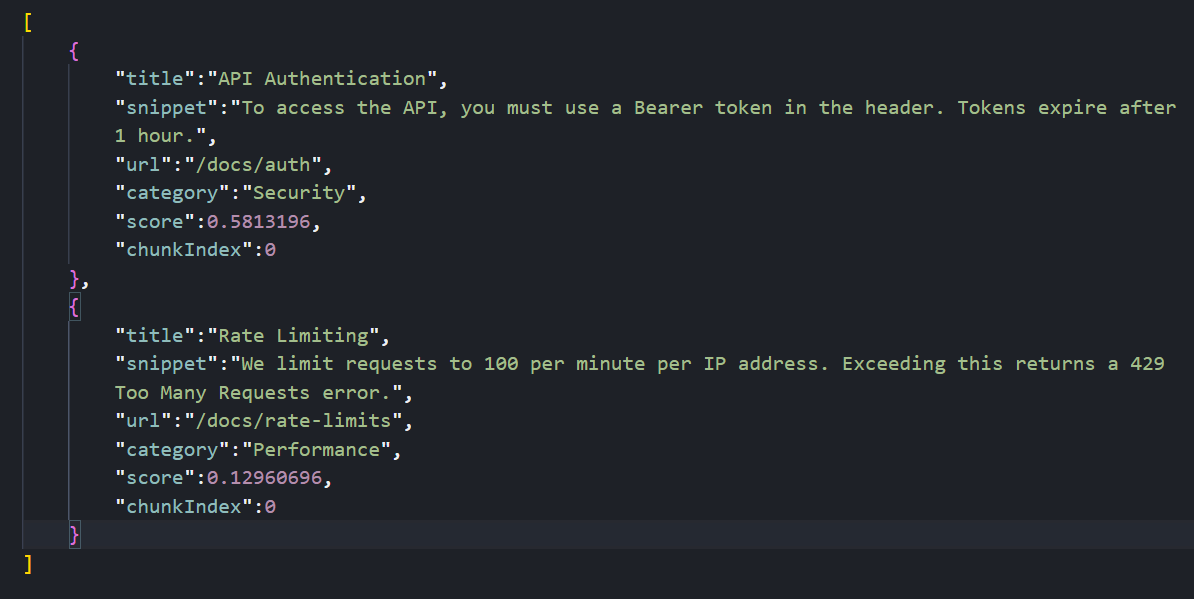
Let’s try a semantic search. Note that we’re not using the exact words “Bearer” or “header”:
curl "http://localhost:3000/search?q=how%20do%20I%20log%20in%20to%20the%20api"
The system understands that “log in” is semantically related to “authentication” and “Bearer token,” so it returns the Authentication document.
Testing Hybrid Search
Let’s try searching with a category filter:
curl "http://localhost:3000/search/hybrid?q=api%20limits&category=Performance"
Your response should be:
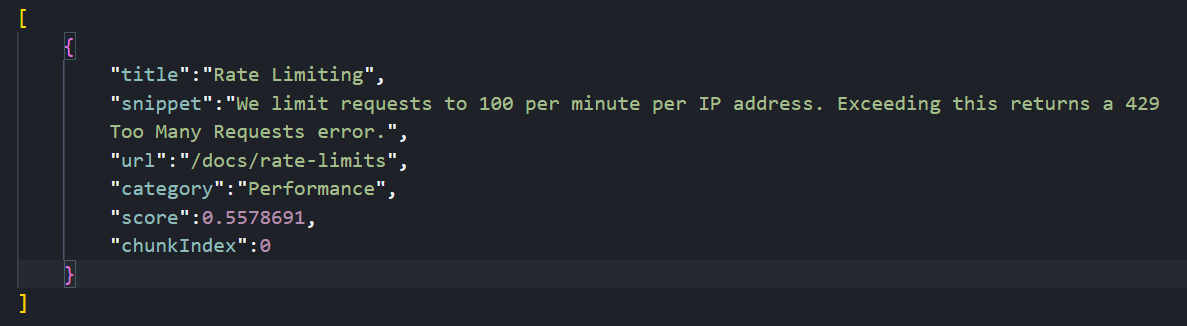
This searches for content semantically related to “api limits” but only returns results in the “Performance” category.
Conclusion
In this article, we learned how to run a vector database locally with Docker, generate embeddings without external APIs, chunk documents with overlapping windows and combine vector similarity with metadata filtering.
Possible next steps include swapping Xenova for OpenAI if we need larger models, or moving Qdrant to a cloud cluster for millions of vectors, while preserving the existing NestJS logic.

Christian Nwamba
Chris Nwamba is a Senior Developer Advocate at AWS focusing on AWS Amplify. He is also a teacher with years of experience building products and communities.
Related Posts
Comments
All articles
Topics
Web MobileMobile
Desktop
Design
Productivity
People