Blazor Basics: Common Blazor Mistakes Beginners Make (and How to Avoid Them)

Summarize with AI:
One Blazor specialist shares common mistakes he sees beginner Blazor web developers make and tips for how to avoid them.
I have been using Blazor daily for building web applications for more than six years. In this article, I want to share common mistakes I see beginner Blazor developers make and help you avoid them.
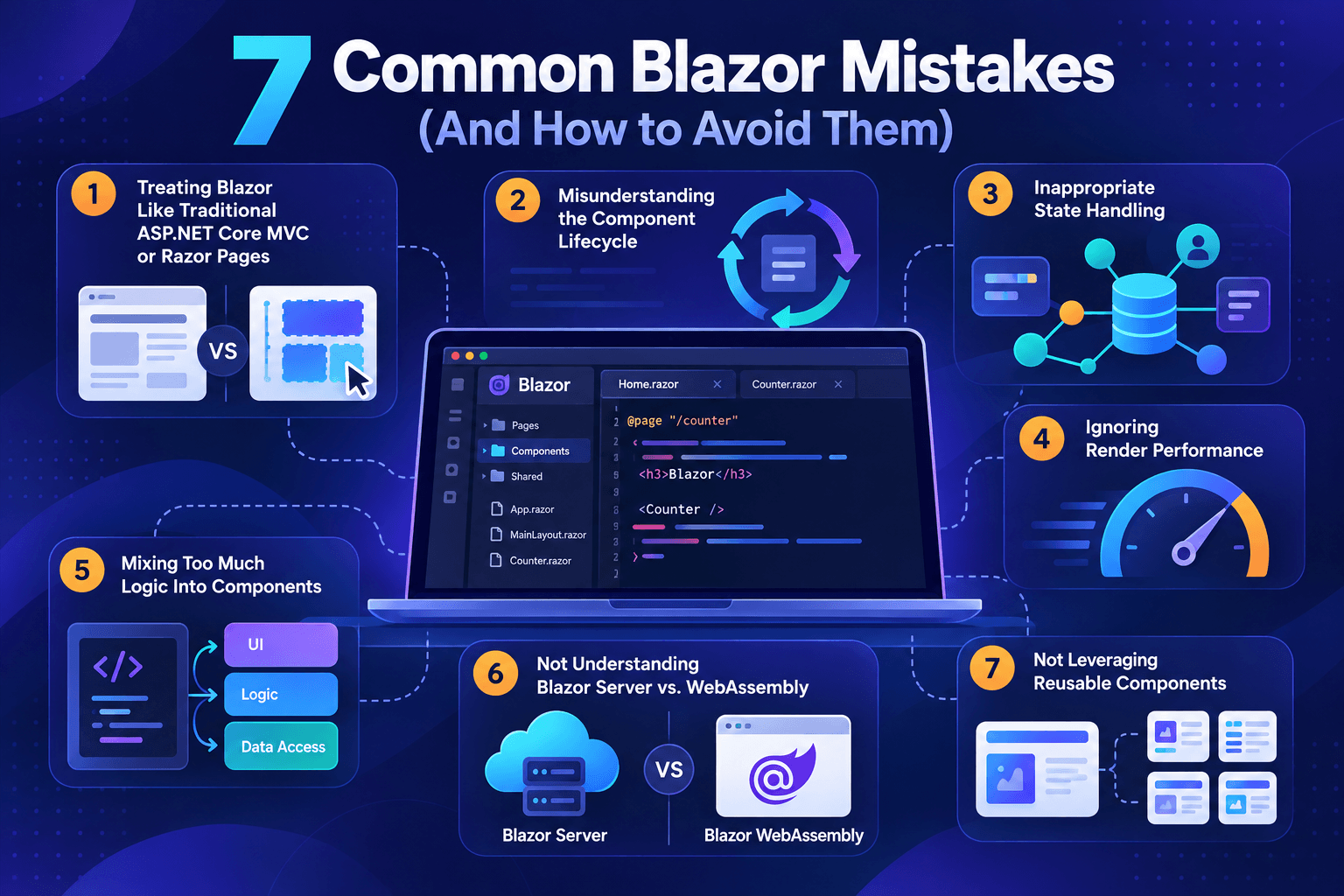
Image generated with AI
Mistake #1: Treating Blazor Similar To Traditional ASP.NET Core MVC or Razor Pages
Mistake: Beginners often assume Blazor is just another evolution of ASP.NET Core MVC or Razor Pages. Especially experienced .NET (desktop or mobile) developers fall into that category. It’s important to understand the conceptual differences from the beginning.
While Razor Pages and MVC focus on page-based development, Blazor is component-oriented and state-based.
Thinking in cohesive, reusable components is the foundation for building maintainable and scalable Blazor web applications.
Instead of full page reloads, we update component state and let the Blazor engine re-render only the parts of the user interface that need to be refreshed.
Instead of directly returning HTML, we maintain UI state over time and let the engine re-render the parts of the page that need to be updated.
Key Lesson: Blazor is a modern single-page web application framework (closer to a JavaScript web framework such as Angular or React).
Mistake #2: Misunderstanding the Component Lifecycle (And Its Methods)
Mistake: Beginners often do not understand the fundamentals of the Blazor component lifecycle model. They use the wrong methods to load data or trigger state changes where they shouldn’t, causing unnecessary re-renders (a performance issue).
Each lifecycle method has a specific purpose and timing. It’s important to put the code in the correct place. Otherwise, unexpected behavior might occur.
Typical problems are:
- Data loads twice
- UI flickers (multiple changes)
- Performance issues
A simple overview or rule of thumb is:
OnInitialized/OnInitializedAsyncexecute once when the component is created and added to the component tree.OnParametersSet/OnParametersSetAsyncruns every time a component parameter changes.OnAfterRender/OnAfterRenderAsyncruns after the user interface is rendered.
For example, if you put your data loading logic in the OnInitalized lifecycle method and your component depends on a component parameter (such as user ID), the data loading code will not be triggered when the user ID changes.
protected override async Task OnInitializedAsync()
{
    data = await LoadDataAsync();
}
<UserDetail Id="1" />
The correct approach is to put the data loading code in the OnParametersSetAsync lifecycle method:
protected override async Task OnParametersSetAsync()
{
    data = await LoadDataAsync(Id);
}
Another mistake is loading the data in the OnAfterRenderAsync lifecycle method. To force Blazor to re-render the component, you need to call the StateHasChanged method. This results in an endless loop of state changes and re-renders of the component.
If we need to utilize the OnAfterRenderAsync method in specific use cases (such as interacting with DOM/JavaScript), always use the firstRender argument to execute the code only on the first render.
Rule of Thumb: Use OnInitializedAsync for static setup and OnParametersSetAsync for anything depending on parameters.
Key Lesson: Learning the fundamentals of the Blazor component lifecycle model and putting code in the correct lifecycle method helps avoid many self-inflicted problems in a Blazor web application (such as unnecessary performance hits).
Mistake #3: Inappropriate State Handling
Mistake: Beginngers sometimes duplicate state by putting everything into a component state or by putting everything into a shared (global) state.
Generally, put the state as close to its usage as possible.
- For example, a counter component should keep track of the state (count number) as a component state property.
- Use component parameters when a parent component controls the information provided to a child component. Typical scenarios include master-detail patterns where the parent component shows a list of users and the child component provides the details for a specific user.
- Use cascading parameters for information shared in multiple levels of the same component tree. For example, provide the customer ID as a cascading value when an entire component tree provides detailed information about its contracts and communication records.
- Use services to share information across multiple (unrelated) component trees. For example, use a service to keep track of the chosen user interface language.
Learn when to use component parameters, cascading parameters, services and local state.
Key Lesson: Use local state (component state) where possible and use shared state when needed. Use state containers (services) where applicable.
Mistake #4: Ignoring Render Performance
Mistake: Some beginners don’t realize that unnecessary re-renders happen more often than expected, slowing down the web application.
Whenever component parameters or local state (component properties or fields) change, Blazor triggers a re-render. Also, events and other mechanisms within the Blazor framework can potentially trigger a component re-render.
The first optimization that comes to mind is splitting a large component into multiple components.
For example, a user profile component might show data from eight different parts of the application. Let’s say we implement it using a single component; a change to a single property (e.g., an updated online state) will trigger a re-render of the entire user profile.
If we split the component into different child components, one for each application section, only the UserOnlineState component will re-render should the user change its state when we look at it on our screen.
Another overlooked performance issue is overusing two-way bindings in forms.
Consider using the @onchange property to only trigger an update when the user leaves the input field instead of triggering an update on every keystroke.
The third potential performance issue is calculating expensive data on every render, rather than only when a parameter changes. Utilizing the OnParametersSet/OnParametersSetAsync methods for calculating expensive data is best practice.
Key Lesson: Test your component’s performance and avoid unnecessary re-renders.
Mistake #5: Mixing Too Much Logic Into Components
Mistake: Beginners often mix user interface logic with business logic, data access and state management in Blazor components.
Generally speaking, we want small and cohesive, reusable components. However, not only size but also form matters.
When picking up Blazor for the first time, developers often tend to put too much logic into Blazor components. While user interface code, such as interaction logic, is great, we do not want to implement data access logic inside our components.
Instead, we want to use dependency injection to inject data access services into our Blazor components.
Separation of concerns still matters for developing Blazor web applications. We want to keep business logic clean and not depend on a user interface framework. It should be reusable and shareable for implementing future applications.
Extracting logic into reusable, testable and scalable services is key when developing applications of any meaningful size, and also true for all Blazor web applications.
Key Lesson: Application architecture also matters for a Blazor web application. Keep the separation of concerns, and only put code in Blazor components that belong there (user interface and interaction code).
Mistake #6: Not Understanding Blazor Server vs. WebAssembly
Mistake: Beginners can pick the wrong hosting model without understanding the consequences of that decision.
The fast-paced world, especially on the internet, wants you to believe simple statements such as Server is just backend or WebAssembly is always faster.
The truth is that making a decision on what hosting model to choose for your application is more nuanced than a simple statement.
Educate yourself on topics such as latency vs. payload tradeoffs.
- If fast responsiveness is very important to you, WebAssembly might be a good choice even though it loads more slowly (because more data has to be initially transferred).
- If a fast first page load is inevitable to your app, Blazor Server might be your best bet.
- If you want a simple line of business application for internal use, Blazor Server might be a good bet since it’s simple to deploy and update, and allows you to process a lot of code on the server (security).
Make sure you understand the impact of choosing one interaction model over the other before making the decision for your application.
?Learn more about five key differences between Blazor Server and Blazor WebAssembly.
Key Lesson: Learn and understand Blazor Server and Blazor WebAssembly interaction models before making a decision on what to use for your application.
Mistake #7: Not Leveraging Reusable Components
Mistake: Beginners sometimes copy-and-paste too much UI code instead of componentizing.
At the beginning of our Blazor development journey, we need to understand that the overhead of creating (and instantiating) a Blazor component is smaller than we think, and the upside usually justifies doing so.
Extracting smaller pieces into individual components makes them simpler to maintain (more focused, coherent code) and more reusable.
A correctly parameterized component can also save a lot of repeated code. And Templated Components provide another level of abstraction.
It’s especially important when implementing user interface controls, such as components in the Progress Telerik UI for Blazor component library.
Key Lesson: Learn when extracting a component makes sense to avoid code duplication and enable reusability.
Conclusion
We all start somewhere in our journey of becoming a Blazor web developer. More than ever, in the AI code generation age we stand on the shoulders of giants and can learn from the mistakes others have made.
In this article, I shared the mistakes I see most commonly among beginner Blazor web developers. There are more pitfalls, but avoiding those mentioned should already put you one step ahead of most beginners.
If you want to learn more about Blazor development, watch my free Blazor Crash Course on YouTube. And stay tuned to the Telerik blog for more Blazor Basics.

Claudio Bernasconi
Claudio Bernasconi is a passionate software engineer and content creator writing articles and running a .NET developer YouTube channel. He has more than 10 years of experience as a .NET developer and loves sharing his knowledge about Blazor and other .NET topics with the community.
Related Posts
Comments
All articles
Topics
Web MobileMobile
Desktop
Design
Productivity
People