AI Productivity for React Developers in 2026

Summarize with AI:
Developers are not blindly handing work over to AI, but treating it as a strategic assistant. Here’s what this looks like for React devs in 2026.
The 2025 Stack Overflow Developer Survey confirmed what most of us already know from experience: 84% of developers are now using or planning to use AI tools in their development process. What’s more revealing is how developers are still being cautious in their use of these tools. Only about one-third say they trust AI outputs completely, while nearly half question their accuracy.
This cautious adoption tells us something important. We’re not blindly handing our work over to AI. We’re learning to use these tools strategically, treating them as assistants rather than replacements. For React developers specifically, this means adapting how we approach building interfaces, managing component libraries and iterating on features.
If you’ve been building React applications for a while, you’ve probably experienced this shift firsthand. Maybe you’re using GitHub Copilot to autocomplete component logic, or Cursor to refactor entire feature branches. Perhaps you’re generating design themes with Progress ThemeBuilder, or using Claude to debug complex state management issues. These aren’t experimental workflows anymore; they’re part of how we work.
In this article, we’ll explore what this actually looks like in practice for React developers in 2026.
Coding Itself Has Changed
There’s a shift in how we write code, and it’s not what most people expected (don’t worry, we’re not being replaced by AI). We’re spending less time on the mechanical act of typing and more time on the creative work of guiding and refining.
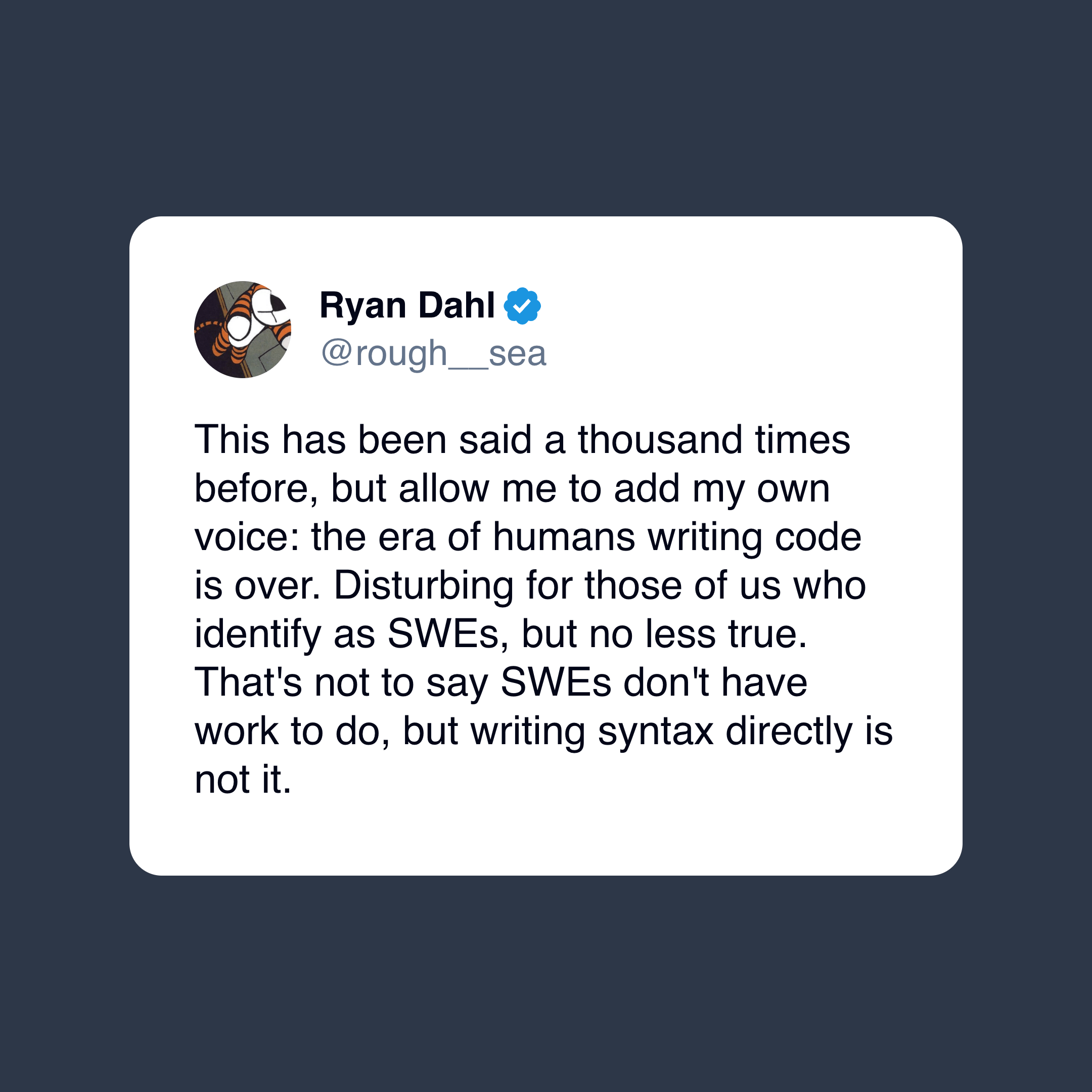
Ryan Dahl, the creator of Node.js and Deno, aptly put it in a recent social media post: “This has been said a thousand times before, but allow me to add my own voice: the era of humans writing code is over. Disturbing for those of us who identify as SWEs, but no less true. That’s not to say SWEs don’t have work to do, but writing syntax directly is not it.”
For React developers, this means our day-to-day work looks different. Instead of spending an hour carefully typing out a form component with all its validation logic, we might spend 10 minutes describing what we need and then another 20 minutes reviewing and adjusting the generated code. The result? The same quality component in a fraction of the time.
The iteration cycles have also become faster. When we can generate and refine code quickly, we’re more willing to try multiple approaches. Need to see how our data grid looks with server-side pagination versus client-side? Generate both implementations and compare them. Want to experiment with different state management patterns? We can prototype each one in minutes rather than hours.
We still need to understand React’s rendering model, still need to know when to use useCallback versus useMemo, still need to architect our component hierarchy thoughtfully. However, we don’t need to manually type out every property definition or write boilerplate code repeatedly.
Continuous Context and AI-Native Editors
One of the significant improvements in AI-assisted development is persistent context. Modern AI coding assistants understand our entire codebase, not just the file we’re currently editing.
Traditional autocomplete tools could only see a few lines around our cursor. They might suggest completing a function name, but they had no idea what that function should actually do or how it fit into our broader application architecture. AI-native editors and tools like Cursor, Claude Code and others have changed this completely.
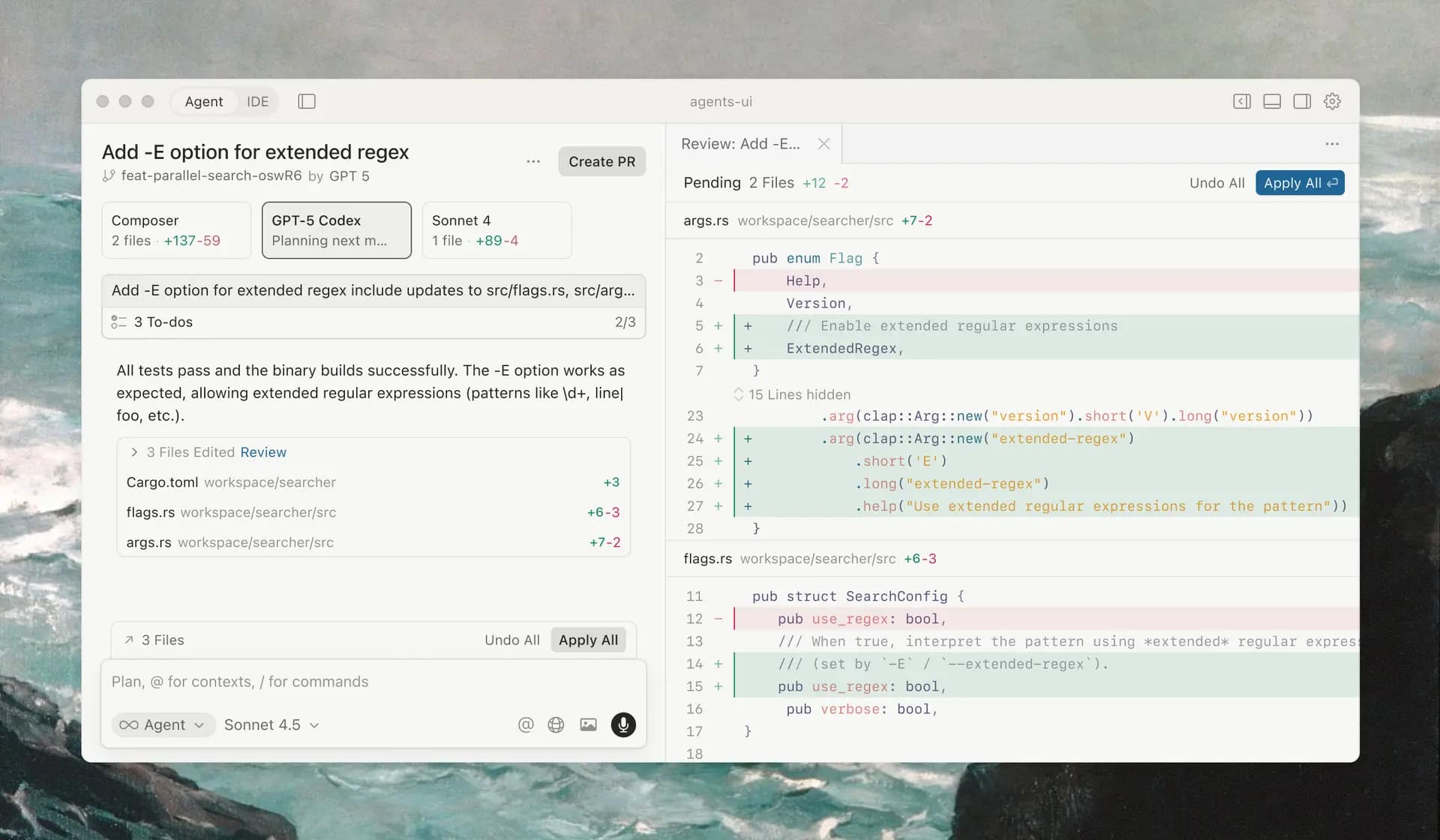
These tools help maintain an understanding of our project structure, our component patterns, our naming conventions and even our coding style. When we ask them to create a new feature, they don’t just generate generic React code; they generate code that looks like it belongs in our codebase because they’ve learned from the rest of our application.
Let’s say we’re building a React dashboard UI that needs to fetch user data and display it in a table. With traditional tools, we’d manually wire up the API call, handle loading states, manage errors and set up the table structure.
With an AI assistant that understands our codebase, we can describe what we need, and it’ll generate code that uses our existing API client, follows our established error handling patterns and implements the table using whatever libraries we’re already using in our app.
Working with these AI assistants feels less like using a tool and more like pair programming with someone who already knows our codebase inside and out.
Planning and Agentic Workflows
Writing individual functions or components is one thing, but modern AI tools are increasingly capable of handling multi-step workflows that require planning and coordination. This is where agentic AI comes in: systems that can break down complex tasks into smaller steps and execute them sequentially or in parallel.
For React developers, this means we can hand off entire features to an AI agent rather than just asking for help with specific files. Want to migrate from Redux to Zustand? An AI agent can analyze our current state management setup, create a migration plan, and then systematically work through each component to update the implementation.
For example, we might tell an agent: “Build a column chart that shows quarterly sales by region, with drill-down functionality to reveal monthly data when a quarter is clicked.”
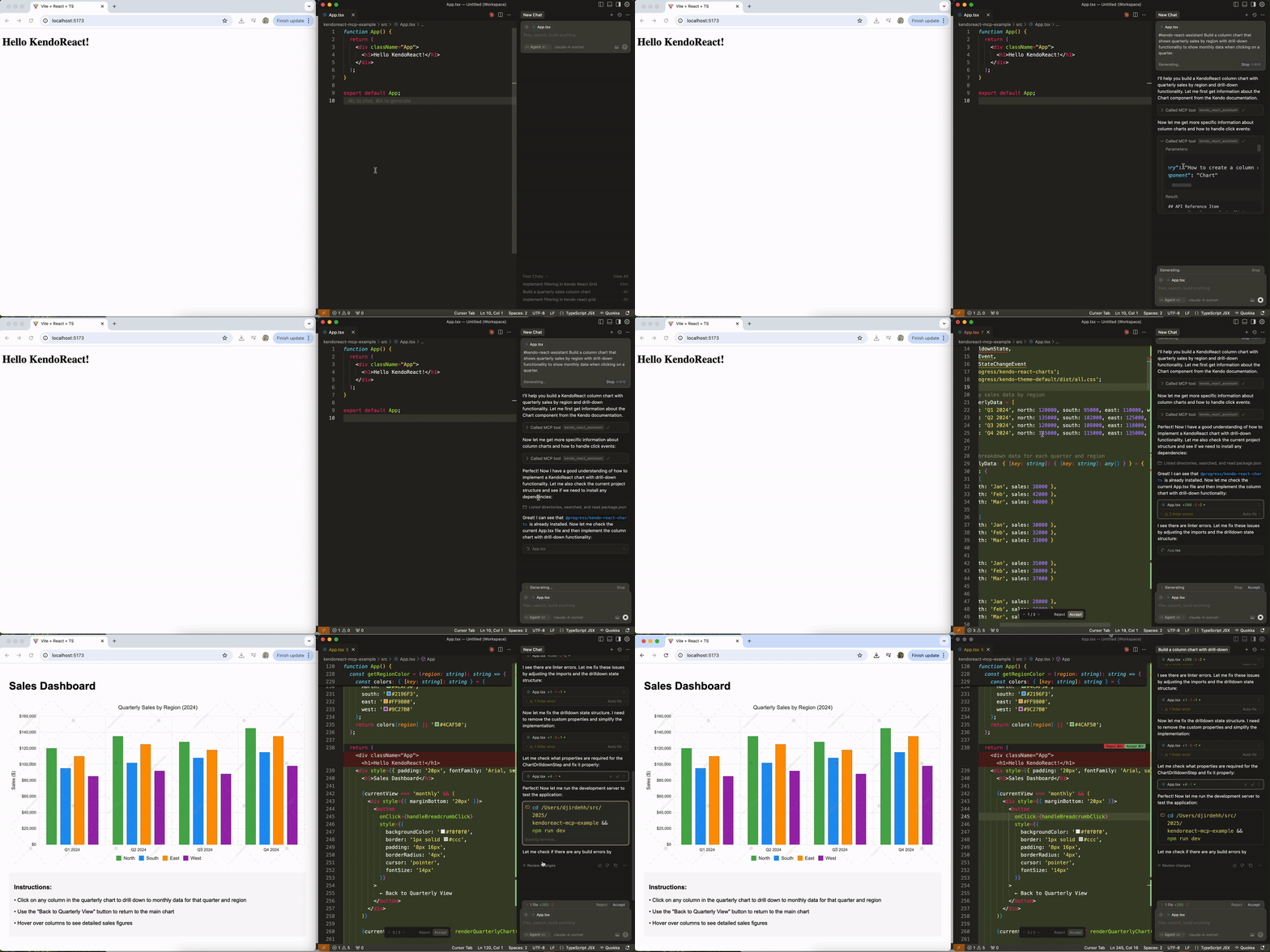
The agent can generate the chart component, configure the data bindings, create any necessary helper functions for aggregation and even add default styling or tooltips.
What’s powerful is that these agents can handle refactors and migrations that would be tedious to do manually. Need to rename a prop across 50 components? Want to update all your class components to functional components with hooks? Planning to migrate from JavaScript to TypeScript? These are exactly the kinds of repetitive-but-important tasks that agents excel at.
UI Generation, Design and Theming with AI
Building user interfaces has always involved a fair amount of repetitive work. Creating layouts, styling components and maintaining design consistency across an application. These are all necessary tasks, but they’re not where some developers want to spend their creative energy.
With AI, layout generation has become surprisingly sophisticated. Tools like v0 can take a description or even a screenshot of a design and generate React components that implement that layout. The code they produce isn’t just a rough approximation either, it’s good-quality JSX with proper semantic HTML, accessibility attributes and responsive styling.
For React developers working with component libraries like Progress KendoReact, this gets even more powerful as long as the agent has the appropriate context about the library and components. Instead of generating generic HTML and CSS, these tools can generate code using the actual components from our library. Need a data grid with sorting, filtering and pagination? Describe it, and the AI will scaffold it using the React Grid component we’re already using elsewhere in our app: with all the right props, event handlers and styling.
Progress ThemeBuilder has taken this a step further with AI-powered theme generation. Instead of manually configuring dozens of color variables and spacing values, we can describe the aesthetic we’re going for in plain English: “Create a clean, modern analytics theme with a cool blue-gray palette that feels data-driven and professional, suitable for a B2B software dashboard.” The AI generates a complete design system that applies consistently across all our components.
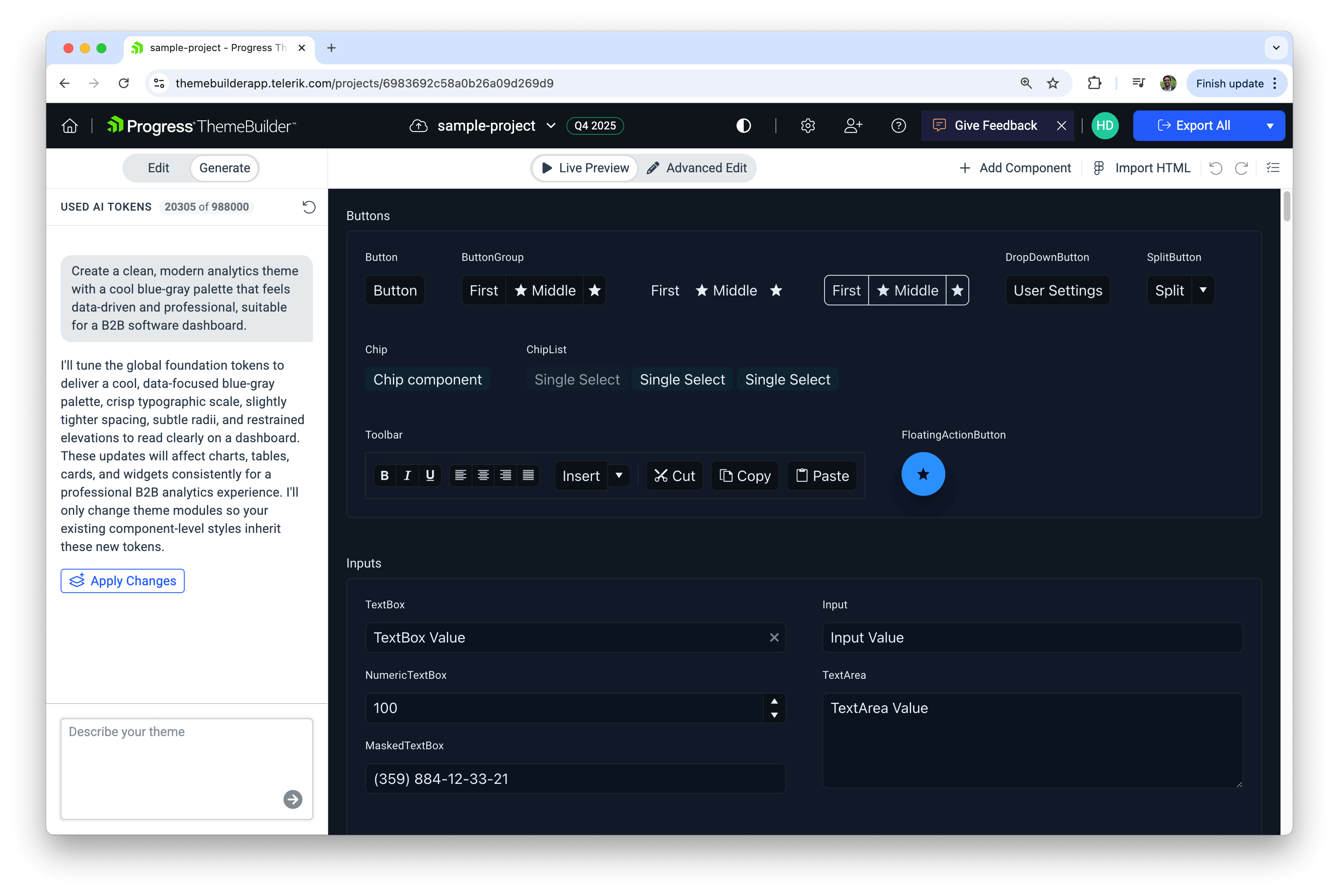
What makes this valuable is that the generated themes aren’t just random color combinations. The AI understands design principles like color theory, contrast ratios for accessibility and how different UI states should relate visually. When it generates a theme, it’s creating a system where primary buttons, hover states, focus indicators and disabled states all work together. ThemeBuilder also provides component-level AI theming, which means we can refine specific components without having to regenerate our entire theme.
For developers who aren’t designers (which is most of us), this removes a huge source of friction. We can focus on building functionality while still delivering applications that look professional and cohesive.
Model Context Protocol and Integration
The tools we’ve talked about so far are impressive, but they have a limitation: they only know what’s in our codebase and what they learned during training. They don’t know about our specific component library’s latest features, our company’s internal design system, or the proprietary APIs we’re building against.
This is where Model Context Protocol (MCP) becomes important. Think of MCP as a standardized way for AI models to connect to external knowledge sources and tools. Instead of the AI being limited to its training data, it can reach out to documentation, component libraries, databases and other resources to get current, specific information about the tools we’re using.
For React developers, this means our AI assistant can understand the actual API of the components we’re working with, not just generic React patterns. When we’re using the KendoReact Grid component, an MCP-enabled assistant can query the real documentation to understand what props are available, what patterns are recommended and what changed in the latest version.
The @progress/kendo-react-mcp server implements this for KendoReact. When we install it and configure it with our editor, the AI assistant gains access to comprehensive knowledge about KendoReact components. It’s not guessing at how to use the Grid, or the Scheduler, or the DatePicker. It’s referencing the actual documentation and best practices.
Here’s an example of generating a KendoReact Grid from scratch with the help of the @progress/kendo-react-mcp tool.
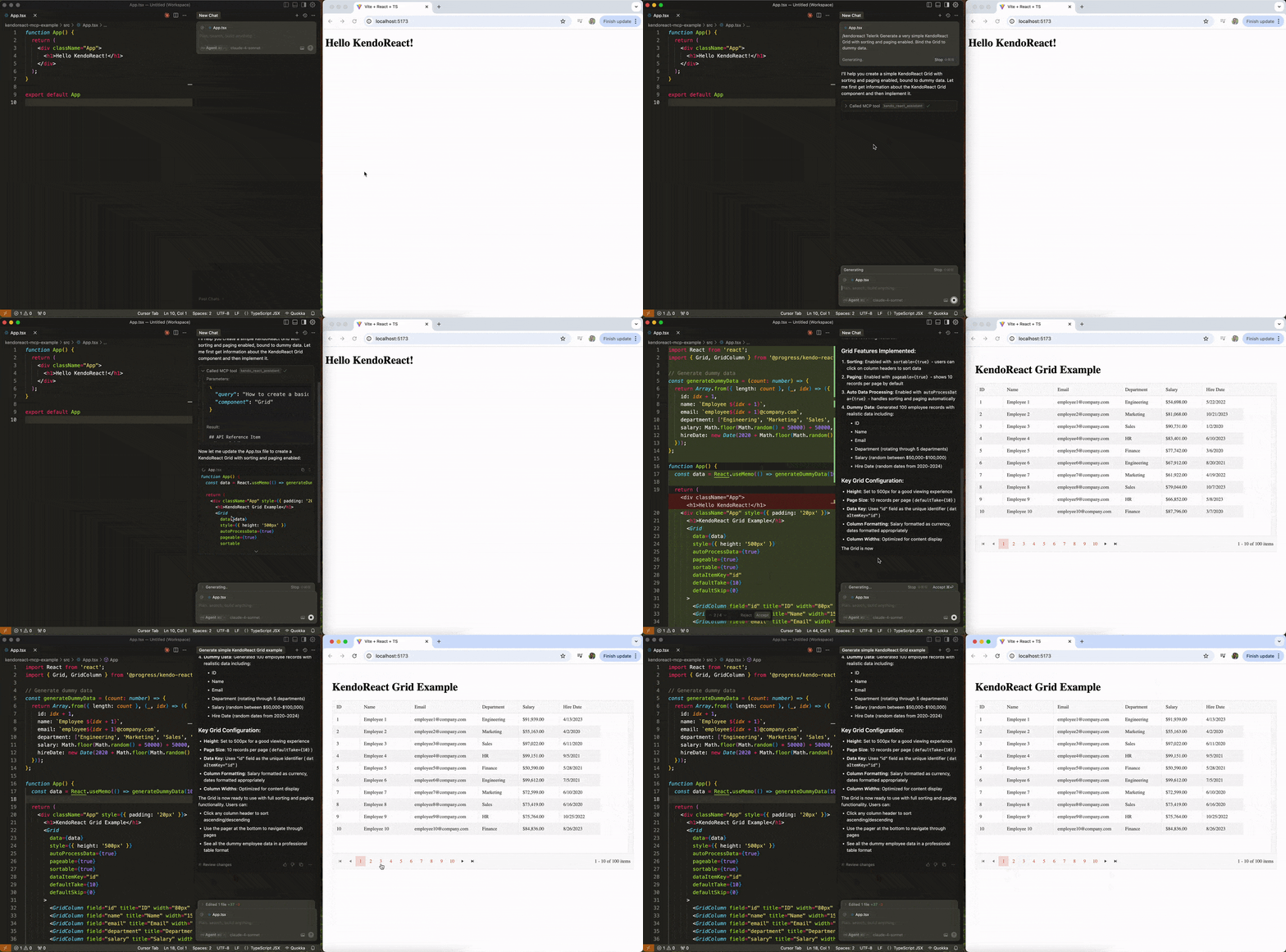
This can make a large difference in practice. Without MCP, we might ask an AI to create a KendoReact Grid component and get something that looks right but uses outdated props or misses important configuration options. With MCP, the AI generates code that follows current best practices and uses the component exactly as it was designed to be used.
Quality, Review and Governance
As AI-generated code becomes more prevalent in React applications, questions about quality and review processes naturally arise. The good news is that AI isn’t just generating code; it’s starting to get better at reviewing and improving it.
Modern AI tools can perform code reviews that go beyond syntax checking. They understand architectural patterns, can spot potential performance issues and flag accessibility concerns. When we commit changes, these tools can analyze the diff and provide feedback similar to what a developer might offer in a pull request review.
For React applications specifically, this means AI can catch issues like unnecessary re-renders, missing dependency arrays in hooks, improper state management patterns or components that should be memoized but aren’t. It can also verify that our components follow established patterns in our codebase and flag when new code deviates from those conventions.
AI-generated code can greatly accelerate development and improve consistency, but it’s not a replacement for human judgment. Even the more sophisticated tools benefit from a steward: a developer who reviews, guides and validates the AI’s output. Humans remain essential for making nuanced decisions, verifying alignment with project goals and upholding quality standards that AI alone can’t fully guarantee. In other words, AI can handle the heavy (repetitive) lifting, but the final responsibility still rests with us.
What This Means for Day-to-Day React Work
What does all of this actually look like in practice? How has the daily experience of building React applications changed? Here are some takeaways:
- Faster iteration: Features that used to take days can now be scaffolded in hours. AI handles repetitive boilerplate, letting us focus on logic, architecture and user experience.
- Less boilerplate, more creativity: Forms, API integrations, responsive layouts and other common patterns can be generated automatically, freeing us to solve higher-level problems.
- Higher-level decisions matter more: Understanding React fundamentals like component composition, state management, performance optimization and accessibility is more important than ever because we’re guiding and reviewing AI outputs rather than typing everything ourselves.
In short, React development in 2026 is faster, more iterative and more creative. The mechanical work of writing boilerplate and translating designs into components is largely automated, but the critical thinking and stewardship still require skilled developers.
Ready to Explore How AI Can Enhance Your React Development?
- Give the KendoReact AI Components and Features a try.
- Watch demos of AI-powered theme generation in ThemeBuilder to see how design ideation can be automated.
- Try the KendoReact MCP Server to give your AI assistant deep knowledge of KendoReact components.
- Check out the KendoReact Prompt Library for ready-made prompts that target common development scenarios.

Hassan Djirdeh
Hassan is a senior frontend engineer and has helped build large production applications at-scale at organizations like Doordash, Instacart and Shopify. Hassan is also a published author and course instructor where he’s helped thousands of students learn in-depth frontend engineering skills like React, Vue, TypeScript and GraphQL.
Related Posts
Comments
All articles
Topics
Web MobileMobile
Desktop
Design
Productivity
People