Progress Telerik Agentic UI Generator vs. Syncfusion Agentic UI Builder

Summarize with AI:
See how the AI-based UI creation tools from devtools powerhouses Progress and Syncfusion stack up when they go head to head.
AI-powered code generation has become a significant part of how developers build user interfaces. The 2025 Stack Overflow Developer Survey found that 84% of developers are now using or planning to use AI tools in their development process.
Original AI adoption has been through tools like code autocompletion and chat-based assistants, but agentic UI tools take things further. Rather than suggesting the next line of code, they can take a natural language prompt and produce working, styled UI code in seconds.
However, not all AI generation tools are created equal. The quality of the output, how reliably it builds on the first attempt, how fast it runs and how well it handles things like accessibility and theming can vary quite a bit between tools. These differences matter because a tool that requires a large number of follow-up prompts to correct errors or produce code that doesn’t match the original requirements isn’t truly saving us time.
In this article, we’ll look at a head-to-head comparison between two agentic UI generation tools: the Progress Telerik Agentic UI Generator which includes the Blazor Agentic UI Generator for .NET/Blazor and the Kendo UI Generator for Angular and React, and the Syncfusion Agentic UI Builder. We’ll walk through the results of extensive testing across multiple frameworks, covering output quality, performance, stability, accessibility, theming and more.
How the Comparison Was Conducted
To make this comparison as fair and thorough as possible, both tools were tested across multiple frameworks using two evaluation approaches.
Blazor/.NET
On the Blazor/.NET side, 23 prompts were run through the Telerik Agentic UI Generator and the Syncfusion Agentic UI Builder. These prompts ranged from simple single-component requests to complex multi-section layouts like e-commerce catalog pages and CMS admin dashboards. Each prompt’s output was rated on a 0 to 7 scale:
- 0-1: Doesn’t build or crashes with no UI
- 2-3: Partially renders, major sections broken
- 4: Renders but requires multiple prompts to clear build or runtime errors
- 5: Renders but doesn’t match prompt requirements in several areas
- 6: Mostly complete, minor issues
- 7: Fully matches requirements
The evaluation also tracked how many prompts were needed before the output could successfully build and render, as well as the time (in seconds) from initial prompt submission to output generation.
Angular and React
For Angular and React, a dedicated evaluation was conducted comparing the Kendo Agentic UI Generator against the Syncfusion Agentic UI Builder. Rather than scoring individual prompts, this evaluation focused on a technical comparison of the tools themselves. By running many prompts and examining the context returned by each tool, the analysis compared how each MCP server helps the AI agent arrive at its output across categories like layout, styling, accessibility, documentation and component handling.
Output Quality and Reliability
This is the category where the gap between the two tools becomes immediately clear.
Across the 23 Blazor prompts, the Telerik Agentic UI Generator consistently produced complete, requirement-matching output on the first attempt. The Syncfusion Agentic UI Builder told a different story. It experienced five failures where no usable UI was generated at all, and several other prompts that required follow-up prompts to fix errors before the output could even build. Let’s look at a couple of examples.
Failures
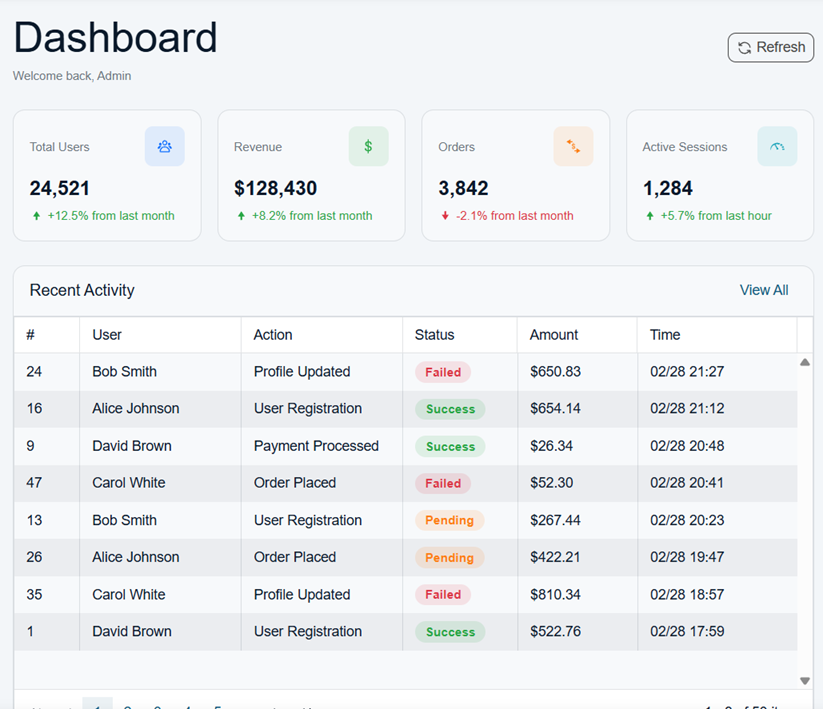
The very first prompt asked both tools to build a login screen with email/password validation and an admin dashboard with a sidebar menu, key metrics and recent activity.
Prompt: “I have created an empty application that now needs a login screen and an admin dashboard. Add a login form with email/password fields and validation. After a successful login, redirect to an admin dashboard page featuring a sidebar menu and a main content area displaying key metrics and recent activity.”
The Telerik Generator produced a fully working output on the first attempt.
The Syncfusion Builder returned an error along the lines of: Error. This response is truncated because it is too long. Try rephrasing your question. No UI was generated at all.
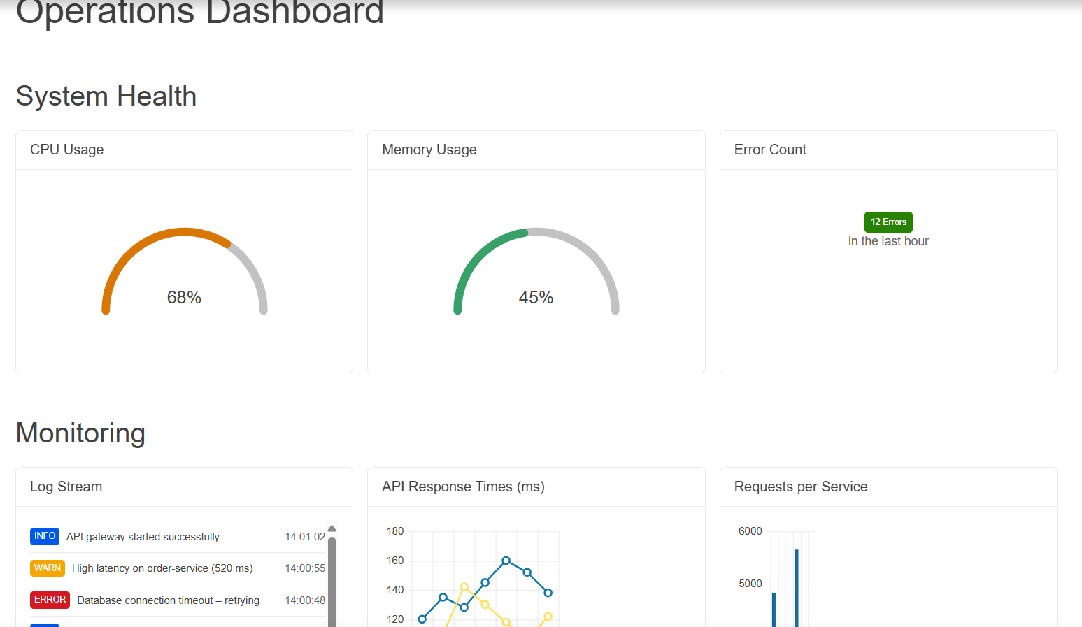
The second prompt told both tools to create a monitoring dashboard with system health KPIs, a log stream panel, charts for API response times and requests per service.
Prompt: “Create a new page using the existing top navigation and footer. In the middle, add 3 rows with 3 responsive columns each. The top row shows system health KPIs for CPU, memory and error counts. The middle rows include a Log Stream panel, a line Chart of API response times and a bar chart of requests per service. The bottom row contains a Deployment History table, an Alerts panel and a list of open tickets.”
The Telerik Generator again produced a fully working output on the first pass.
The Syncfusion Builder hit the same truncation error.
These are the kinds of prompts that represent real-world use cases. A login screen with a dashboard and a monitoring page with multiple data panels aren’t unusual requests.
Errors Requiring Follow-ups
Not every issue is an error during the generation process. Some prompts produced output that needed additional work to get running.
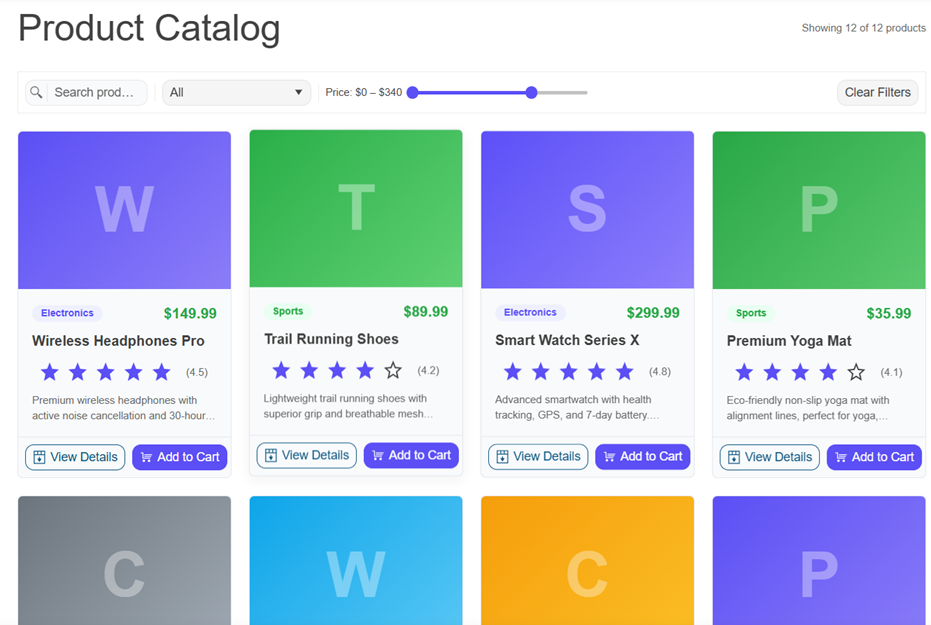
We fired a prompt to ask for a product catalog page with a responsive layout, product cards, a filtering toolbar and expandable detail views. The Telerik Generator handled it cleanly on the first attempt. The Syncfusion Builder hit an error about a missing component parameter and needed a second follow-up prompt to fix it.
Prompt: “Create a product catalog page with a responsive CSS layout. The layout should display product cards. Add a toolbar with filtering options, and expandable detail view for each product that work seamlessly on mobile, tablet, and desktop.”
The first output by the Telerik Blazor generator:
The final output from Syncfusion, after the necessary follow-up prompt:
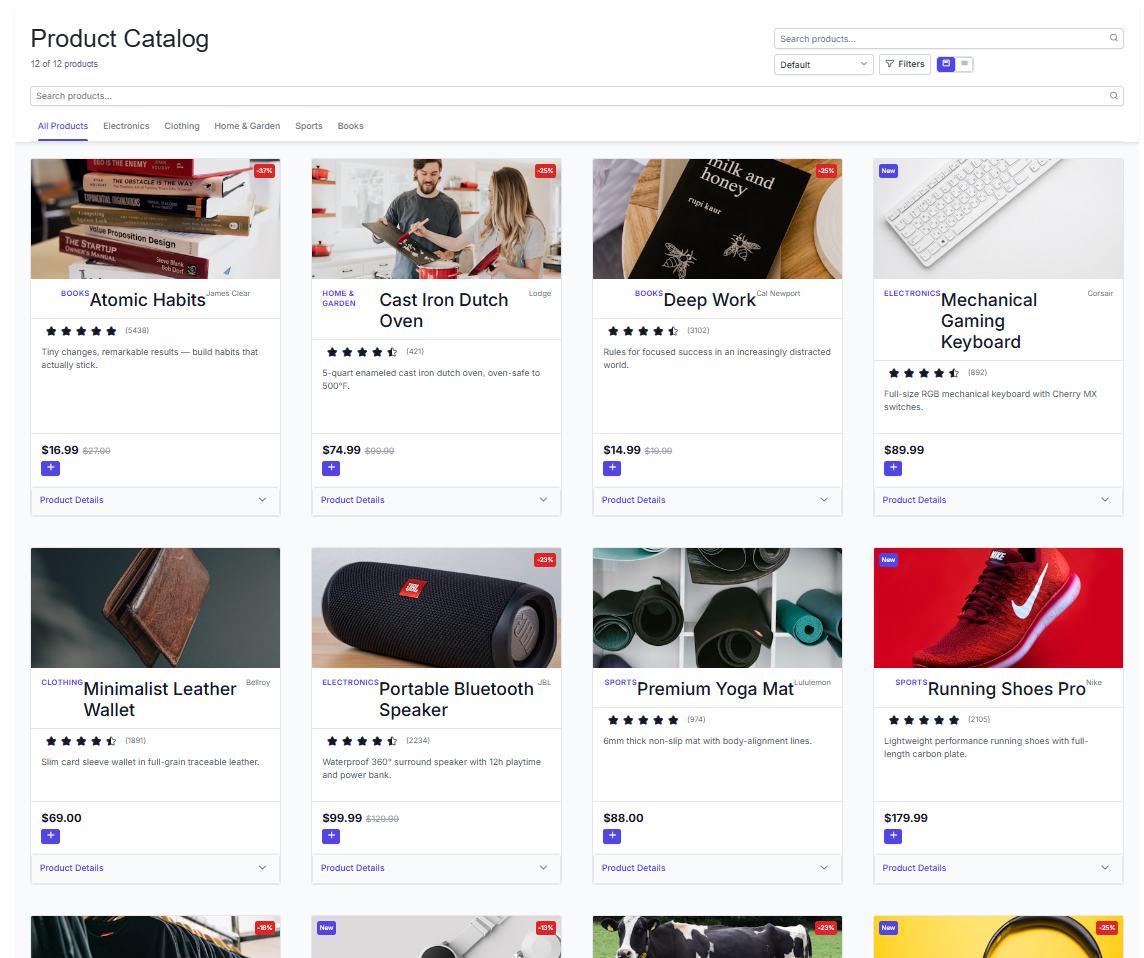
The Syncfusion Builder’s errors in these cases often involved referencing component parameters that don’t exist, which may suggest the tool’s AI agent is working with less reliable component information during generation.
Partial Results
Not all issues showed up as crashes or errors needing follow-ups. Let’s look at an example of a prompt that was made which involved a theming request.
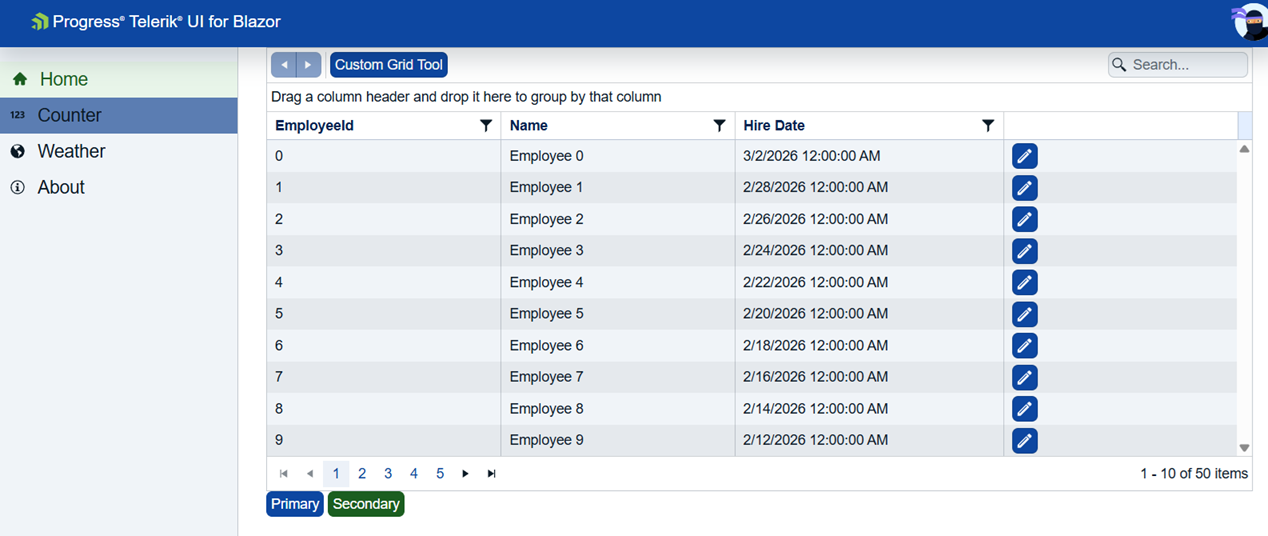
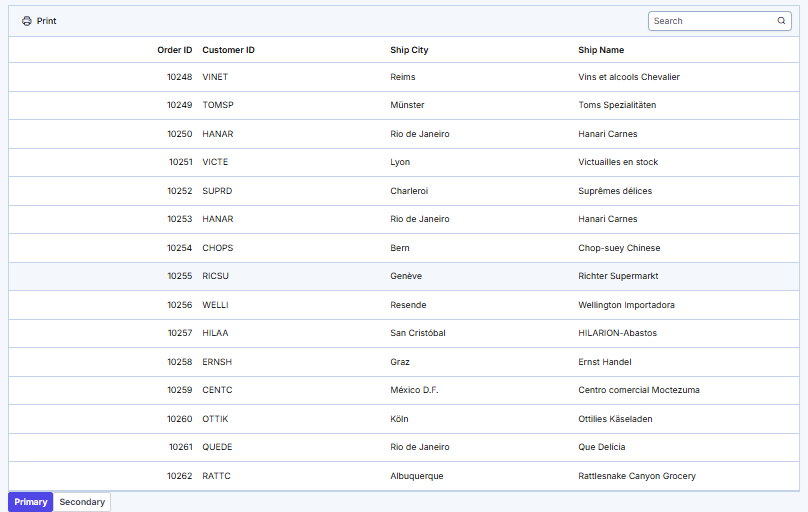
Prompt: “Generate a custom theme for a corporate blue and green color scheme with high contrast accessibility requirements.”
The Telerik Agentic UI Generator created the output matching the requirements.
The Syncfusion Builder did create a custom theme, but the expected theme wasn’t applied to the output.
The Bigger Picture
Even when we set aside the failures and only look at prompts where the Syncfusion Builder produced something usable, the outputs still frequently fell short of the original requirements.
On the Angular and React side, the findings were consistent. While the final rendered UI sometimes appeared similar at a glance, the most significant differences were in how each tool’s MCP server helped the agent arrive at that output. The Kendo Generator’s tools consistently delivered more relevant, targeted context to the AI agent, filtering results to what was actually needed for the prompt. The Syncfusion Builder’s tools returned broader, less filtered responses, often including full component prop lists and governance rules regardless of what was asked.
Performance
Speed matters when we’re iterating on UI designs with AI. Waiting several minutes for a complex layout to generate can significantly slow down the development flow.
Across the Blazor evaluation, the Telerik Generator was consistently faster. The speed advantage was most noticeable on complex layout prompts. For example, on a complex e-commerce catalog page with filtering, sorting, responsive breakpoints and pagination, the Telerik Generator completed in about 799 seconds while the Syncfusion Builder took 908 seconds.
There was one outlier where Syncfusion was notably faster (a simpler single-component case), but across the full set of 23 prompts, the speed advantage consistently favored Telerik.
Accessibility
Accessibility is often treated as an afterthought, but for enterprise applications, it’s a requirement, not a nice-to-have!
The Kendo Generator includes a dedicated accessibility tool (#kendo_accessibility_assistant) that retrieves WCAG 2.2 Level AA guidelines as a mandatory step in the generation process. It also fetches component-specific accessibility requirements for each component used in the output. This leads to every piece of generated UI having accessibility considerations baked in from the start.
From what we can gather, and at the time of writing, the Syncfusion Builder doesn’t have a strong accessibility tool like the #kendo_accessibility_assistant.
Theming, Layout and Documentation
Beyond output quality and speed, the Angular and React evaluation revealed some important architectural differences in how each tool handles theming, layout and documentation.
Theming
Theming is more than color selection. The Kendo UI Generator produces a complete design system from a single prompt, including colors, typography, spacing scales, border radius, elevation and shadows. The Syncfusion Builder’s style tool is limited to component state colors and semantic colors. Typography, spacing and elevation aren’t reachable through it, so the generated output may look right in terms of color but lack the design coherence that holds a full application together.
Layout
Layout is also where a notable dependency difference comes in. The Kendo UI Generator uses a self-contained layout system built on its own CSS utilities, introducing no external dependencies. The Syncfusion Builder relies on Tailwind CSS, injected into every project, and works from a catalog of 265+ prebuilt blocks. When the desired layout doesn’t match a catalog entry, the result approximates what was asked for.
For teams already using Tailwind, this might feel natural but for projects on a different CSS framework (Angular Material, for example), adding Tailwind on top can introduce style conflicts. This can also be a potential blocker for organizations that restrict third-party dependencies.
Responsiveness follows a similar split: the Kendo UI Generator has a dedicated phase with explicit breakpoint reasoning, while the Syncfusion Builder inherits responsive behavior from Tailwind’s defaults without any first-class responsive logic of its own.
Documentation
Documentation plays a bigger role in output quality than it might seem, since it directly shapes how well the AI agent understands the components it’s generating. The Kendo UI Generator injects relevant documentation chunks directly into every component tool call, including API references with full type signatures. The Syncfusion Builder treats documentation as a separate tool, triggered only by specific keywords. At the time of the evaluation, results from this tool were inconsistent and the service had been unavailable for over 24 hours for both Angular and React.
One other important observation from the Angular and React evaluation: the Kendo UI Generator customizes its workflow per prompt using confidence scores, including only the tools and instructions relevant to each request. The Syncfusion Builder runs the same fixed sequence for most prompts regardless of complexity, and its component tools return the full prop list and approximately 250 lines of governance rules on every call. The result is that the Kendo UI agent operates on targeted, preprocessed context while the Syncfusion agent carries a heavier payload for every request.
Wrap-up
The comparison across Blazor, Angular and React tells a consistent story with these agentic UI generators. The Progress Telerik Agentic UI Generator outperforms the Syncfusion Agentic UI Builder across output quality, reliability, performance, accessibility, theming, layout and documentation.
On the Blazor side, the Telerik Generator had zero full failures across 23 prompts while Syncfusion had five, along with a consistent speed advantage on complex prompts and more reliable first-pass output. On the Angular and React side, the advantages show up in the underlying architecture, where the Kendo Generator’s tools consistently deliver cleaner, more relevant context to the AI agent.
Get started with AI-empowered development. The Kendo UI and Telerik AI tools are ready. And they come as part of the free trial of the component libraries.
For more information on the Progress Telerik Agentic UI Generator, check out the following resources:
The full comparison data referenced in this article is available for download:
- Telerik UI for Blazor Agentic UI Generator vs Syncfusion Agentic UI Builder Comparative Evaluation (XLSX)
- Kendo Agentic UI Generator vs Syncfusion Agentic UI Builder (XLSX)
Summary FAQs
What Do These Tools Do?
What Telerik Agentic UI Generator Is
According to the Progress Telerik website, the Telerik Agentic UI Generator for Telerik and Kendo UI libraries is an intelligent development tool delivered through the Model Context Protocol (MCP) Server that enables UI generation from natural language prompts. Once configured and authenticated, you can use the Agentic UI Generator tool (#telerik_ui_generator) together with the available specialized MCP assistants.
What Syncfusion Agentic UI Builder Is
According to the Syncfusion site, Syncfusion’s Agentic UI Builder is designed to work inside an IDE to generate UIs, dashboards or pages with Syncfusion components with natural language commands. Syncfusion uses MCP integration to access component APIs, prebuilt UI blocks, styling configurations, icon libraries and code generation.
Why Does MCP Matter in Both Products?
Both brands’ tools use Model Context Protocol (MCP) servers to connect AI applications directly to the software specs for the individual library. This means that the AI is informed on component documentation, best practices, workflows and tooling provided by the UI library, so the AI can create a user interface more in line with how the library was designed to work. It should result in better outputs than if an AI were cobbling together an interface without guidance.
Learn more about the individual MCP servers:
- Telerik UI for Blazor MCP Servers
- Kendo UI for Angular MCP Servers
- KendoReact MCP Servers
- Syncfusion EJ2 React MCP Server
- Syncfusion EJ2 Angular MCP Server
- Syncfusion Blazor MCP Server
Are Prompt Libraries Included?
Telerik and Kendo UI Generator Prompt Libraries
Yes! Prompt libraries are included for the Kendo UI and Telerik AI UI Generator tools:
- Blazor: https://www.telerik.com/blazor-ui/documentation/ai/agentic-ui-generator/prompt-library
- React: https://www.telerik.com/kendo-react-ui/components/ai-tools/agentic-ui-generator/getting-started
- Angular: https://www.telerik.com/kendo-angular-ui/components/ai-tools/agentic-ui-generator/prompt-library
Syncfusion Agentic UI Builder Prompt Libraries
Yes! Prompt libraries are included for the Syncfusion Agentic UI Builder tools:

Hassan Djirdeh
Hassan is a senior frontend engineer and has helped build large production applications at-scale at organizations like Doordash, Instacart and Shopify. Hassan is also a published author and course instructor where he’s helped thousands of students learn in-depth frontend engineering skills like React, Vue, TypeScript and GraphQL.
Related Posts
Comments
All articles
Topics
Web MobileMobile
Desktop
Design
Productivity
People