.NET MAUI RefreshView Refresh State
The RefreshView refresh state defines whether a refresh is in progress and whether the user can start a refresh with a pull gesture. Use these settings to start a refresh from code, for example, when the page loads, or to block the pull gesture while the data source is unavailable.
Control the Refresh State
To control the refresh state of the RefreshView, use the following properties:
IsRefreshing(bool)—Defines whether a refresh is in progress. Set the property totrueto start a refresh from code. Set it tofalseto end the refresh and hide the indicator.IsRefreshEnabled(bool)—Defines whether pull gestures can start a refresh. When the value isfalse, the pull gesture is unavailable, but you can still start a refresh by settingIsRefreshingtotrue.
The RefreshView doesn't end a refresh on its own. When your data is loaded, set IsRefreshing to false. When the refresh ends, the RefreshView raises the Refreshed event.
Start and Stop a Refresh Programmatically
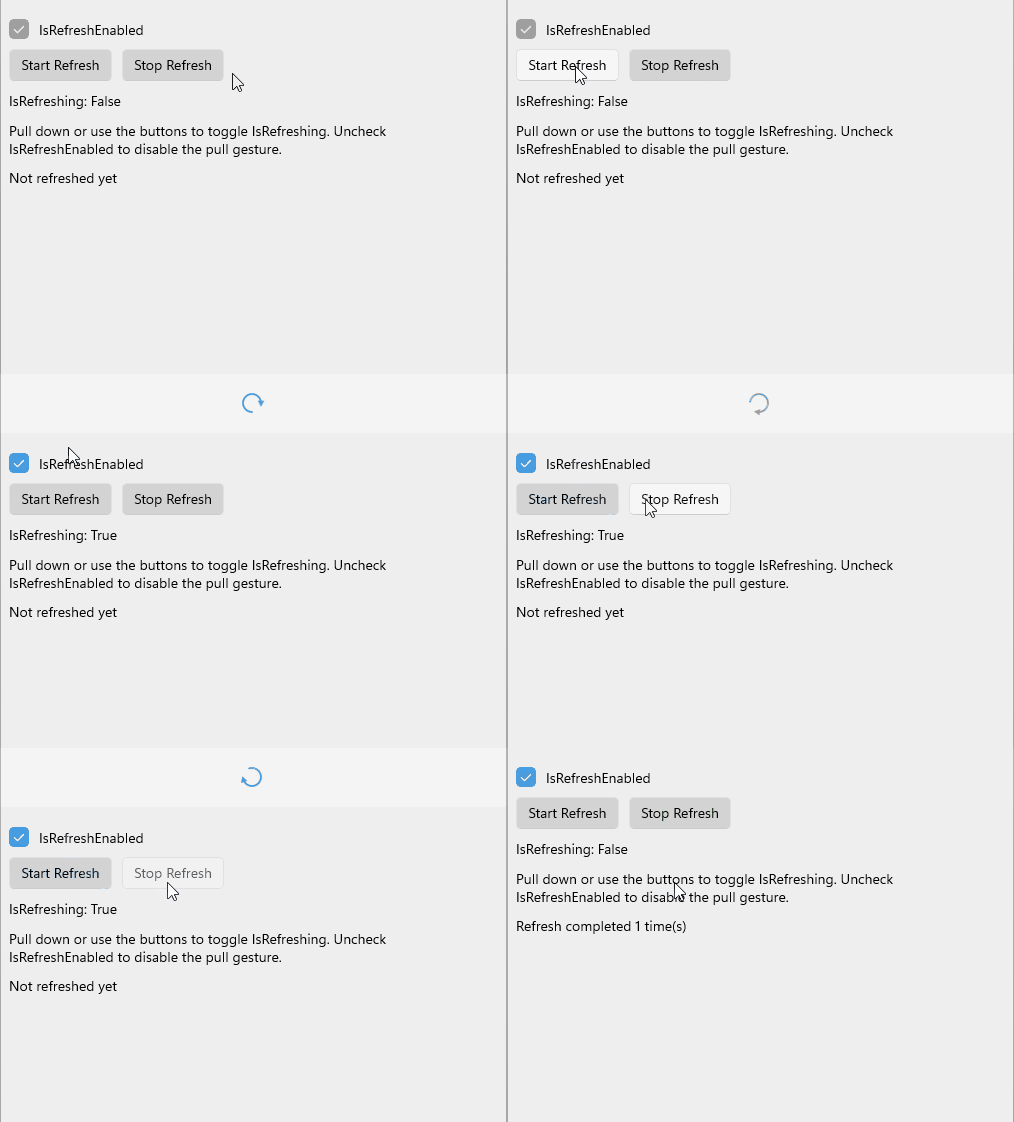
The following example demonstrates how to start and stop a refresh with buttons and how to turn the pull gesture on or off with a checkbox.
-
Define the RefreshView in XAML:
XAML<telerik:RadRefreshView x:Name="refreshView" IsRefreshEnabled="True" Refreshed="OnRefreshed"> <VerticalStackLayout Padding="20" Spacing="10" BackgroundColor="#EEEEEE"> <HorizontalStackLayout Spacing="10"> <telerik:RadCheckBox IsChecked="{Binding Source={x:Reference refreshView}, Path=IsRefreshEnabled}" /> <Label Text="IsRefreshEnabled" VerticalOptions="Center" /> </HorizontalStackLayout> <HorizontalStackLayout Spacing="10"> <telerik:RadTemplatedButton Content="Start Refresh" Background="LightGray" Clicked="OnStartRefreshClicked" /> <telerik:RadTemplatedButton Content="Stop Refresh" Background="LightGray" Clicked="OnStopRefreshClicked" /> </HorizontalStackLayout> <Label Text="{Binding Source={x:Reference refreshView}, Path=IsRefreshing, StringFormat='IsRefreshing: {0}'}" /> <Label Text="Pull down or use the buttons to toggle IsRefreshing. Uncheck IsRefreshEnabled to disable the pull gesture." /> <Label x:Name="statusLabel" Text="Not refreshed yet" /> </VerticalStackLayout> </telerik:RadRefreshView> -
Add the
teleriknamespace:XAMLxmlns:telerik="http://schemas.telerik.com/2022/xaml/maui" -
Set the
IsRefreshingproperty in the button click handlers and handle theRefreshedevent:C#private void OnStartRefreshClicked(object sender, EventArgs e) { this.refreshView.IsRefreshing = true; } private void OnStopRefreshClicked(object sender, EventArgs e) { this.refreshView.IsRefreshing = false; }
The following image shows the result:
For a runnable example with the RefreshView Refresh State scenario, see the SDKBrowser Demo Application and go to the RefreshView > Configuration category.