or
1 answer
158 views
Hello, I'm having a problem where validation is not firing for columns utilizing ColumnValidationSettings when they are within detail tables within hierarchical radgrids. I am just using required field validators, but when a user edits or inserts in the insert/edit modal and does not fill them in the validation does not fire. The same validation settings work just fine at the mastertableview level in the same grid, just not at deeper tiers within the hierarchy.
The relavant columns have data fields 'Start_Date' and 'End_Date'.
Here is my source (with datakeys, columns etc renamed):
<telerik:RadGrid
ID="grid"
runat="server"
SkinID="skin"
Width="95%"
DataSourceID="datasource">
<ClientSettings AllowExpandCollapse="true"/>
<MasterTableView
Width="100%"
DataSourceID="datasource"
DataKeyNames="adatakey"
HierarchyLoadMode="Client"
CommandItemSettings-ShowAddNewRecordButton="false"
HierarchyDefaultExpanded="true"
CommandItemDisplay="None"
AllowMultiColumnSorting="True">
<EditFormSettings
PopUpSettings-Modal="True"
PopUpSettings-ZIndex="2010"
CaptionFormatString="Edit Records"
PopUpSettings-Width="230px"
EditFormType="AutoGenerated">
</EditFormSettings>
<DetailTables>
<telerik:GridTableView
DataKeyNames="datakey"
DataSourceID="datasource"
HierarchyLoadMode="Client"
Name="ChildGrid"
Width="100%"
AllowAutomaticInserts="True"
AllowAutomaticUpdates="True"
ShowFooter="false"
CommandItemDisplay="None"
AllowCustomSorting="True">
<ParentTableRelation>
<telerik:GridRelationFields
DetailKeyField="datakey"
MasterKeyField="datakey">
</telerik:GridRelationFields>
</ParentTableRelation>
<DetailTables>
<telerik:GridTableView
DataKeyNames="datakey"
DataSourceID="datasource"
Name="GrandChildGrid"
Width="100%"
AllowAutomaticInserts="True"
AllowAutomaticUpdates="True"
ShowFooter="false"
CommandItemDisplay="None"
AllowCustomSorting="True">
<ParentTableRelation>
<telerik:GridRelationFields
DetailKeyField="datakey"
MasterKeyField="datakey">
</telerik:GridRelationFields>
</ParentTableRelation>
<DetailTables>
<telerik:GridTableView
DataKeyNames="datakey"
DataSourceID="datasource"
Name="GreatGrandChildGrid"
EditMode="PopUp"
CommandItemDisplay="Top"
ShowFooter="true"
Width="100%">
<EditFormSettings
PopUpSettings-Modal="True"
PopUpSettings-ZIndex="2010"
PopUpSettings-ShowCaptionInEditForm="false"
CaptionFormatString="Edit Record"
InsertCaption="Add New Record"
EditFormType="AutoGenerated">
</EditFormSettings>
<ParentTableRelation>
<telerik:GridRelationFields
DetailKeyField="datasource"
MasterKeyField="datasource">
</telerik:GridRelationFields>
</ParentTableRelation>
<Columns>
<telerik:GridEditCommandColumn
ButtonType="ImageButton"
UniqueName="EditCommandColumn"
Reorderable="false"
Resizable="false"
HeaderText="Edit"
HeaderStyle-HorizontalAlign="Center"
HeaderTooltip="Edit Record">
<HeaderStyle
Width="70px" />
<ItemStyle
HorizontalAlign="Center"
CssClass="MyImageButton" />
</telerik:GridEditCommandColumn>
<telerik:GridBoundColumn
Aggregate="Count"
SortExpression="datafield"
HeaderText="Header"
HeaderButtonType="TextButton"
ColumnEditorID="columnEditor"
MaxLength="20"
DataField="datafield">
<ColumnValidationSettings
EnableRequiredFieldValidation="true">
<RequiredFieldValidator
ErrorMessage="Item is required."
Display="None">
</RequiredFieldValidator>
</ColumnValidationSettings>
</telerik:GridBoundColumn>
<telerik:GridDateTimeColumn
SortExpression="Start_Date"
HeaderText="Start"
HeaderButtonType="TextButton"
Itemstyle-Width="100px"
DataField="Start_Date"
EditDataFormatString="MM/dd/yyyy"
DataFormatString="{0:MM/dd/yyyy}">
<ColumnValidationSettings
EnableRequiredFieldValidation="true">
<RequiredFieldValidator
ErrorMessage="Start is required."
Display="None">
</RequiredFieldValidator>
</ColumnValidationSettings>
</telerik:GridDateTimeColumn>
<telerik:GridDateTimeColumn
SortExpression="End_Date"
HeaderText="End"
HeaderButtonType="TextButton"
Itemstyle-Width="100px"
DataField="End_Date"
EditDataFormatString="MM/dd/yyyy"
DataFormatString="{0:MM/dd/yyyy}">
</telerik:GridDateTimeColumn>
<telerik:GridButtonColumn
ConfirmText="Delete this item?"
ConfirmDialogType="RadWindow"
ConfirmTitle="Delete"
Reorderable="false"
Resizable="false"
ButtonType="ImageButton"
CommandName="Delete"
Text="Delete"
HeaderStyle-HorizontalAlign="Center"
HeaderText="Delete"
HeaderTooltip="Delete Item"
UniqueName="DeleteCommandColumn">
<HeaderStyle
Width="70px" />
<ItemStyle
HorizontalAlign="Center"
CssClass="DeleteConfirmPopup" />
</telerik:GridButtonColumn>
</Columns>
</telerik:GridTableView>
</DetailTables>
<Columns>
<telerik:GridBoundColumn
SortExpression="datafield"
HeaderText="Product Type"
HeaderButtonType="TextButton"
DataField="datafield">
</telerik:GridBoundColumn>
<telerik:GridBoundColumn
SortExpression="Count"
HeaderText="Count"
HeaderButtonType="TextButton"
DataField="Count">
</telerik:GridBoundColumn>
</Columns>
</telerik:GridTableView>
</DetailTables>
<Columns>
<telerik:GridBoundColumn
SortExpression="Description"
HeaderText="Item"
HeaderButtonType="TextButton"
ColumnEditorID="itemEditor"
DataField="Item">
</telerik:GridBoundColumn>
</Columns>
</telerik:GridTableView>
</DetailTables>
<Columns>
<telerik:GridEditCommandColumn
ButtonType="ImageButton"
UniqueName="EditCommandColumn"
Reorderable="false"
Resizable="false"
HeaderText="Edit"
HeaderStyle-HorizontalAlign="Center"
HeaderTooltip="Edit thing">
<HeaderStyle
Width="70px" />
<ItemStyle
HorizontalAlign="Center"
CssClass="MyImageButton" />
</telerik:GridEditCommandColumn>
<telerik:GridBoundColumn
SortExpression="thing"
HeaderText="Thing Name"
ReadOnly="true"
ItemStyle-Wrap="false"
MaxLength="50"
HeaderButtonType="TextButton"
DataField="thing">
</telerik:GridBoundColumn>
<telerik:GridBoundColumn
SortExpression="stuff"
HeaderText="Stuff"
HeaderButtonType="TextButton"
ReadOnly="true"
DataField="stuff">
</telerik:GridBoundColumn>
<telerik:GridNumericColumn
SortExpression="percentagething"
HeaderText="Number"
ItemStyle-Width="100px"
HeaderStyle-Width="200px"
HeaderButtonType="TextButton"
ColumnEditorID="Percentage_Thing_Editor"
ConvertEmptyStringToNull="true"
DataFormatString="{0:F2}%"
DecimalDigits="2"
DataField="percentagething">
</telerik:GridNumericColumn>
</Columns>
</MasterTableView>
<ClientSettings>
<ClientEvents OnPopUpShowing="PopupCenteringScript" />
</ClientSettings>
</telerik:RadGrid>
The relavant columns have data fields 'Start_Date' and 'End_Date'.
Here is my source (with datakeys, columns etc renamed):
<telerik:RadGrid
ID="grid"
runat="server"
SkinID="skin"
Width="95%"
DataSourceID="datasource">
<ClientSettings AllowExpandCollapse="true"/>
<MasterTableView
Width="100%"
DataSourceID="datasource"
DataKeyNames="adatakey"
HierarchyLoadMode="Client"
CommandItemSettings-ShowAddNewRecordButton="false"
HierarchyDefaultExpanded="true"
CommandItemDisplay="None"
AllowMultiColumnSorting="True">
<EditFormSettings
PopUpSettings-Modal="True"
PopUpSettings-ZIndex="2010"
CaptionFormatString="Edit Records"
PopUpSettings-Width="230px"
EditFormType="AutoGenerated">
</EditFormSettings>
<DetailTables>
<telerik:GridTableView
DataKeyNames="datakey"
DataSourceID="datasource"
HierarchyLoadMode="Client"
Name="ChildGrid"
Width="100%"
AllowAutomaticInserts="True"
AllowAutomaticUpdates="True"
ShowFooter="false"
CommandItemDisplay="None"
AllowCustomSorting="True">
<ParentTableRelation>
<telerik:GridRelationFields
DetailKeyField="datakey"
MasterKeyField="datakey">
</telerik:GridRelationFields>
</ParentTableRelation>
<DetailTables>
<telerik:GridTableView
DataKeyNames="datakey"
DataSourceID="datasource"
Name="GrandChildGrid"
Width="100%"
AllowAutomaticInserts="True"
AllowAutomaticUpdates="True"
ShowFooter="false"
CommandItemDisplay="None"
AllowCustomSorting="True">
<ParentTableRelation>
<telerik:GridRelationFields
DetailKeyField="datakey"
MasterKeyField="datakey">
</telerik:GridRelationFields>
</ParentTableRelation>
<DetailTables>
<telerik:GridTableView
DataKeyNames="datakey"
DataSourceID="datasource"
Name="GreatGrandChildGrid"
EditMode="PopUp"
CommandItemDisplay="Top"
ShowFooter="true"
Width="100%">
<EditFormSettings
PopUpSettings-Modal="True"
PopUpSettings-ZIndex="2010"
PopUpSettings-ShowCaptionInEditForm="false"
CaptionFormatString="Edit Record"
InsertCaption="Add New Record"
EditFormType="AutoGenerated">
</EditFormSettings>
<ParentTableRelation>
<telerik:GridRelationFields
DetailKeyField="datasource"
MasterKeyField="datasource">
</telerik:GridRelationFields>
</ParentTableRelation>
<Columns>
<telerik:GridEditCommandColumn
ButtonType="ImageButton"
UniqueName="EditCommandColumn"
Reorderable="false"
Resizable="false"
HeaderText="Edit"
HeaderStyle-HorizontalAlign="Center"
HeaderTooltip="Edit Record">
<HeaderStyle
Width="70px" />
<ItemStyle
HorizontalAlign="Center"
CssClass="MyImageButton" />
</telerik:GridEditCommandColumn>
<telerik:GridBoundColumn
Aggregate="Count"
SortExpression="datafield"
HeaderText="Header"
HeaderButtonType="TextButton"
ColumnEditorID="columnEditor"
MaxLength="20"
DataField="datafield">
<ColumnValidationSettings
EnableRequiredFieldValidation="true">
<RequiredFieldValidator
ErrorMessage="Item is required."
Display="None">
</RequiredFieldValidator>
</ColumnValidationSettings>
</telerik:GridBoundColumn>
<telerik:GridDateTimeColumn
SortExpression="Start_Date"
HeaderText="Start"
HeaderButtonType="TextButton"
Itemstyle-Width="100px"
DataField="Start_Date"
EditDataFormatString="MM/dd/yyyy"
DataFormatString="{0:MM/dd/yyyy}">
<ColumnValidationSettings
EnableRequiredFieldValidation="true">
<RequiredFieldValidator
ErrorMessage="Start is required."
Display="None">
</RequiredFieldValidator>
</ColumnValidationSettings>
</telerik:GridDateTimeColumn>
<telerik:GridDateTimeColumn
SortExpression="End_Date"
HeaderText="End"
HeaderButtonType="TextButton"
Itemstyle-Width="100px"
DataField="End_Date"
EditDataFormatString="MM/dd/yyyy"
DataFormatString="{0:MM/dd/yyyy}">
</telerik:GridDateTimeColumn>
<telerik:GridButtonColumn
ConfirmText="Delete this item?"
ConfirmDialogType="RadWindow"
ConfirmTitle="Delete"
Reorderable="false"
Resizable="false"
ButtonType="ImageButton"
CommandName="Delete"
Text="Delete"
HeaderStyle-HorizontalAlign="Center"
HeaderText="Delete"
HeaderTooltip="Delete Item"
UniqueName="DeleteCommandColumn">
<HeaderStyle
Width="70px" />
<ItemStyle
HorizontalAlign="Center"
CssClass="DeleteConfirmPopup" />
</telerik:GridButtonColumn>
</Columns>
</telerik:GridTableView>
</DetailTables>
<Columns>
<telerik:GridBoundColumn
SortExpression="datafield"
HeaderText="Product Type"
HeaderButtonType="TextButton"
DataField="datafield">
</telerik:GridBoundColumn>
<telerik:GridBoundColumn
SortExpression="Count"
HeaderText="Count"
HeaderButtonType="TextButton"
DataField="Count">
</telerik:GridBoundColumn>
</Columns>
</telerik:GridTableView>
</DetailTables>
<Columns>
<telerik:GridBoundColumn
SortExpression="Description"
HeaderText="Item"
HeaderButtonType="TextButton"
ColumnEditorID="itemEditor"
DataField="Item">
</telerik:GridBoundColumn>
</Columns>
</telerik:GridTableView>
</DetailTables>
<Columns>
<telerik:GridEditCommandColumn
ButtonType="ImageButton"
UniqueName="EditCommandColumn"
Reorderable="false"
Resizable="false"
HeaderText="Edit"
HeaderStyle-HorizontalAlign="Center"
HeaderTooltip="Edit thing">
<HeaderStyle
Width="70px" />
<ItemStyle
HorizontalAlign="Center"
CssClass="MyImageButton" />
</telerik:GridEditCommandColumn>
<telerik:GridBoundColumn
SortExpression="thing"
HeaderText="Thing Name"
ReadOnly="true"
ItemStyle-Wrap="false"
MaxLength="50"
HeaderButtonType="TextButton"
DataField="thing">
</telerik:GridBoundColumn>
<telerik:GridBoundColumn
SortExpression="stuff"
HeaderText="Stuff"
HeaderButtonType="TextButton"
ReadOnly="true"
DataField="stuff">
</telerik:GridBoundColumn>
<telerik:GridNumericColumn
SortExpression="percentagething"
HeaderText="Number"
ItemStyle-Width="100px"
HeaderStyle-Width="200px"
HeaderButtonType="TextButton"
ColumnEditorID="Percentage_Thing_Editor"
ConvertEmptyStringToNull="true"
DataFormatString="{0:F2}%"
DecimalDigits="2"
DataField="percentagething">
</telerik:GridNumericColumn>
</Columns>
</MasterTableView>
<ClientSettings>
<ClientEvents OnPopUpShowing="PopupCenteringScript" />
</ClientSettings>
</telerik:RadGrid>

Pavlina
Telerik team

answered
on
27 Mar 2013
4 answers
267 views
Hi,
I am using ajaxToolkit:ModalPopupExtender. but I am facing a problem that on maximizing the window after restoreDown the Work Area decreases. Please go through the attached file. I am not able to find any clue why this is happening. Source Code and Screenshot are attached herewith.
Its a Zip file change extension to .jpeg, please convert it to .zip file.
If you find anything please get back to me ASAP. This is on very high priority.
Thanks & Regards,
Saurabh
***********************Source Code********************************
I am using ajaxToolkit:ModalPopupExtender. but I am facing a problem that on maximizing the window after restoreDown the Work Area decreases. Please go through the attached file. I am not able to find any clue why this is happening. Source Code and Screenshot are attached herewith.
Its a Zip file change extension to .jpeg, please convert it to .zip file.
If you find anything please get back to me ASAP. This is on very high priority.
Thanks & Regards,
Saurabh
***********************Source Code********************************
<html xmlns="http://www.w3.org/1999/xhtml">
<head id="ctl00_Head1">
<style type="text/css">
.style1
{
height: 30px;
}
</style>
<link rel="stylesheet" href="dwp.css" />
<style type="text/css">
html, body, form
{
height: 100%;
margin: 0px;
padding: 0px;
overflow: hidden;
}
</style>
<script type="text/javascript" src="../JSFiles/dwp.js"></script>
<script type="text/javascript" language="javascript">
function ShowIPlan() {
window.open("IPlanFactorsView.aspx", "Window_26", "height=300,width=500,status=yes,toolbar=no,menubar=no,location=no,scrollbars=yes")
}
function ShowHelpMenu() {
var HelpMenu = document.getElementById('HelpMenu');
if (HelpMenu.style.visibility == "visible")
HelpMenu.style.visibility = "hidden";
else {
HelpMenu.style.visibility = "visible";
//HelpMenu.style.visibility="hidden";
}
}
// onload="maximize();"
</script>
<title>
DWP 2.9 - View DWP
</title>
<style type="text/css">
html, body, form
{
height: 100%;
margin: 0px;
padding: 0px;
}
</style>
<link href="/WebResource.axd?d=4zKBVVAWPM6LF35SNmhyrkF70qUPRNxpIiVplnDW91aoEAl4WYjWYjhJHcLjwsjYHa5MTEdnD-f7yOpugSMF9v5etxo6PftVVYlAsMSu7N3pHB4Cc3kYfhxsCtBjZkC7_ogRL20YSxwdia4RaFUqwQ2&t=634921080620000000" type="text/css" rel="stylesheet" class="Telerik_stylesheet" /><link href="/WebResource.axd?d=hJSrP8hkAzeYjdgUqFokcVSfLyk24Gkn0GulRnecGoArExfUxsHbFLzsVPCvmbIpFw03xDlvQhYq6_RBAe1BIMqodV011eA_nVFOIJNuu-UkOx3EzSPihbYQKa9OjPsZDrx2BVODABvxFtZl5MN2zJSaVFO_RdteuHoF3lDe9481&t=634921080620000000" type="text/css" rel="stylesheet" class="Telerik_stylesheet" /><link href="/WebResource.axd?d=rH811iwZ1QByH6IIDidQIdKNIeXc3NMOlIt64xSR42Wh8_hxseLKnPAg5ogeOuJZ6aACPcw_yKwrNEfBq-VwBDjZvvJSNAxq1I_6wQvoxOFmpxoGYr8SqSx_wejeZuQReIdYpD3cXZvvSUS7VpWUjg2&t=634921080620000000" type="text/css" rel="stylesheet" class="Telerik_stylesheet" /><link href="/WebResource.axd?d=MriOelNDsrzB7TfwxX8j85ck6Ymi3Ra-uZnbkhrYm8hfZYc6_I9Hc_qvVF1FF67wI_xPU_elYRtYbzrwEhhqgXHcpsaVXWDisPG6t3NJVD7BdtSWBe638y9xLfsxSaT7uVQiW1XkwuasUsgKMM0csgA_FYNVELvH8KE_UXDQRR81&t=634921080620000000" type="text/css" rel="stylesheet" class="Telerik_stylesheet" /><link href="/WebResource.axd?d=O-0SuxvIor4xTDha0v0whwFb6TjWjBkYGAQVOzayTL2loDS7KzP3kZI9XXjHVtg5joA-CBzqAqY4UHc9t9XXudPTn_Ntcr1PpQfurCY37Y1yLG5sKy_LzQr_SUs-FgQd14yBNl3uhHHg9qxw3EPuew2&t=634921080620000000" type="text/css" rel="stylesheet" class="Telerik_stylesheet" /><link href="/WebResource.axd?d=mOhRQ3jnhs3mdGE1cWE020j8uvEeOOV0DYuF_PDyDeri4S0JvIAHK6SU-AWx5z7zzQR3V0e7A6sB4o-2cqFdujWy6JrwYttknxienIFt41fLT7ZMCQxK-pvgCt7A_GkS5dUUvCBW0ZGsuIec4iKZyYEgBFf7XQtVkQ9QQXsbAV81&t=634921080620000000" type="text/css" rel="stylesheet" class="Telerik_stylesheet" /></head>
<body onload="maximize();">
<form name="aspnetForm" method="post" action="ViewDWP.aspx" id="aspnetForm">
<div>
<input type="hidden" name="__EVENTTARGET" id="__EVENTTARGET" value="" />
<input type="hidden" name="__EVENTARGUMENT" id="__EVENTARGUMENT" value="" />
<input type="hidden" name="__VIEWSTATE" id="__VIEWSTATE" value="/wEPDwULLTE2MDM1NzkzNjMPZBYCZg9kFgICAw9kFgYCAw8UKwACFCsAAg8WEB4LRGF0YUZpZWxkSUQFAklEHg1TZWxlY3RlZEluZGV4Zh4NRGF0YVRleHRGaWVsZAUEVGV4dB4RRGF0YUZpZWxkUGFyZW50SUQFCFBhcmVudElEHg5EYXRhVmFsdWVGaWVsZAUCSUQeC18hRGF0YUJvdW5kZx4XRW5hYmxlQWpheFNraW5SZW5kZXJpbmdoHhREYXRhTmF2aWdhdGVVcmxGaWVsZAUDVXJsFgIeB29uY2xpY2sFEk9wZW5IZWxwV2luZG93KDApOw8UKwAGFCsAAg8WCh4EVGV4dAUIVmlldyBEV1AeBVZhbHVlBQExHgtOYXZpZ2F0ZVVybAUPLi4vVmlld0RXUC5hc3B4HglGb250X0JvbGRnHgRfIVNCAoAQZGQUKwACDxYGHwkFDFJlcXVpcmVkIERXUB8KBQEyHwsFEy4uL1JlcXVpcmVkRFdQLmFzcHhkZBQrAAIPFgYfCQUKQWN0dWFsIERXUB8KBQEzHwsFES4uL0FjdHVhbERXUC5hc3B4ZGQUKwACDxYGHwkFB1JlcG9ydHMfCgUBNB8LBQ8uLi9SZXBvcnRzLmFzcHhkZBQrAAIPFggfCQUORFdQIFBhcmFtZXRlcnMfCgUBNR8LBRguLi9TeXN0ZW1QYXJhbWV0ZXJzLmFzcHgeB1Zpc2libGVoZGQUKwACDxYGHwkFBEhlbHAfCgUBNh8LZWRkDxQrAQZmZmZmZmYWAQVuVGVsZXJpay5XZWIuVUkuUmFkVGFiLCBUZWxlcmlrLldlYi5VSSwgVmVyc2lvbj0yMDEyLjIuOTEyLjQwLCBDdWx0dXJlPW5ldXRyYWwsIFB1YmxpY0tleVRva2VuPTEyMWZhZTc4MTY1YmEzZDRkFgxmDw8WCh8JBQhWaWV3IERXUB8KBQExHwsFDy4uL1ZpZXdEV1AuYXNweB8MZx8NAoAQZGQCAQ8PFgYfCQUMUmVxdWlyZWQgRFdQHwoFATIfCwUTLi4vUmVxdWlyZWREV1AuYXNweGRkAgIPDxYGHwkFCkFjdHVhbCBEV1AfCgUBMx8LBREuLi9BY3R1YWxEV1AuYXNweGRkAgMPDxYGHwkFB1JlcG9ydHMfCgUBNB8LBQ8uLi9SZXBvcnRzLmFzcHhkZAIEDw8WCB8JBQ5EV1AgUGFyYW1ldGVycx8KBQE1HwsFGC4uL1N5c3RlbVBhcmFtZXRlcnMuYXNweB8OaGRkAgUPDxYGHwkFBEhlbHAfCgUBNh8LZWRkAgYPZBYEAgEPFgIfCAV0amF2YXNjcmlwdDp3aW5kb3cub3BlbignaHR0cDovL2l3d3cubGVhcm5pbmcuaWtlYS5jb20vL0hlbHBDb24vSGVscC5hc3B4P2FwcGlkPTI4JmhlbHBpZD0zJmxhbmdpZD0xJyk7IHJldHVybiBmYWxzZTtkAgMPFCsAAhQrAAIPFgIfBmhkEBYDZgIBAgIWAxQrAAIPZBYCHwgFElByaW50Q3VycmVudFRhYigpO2QUKwACD2QWAh8IBQtQcmludERXUCgpO2QUKwACDxYCHw5oFgIfCAUJRXhwb3J0KCk7ZA8WA2ZmZhYBBXNUZWxlcmlrLldlYi5VSS5SYWRNZW51SXRlbSwgVGVsZXJpay5XZWIuVUksIFZlcnNpb249MjAxMi4yLjkxMi40MCwgQ3VsdHVyZT1uZXV0cmFsLCBQdWJsaWNLZXlUb2tlbj0xMjFmYWU3ODE2NWJhM2Q0ZBYGZg8PZBYCHwgFElByaW50Q3VycmVudFRhYigpO2QCAQ8PZBYCHwgFC1ByaW50RFdQKCk7ZAICDw8WAh8OaBYCHwgFCUV4cG9ydCgpO2QCCA8PFgIfDmhkFgICAQ8UKwACFCsAAmQQFgFmFgEUKwACZGQPFgFmFgEFc1RlbGVyaWsuV2ViLlVJLlJhZE1lbnVJdGVtLCBUZWxlcmlrLldlYi5VSSwgVmVyc2lvbj0yMDEyLjIuOTEyLjQwLCBDdWx0dXJlPW5ldXRyYWwsIFB1YmxpY0tleVRva2VuPTEyMWZhZTc4MTY1YmEzZDRkZBgBBR5fX0NvbnRyb2xzUmVxdWlyZVBvc3RCYWNrS2V5X18WBgUSY3RsMDAkUmFkVGFiU3RyaXAxBRVjdGwwMCR2aWV3TWVudU9wdGlvbnMFJmN0bDAwJENvbnRlbnRQbGFjZUhvbGRlcjEkbWFpblNwbGl0dGVyBSRjdGwwMCRDb250ZW50UGxhY2VIb2xkZXIxJHNlYXJjaFBhbmUFJmN0bDAwJENvbnRlbnRQbGFjZUhvbGRlcjEkUmFkc3BsaXRiYXIxBSJjdGwwMCRDb250ZW50UGxhY2VIb2xkZXIxJGluZm9QYW5l" />
</div>
<script type="text/javascript">
//<![CDATA[
var theForm = document.forms['aspnetForm'];
if (!theForm) {
theForm = document.aspnetForm;
}
function __doPostBack(eventTarget, eventArgument) {
if (!theForm.onsubmit || (theForm.onsubmit() != false)) {
theForm.__EVENTTARGET.value = eventTarget;
theForm.__EVENTARGUMENT.value = eventArgument;
theForm.submit();
}
}
//]]>
</script>
<script src="/WebResource.axd?d=z6V6GVqRAzz_IWc7JMP3VCDrAG49sbICyL-QGsro0Fb5WThpnyp-st7nrpeweXZcMLtzwF2TTjT8mK85xkdDAJUzeHpGXYlTIdnIlNAbHHs1&t=634860848639045571" type="text/javascript"></script>
<script src="/ScriptResource.axd?d=R_cz9SNcpfP4CWuk_WYGa5LLRoMzxbbpqyUPKkO0u19CdnG5-v8Wd8oq8vu-GXyBZ_5JZufh_AGcXjAtDVdo2lxVu7hESLFjKiRjyhx-7OicJ938MHPu3wJKFZ4YV-P9rDe9uA0vvDWhr3jznnIWdMY7x2KmSRxKjTNGFJzJrUxpx_v3Be3PHBXeJWHjXUcy0&t=ffffffffcd98f1ab" type="text/javascript"></script>
<script type="text/javascript">
//<![CDATA[
if (typeof(Sys) === 'undefined') throw new Error('ASP.NET Ajax client-side framework failed to load.');
//]]>
</script>
<script src="/ScriptResource.axd?d=ysOuY7yCwxpghY8pgSfY1z1rClVAr717WdbI4_iSVFqcRBrxHKRHEXt8PAYMGENrMJ-82bCCzy0A3E_bGy9npCBwB0FhKqMco7VzE9FHDKYA4duNKL6jWcVkvJeoqoA9SWXh5i48nKcokZ3LYSrhKknf4m9DBK7XfZNXwkRZlW7vknlk8YPb0ZDxi28yboOb0&t=ffffffffcd98f1ab" type="text/javascript"></script>
<script src="/ScriptResource.axd?d=h6ITetJ6jYzp9O63MuftCCHN0u-vFePu4HUPcj9edAFyhWyPaHqgXVFlEQv9qieIS89bNhQqgnRb2YS1tLLnwCdwsS53lcNqb2RdJW3izVPGebA21T-T0JReNWxuAfYCly43EDxN49bdPA4u8FPB8Q2&t=ffffffffcf75b14c" type="text/javascript"></script>
<script src="/ScriptResource.axd?d=HhdTziG7qsx4QOKcK-jIZvkp8AjZQ9kM8qo0bOi4VQK1v29gnl9R4Dy326k0X5KjHKiKdIc6qyRF3cnOSqnrSFo9kQJQzZjSugvYEZZA9k7IzSTEybzGU337WGGzJfr2IteUm26P1yrRUuD92fKHVQ2&t=ffffffffcf75b14c" type="text/javascript"></script>
<script src="/ScriptResource.axd?d=iXCgOdVEw2HF_yQ6CgZQ_JyvT7nHQ3TmMxcLDWBsM1vSNXTVxX0DPC8cPllR44poLpBl9xyirif8OxGRmWqGeztuweLFlS6d-R6f7zwvrdVfNlyuSBsKOnF6RJwyXQYFMhNK1-PlbNYOsRS_a7DhZQ2&t=ffffffffcf75b14c" type="text/javascript"></script>
<script src="/ScriptResource.axd?d=fHYoHUXoluLVQcl4rbWxjtlQA2GQC9LTq2ApPth1ZrLizyCWQEa6FD4rEPWwrEQ9XtVckn-EODAKUBbQkVhnOhSTKX4N0wJLqQLzPerm3bUxu6QQ-fAwBFX-QZuHISEatIvzFwED2eLLQdGtvdifZsoN-va7uHczU92H8dt3czQ1&t=ffffffffcf75b14c" type="text/javascript"></script>
<script src="/ScriptResource.axd?d=4kpUNKvY7gpkJ24Yfb3_IN3O_O6HoH48Y_F9L38pCQDUc1zCXnJ-fWCAhuaaVqCSX00b7LWQNpUAzFVb8HogNFgeKOOi-2NnPALjBJO72XskmHXac57Zc8BAx_HuWoElLfpqL_0cpahGomJFtuuA61QXJbwfjl7nPhLElN4D0FQ1&t=ffffffffcf75b14c" type="text/javascript"></script>
<script src="/ScriptResource.axd?d=mBMg6j425Ndlxrx1bN81UI7yHP50v2tnWc-0trotXNfq0arcLoUJiYqPZwX_GuSqmsk4w8fA8f5Ue4rNfZNT-QHJuh65xUhDDnJ5gBBSDyWs93InIKaaT5afqPyIne6mUpQbv3DB1-YGZLyxUu-sXQ1yaJv9qScIx9UDhdlJIv41&t=ffffffffcf75b14c" type="text/javascript"></script>
<script src="/ScriptResource.axd?d=VIFIlUgw318Z445CClzhG5JX_-2h4lHjcaCWUexsQ7CZWQjB4s2mld8Qhsxv5QYpCewACNuux7HGSlm7gUoDNiIy3-uuged2iO80vqhSd0e4oRnpazIK0pVq3CVvjOXBOjflx7Q0eayQZuqmFMbtnuYjdaIWLC6kSL2YSJPm_3Y1&t=ffffffffcf75b14c" type="text/javascript"></script>
<script src="/ScriptResource.axd?d=dDaNqH2g5nBwIUABZyok3skQDQ-nmPFApCo-tXWPs2imS48pTxM2hpsg52qDisdcPHuRyJcUbmhIj3rpjEB_crVMAC1AHhePDzhsG75GlGaohh7hkkHosQMX4wQGH01-JEWyd5s0k_zUKauwfOYNCw2&t=ffffffffcf75b14c" type="text/javascript"></script>
<script src="/ScriptResource.axd?d=BmSvC-jcHjnwVXWQR1M4Hm6Dhzw8siw_kRO4wX4xkiL2KT_-4lqw3QsLkMfPz1YNQUz_VonCzW25dGRtPEciNjCdBrO-Dmt5cHut2TJfbc_-8cRzvZlIwoLteKnE9ar8PxYlJqPa-yH5gCPvhqV6BposQAkw3GKRM0ppWsS5rVs1&t=ffffffffcf75b14c" type="text/javascript"></script>
<script src="/ScriptResource.axd?d=CbCrBydz8xQFzxbxCc-vve9WRfROiWKIIZ59kM-k79CTH_3ezXeUbVmkCoo52yVIj5aY1kC6EF3dm3TFMVfUMVYb2kkFxN1hto-_HBtvtujGXHgBBBUtd05NmcxBt2I1TVtcF0Y7Va1MfvAXNEsPRtoSSuLjKFjV4moTtvJ6WdM1&t=ffffffffcf75b14c" type="text/javascript"></script>
<script src="/ScriptResource.axd?d=fMC9unOPfhGebjeU8T_PCiG6ezO5Ie8acviMVjmLUUkoJEtSJh-Wii3IpvpyZlVVHFCjBIA8523uGkHG8ZlsO23-1kqK9upjMvPaIlQoCbOdA9_LYQqMNHfFcWm9Fsm2ZMCMzE1nWbJ46V1gylQaTXhjPVI1NAlhr5tayZmy8ns1&t=ffffffffcf75b14c" type="text/javascript"></script>
<div>
<input type="hidden" name="__EVENTVALIDATION" id="__EVENTVALIDATION" value="/wEWAgLRmavZBQL+yOWJBQ==" />
</div>
<script type="text/javascript">
//<![CDATA[
Sys.WebForms.PageRequestManager._initialize('ctl00$ScriptManager', 'aspnetForm', [], [], [], 90, 'ctl00');
//]]>
</script>
<div>
<table>
<tr>
<td colspan="2">
<img height="38px" src="../Images/applicationbanner2.png" />
</td>
</tr>
</table>
<table>
<tr>
<td>
<div id="ctl00_RadTabStrip1" class="RadTabStrip RadTabStrip_Default RadTabStripTop_Default" onclick="OpenHelpWindow(0);" style="float: left">
<!-- 2012.2.912.40 --><div class="rtsLevel rtsLevel1">
<ul class="rtsUL"><li class="rtsLI rtsFirst"><a class="rtsLink rtsSelected" href="ViewDWP.aspx" style="font-weight:bold;"><span class="rtsOut"><span class="rtsIn"><span class="rtsTxt">View DWP</span></span></span></a></li><li class="rtsLI"><a class="rtsLink rtsAfter" href="RequiredDWP.aspx"><span class="rtsOut"><span class="rtsIn"><span class="rtsTxt">Required DWP</span></span></span></a></li><li class="rtsLI"><a class="rtsLink" href="ActualDWP.aspx"><span class="rtsOut"><span class="rtsIn"><span class="rtsTxt">Actual DWP</span></span></span></a></li><li class="rtsLI"><a class="rtsLink" href="Reports.aspx"><span class="rtsOut"><span class="rtsIn"><span class="rtsTxt">Reports</span></span></span></a></li><li class="rtsLI rtsLast"><a class="rtsLink" href="#"><span class="rtsOut"><span class="rtsIn"><span class="rtsTxt">Help</span></span></span></a></li></ul>
</div><input id="ctl00_RadTabStrip1_ClientState" name="ctl00_RadTabStrip1_ClientState" type="hidden" />
</div>
</td>
<td align="right" width="450px">
<div id="ctl00_pnlViewMenuOptions">
<table border="0">
<tr>
<td align="right">
<input name="ctl00$btnHelp" type="button" id="ctl00_btnHelp" class="SmallHelpButton" value="?" title="Help for View menu options " onclick="javascript:window.open('http://iwww.learning.ikea.com//HelpCon/Help.aspx?appid=28&helpid=3&langid=1'); return false;" />
</td>
<td align="left">
<div id="ctl00_viewMenuOptions" class="RadMenu RadMenu_Default">
<ul class="rmRootGroup rmHorizontal">
<li class="rmItem rmFirst"><a href="#" class="rmLink rmRootLink" onclick="PrintCurrentTab();"><span class="rmText">Print Current Tab</span></a></li><li class="rmItem rmLast"><a href="#" class="rmLink rmRootLink" onclick="PrintDWP();"><span class="rmText">Print All Tabs</span></a></li>
</ul><input id="ctl00_viewMenuOptions_ClientState" name="ctl00_viewMenuOptions_ClientState" type="hidden" />
</div>
</td>
</tr>
</table>
</div>
</td>
</tr>
</table>
</div>
<div id="content">
<!-- Content Start Here -->
<script type="text/javascript" language="javascript">
var currentTab = 0;
var queryString = '';
function ShowBlank()
{
var splitter = $find("ctl00_ContentPlaceHolder1_mainSplitter");
var pane = splitter.getPaneById('ctl00_ContentPlaceHolder1_infoPane');
pane.set_contentUrl('dwpinfo.aspx');
}
function LoadRequired(itemNo,itemType,reqVerNo,reqVerEd,buCodeCre)
{
//var currentTab = document.getElementById('hdnCurrentTab').value;
//top.right.ShowProgress();
queryString = 'DWP=Req&ItemNo=' + itemNo + '&ItemType=' + itemType + '&ReqverNo=' + reqVerNo + '&ReqVerEd=' + reqVerEd + '&BUCodeCre=' + buCodeCre;
var splitter = $find("ctl00_ContentPlaceHolder1_mainSplitter");
var pane = splitter.getPaneById('ctl00_ContentPlaceHolder1_infoPane');
pane.set_contentUrl('dwpinfo.aspx?DWP=Req&ItemNo=' + itemNo + '&ItemType=' + itemType + '&ReqverNo=' + reqVerNo + '&ReqVerEd=' + reqVerEd + '&BUCodeCre=' + buCodeCre + '&Tab=' + currentTab);
//top.right.location = 'dwpinfo.aspx?DWP=Req&ItemNo=' + itemNo + '&ItemType=' + itemType + '&ReqverNo=' + reqVerNo + '&ReqVerEd=' + reqVerEd + '&BUCodeCre=' + buCodeCre + '&Tab=' + currentTab;
}
function LoadActual(itemNo, itemType, reqVerNo, reqVerEd,buCodeCre, buTypeCre, fromDate)
{
//var currentTab = document.getElementById('hdnCurrentTab').value;
//top.right.ShowProgress();
queryString = 'DWP=Act&ItemNo=' + itemNo + '&ItemType=' + itemType + '&ReqverNo=' + reqVerNo + '&ReqVerEd=' + reqVerEd + '&BUCodeCre=' + buCodeCre + '&BUTypeCre=' + buTypeCre + '&FromDate=' + fromDate;
var splitter = $find("ctl00_ContentPlaceHolder1_mainSplitter");
var pane = splitter.getPaneById('ctl00_ContentPlaceHolder1_infoPane');
pane.set_contentUrl('dwpinfo.aspx?DWP=Act&ItemNo=' + itemNo + '&ItemType=' + itemType + '&ReqverNo=' + reqVerNo + '&ReqVerEd=' + reqVerEd + '&BUCodeCre=' + buCodeCre + '&BUTypeCre=' + buTypeCre + '&FromDate=' + fromDate + '&Tab=' + currentTab);
//top.right.location = 'dwpinfo.aspx?DWP=Act&ItemNo=' + itemNo + '&ItemType=' + itemType + '&ReqverNo=' + reqVerNo + '&ReqVerEd=' + reqVerEd + '&BUCodeCre=' + buCodeCre + '&BUTypeCre=' + buTypeCre + '&FromDate=' + fromDate + '&Tab=' + currentTab
}
function SetActiveTabIndex(currentTabIndex)
{
//document.getElementById('hdnCurrentTab').value = currentTabIndex;
currentTab = currentTabIndex
}
function ShowSystemParameters()
{
var splitter = $find("ctl00_ContentPlaceHolder1_mainSplitter");
var pane = splitter.getPaneById('ctl00_ContentPlaceHolder1_infoPane');
pane.set_contentUrl('SystemParameters.aspx');
}
function ShowHelpMenu()
{
var HelpMenu = document.getElementById('HelpMenu');
if (HelpMenu.style.visibility=="visible")
HelpMenu.style.visibility="hidden";
else
{
HelpMenu.style.visibility="visible";
//HelpMenu.style.visibility="hidden";
}
}
</script>
<script type="text/javascript">
function SplitterLoaded(splitter, arg) {
var pane = splitter.getPaneById("ctl00_ContentPlaceHolder1_searchPane");
var height = pane.getContentElement().scrollHeight;
var parentPane = $find("ctl00_ContentPlaceHolder1_mainSplitter");
parentPane.resize(GetWidth(), GetHeight() - 85);
}
function GetWidth() { var x = 0; if (self.innerHeight) { x = self.innerWidth; } else if (document.documentElement && document.documentElement.clientHeight) { x = document.documentElement.clientWidth; } else if (document.body) { x = document.body.clientWidth; } return x; }
function GetHeight() { var y = 0; if (self.innerHeight) { y = self.innerHeight; } else if (document.documentElement && document.documentElement.clientHeight) { y = document.documentElement.clientHeight; } else if (document.body) { y = document.body.clientHeight; } return y; }
</script>
<div id="ctl00_ContentPlaceHolder1_mainSplitter" style=""><table id="RAD_SPLITTER_ctl00_ContentPlaceHolder1_mainSplitter" class="RadSplitter RadSplitter_Default" cellpadding="0" cellspacing="0" style="width:1px;height:1px;border-left-width:1px;border-top-width:1px;">
<tr>
<td id="ctl00_ContentPlaceHolder1_searchPane" valign="top" class="rspPane rspFirstItem" style="border-right-width:1px;border-bottom-width:1px;"><div id="RAD_SPLITTER_PANE_CONTENT_ctl00_ContentPlaceHolder1_searchPane" style="width:164px;height:398px;overflow:auto;"></div><input id="ctl00_ContentPlaceHolder1_searchPane_ClientState" name="ctl00_ContentPlaceHolder1_searchPane_ClientState" type="hidden" /></td><td class="rspResizeBar" id="ctl00_ContentPlaceHolder1_Radsplitbar1" style="border-right-width:1px;border-bottom-width:1px;"><input id="RAD_SPLITTER_BAR_COLLAPSE_Forward_ctl00_ContentPlaceHolder1_Radsplitbar1" class="rspCollapseBarCollapse" title="Collapse/expand the left pane" type="button" value=" " /><input id="RAD_SPLITBAR_SPACER_ctl00_ContentPlaceHolder1_Radsplitbar1" class="rspCollapseBarSpacer" style="width:4px;height:1px;line-height:1px;" type="button" value=" " /><div style="display:none;">
<input id="ctl00_ContentPlaceHolder1_Radsplitbar1_ClientState" name="ctl00_ContentPlaceHolder1_Radsplitbar1_ClientState" type="hidden" />
</div></td><td id="ctl00_ContentPlaceHolder1_infoPane" valign="top" class="rspPane rspLastItem" style="border-right-width:1px;border-bottom-width:1px;"><div id="RAD_SPLITTER_PANE_CONTENT_ctl00_ContentPlaceHolder1_infoPane" style="width:227px;height:398px;overflow:auto;">
</div><input id="ctl00_ContentPlaceHolder1_infoPane_ClientState" name="ctl00_ContentPlaceHolder1_infoPane_ClientState" type="hidden" /></td>
</tr>
</table><input id="ctl00_ContentPlaceHolder1_mainSplitter_ClientState" name="ctl00_ContentPlaceHolder1_mainSplitter_ClientState" type="hidden" /></div>
<!-- Child forms -->
</div>
<script type="text/javascript">
//<![CDATA[
Telerik.Web.UI.RadSplitter._preInitialize("ctl00_ContentPlaceHolder1_mainSplitter");Telerik.Web.UI.RadPane._preInitialize("ctl00_ContentPlaceHolder1_searchPane", "ctl00_ContentPlaceHolder1_mainSplitter", "", "ctl00_ContentPlaceHolder1_Radsplitbar1", 0, 0, "False");Telerik.Web.UI.RadSplitBar._preInitialize("ctl00_ContentPlaceHolder1_Radsplitbar1", "ctl00_ContentPlaceHolder1_mainSplitter", "ctl00_ContentPlaceHolder1_searchPane", "ctl00_ContentPlaceHolder1_infoPane", 1, 0);Telerik.Web.UI.RadPane._preInitialize("ctl00_ContentPlaceHolder1_infoPane", "ctl00_ContentPlaceHolder1_mainSplitter", "ctl00_ContentPlaceHolder1_Radsplitbar1", "", 2, 1, "True");Sys.Application.add_init(function() {
$create(Telerik.Web.UI.RadTabStrip, {"_selectedIndex":0,"_skin":"Default","attributes":{},"clientStateFieldID":"ctl00_RadTabStrip1_ClientState","selectedIndexes":["0"],"tabData":[{"value":"1"},{"value":"2"},{"value":"3"},{"value":"4"},{"value":"6"}]}, null, null, $get("ctl00_RadTabStrip1"));
});
Sys.Application.add_init(function() {
$create(Telerik.Web.UI.RadMenu, {"_childListElementCssClass":null,"_skin":"Default","clientStateFieldID":"ctl00_viewMenuOptions_ClientState","collapseAnimation":"{\"duration\":450}","expandAnimation":"{\"duration\":450}","itemData":[{},{}]}, null, null, $get("ctl00_viewMenuOptions"));
});
Sys.Application.add_init(function() {
$create(Telerik.Web.UI.RadPane, {"_collapsedDirection":1,"_expandedSize":0,"_originalHeight":"","_originalWidth":"42%","_scrollLeft":0,"_scrollTop":0,"_splitterOrientation":1,"_width":"42%","clientStateFieldID":"ctl00_ContentPlaceHolder1_searchPane_ClientState","contentUrl":"/DWPView.aspx","maxWidth":560}, null, null, $get("ctl00_ContentPlaceHolder1_searchPane"));
});
Sys.Application.add_init(function() {
$create(Telerik.Web.UI.RadSplitBar, {"_liveResize":false,"_splitterOrientation":1,"clientStateFieldID":"ctl00_ContentPlaceHolder1_Radsplitbar1_ClientState","collapseMode":2}, null, null, $get("ctl00_ContentPlaceHolder1_Radsplitbar1"));
});
Sys.Application.add_init(function() {
$create(Telerik.Web.UI.RadPane, {"_collapsedDirection":1,"_expandedSize":0,"_originalHeight":"","_originalWidth":"58%","_scrollLeft":0,"_scrollTop":0,"_splitterOrientation":1,"_width":"58%","clientStateFieldID":"ctl00_ContentPlaceHolder1_infoPane_ClientState"}, null, null, $get("ctl00_ContentPlaceHolder1_infoPane"));
});
Sys.Application.add_init(function() {
$create(Telerik.Web.UI.RadSplitter, {"_attachResizeHandler":true,"_height":"100%","_isNested":false,"_load":"SplitterLoaded","_registerWithScriptManager":true,"_resizeMode":3,"_width":"100%","clientStateFieldID":"ctl00_ContentPlaceHolder1_mainSplitter_ClientState","heightOffset":90}, null, null, $get("ctl00_ContentPlaceHolder1_mainSplitter"));
});
//]]>
</script>
</form>
</body>
</html>
Meghan
Telerik team
answered
on
27 Mar 2013
3 answers
88 views
Hello,
I am trying to find out how to properly align a Gantt chart. There are two Series and each series only contains one actual point, but they should be in different segments (1 & 2). I can get this behavior to somewhat work by inserting a dummy item in each series, but even when trying to hide, set empty, and change the dummy item to 0px, it still holds the space even though it isn't there. Below, this is to the left of the first and to the right of the second. How can I achieve two series with one in each column where it doesn't have this empty yet allocated item space?
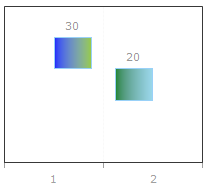
Here is the code I have that produces the above:
I am trying to find out how to properly align a Gantt chart. There are two Series and each series only contains one actual point, but they should be in different segments (1 & 2). I can get this behavior to somewhat work by inserting a dummy item in each series, but even when trying to hide, set empty, and change the dummy item to 0px, it still holds the space even though it isn't there. Below, this is to the left of the first and to the right of the second. How can I achieve two series with one in each column where it doesn't have this empty yet allocated item space?
Here is the code I have that produces the above:
<telerik:RadChart ID="chartAnchorTip" SkinsOverrideStyles="true" runat="server" Width="225px" Height="200px" AutoLayout="true"> <Appearance Border-Visible="false" Dimensions-AutoSize="true" TextQuality="ClearTypeGridFit" /> <ChartTitle Visible="false" /> <PlotArea Appearance-FillStyle-MainColor="White" Appearance-FillStyle-FillType="Solid"> <XAxis MaxValue="6" MinValue="1" Step="1" /> <YAxis MaxValue="60" Step="5" AxisMode="Extended" Visible="False" /> <YAxis2 MaxValue="5" MinValue="1" Step="1" Visible="False" /> </PlotArea> <Series> <telerik:ChartSeries Name="Series 1" Type="gantt"> <Appearance LegendDisplayMode="ItemLabels" EmptyValue-Mode="Zero"> <FillStyle MainColor="Green"> </FillStyle> </Appearance> <Items> <telerik:ChartSeriesItem Visible="False" Empty="true" Label-Appearance-Visible="false" Label-Appearance-Dimensions-Width="0px" Label-Appearance-Position-AlignedPosition="None" PointAppearance-Dimensions-Width="0px" /> <telerik:ChartSeriesItem YValue="20" YValue2="30" Name="Item 2" /> </Items> </telerik:ChartSeries> </Series> <Series> <telerik:ChartSeries Name="Series 2" Type="gantt"> <Appearance LegendDisplayMode="ItemLabels" EmptyValue-Mode="Zero"> <FillStyle MainColor="Blue"> </FillStyle> </Appearance> <Items> <telerik:ChartSeriesItem YValue="30" YValue2="40" Name="Item 1" /> <telerik:ChartSeriesItem Visible="False" Empty="true" Label-Appearance-Visible="false" Label-Appearance-Dimensions-Width="0px" Label-Appearance-Position-AlignedPosition="None" PointAppearance-Dimensions-Width="0px" /> </Items> </telerik:ChartSeries> </Series> <Legend Visible="false" /></telerik:RadChart>
Steve
Top achievements
 Rank 1
Rank 1
answered
on
27 Mar 2013
2 answers
126 views
Hi
We are using RadGrids with Microsoft's Dynamic Data scaffolding.
In testing these grids with the new Radfilter control, I found that the fileter displays the underlying database attribute names intsead of the column header labels assigned to the grid columns (GridColumn.HeaderText). This creates and issue for our users as they cannot easily detrmine the column the wish to filter on. Also, it appears that the column type is derived from the underlying database attribute as well.
For example- we create a virtual attribute based on a concatentation of a numeric id and a string label - based on a joined table and using a foreign key (routefk in master table is linked to routes table, with route id and routelabel concatenated and displayed.) The radfilter displays the column as "routefk" and expects the user to enter a number.
Is there any way we can force the filter to use the column labels and types instead of the underlying data labels and data types.
We are using RadGrids with Microsoft's Dynamic Data scaffolding.
In testing these grids with the new Radfilter control, I found that the fileter displays the underlying database attribute names intsead of the column header labels assigned to the grid columns (GridColumn.HeaderText). This creates and issue for our users as they cannot easily detrmine the column the wish to filter on. Also, it appears that the column type is derived from the underlying database attribute as well.
For example- we create a virtual attribute based on a concatentation of a numeric id and a string label - based on a joined table and using a foreign key (routefk in master table is linked to routes table, with route id and routelabel concatenated and displayed.) The radfilter displays the column as "routefk" and expects the user to enter a number.
Is there any way we can force the filter to use the column labels and types instead of the underlying data labels and data types.
Francisco
Top achievements
Rank 1
Rank 1
answered
on
27 Mar 2013
1 answer
101 views
Hi
i have two texbox and database if i enter dates in the two textbox means
it will retrive the database value between this two dates enterd in the textbox
Regards
P.Mugil
i have two texbox and database if i enter dates in the two textbox means
it will retrive the database value between this two dates enterd in the textbox
Regards
P.Mugil
Vasil
Telerik team
answered
on
27 Mar 2013
5 answers
395 views
Hello,
I am using a Radlistview with a nested Radlistview nested under the top level <ItemTemplate> tag area. In the nested itemTemplate I display groups of emails by groupID's. So each group contains 5 emails within that group. Under each group there is an edit button, so my problem is that when the user clicks the edit button the editItemTemplate doesn't display so the user can edit the group of emails by that pertain to that groupID. And the edit button needs to make all items within that group editable. I tried using my layout under the nested EditItemTemplate tag and also under the parent EditItemTemplate tag.
My code is below. Any help would be great.
Thanks
I am using a Radlistview with a nested Radlistview nested under the top level <ItemTemplate> tag area. In the nested itemTemplate I display groups of emails by groupID's. So each group contains 5 emails within that group. Under each group there is an edit button, so my problem is that when the user clicks the edit button the editItemTemplate doesn't display so the user can edit the group of emails by that pertain to that groupID. And the edit button needs to make all items within that group editable. I tried using my layout under the nested EditItemTemplate tag and also under the parent EditItemTemplate tag.
My code is below. Any help would be great.
Thanks
<%@ Page Language="C#" MasterPageFile="~/Main.master" AutoEventWireup="true" CodeFile="ListDeactivation.aspx.cs" Inherits="ListDeactivation" Title="Partner List Deactivation" %><%@ Register Assembly="Telerik.Web.UI" Namespace="Telerik.Web.UI" TagPrefix="telerik" %><asp:Content ID="Content1" ContentPlaceHolderID="MainContent" Runat="Server"> <telerik:RadScriptManager ID="ScriptManager1" runat="server" EnableTheming="True"></telerik:RadScriptManager><style type="text/css">.products{ empty-cells: show; table-layout: fixed; border-collapse: collapse; width: 100%;}.products th{ background-color: #C3D8F1; padding: 5px; border-bottom: 1px solid #5D8CC9; color: #00156E; text-align: left; width:130px;}.products td{ padding: 4px 7px 3px 7px;}.orders td{ padding:0; width:auto;}.orders table{ table-layout:fixed; border-collapse:collapse; width:100%;}.orders table td{ width:130px; padding: 4px 7px 3px 7px; padding:3px 3px 3px 7px;}.orders table tr:last-child td{ border-bottom:none;}.hidden{ display:none;}</style> <telerik:RadAjaxManager ID="RadAjaxManager1" runat="server"> <AjaxSettings> <telerik:AjaxSetting AjaxControlID="UpdatePanel1"> <UpdatedControls> <telerik:AjaxUpdatedControl ControlID="UpdatePanel1" LoadingPanelID="RadAjaxLoadingPanel1" /> </UpdatedControls> </telerik:AjaxSetting> <telerik:AjaxSetting AjaxControlID="lstVpanel"> <UpdatedControls> <telerik:AjaxUpdatedControl ControlID="lstVpanel" LoadingPanelID="RadAjaxLoadingPanel1" /> </UpdatedControls> </telerik:AjaxSetting> </AjaxSettings></telerik:RadAjaxManager><asp:Label runat="Server" ID="lblTitle" Font-Size="Large" ForeColor="#339ec6" Font-Bold="True" >List Deactivation</asp:Label> <asp:Panel ID="UpdatePanel1" runat="server"> <asp:Label id="lblError" runat="server" Font-Bold="true" ForeColor="Red"></asp:Label> <div id="topDiv" runat="server" cellpadding="0" cellspacing="0" style="position:relative;"> <div style="position: relative; top: 20px"> <asp:Label ID="lblPartners" runat="server" Font-Bold="true" Text="Partners:"></asp:Label> </div> <div style="left: 175px; position: relative;"> <telerik:RadComboBox ID="cbTeams" runat="server" AutoPostBack="true" Skin="Default" OnSelectedIndexChanged="cbTeams_SelectedIndexChanged"> <CollapseAnimation Duration="10" Type="InOutElastic" /> </telerik:RadComboBox> </div> <hr /> <asp:Panel ID="lstVpanel" runat="server"> <telerik:RadListView ID="lvSeeds" AllowPaging="True" OnItemDataBound="lvSeeds_ItemDataBound" AllowMultiItemSelection="true" ItemPlaceholderID="SeedHolder" OnItemCommand="listView_ItemCommand" runat="server" Skin="Outlook" OnPageIndexChanged="lvSeeds_PageIndexChanged"> <ValidationSettings EnableValidation="true" /> <LayoutTemplate > <table cellpadding="0" cellspacing="0" width="100%;" style="clear: both;"> <tr> <td> <telerik:RadDataPager ID="RadDataPager1" runat="server" PagedControlID="lvSeeds" PageSize="6"> <Fields> <telerik:RadDataPagerButtonField FieldType="FirstPrev" /> <telerik:RadDataPagerButtonField FieldType="Numeric" /> <telerik:RadDataPagerButtonField FieldType="NextLast" /> <telerik:RadDataPagerTemplatePageField> <PagerTemplate> <div style="float: right"> <b>Items <asp:Label runat="server" ID="CurrentPageLabel" Text="<%# Container.Owner.StartRowIndex+1%>" /> to <asp:Label runat="server" ID="TotalPagesLabel" Text="<%# Container.Owner.TotalRowCount > (Container.Owner.StartRowIndex+Container.Owner.PageSize) ? Container.Owner.StartRowIndex+Container.Owner.PageSize : Container.Owner.TotalRowCount %>" /> of <asp:Label runat="server" ID="TotalItemsLabel" Text="<%# Container.Owner.TotalRowCount%>" /> <br /> </b> </div> </PagerTemplate> </telerik:RadDataPagerTemplatePageField> </Fields> </telerik:RadDataPager> </td> </tr> </table> <asp:Panel ID="HierarchyPanel" runat="Server"> <table id="products" class="products"> <thead> <tr> <th></th> <th>Seed Name</th> <th>Domain</th> <th>Password</th> <th>Status</th> </tr> </thead> <tbody> <tr id="SeedHolder" runat="server"></tr> <tr> <td> <asp:Button id="btnInsert" runat="server" Text="Insert Seed" OnClick="btnInsert_Click" /> </td> </tr> </tbody> </table> </asp:Panel> </LayoutTemplate> <ItemTemplate> <tr> <td></td> <td style="border:none" colspan="4" class="hidden"> <%# Session["groupID"] = Eval("groupID").ToString() %> </td> </tr> <tr class="orders"> <td></td> <td colspan="4"> <telerik:RadListView ID="nestedView" runat="server" DataKeyNames="seedID" ItemPlaceholderID="nestedHolder"> <LayoutTemplate> <table> <asp:PlaceHolder ID="nestedHolder" runat="server"></asp:PlaceHolder> </table> <br /> <br /> <table> <tr> <td style="float:right"> <asp:Button ID="btnEdit" runat="server" Text="Edit" CommandName="Edit" CausesValidation="false" /> </td> </tr> </table> </LayoutTemplate> <ItemTemplate> <tr> <td> <%# Eval("seedName")%> </td> <td> <%# Eval("DomainName")%> </td> <td> <%# Eval("password")%> </td> <td> <%# Eval("statusName")%> </td> </tr> </ItemTemplate> <EditItemTemplate> <fieldset style="float:left; width: 350px; margin-top: 5px; margin-left: 5px; margin-right: 5px; margin-bottom: 5px; padding-left: 15px;"> <table cellpadding="0" cellspacing="0" style="height: 100%;width: 100%"> <tr> <td> <table cellpadding="5" cellspacing="1"> <tr> <td style="width: 10%">Seed:</td> <td style="width: 20%"> <asp:TextBox ID="txtSeedName1" runat="server" Text='<%# Bind("SeedName") %>' /> <asp:RequiredFieldValidator ID="rvSeedName" runat="server" ControlToValidate="txtSeedName1" ErrorMessage="Please enter seed name" Display="Dynamic" /> </td> <td> <asp:Label ID="lblDomain1" runat="server" Text="gmail.com" /> </td> </tr> <tr> <td style="width: 10%">Password:</td> <td style="width: 20%"> <asp:TextBox ID="txtPassword1" TextMode="Password" runat="server" Text='<%# Bind("Password") %>' /> <asp:RequiredFieldValidator ID="rvSeedPassword" runat="server" ControlToValidate="txtPassword1" ErrorMessage="Please enter seeds password" Display="Dynamic" /> </td> </tr> </table> </td> </tr> <tr> <td> <asp:Button ID="btnPerformInsert" runat="server" Text="Insert" CommandName="PerformInsert" /> <asp:Button ID="btnCancelInsert" runat="server" Text="Cancel" CommandName="Cancel" CausesValidation="false" /> </td> </tr> </table> </fieldset> </EditItemTemplate> </telerik:RadListView> </td> </tr> </ItemTemplate> <InsertItemTemplate> <fieldset style="float:left; width: 350px; margin-top: 5px; margin-left: 5px; margin-right: 5px; margin-bottom: 5px; padding-left: 15px;"> <table cellpadding="0" cellspacing="0" style="height: 100%;width: 100%"> <tr> <td> <table cellpadding="5" cellspacing="1"> <tr> <td style="width: 10%">Seed:</td> <td style="width: 20%"> <asp:TextBox ID="txtSeedName1" runat="server" Text='<%# Bind("SeedName1") %>' /> <asp:RequiredFieldValidator ID="rvSeedName" runat="server" ControlToValidate="txtSeedName1" ErrorMessage="Please enter seed name" Display="Dynamic" /> </td> <td> <asp:Label ID="lblDomain1" runat="server" Text="gmail.com" /> </td> </tr> <tr> <td style="width: 10%">Password:</td> <td style="width: 20%"> <asp:TextBox ID="txtPassword1" TextMode="Password" runat="server" Text='<%# Bind("Password1") %>' /> <asp:RequiredFieldValidator ID="rvSeedPassword" runat="server" ControlToValidate="txtPassword1" ErrorMessage="Please enter seeds password" Display="Dynamic" /> </td> </tr> <tr> <td style="width: 10%">Seed:</td> <td style="width: 20%"> <asp:TextBox ID="txtSeedName2" runat="server" Text='<%# Bind("SeedName2") %>' /> <asp:RequiredFieldValidator ID="RequiredFieldValidator7" runat="server" ControlToValidate="txtSeedName2" ErrorMessage="Please enter seed name" Display="Dynamic" /> </td> <td> <asp:Label ID="lblDomain2" runat="server" Text="hotmail.com" /> </td> </tr> <tr> <td style="width: 10%">Password:</td> <td style="width: 20%"> <asp:TextBox ID="txtPassword2" TextMode="Password" runat="server" Text='<%# Bind("Password2") %>' /> <asp:RequiredFieldValidator ID="RequiredFieldValidator8" runat="server" ControlToValidate="txtPassword2" ErrorMessage="Please enter seeds password" Display="Dynamic" /> </td> </tr> <tr> <td style="width: 10%">Seed:</td> <td style="width: 20%"> <asp:TextBox ID="txtSeedName3" runat="server" Text='<%# Bind("SeedName3") %>' /> <asp:RequiredFieldValidator ID="RequiredFieldValidator1" runat="server" ControlToValidate="txtSeedName3" ErrorMessage="Please enter seed name" Display="Dynamic" /> </td> <td> <asp:Label ID="lblDomain3" runat="server" Text="yahoo.com" /> </td> </tr> <tr> <td style="width: 10%">Password:</td> <td style="width: 20%"> <asp:TextBox ID="txtPassword3" TextMode="Password" runat="server" Text='<%# Bind("Password3") %>' /> <asp:RequiredFieldValidator ID="RequiredFieldValidator2" runat="server" ControlToValidate="txtPassword3" ErrorMessage="Please enter seeds password" Display="Dynamic" /> </td> </tr> <tr> <td style="width: 10%">Seed:</td> <td style="width: 20%"> <asp:TextBox ID="txtSeedName4" runat="server" Text='<%# Bind("SeedName4") %>' /> <asp:RequiredFieldValidator ID="RequiredFieldValidator3" runat="server" ControlToValidate="txtSeedName4" ErrorMessage="Please enter seed name" Display="Dynamic" /> </td> <td> <asp:Label ID="lblDomain4" runat="server" Text="gmx.com" /> </td> </tr> <tr> <td style="width: 10%">Password:</td> <td style="width: 20%"> <asp:TextBox ID="txtPassword4" TextMode="Password" runat="server" Text='<%# Bind("Password4") %>' /> <asp:RequiredFieldValidator ID="RequiredFieldValidator4" runat="server" ControlToValidate="txtPassword4" ErrorMessage="Please enter seeds password" Display="Dynamic" /> </td> </tr> <tr> <td style="width: 10%">Seed:</td> <td style="width: 20%"> <asp:TextBox ID="txtSeedName5" runat="server" Text='<%# Bind("SeedName5") %>' /> <asp:RequiredFieldValidator ID="RequiredFieldValidator5" runat="server" ControlToValidate="txtSeedName5" ErrorMessage="Please enter seed name" Display="Dynamic" /> </td> <td> <asp:Label ID="lblDomain5" runat="server" Text="aol.com" /> </td> </tr> <tr> <td style="width: 10%">Password:</td> <td style="width: 20%"> <asp:TextBox ID="txtPassword5" TextMode="Password" runat="server" Text='<%# Bind("Password5") %>' /> <asp:RequiredFieldValidator ID="RequiredFieldValidator6" runat="server" ControlToValidate="txtPassword5" ErrorMessage="Please enter seeds password" Display="Dynamic" /> </td> </tr> </table> </td> </tr> <tr> <td> <asp:Button ID="btnPerformInsert" runat="server" Text="Insert" CommandName="PerformInsert" /> <asp:Button ID="btnCancelInsert" runat="server" Text="Cancel" CommandName="Cancel" CausesValidation="false" /> </td> </tr> </table> </fieldset> </InsertItemTemplate> </telerik:RadListView> </asp:Panel> </div> </asp:Panel> <telerik:RadAjaxLoadingPanel ID="RadAjaxLoadingPanel1" Skin="Default" runat="server" Transparency="10" EnableSkinTransparency="true"> <asp:Label ID="lblLoading" Font-Size="large" runat="server" ForeColor="Red">Loading...</asp:Label> </telerik:RadAjaxLoadingPanel> </asp:Content>
Marin
Telerik team
answered
on
27 Mar 2013
1 answer
132 views
Hi all,
I have used Radtreelist and add, edit in popup window.
How to set Popup window alignment Right side.
see Image1 - Normal open popup window
Image2 - I want popup window open in this format
My Sample Coding:
<tr>
<td>
<telerik:RadTreeList ID="RadTreeListWork" runat="server" OnNeedDataSource="RadTreeListWork_NeedDataSource"
OnUpdateCommand="RadTreeListWork_UpdateCommand" OnInsertCommand="RadTreeListWork_InsertCommand"
ParentDataKeyNames="WorkParentId" DataKeyNames="WorkId" AutoGenerateColumns="False"
OnItemDataBound="RadTreeListWork_ItemDataBound" EditMode="PopUp" OnDeleteCommand="RadTreeListWork_DeleteCommand"
OnItemCreated="RadTreeListWork_ItemCreated" AllowMultiItemEdit="False" Culture="(Default)"
GridLines="None" IsItemInserted="False" ShowOuterBorders="False" Width="500px"
PageSize="10" AllowPaging="true" EditFormSettings-PopUpSettings-Modal="true">
<Columns>
<telerik:TreeListEditCommandColumn UniqueName="InsertCommandColumn" ButtonType="ImageButton"
ShowEditButton="false" HeaderStyle-Width="20px" ItemStyle-HorizontalAlign="Center" />
<telerik:TreeListButtonColumn CommandName="Edit" Text="Edit" UniqueName="EditCommandColumn"
ButtonType="ImageButton" HeaderStyle-Width="20px" ItemStyle-HorizontalAlign="Center"
HeaderText="EDIT" />
<telerik:TreeListBoundColumn DataField="WorkId" HeaderText="WorkId" ReadOnly="true"
UniqueName="WorkId" HeaderStyle-Width="75px" ForceExtractValue="Always" Visible="false" />
<telerik:TreeListBoundColumn DataField="WorkParentId" HeaderText="WorkParentId" HeaderStyle-Width="65px"
UniqueName="WorkParentId" ReadOnly="true" ForceExtractValue="Always" Visible="false" />
<telerik:TreeListBoundColumn DataField="WorkName" HeaderText="NAME" UniqueName="WorkName"
HeaderStyle-Width="100px">
<HeaderStyle Font-Bold="true" Font-Size="Small"></HeaderStyle>
</telerik:TreeListBoundColumn>
<telerik:TreeListBoundColumn DataField="WorkDescription" HeaderText="DESCRIPTION"
UniqueName="WorkDescription" HeaderStyle-Width="200px">
<HeaderStyle Font-Bold="true" Font-Size="Small"></HeaderStyle>
</telerik:TreeListBoundColumn>
<telerik:TreeListBoundColumn DataField="UnitCode" HeaderText="UNIT" UniqueName="UnitCode"
HeaderStyle-Width="100px">
<HeaderStyle Font-Bold="true" Font-Size="Small"></HeaderStyle>
</telerik:TreeListBoundColumn>
<telerik:TreeListTemplateColumn DataField="Quantity" HeaderText="QUANTITY" UniqueName="Quantity"
HeaderStyle-Width="100px">
<HeaderStyle Font-Bold="true" Font-Size="Small"></HeaderStyle>
<ItemTemplate>
<asp:Label runat="server" ID="Qty" Text='<%# Eval("Quantity") %>'></asp:Label>
</ItemTemplate>
</telerik:TreeListTemplateColumn>
<telerik:TreeListTemplateColumn DataField="Rate" HeaderText="RATE ($)" UniqueName="Rate"
HeaderStyle-Width="100px">
<HeaderStyle Font-Bold="true" Font-Size="Small"></HeaderStyle>
<ItemTemplate>
<asp:Label runat="server" ID="Rte" Text='<%# Eval("Rate") %>'></asp:Label>
</ItemTemplate>
</telerik:TreeListTemplateColumn>
<telerik:TreeListTemplateColumn DataField="Amount" HeaderText="AMOUNT ($)" UniqueName="Amount"
HeaderStyle-Width="100px">
<HeaderStyle Font-Bold="true" Font-Size="Small"></HeaderStyle>
<ItemTemplate>
<asp:Label runat="server" ID="Amt" Text='<%# Eval("Amount") %>'></asp:Label>
</ItemTemplate>
</telerik:TreeListTemplateColumn>
<telerik:TreeListButtonColumn ButtonType="ImageButton" UniqueName="DeleteCommandColumn"
Text="Delete" CommandArgument="Child" CommandName="Delete" HeaderStyle-Width="20px" />
</Columns>
<ValidationSettings CommandsToValidate="PerformInsert, Update" EnableValidation="true" />
<EditFormSettings CaptionFormatString="Create" EditFormType="Template" PopUpSettings-Width="400px">
<FormTemplate>
<div style="margin-left: 1%;">
<table width="100%">
<tr>
<td style="height: 75px; width: 75%;">
<table style="float: right;">
<tr>
<td>
<asp:Label ID="Label3" runat="server" ForeColor="Red" Text="*" Width="1px"></asp:Label>
<asp:Label ID="Label2" Text="Mandatory Field(s)" runat="server"></asp:Label>
</td>
</tr>
</table>
<br />
<br />
<fieldset>
<legend style="margin-bottom: 10px">Work Definition</legend>
<table cellspacing="2" cellpadding="1" width="100%" border="0">
<tr>
<td align="right">
<asp:Label ID="Label1" runat="server" ForeColor="Red" Text="*" Width="1px"></asp:Label>
Code :
</td>
<td>
<asp:TextBox Width="90%" ID="WorkName" AutoCompleteType="Disabled" runat="server"
MaxLength="5" Text='<%# Bind("WorkName") %>'></asp:TextBox>
</td>
</tr>
<tr>
<td valign="top" align="right">
<asp:Label ID="Label4" runat="server" ForeColor="Red" Text="*" Width="1px"></asp:Label>
Description :
</td>
<td>
<asp:TextBox Width="90%" ID="WorkDescription" AutoCompleteType="Disabled" runat="server"
MaxLength="300" TextMode="MultiLine" Height="100px" Text='<%# Bind("WorkDescription") %>'></asp:TextBox>
</td>
</tr>
<tr>
<td valign="top" align="right">
Unit :
</td>
<td>
<telerik:RadComboBox runat="server" ID="UnitCode" Skin="Vista" AppendDataBoundItems="True"
AutoPostBack="True" DataTextField="UnitName" DataValueField="UnitCode" Height="200px"
OnSelectedIndexChanged="UnitCode_SelectedIndexChanged">
</telerik:RadComboBox>
</td>
<%--<td>
<telerik:RadComboBox runat="server" ID="UnitCode">
</telerik:RadComboBox>
</td>--%>
</tr>
<tr>
<td valign="top" align="right">
<asp:Label ID="Label9" runat="server" ForeColor="Red" Text="*" Width="1px" Visible="false"></asp:Label>
Quantity :
</td>
<td>
<telerik:RadNumericTextBox Width="50%" ID="Quantity" AutoCompleteType="Disabled"
MaxLength="6" FocusedStyle-BackColor="Lavender" runat="server" Text='<%# Bind("Quantity") %>'
onkeydown="return (event.keyCode!=13);" ReadOnly="true">
<NumberFormat GroupSeparator="" DecimalDigits="0" AllowRounding="true" KeepNotRoundedValue="false" />
<IncrementSettings InterceptMouseWheel="false" InterceptArrowKeys="false" />
<ClientEvents OnKeyPress="KeyPress" />
</telerik:RadNumericTextBox>
<%--<telerik:RadListBox runat="server" ID="UnitNo">
</telerik:RadListBox>--%>
</td>
</tr>
<tr>
<td valign="top" align="right">
<asp:Label ID="Label10" runat="server" ForeColor="Red" Text="*" Width="1px" Visible="false"></asp:Label>
Rate ($):
</td>
<td>
<telerik:RadNumericTextBox Width="50%" ID="Rate" AutoCompleteType="Disabled" MaxLength="6"
ReadOnly="true" FocusedStyle-BackColor="Lavender" runat="server" Text='<%# Bind("Rate") %>'
onkeydown="return (event.keyCode!=13);">
<NumberFormat GroupSeparator="" DecimalDigits="0" AllowRounding="true" KeepNotRoundedValue="false" />
<IncrementSettings InterceptMouseWheel="false" InterceptArrowKeys="false" />
<ClientEvents OnKeyPress="KeyPress" />
</telerik:RadNumericTextBox>
</td>
</tr>
<tr>
<td valign="top" align="right">
Amount ($):
</td>
<td>
<telerik:RadNumericTextBox Width="50%" ID="Amount" AutoCompleteType="Disabled" MaxLength="6"
FocusedStyle-BackColor="Lavender" runat="server" Text='<%# Bind("Amount") %>'
onkeydown="return (event.keyCode!=13);" ReadOnly="true">
<NumberFormat GroupSeparator="" DecimalDigits="0" AllowRounding="true" KeepNotRoundedValue="false" />
<IncrementSettings InterceptMouseWheel="false" InterceptArrowKeys="false" />
<ClientEvents OnKeyPress="KeyPress" />
</telerik:RadNumericTextBox>
</td>
</tr>
</table>
</fieldset>
</td>
</tr>
</table>
<table>
<tr>
<td>
<telerik:RadButton ID="btnUpdate" Text='<%# (Container is TreeListEditFormInsertItem) ? "Insert" : "Update" %>'
runat="server" CommandName='<%# (Container is TreeListEditFormInsertItem) ? "PerformInsert" : "Update" %>'
Icon-PrimaryIconCssClass="rbOk">
</telerik:RadButton>
<telerik:RadButton ID="btnCancel" Text="Cancel" runat="server" CausesValidation="False"
CommandName="Cancel" Icon-PrimaryIconCssClass="rbCancel">
</telerik:RadButton>
</td>
</tr>
</table>
</div>
</FormTemplate>
<PopUpSettings Modal="True"></PopUpSettings>
</EditFormSettings>
</telerik:RadTreeList>
</td>
</tr>
Advance & Thanks,
Ansari.
Andrey
Telerik team
answered
on
27 Mar 2013
4 answers
1.4K+ views
Hi all member,
I want Make enter key behave like tab key .in my form there are multi control like RadInput and Rad grid and RadButton ,how to Make enter key behave like tab key which go to next control , not fire default button click when it not focus
please help to me
thanks
I want Make enter key behave like tab key .in my form there are multi control like RadInput and Rad grid and RadButton ,how to Make enter key behave like tab key which go to next control , not fire default button click when it not focus
please help to me
thanks
Vasil
Telerik team
answered
on
27 Mar 2013
3 answers
92 views
Have you changed the default z-index in 2013Q1?
I had a css overlay "eu cookie warning" which is now obscured by a radpanelbar since upgrading to 2013Q1.
I have fixed this by explicitly setting a very high z-index for the overlay, which is fine.
But can you confirm whether this is a bug, or do you have a new updated list of default z-indices for all controls.
I had a css overlay "eu cookie warning" which is now obscured by a radpanelbar since upgrading to 2013Q1.
I have fixed this by explicitly setting a very high z-index for the overlay, which is fine.
But can you confirm whether this is a bug, or do you have a new updated list of default z-indices for all controls.
Kate
Telerik team
answered
on
27 Mar 2013
4 answers
144 views
I'm trying to have a radgrid that uses the needdatasource event to allow filtering/sorting, but how do I keep client side changes made to the grid in between loads?
For example, the page loads, then a user clicks a button which changes the selected row on the client side. The user then sorts/filters and the changes are gone. I would like those changes to be preserved. The changes are actually committed to the server on another button click. Is this possible?
For example, the page loads, then a user clicks a button which changes the selected row on the client side. The user then sorts/filters and the changes are gone. I would like those changes to be preserved. The changes are actually committed to the server on another button click. Is this possible?





