Understanding Race Conditions in ASP.NET Core
 by
by 
Summarize with AI:
Explore the concept of race conditions in ASP.NET Core, understand how to identify them in practice and learn strategies to protect applications against this type of issue.
Two requests arrive at your application at the exact same moment. Both read the same data, both attempt to update it, and everything appears to work correctly. Yet one update silently overwrites the other. This is a classic race condition. In this post, you’ll see how these problems arise and how to prevent them using common concurrency control techniques.
Working with systems that execute multiple operations in milliseconds is not a distant reality. On the contrary, in medium- and large-scale applications, this is a common scenario.
But along with this level of concurrency comes a problem that is often overlooked: race conditions. When not handled properly, they can lead to inconsistencies and even silently corrupt data.
In this post, we will explore the concept of race conditions, understand how to identify them in practice, and discuss strategies to protect our applications against this type of issue.
What Is a Race Condition?
According to Microsoft documentation on race conditions and deadlocks, a race condition occurs when two threads access and modify a shared resource at the same time. The final result depends on the order in which these operations are executed.
The problem is that this order is not guaranteed; it can vary with each execution. This leads to unpredictable behavior, such as inconsistent data, lost updates or invalid states.
Imagine two requests trying to update an account balance at the same time. Both read the same initial value, perform separate calculations and save the result. Depending on which one saves last, one update may overwrite the other, even if both were performed correctly in isolation.
When Do Race Conditions Occur?
Race conditions don’t appear “out of nowhere.” They usually arise from some very common code and architectural patterns. Below, we’ll look at two of the best-known: Read-Modify-Write and Check-Then-Act.
Read-Modify-Write
The idea here is simple: you read a value, make some modification to it and then write it back. The problem starts when two or more executions do this at the same time. Consider the image below:
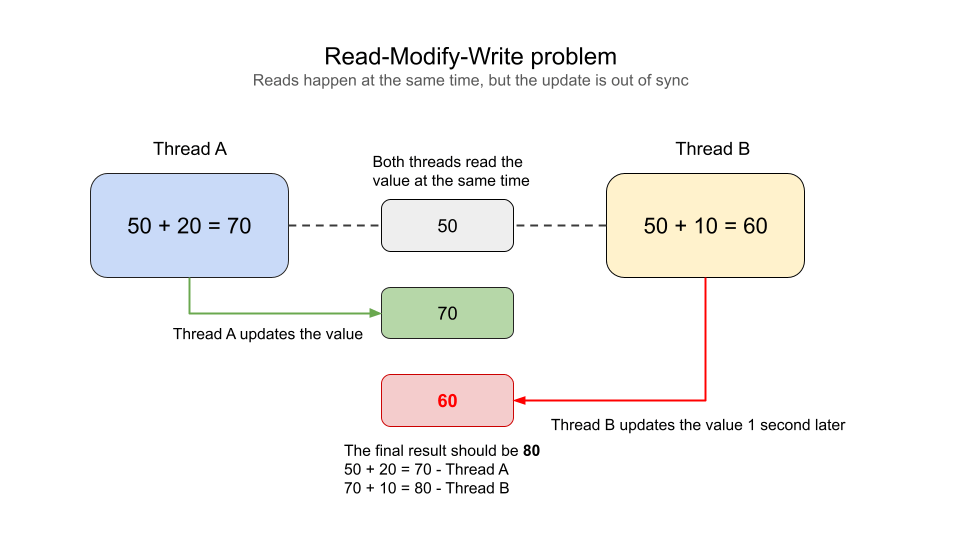
Note that both readings happen simultaneously, returning the value of 50. However, Thread A adds 20 to the initial value, while Thread B adds 10. The problem occurs when Thread A updates the initial value (50) to 70, while Thread B updates it 1 second later with the value of 60, completely disregarding the value previously added by Thread A.
The result is an incorrectly calculated value, something that would certainly cause losses in a production environment.
Check-Then-Act
The Check-Then-Act pattern is often even more subtle than the previous pattern. The problem with this pattern is not in updating a value, but in making a decision based on a state that may change before the action takes place. Consider the image below:
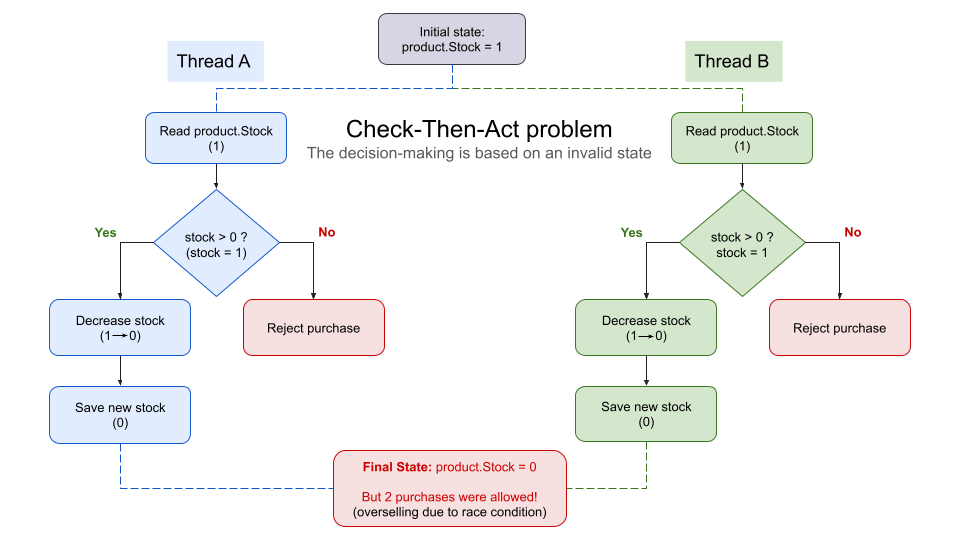
In this case we have two threads that check the stock quantity of a product. In both queries, the quantity is 1, and even though there is a check, both purchases were executed based on an invalid state. After all, when Thread A executed the purchase, there was no longer any quantity available for Thread B. If this problem had occurred in a real environment, the client of Thread B would have been left without the product.
Avoiding Race Conditions
Now that we’ve learned how to identify a race condition, let’s understand how to prevent it from happening. There are different strategies to protect ASP.NET Core applications against concurrency issues, and choosing the most appropriate approach depends on the scenario.
The main point is to understand that any concurrent operation involving shared state needs to be handled with care.
Understanding the Concept of Thread Safety
Thread safety is the ability of code or a resource to function correctly even when accessed simultaneously by multiple threads.
We can say that thread-safe code means that data is not corrupted, the state remains valid, and the behavior does not depend on the order of execution of the threads.
1. Using Locks
A lock is a mechanism used to make an operation thread-safe. It allows only one thread to execute a given piece of code at a time.
Consider the code below:
using System;
using System.Threading;
using System.Threading.Tasks;

public class ProductService
{
    private static readonly object _lock = new();

    // Simulating a stock quantity
    private int _stock = 1;

    public void Purchase(string customer)
    {
        Console.WriteLine($"{customer} is waiting to enter the critical section...");

        lock (_lock)
        {
            Console.WriteLine($"{customer} entered the critical section.");

            if (_stock <= 0)
            {
                Console.WriteLine($"{customer} could not complete the purchase. Product out of stock.");
                return;
            }

            Console.WriteLine($"{customer} is processing the purchase...");

            // Simulating a slow operation
            Thread.Sleep(3000);

            _stock--;

            Console.WriteLine($"{customer} completed the purchase.");
            Console.WriteLine($"Remaining stock: {_stock}");
        }

        Console.WriteLine($"{customer} left the critical section.");
    }
}

public class Program
{
    public static async Task Main()
    {
        var service = new ProductService();

        var task1 = Task.Run(() => service.Purchase("Customer A"));
        var task2 = Task.Run(() => service.Purchase("Customer B"));

        await Task.WhenAll(task1, task2);
    }
}
You can run this code in Fiddle and get the following result:
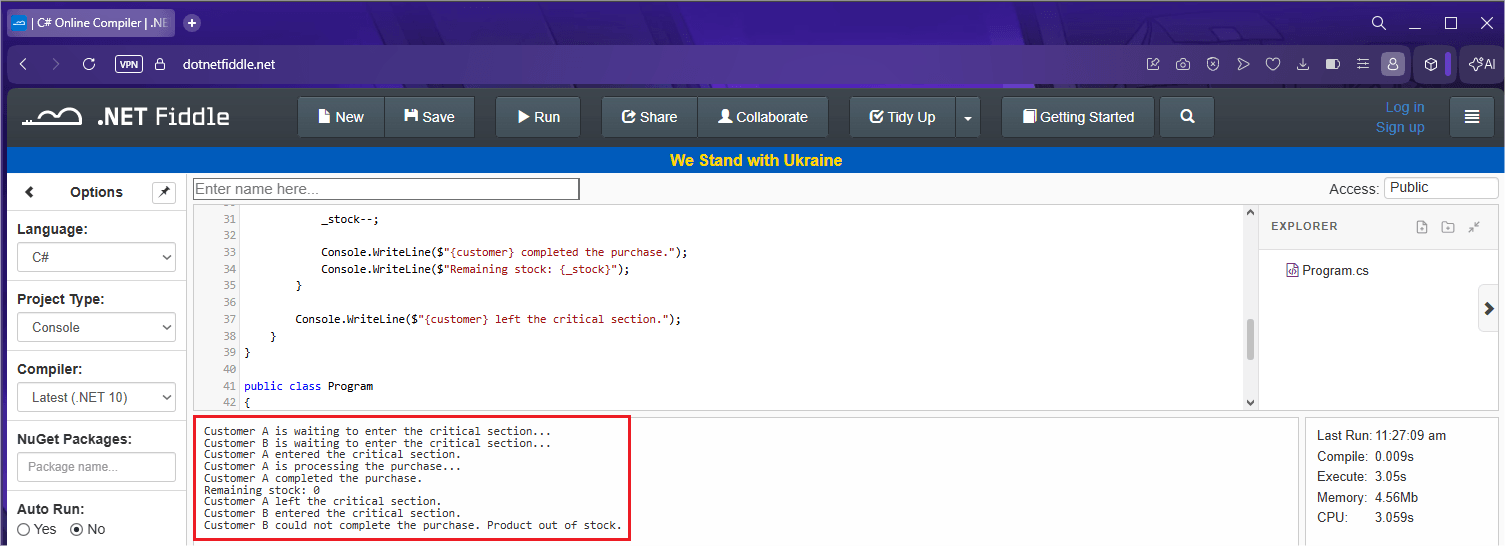
The idea here is to simulate a scenario where only one unit of stock is available for two customers attempting to make a purchase simultaneously. Note that we declare a static object _lock, which acts as a guardian for the critical section of the code, so only one thread at a time can execute the logic block that checks and decrements the stock.
When the request is triggered, two distinct tasks are initiated in parallel for customers A and B. If we didn’t use the locking structure, both could read the stock value as available at the same time, resulting in a duplicate sale of an item that only exists once, which constitutes a race condition.
However, the use of the lock instruction forces a waiting queue. While the first customer processes their purchase and the system waits (Thread.Sleep), the second customer remains held at the entrance of the critical section.
Only after the first customer’s transaction is completed and the stock is updated to zero is the lock released for the next customer. Upon entering the critical section, the second client performs a logical security check, realizes that the stock has been depleted by the previous processing and ends the purchase attempt without causing data inconsistencies.
The end result is a predictable execution flow, where we guarantee data integrity in a critical scenario under concurrent demand.
2. Using SemaphoreSlim
As we saw above, a lock blocks the current thread until the critical region is released. This may not always be a good strategy, as in some cases it can reduce the scalability of the application. In these cases, SemaphoreSlim may be a more suitable alternative.
In ASP.NET Core, SemaphoreSlim is a built-in class used to limit the number of threads that can access a resource or a section of code simultaneously. When set to 1, it works similarly to a lock, allowing only one execution at a time. Consider the example below:
using System;
using System.Threading;
using System.Threading.Tasks;

public class Program
{
    public static async Task Main()
    {
        var service = new ProductService();

        var task1 = Task.Run(() => service.PurchaseAsync("Customer A"));
        var task2 = Task.Run(() => service.PurchaseAsync("Customer B"));

        await Task.WhenAll(task1, task2);

        Console.WriteLine("Finished.");
    }
}

public class ProductService
{
    private readonly SemaphoreSlim _semaphore = new(1, 1);
    private int _stock = 1;

    public async Task PurchaseAsync(string customer)
    {
        Console.WriteLine($"{customer} is waiting to enter the critical section...");

        await _semaphore.WaitAsync();

        try
        {
            Console.WriteLine($"{customer} entered the critical section.");

            if (_stock <= 0)
            {
                Console.WriteLine($"{customer} could not complete the purchase. Product out of stock.");
                return;
            }

            Console.WriteLine($"{customer} is processing the purchase...");

            // Simulates an asynchronous operation
            await Task.Delay(3000);

            _stock--;

            Console.WriteLine($"{customer} completed the purchase.");
            Console.WriteLine($"Remaining stock: {_stock}");
        }
        finally
        {
            _semaphore.Release();

            Console.WriteLine($"{customer} left the critical section.");
        }
    }
}
You can run this code in Fiddle and get the following result:
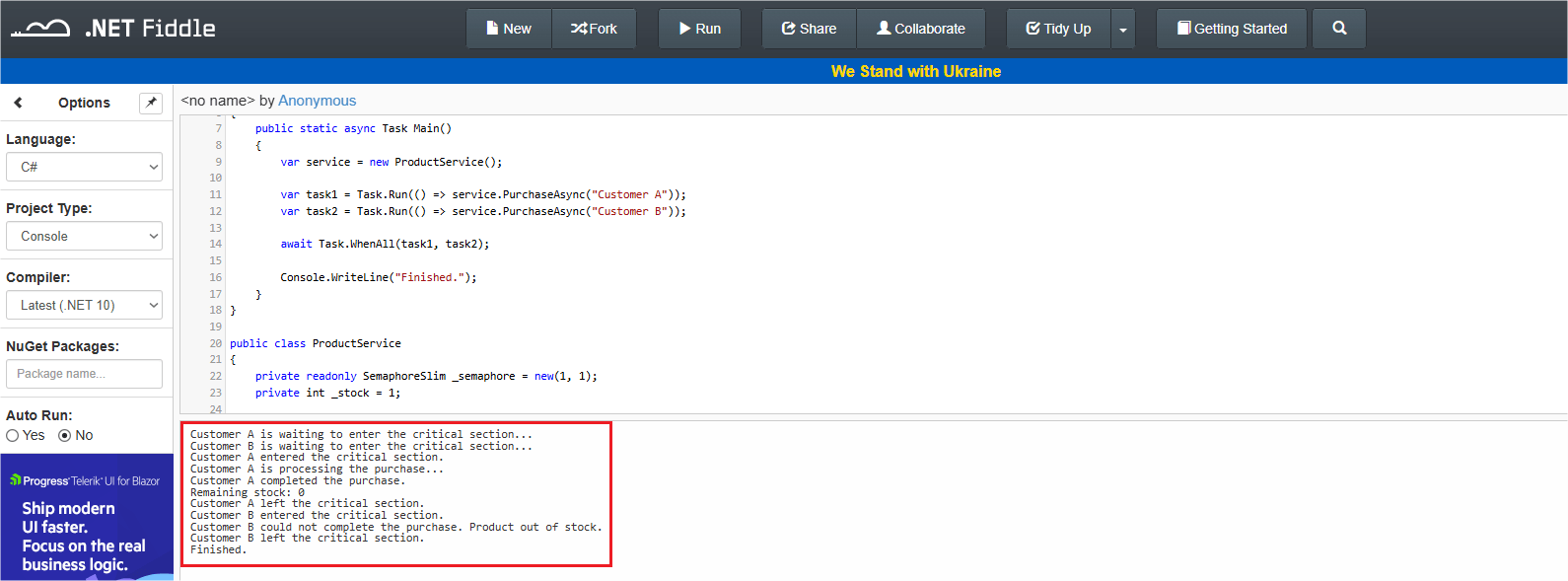
In this code, we create an instance of SemaphoreSlim, passing an initial and maximum value of 1 as a parameter. Thus, when two threads attempt to execute PurchaseAsync simultaneously, the first thread enters SemaphoreSlim while the second waits.
After the first operation is completed, the semaphore is released and the second thread can finally continue.
As in the example with lock, this prevents two operations from altering the stock at the same time. Tthe difference here is that the threads are asynchronous, and we also have the possibility of configuring an initial and maximum value for the number of simultaneous threads.
3. Using Thread-Safe Collections
Another scenario prone to race condition problems is using collections shared between multiple threads. Structures such as List<T>, Dictionary<TKey, TValue> and HashSet<T> were not designed for concurrent access. This means that collections of these types allow multiple threads to read and modify their data, generating inconsistent data and unpredictable behavior.
Consider the example below:
   private readonly Dictionary<Guid, Product> _products = new();

    public void AddProduct(Product product)
    {
        _products.Add(product.Id, product);
    }
If multiple requests attempt to add or update items at the same time, the application may throw exceptions or even corrupt the internal state of the collection. The problem occurs because Dictionary<TKey, TValue> is not prepared for synchronization.
For concurrent scenarios, .NET provides thread-safe collections through the namespace System.Collections.Concurrent, one of the most commonly used being ConcurrentDictionary<TKey, TValue>. Thus, we can use ConcurrentDictionary with safe concurrent access between multiple threads:
   private readonly ConcurrentDictionary<Guid, Product> _concurrentProducts = new();

    public void AddConcurrentProduct(Product product)
    {
        _concurrentProducts.TryAdd(product.Id, product);
    }

    public Product? GetProduct(Guid id)
    {
        _concurrentProducts.TryGetValue(id, out var product);

        return product;
    }
Now multiple threads can read _concurrentProducts at the same time, and concurrent operations are handled internally.
4. Using Optimistic Concurrency
Optimistic concurrency is another option for avoiding race conditions, especially in modern applications.
Unlike previously seen approaches such as locking or SemaphoreSlim, it does not attempt to prevent simultaneous accesses. Instead, it assumes that conflicts are rare and only detected when they occur.
Imagine that multiple operations can read the same data simultaneously. The first update happens normally, but subsequent updates fail if the data has been changed in the middle of the process. This prevents silent overwrites and provides consistency.
Consider the image below: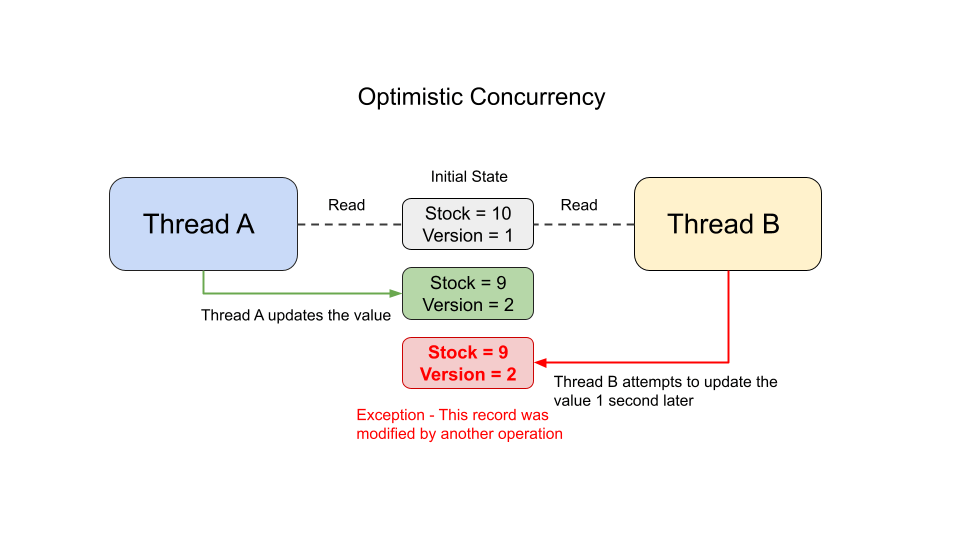
Note that both threads read the value at the same time (stock = 10, version 1), but Thread A was faster and updated the value first (stock = 9, version 2). When Thread B tries to update the value, an exception is generated because version 2 already exists. This verifies the consistency of the object’s initial state; in this case, the stock quantity does not receive an invalid state.
Implementing Optimistic Concurrency with EF Core
Entity Framework Core has a mechanism for using Optimistic Concurrency. To implement it, in an entity class we define a Version column as follows:
using System.ComponentModel.DataAnnotations;

namespace PracticingRaceConditions.Models;

public class Product
{
    public Guid Id { get; internal set; }
    public string Name { get; set; } = string.Empty;

    public int Stock { get; set; }

    [Timestamp]
    public byte[] Version { get; set; } = default!;
}
This Version column informs EF Core that it will be used by the Optimistic Concurrency mechanism, and when two threads attempt to update the same record with the same version, an exception will be thrown.
To simulate the error, we can do the following:
public async Task SimulatingPurchaseAsync()
{
    var options = new DbContextOptionsBuilder<ProductDbContext>()
        .UseSqlite("Data Source=productsDb")
        .Options;

    // Request A
    using var contextA = new ProductDbContext(options);

    // Request B
    using var contextB = new ProductDbContext(options);

    var productA = await contextB.Products.FirstOrDefaultAsync();

    var productB = await contextB.Products.FirstOrDefaultAsync();

    productA.Stock--;
    productB.Stock--;

    // Request A saves first
    await contextA.SaveChangesAsync();

    try
    {
        // Request B attempts to save using an outdated version
        await contextB.SaveChangesAsync();
    }
    catch (DbUpdateConcurrencyException)
    {
        Console.WriteLine("Concurrency conflict detected!");
    }
}
If we execute the SimulatingPurchaseAsync() method, we will get the following output in the console:
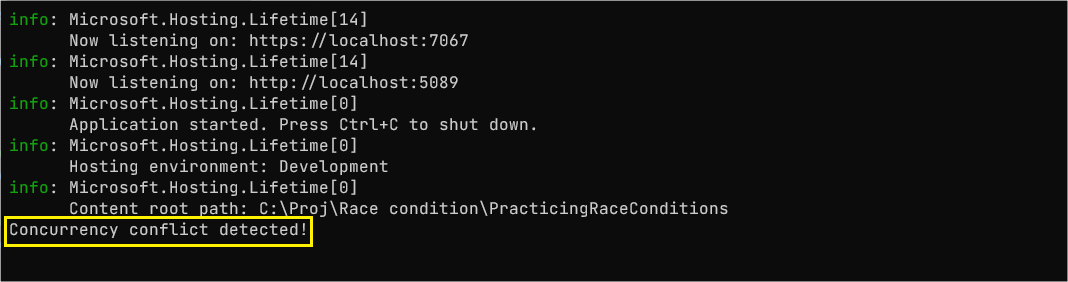
Note that when executing the SimulatingPurchaseAsync() method, we simulate two stock changes at the same time. When saving the result of Thread A, execution occurs normally because a version 2 of the product did not yet exist. But when trying to save the result of Thread B, a DbUpdateConcurrencyException exception is thrown, because EF Core detected that a version 2 was again trying to update the record.
In this way, we can use the EF Core’s Optimistic Concurrency mechanism to prevent the race condition problem.
Conclusion
The race condition problem occurs when two threads access and modify the same resource at the same time, which can result in an invalid state depending on the order in which the operations are performed.
In this post, we’ve seen common examples where race conditions can occur, and learned how protect our code from these problems through approaches like Locks, SemaphoreSlim, Thread-Safe Collections and Optimistic Concurrency with EF Core. I hope this post has helped you understand what race conditions are and how to protect your applications from errors resulting from this type of problem.
Related Posts
Comments
All articles
Topics
Web MobileMobile
Desktop
Design
Productivity
People