Top 3 Everyday Angular Tasks That MCP Servers Automate for You

Summarize with AI:
Scaffolding, creating UI from ideas and data, iterating and updating. These are things every Angular developer does, and here’s how MCP can help.
Angular developers spend a lot of time on repetitive UI tasks like scaffolding components, wiring data into views and adjusting layouts. Or, at least they used to, before the age of AI.
Now, MCP-powered tools can automate much of that work—letting coding assistants generate Angular code and tools like Agentic UI Generator turn prompts or data into working UI so developers can move faster.
“AI made refactoring and handling technical debt much faster, allowing us to focus on market features. Validating ideas, creating POCs, and writing tests are also areas where we’ve seen huge impact. The whole development lifecycle changed, and it opened the door for exploration and innovation.”
— Progress Product Team Insight
Model Context Protocol (MCP) is a way for AI assistants to connect directly to tools and dev environments instead of generating code in isolation.
Without that connection, AI can only make suggestions based on patterns it has seen before. It doesn’t know what Angular version you’re using, what components exist in your UI library or what APIs are actually available in your project. (Unless your assistant is built into a full-blown IDE, like Cursor.)
Often, with AI, the output might look correct, but developers end up fixing hallucinated APIs or rewriting scaffolding to make it fit their app. MCP closes that gap by giving AI access to real context—frameworks, component libraries, project structure and tooling. Instead of guessing what code might work, the assistant can generate output grounded in the tools you’re actually using.
So if you love VS Code, for example, but Copilot just isn’t cutting it for frontend AI-generated code, this is where MCP can fill the gap.
This is especially true for frontend work. Angular developers spend a lot of time on repetitive UI tasks like scaffolding components, wiring data into views and configuring layouts. MCP-powered tools can automate much of that groundwork. Coding assistants can generate valid Angular structures, and tools like Agentic UI Generator can turn prompts or data into working UI.
The result isn’t magic code generation—it’s a faster starting point. AI helps developers get moving, while humans still shape the final result.
Task #1: Scaffolding Angular Components Faster
Creating components is one of the most common tasks in Angular development. Even with Angular CLI, developers still need to generate the component, add inputs, wire services and start building the template.
If your coding assistant is connected to the Progress Kendo UI for Angular MCP server, it understands the components available in your UI library and can generate valid Angular structures using them.
With an MCP-powered coding assistant, you can start with a simple prompt:
#kendo_component_assistant Create a ProductCard Angular component that displays a product image,
name, and price using Kendo UI components.
The assistant can generate a working Angular component structure:
@Component({
  selector: 'app-product-card',
  imports: [KENDO_LAYOUT, NgOptimizedImage],
  template: `
    <kendo-card class="product-card" width="100%">
      <img
        kendoCardMedia
        [ngSrc]="product().imageUrl"
        [width]="product().imageWidth"
        [height]="product().imageHeight"
        [alt]="product().imageAlt"
      />

      <kendo-card-body>
        <h3 kendoCardTitle>{{ product().name }}</h3>
        <p class="product-price" [attr.aria-label]="'Price: ' + formattedPrice()">
          {{ formattedPrice() }}
        </p>
      </kendo-card-body>
    </kendo-card>
    ...
Instead of starting from scratch, developers get a valid Angular starting point immediately and can focus on refining the UI.
Task #2: Turning Data Into UI
A large portion of frontend work isn’t writing complex logic—it’s translating data and ideas into working UI.
As devs, we are accustomed to taking API responses or product requirements and turn them into forms, dashboards or application layouts. That process usually starts with sketching the structure of the interface and then building the components to support it.
With the Angular Agentic UI Generator, you can start that process with a prompt instead.
Because the tool connects to your UI library through MCP, it understands the components available in your stack and can generate layouts using them. Instead of manually assembling the structure of the page, the generator produces a working Angular layout you can refine.
For example, you might start with a prompt like this:
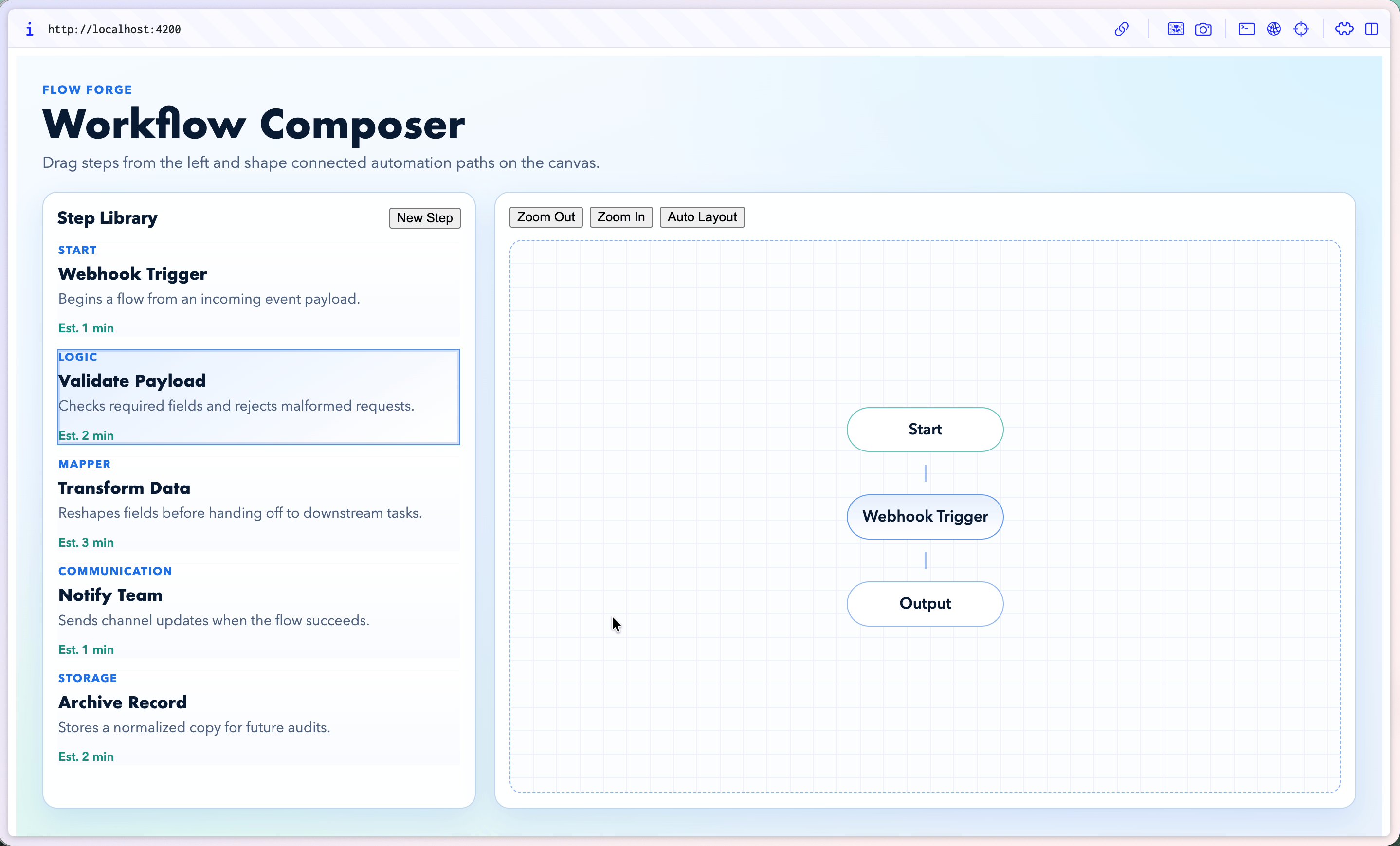
#kendo-ui-generator Create a responsive Workflow Composer app layout that includes: a left sidebar that only takes up 1/3 max of the UI for available workflow steps (this is essentially a column that is a list of individual cards/tasks), and main canvas area for building connected flows.
From there, the generator produces a starting UI layout using Kendo UI for Angular components.
Task #3: Updating and Iterating on UI
Building the first version of a UI is only the beginning. Most frontend work happens in the iteration phase—adjusting layouts, adding interactions and refining components as requirements evolve.
This is another area where MCP-connected assistants can help speed things up. Instead of manually digging through templates and wiring new behavior, developers can describe the change they want and let the assistant update the structure.
For this last task, I took our generated Workflow Composer app and added drag-and-drop support with a simple prompt:
#kendo_ui_generator let’s add drag and drop

Rather than rewriting the layout or manually integrating interaction logic, the assistant extends the generated UI and adds the new behavior.
One thing I’ve noticed while experimenting with this workflow is that single task prompts tend to work best. Breaking changes into bite-sized requests often produces cleaner results when working with MCP-powered tools and Copilot.
Why MCP Matters
AI coding tools are useful, but without access to your real development environment, they can only generate suggestions based on patterns they’ve seen before.
MCP changes that by connecting AI assistants directly to the tools developers already use. Instead of guessing which components exist or how your project is structured, the assistant can interact with real frameworks, libraries and development workflows.
That connection is what makes tasks like generating Angular components, creating UI layouts or iterating on interfaces possible with simple prompts. Rather than starting from scratch each time, devs get a working starting point that fits their stack.
Conclusion
Angular developers spend a lot of time on repetitive UI work—scaffolding components, turning data into layouts and iterating on interfaces as requirements evolve.
MCP-powered tools can help automate much of that groundwork. Coding assistants can generate valid Angular structures, and tools like the Angular Agentic UI Generator can turn prompts into working UI layouts that developers can refine and extend.
If you’d like to try it yourself, you can install our MCP servers and learn how to get started with Coding Assistant and Agentic UI Generator in the documentation.

Alyssa Nicoll
Alyssa was an Angular Developer Advocate & GDE. Her two degrees (Web Design & Development and Psychology) feed her speaking career. She has spoken at over 30 conferences internationally, specializing in motivational soft talks, enjoys gaming on Xbox and scuba diving in her spare time.
Related Posts
Comments
All articles
Topics
Web MobileMobile
Desktop
Design
Productivity
People