How to Use Ocelot as an API Gateway in ASP.NET Core

Summarize with AI:
Learn how to use Ocelot in ASP.NET Core APIs as an API gateway.
An API gateway is a frontend server for APIs, handling incoming API requests and routing them to the appropriate backend services. It plays a crucial role in microservice architecture by offering a single entry point to the system.
Some main functionalities of an API gateway are:
- Routing
- Authentication
- Authorization
- Request composition
- Caching
- Load balancing
- Fault tolerance
- Service discovery
There are many popular choices for API gateway in ASP.NET Core-based microservices, such as Ocelot, YARP and others.
This blog post explains how Ocelot can be an API gateway in ASP.NET Core APIs.
Setting Up APIs
There are two APIs. The first API has a ProductController with two endpoints.
[Route("api/products")]
  [ApiController]
    public class ProductController : ControllerBase
    {
        static List<Product> Products = new List<Product>()
        {
            new Product { Id = 1, Name = "Product 1", Price = 10.0m },
            new Product { Id = 2, Name = "Product 2", Price = 20.0m },
            new Product { Id = 3, Name = "Product 3", Price = 30.0m }
        };
        [HttpGet]
        public async Task<ActionResult<IEnumerable<Product>>> Get()
        {
            var products = await GetProductsAsync();
            await Task.Delay(500);
            return Ok(products);
        }


        [HttpPost]
        public async Task<ActionResult<Product>> Post(Product product)
        {
            Products.Add(product);
            await Task.Delay(500);
            // Return the product along with a 201 Created status code
            return CreatedAtAction(nameof(Get), new { id = product.Id }, product);
        }

        private Task<List<Product>> GetProductsAsync()
        {

            return Task.FromResult(Products);
        }
    }
These endpoints are available at http://localhost:5047/api/products for both GET and POST operations.
The second API has InvoiceController with just one endpoint.
[Route("api/invoice")]
[ApiController]
public class InvoiceController : ControllerBase
  {
    [HttpGet]
      public async Task<ActionResult<IEnumerable<string>>> Get()
      {
        await Task.Delay(100);
        return new string[] { "Dhananjay", "Nidhish", "Vijay","Nazim","Alpesh" };
      }
  }
The endpoint is available at http://localhost:5162/api/invoice for the GET operation.
Setting Up API Gateway
We are going to set up the API gateway using Ocelot. For that, let’s follow these steps:
- Create an API project.
- Do not add any controller to that.
Very first, add the Ocelot package from NuGet to the project.

After adding the Ocelot package, add a file named ocelot.json to the API gateway project.
ocelot.json
{
  "GlobalConfiguration": {
    "BaseUrl": "http://localhost:5001"
  },
  "Routes": [
    {
      "UpstreamPathTemplate": "/gateway/products",
      "UpstreamHttpMethod": [ "GET" ],
      "DownstreamPathTemplate": "/api/products",
      "DownstreamScheme": "http",
      "DownstreamHostAndPorts": [
        {
          "Host": "localhost",
          "Port": 5047
        }
      ]
    },
    {
      "UpstreamPathTemplate": "/gateway/invoice",
      "UpstreamHttpMethod": [ "GET" ],
      "DownstreamPathTemplate": "/api/invoice",
      "DownstreamScheme": "http",
      "DownstreamHostAndPorts": [
        {
          "Host": "localhost",
          "Port": 5162
        }
      ]
    }
  ]
}
Let’s explore each configuration in the above file.
- In the
GlobalConfigurationsection, theBaseUrlis the URL of API gateway. API clients will interact with this URL. When running the API gateway project, it should run on this base URL. - The Routes section contains various routes in the array.
- The Routes have UpStream and DownStream sections.
- The UpStream section represents the API gateway.
- The DownStream section represents the APIs.
The above configuration can be depicted with this diagram:
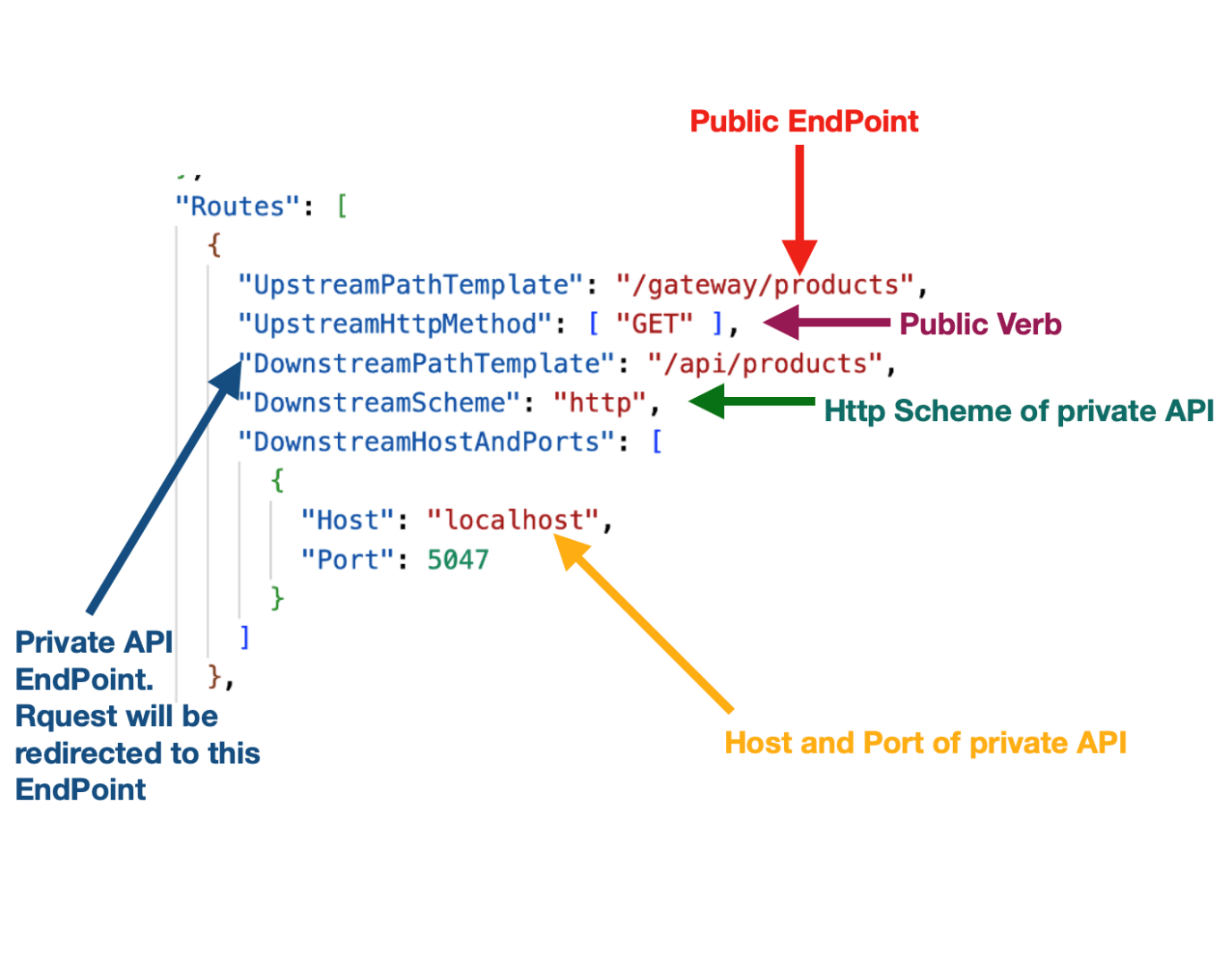
By the above configuration, when you hit the endpoint, it will be redirected to API endpoint http://localhost:5047/api/Products.
Next in the Program.cs, at the App gateway startup, add the configuration below:
builder.Configuration.AddJsonFile("ocelot.json", optional: false, reloadOnChange: true);
builder.Services.AddOcelot(builder.Configuration);

app.UseOcelot();
Now run the API gateway application and you should be able to navigate the private APIs. Ocelot supports other HTTP Verbs besides GET. A route for POST operations can be added, as shown below.
{
  "UpstreamPathTemplate": "/gateway/products",
  "UpstreamHttpMethod": [ "POST" ],
  "DownstreamPathTemplate": "/api/products",
  "DownstreamScheme": "http",
  "DownstreamHostAndPorts": [
    {
      "Host": "localhost",
      "Port": 5047
    }
  ]
},
Using basic configurations, you should be able to read the HttpContext object, headers and request objects in the private API.
I hope you find this blog post helpful. Thanks for reading it.

Dhananjay Kumar
Dhananjay Kumar is the founder of nomadcoder, an AI-driven developer community and training platform in India. Through nomadcoder, he organizes leading tech conferences such as ng-India and AI-India. He partners with startups to rapidly build MVPs and ship production-ready applications. His expertise spans Angular, modern web architecture and AI agents, and he is available for training, consulting or product acceleration from Angular to API to agents.
Related Posts
Comments
All articles
Topics
Web MobileMobile
Desktop
Design
Productivity
People