Design Systems, Tokens and AI

Summarize with AI:
AI can compress the time between a design decision and its implementation when design systems can be updated with tokens.
Design systems have long been cornerstones of building consistent user interfaces. They provide teams with a shared vocabulary for colors, typography, spacing and more, so that every aspect of a product feels cohesive and consistent.
Creating and maintaining these systems has traditionally involved a significant amount of manual work, including defining hundreds of token values, keeping them in sync across codebases and navigating lengthy review cycles.
AI is starting to change this. Tools now exist that can generate cohesive token sets from natural language descriptions, refine individual components without disrupting an entire theme and reduce the overhead of managing design systems at scale.
In this article, we’ll explore how AI integrates with design systems and tokens, what the workflow looks like in practice and what this means for teams building products today.
Design Systems and Tokens
A design system is a collection of reusable components, guidelines and assets that enable a unified user experience across a product. Design tokens, on the other hand, are the smallest building blocks within that system. They are named values that store visual design attributes like colors, font sizes, spacing and borders in a central location.
Instead of hard-coding values throughout our CSS, we reference tokens (with the help of CSS custom properties, for example) that can be updated from a single source of truth:
:root {
  --color-primary: #0058e9;
  --color-secondary: #666666;
  --color-success: #37b400;
  --color-warning: #ffc000;

  --font-size-sm: 0.75rem;
  --font-size-md: 0.875rem;
  --font-size-lg: 1rem;

  --spacing-sm: 8px;
  --spacing-md: 16px;
  --spacing-lg: 32px;
}
These CSS custom properties act as our token layer. When we need to change the primary color (e.g., color-primary in the example above) across an entire application, we update the token in one place, and the change propagates everywhere it’s referenced. For a deeper look at how tokens work and the different types (global, alias, component-specific), check out our previous article on design tokens.
The Traditional Workflow and Its Challenges
The typical process for creating a design system would look something like this:
- Designers define a set of tokens and visual guidelines in tools like Figma.
- Frontend engineers then translate those values into code (SASS variables, CSS custom properties or JSON token files).
- Teams iterate through review cycles to make sure everything aligns.
- When the design system needs to support a new brand or product variant, much of the above process starts over.
This workflow has served teams well, but it comes with friction. Keeping tokens synchronized between design tools and codebases requires constant attention. Starting a new theme from scratch means confronting a blank canvas of hundreds of variables that all need to work together, and as design systems grow to support multiple products or teams, the maintenance burden grows with them.
These are the kinds of challenges that AI is well-positioned to address. Not by replacing the decision-making that goes into a design system, but by handling the mechanical work of generating, adjusting and maintaining the token values themselves.
How AI Changes the Design System Workflow
With AI, the shift is moving from “manually define every value” to “describe intent, then refine.” Instead of opening a blank stylesheet and deciding what --color-primary should be, then figuring out what --color-primary-hover and --color-primary-active need to be relative to that base, we can describe the aesthetic we’re going for and let AI generate a cohesive set of tokens that all work together.
What makes this especially compelling is that modern AI tools, though not perfect, understand design principles! Instead of picking random hex values, these tools can apply color theory to create palettes with appropriate contrast ratios. Spacing scales follow consistent rhythms, and typography hierarchies keep heading sizes balanced relative to body text. The resulting token systems aren’t just technically valid; with some guidance, they can be designed to work as a coherent whole.
This doesn’t mean we hand off all creative control. The AI handles the heavy lifting of producing a complete, internally consistent token set, while we focus on the strategic decisions:
- Does this palette match our brand?
- Does the typography hierarchy support readability for our audience?
- Are the contrast ratios meeting our accessibility standards?
AI shifts our energy from the tedious work of defining individual values to the more meaningful work of evaluating and directing the system as a whole.
AI-Powered Theme Generation
To see what we’ve discussed above looks like in practice, we’ll walk through an example using Progress ThemeBuilder: a visual styling tool for customizing the theme of Telerik and Kendo UI components.
In the ThemeBuilder Generate panel, we can describe a theme in plain English. For instance, we might enter: “Generate a dark theme for an internal operations dashboard with charcoal surfaces, muted gray borders and subtle blue highlights for interactive elements. Keep the overall feel minimal and easy on the eyes during long work sessions.”
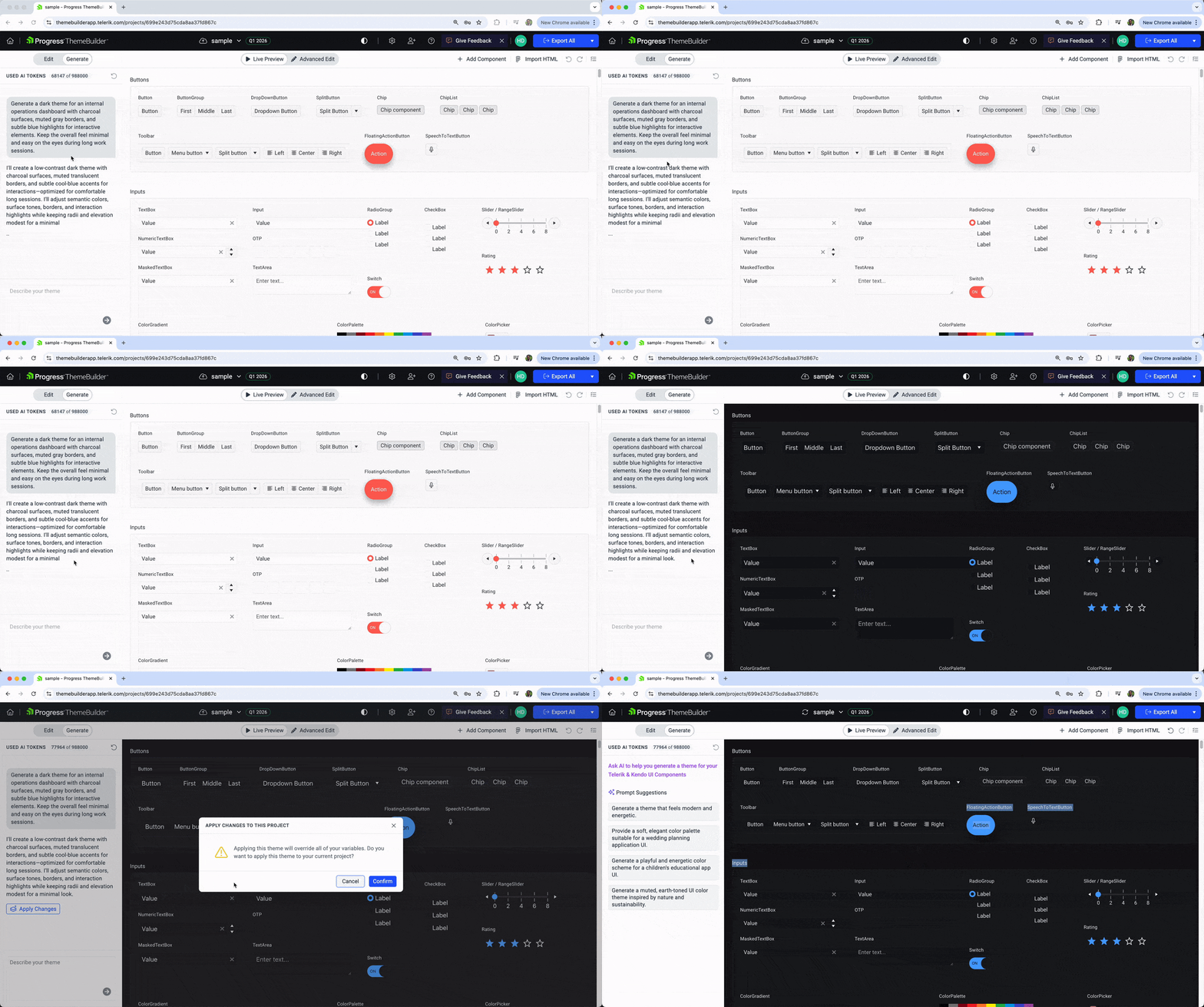
Within seconds, the AI analyzes the description and produces a complete design system. It doesn’t just set a few colors. It generates a full set of tokens spanning global values (the core palette), alias tokens (contextual mappings like info, success, warning) and component-specific tokens (button backgrounds, input borders, grid header styles). All of these tokens reference each other in a structured hierarchy, so a change to a global value cascades through the system in a predictable way.
The result is a production-ready set of tokens that we can export as CSS or SASS and bring directly into our project.
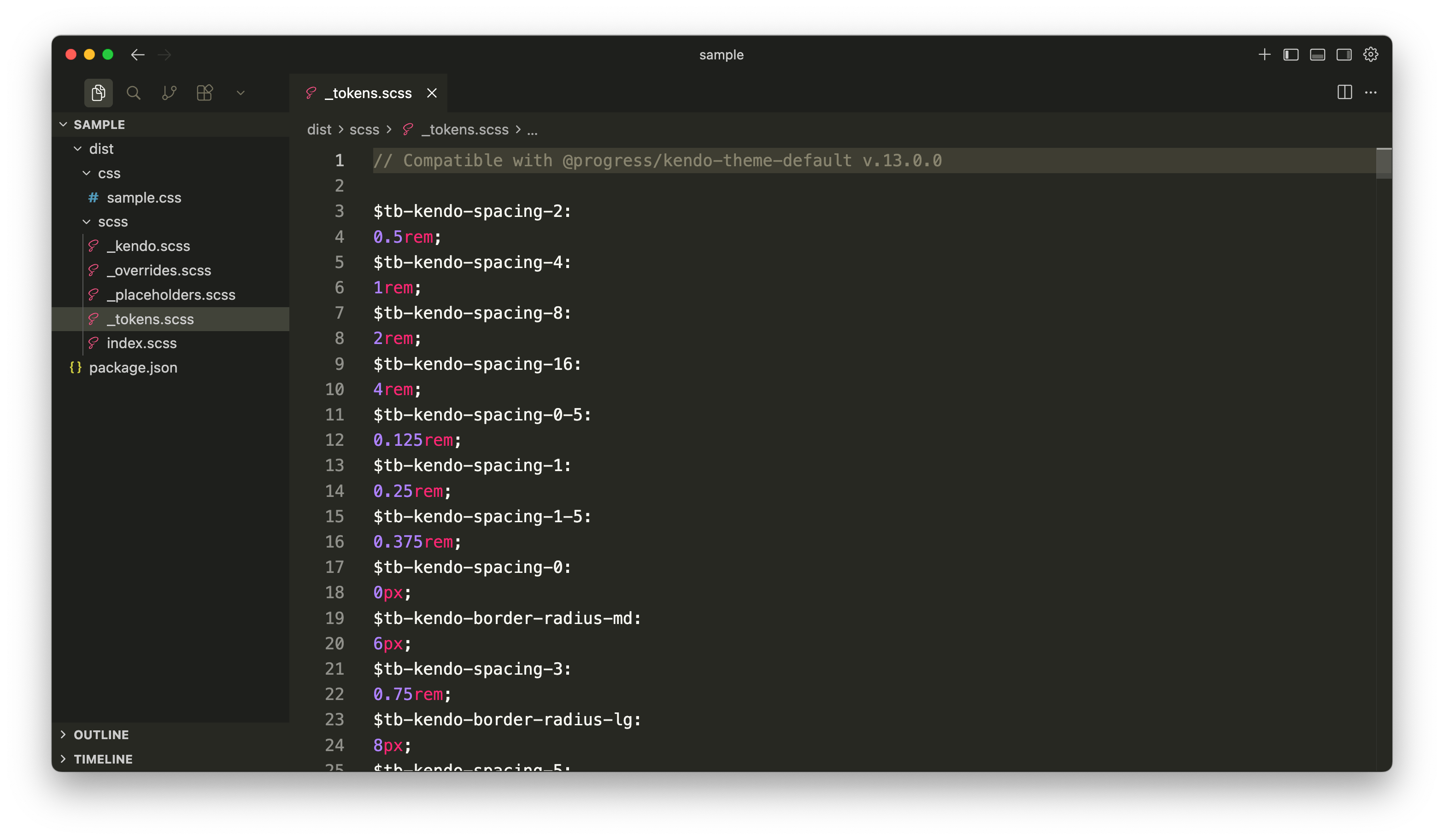
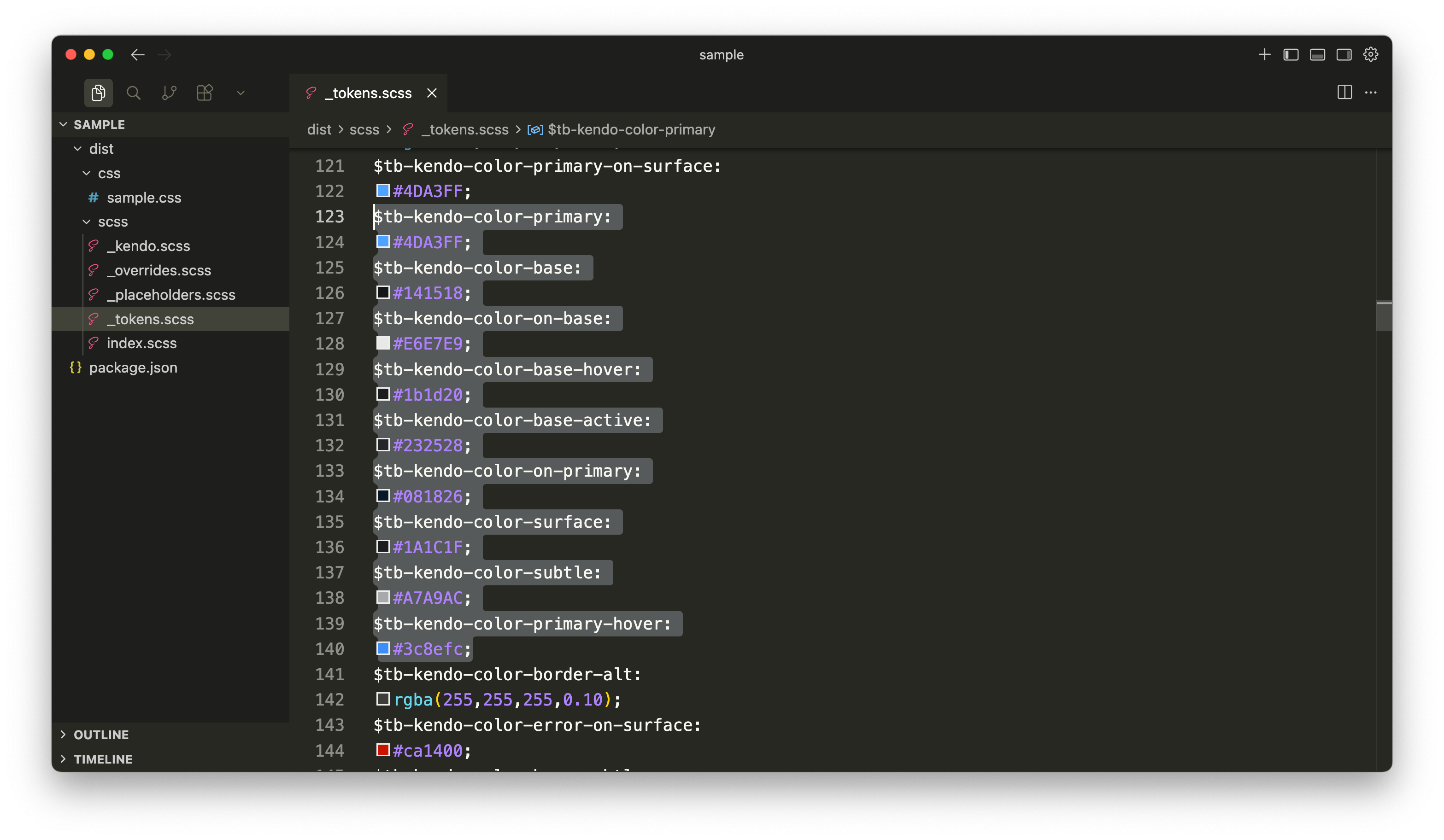
In the exported output, we’ll be able to see how the AI has generated a set of interconnected tokens. For example, the primary color would have corresponding hover and active states that maintain visual cohesion, and the base and on-base colors will enable readable contrast throughout the interface.
Design Tokens as the Integration Layer
At the core of this entire workflow is a simple but important idea: design tokens are the integration layer between AI tools and our component libraries.
When AI generates a theme in ThemeBuilder, it isn’t just producing abstract styling ideas; it produces concrete token values that flow directly into our CSS or SASS files, which our component library consumes.
.button-primary {
  background-color: var(--kendo-color-primary);
  color: var(--kendo-color-on-primary);
  border-radius: var(--kendo-border-radius);
  font-size: var(--kendo-font-size);
}

.button-primary:hover {
  background-color: var(--kendo-color-primary-hover);
}
In the above snippet, the button component doesn’t know or care whether the token values were defined manually or generated by AI. It references the same custom properties either way. This separation is what makes AI-assisted design systems practical. The tokens act as a contract between the theming layer and the component layer, so the source of those values (human or AI) doesn’t affect how they’re consumed.
This also means we can mix approaches freely. We might generate a baseline theme with AI, manually override specific tokens for brand alignment, and then use component-level AI theming to refine individual components (a workflow supported by ThemeBuilder). The token layer absorbs all of these inputs into a single, consistent system.
Wrap-up
For enterprise teams that maintain design systems across multiple products, teams and technology stacks, AI compresses the time between a design decision and its implementation. Instead of manually auditing hundreds of tokens when a brand update happens, teams can regenerate or adjust themes from a central tool like ThemeBuilder and export updated tokens to each project.
Governance still matters since teams still own the decisions around brand direction, accessibility compliance and cross-product consistency. But AI handles the mechanical work, so we can spend more time on strategy and less on manual token management.
Tokens remain at the center of it all. They are the shared language between AI generation tools and component libraries (i.e., the contract that keeps everything consistent regardless of how the values were produced).
Ready to see this in action? Explore Progress ThemeBuilder and see how AI-powered theme generation can streamline the way we create and manage design systems. For more details on design systems and ThemeBuilder, check out some of the previous articles we’ve written on this topic:

Hassan Djirdeh
Hassan is a senior frontend engineer and has helped build large production applications at-scale at organizations like Doordash, Instacart and Shopify. Hassan is also a published author and course instructor where he’s helped thousands of students learn in-depth frontend engineering skills like React, Vue, TypeScript and GraphQL.
Related Posts
Comments
All articles
Topics
Web MobileMobile
Desktop
Design
Productivity
People