New to Telerik UI for WinForms? Start a free 30-day trial
FocusPrimitive
Updated on Aug 27, 2026
FocusPrimitive supplies user interface cues that an element has received focus. The constructor for FocusPrimitive takes a BorderPrimitive that provides the basic dimensions. Fore colors and inner colors may be set explicitly or default control colors are used.
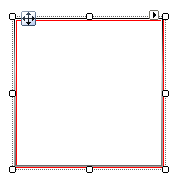
Creating a FocusPrimitive
C#
public class MyFocusPrimitiveElement : RadElement
{
    protected override void CreateChildElements()
    {
        BorderPrimitive borderPrimitive = new BorderPrimitive();
        borderPrimitive.Class = "MyBorderPrimtiveClass";
        borderPrimitive.BoxStyle = BorderBoxStyle.SingleBorder;
        borderPrimitive.Width = 3;
        borderPrimitive.ForeColor = Color.Red;
        borderPrimitive.GradientStyle = GradientStyles.Solid;
        FocusPrimitive focusPrimitive = new FocusPrimitive(borderPrimitive);
        this.Children.Add(borderPrimitive);
        this.Children.Add(focusPrimitive);
        base.CreateChildElements();
    }
}