New to Telerik UI for WinForms? Start a free 30-day trial
ArrowPrimitive
Updated on Aug 27, 2026
The ArrowPrimitive draws a filled triangular polygon. Orientation is controlled by the Direction property with possible ArrowDirection enumeration values of Up, Down, Left or Right. The arrow is filled with the ForeColor property value. The example below draws a BorderPrimitive and an ArrowPrimitive.
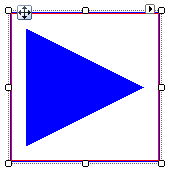
Creating an ArrowPrimitive
C#
public class MyArrowPrimitiveElement : RadElement
{
    protected override void CreateChildElements()
    {
        BorderPrimitive borderPrimitive = new BorderPrimitive();
        borderPrimitive.BoxStyle = BorderBoxStyle.OuterInnerBorders;
        borderPrimitive.Width = 1;
        borderPrimitive.GradientStyle = GradientStyles.Solid;
        borderPrimitive.ForeColor = Color.Blue;
        borderPrimitive.InnerColor = Color.Red;
        borderPrimitive.ZIndex = 1;
        ArrowPrimitive arrowPrimitive = new ArrowPrimitive();
        arrowPrimitive.Margin = new System.Windows.Forms.Padding(15);
        arrowPrimitive.StretchHorizontally = true;
        arrowPrimitive.StretchVertically = true;
        arrowPrimitive.Direction = ArrowDirection.Right;
        arrowPrimitive.ForeColor = Color.Blue;
        this.Children.Add(borderPrimitive);
        this.Children.Add(arrowPrimitive);
        base.CreateChildElements();
    }
}